# Intro
## Introduction
Welcome to the Fonbnk Pay Widget Documentation!
### Overview
The Fonbnk Pay Widget is a secure and efficient way to facilitate both on-ramp and off-ramp transactions in crypto. It supports integrated and non-integrated methods, making it versatile for various use cases. This documentation will guide you through the setup, integration, and usage of the Fonbnk Pay Widget.
### Key Features
* **P2P Platform**: Connects buyers and sellers of mobile money (Airtime, Mobile Money, Bank, etc.).
* **Crypto Payments**: Facilitates transactions in crypto.
* **Multiple Integration Options**: Supports standalone, iframe/webview, and webhook integrations.
* **Customizable**: Configure the widget using URL parameters to suit your needs.
### How on-ramp works
1. **Customer Selection**: The customer selects the source of their fund and the amount of crypto they want to receive.
2. **Wallet Details**: The customer provides their wallet details.
3. **Funds Transfer**: The customer transfers funds to an agent and confirms the order.
4. **Order Confirmation**: The agent confirms the order, and the system sends crypto to the customer's wallet.
### How off-ramp works
Fonbnk Pay Widget also supports off-ramp transactions, allowing users to convert their crypto back into traditional fiat currency. Here’s how the off-ramp process works for end users:
1. **Customer Selection**: The customer selects the amount of crypto they want to convert to fiat.
2. **Wallet Details**: The customer provides their wallet details for receiving the crypto.
3. **Funds Transfer**: The customer transfers the crypto to an agent and confirms the order.
4. **Order Confirmation**: The agent confirms the receipt of crypto, and the system initiates the transfer of fiat currency to the customer's bank account or other specified method.
This process ensures a secure and efficient way for users to convert their crypto holdings into fiat currency.
### Getting Started
To get started, choose the integration type that best suits your needs and follow the detailed guides provided in this documentation. Whether you are setting up a simple donation link or a complex merchant integration, the Fonbnk Pay Widget offers a flexible solution for accepting and converting crypto payments.
Explore the documentation to learn more about the features, configurations, and best practices for using the Fonbnk Pay Widget.
# Integration Guide
### Video tutorial
{% embed url="" %}
### Setting Up Your Sandbox Environment
To begin integrating with our system, the first step is to register a merchant account in the sandbox environment. Follow this link to initiate the registration process: .
Configuring Webhook Integration
Once you have a sandbox account, navigate to the **Settings** page on the dashboard. Here, you can configure a webhook URL to receive notifications regarding order status changes.
Webhook setup in the merchant dashboard
{% hint style="info" %}
Learn more about the webhook structure and signature [here](/v1.5/on-ramp/webhook).
{% endhint %}
You can also test your webhook integration using the **Simulate the webhook request** feature. Provide a URL and click the **Send Request** button to have the dashboard send a test notification to the specified URL.
Webhook simulation in the merchant dashboard
{% hint style="info" %}
If you want to preview webhook notifications without setting up a server, you can use the [webhooks service](https://webhook.site/).
{% endhint %}
### Generating Payment URLs and Creating Orders
To create sandbox orders, utilize the sandbox pay widget, which can be accessed at [Sandbox Pay Widget](https://sandbox-pay.fonbnk.com/). To associate an order with your merchant account, you must include the **source** parameter in the pay widget URL. You can find the **source** parameter value in the **Additional Details** section of the **Settings** page on the dashboard.
Source param in the merchant dashboard
Additionally, you must provide a unique **signature** parameter, which is a JWT token (HS256 encryption algorithm) generated using "URL signature secret" value as a secret. You must add some unique value to the token payload to make each token unique because we don't allow to create more than 1 order using the same signature. During testing, you can generate a JWT signature using this website, . You can also provide [URL configuration parameters](/v1.5/on-ramp/url-parameters) in the JWT token payload.\
An example of a token generation in typescript:
```typescript
import * as jsonwebtoken from 'jsonwebtoken';
import { v4 as uuid } from 'uuid';
const token = jsonwebtoken.sign(
{
uid: uuid(),
},
YOUR_SIGNATURE_SECRET,
{
algorithm: 'HS256',
},
);
```
With the provided **source** parameter, the pay widget URL will look like this: .
To create an order in the sandbox environment, you must use one of the following accounts if you want an order to be automatically confirmed.
Country
Email
Password
Nigeria
sandbox-ng@fonbnk.com
ZoA8dA9CXF
Kenya
sandbox-ke@fonbnk.com
ZoA8dA9CXF
Ghana
sandbox-gh@fonbnk.com
ZoA8dA9CXF
Any supported country
sandbox-{countryCode}@fonbnk.com
ZoA8dA9CXF
You can register your email, but orders will be automatically rejected.
Make sure to use the **Login with Password** flow:
{% hint style="warning" %}
Warning
During sandbox testing, do not use real money. Simply confirm the order, and it will be marked as paid.
{% endhint %}
If the correct **source** parameter is present in the URL, the order will be displayed in the **Orders** tab of the dashboard:
Merchant dashboard on-ramp orders list
Webhook requests will also be visible in the **Webhooks** tab of the dashboard:
Merchant dashboard on-ramp webhooks
### Merchant API
For those who wish to access pay widget-related data from their back-end, our merchant API is available. You can find the API documentation here.
### Transitioning to Production
To create a live merchant account, proceed to register it here: . The live pay widget can be accessed at .
{% hint style="warning" %}
After registering, you'll need to contact our support team and complete a KYB process. Thereafter, you'll be able to receive webhooks and preconfigure user wallet addresses.
{% endhint %}
# On-ramp
# How it works
Fonbnk Pay Widget is a secure and efficient way to accept payments in stable coins from customers in an integrated and non-integrated way.
It's a P2P platform that connects people who want to sell mobile money (Airtime, Mobile Money, Bank, etc.) with people who would like to buy it.
How it works for end users:
1. A customer selects his funds source (Airtime, Mobile Money, Bank, etc.) and the amount of crypto he would like to receive
2. Customer provides his wallet details
3. Customer transfers funds to an agent we found for him and confirms the order
4. An agent confirms the order and the system sends crypto to a customer's wallet
{% @mermaid/diagram content="sequenceDiagram
User->>Widget: Specify the amount of crypto to buy
Widget->>User: Show the best offer
User->>Widget: Specify wallet details
User->>Widget: Verify email
User->>Widget: Create order
Widget->>User: Provide transfer funds instructions
Note over User: Send funds to an agent
User->>Widget: Confirm that funds are sent
Note over Agent: Check if funds are received
Agent->>Widget: Confirm that funds are received
Widget->>User: Send crypto to user wallet" %}
Example of a flow:
Pay Widget supports configuration via [URL parameters](/v1.5/on-ramp/url-parameters). Merchants can force the widget to use specific wallet address, memo, crypto amount, etc. This allows integrating the widget as a payment system.
# URL Parameters
### On-ramp URL
| Environment | URL |
| ----------- | ------------------------------------------------------------------------ |
| Sandbox | [https://sandbox-pay.fonbnk.com](https://sandbox-pay.fonbnk.com/offramp) |
| Production | [https://pay.fonbnk.com](https://pay.fonbnk.com/offramp) |
### List of parameters
Here is the list of parameters that can be added to the URL:
| Parameter | Description |
| --------------- | -------------------------------------------------------------------------------------------------------------------------------------------------------------------------------------------------------------------------------------------------------------------------------------------------------------------------------------------------------------------------------------------------------------------------------------------------------------------------------------------------------------------------------------------------------------------------------------------------------------------------------------------------------------------------------------------------------------------------------------------------------------------------------------------------------------------------------------------------------------------------------------------------------------------------------------------------------------------------------------------------------------------------------------------------------------------------------------------------------------------------------------------------------------------------------------------- |
| address |
Address of the wallet you want to receive crypto to \[Warning] In production, you must be a verified merchant to use this parameter, also a valid signature parameter should be present. Please contact our team for a KYB process.
|
| network | Wallet network. Supported values: ARBITRUM, AVALANCHE, BASE, BNB, CELO, ETHEREUM, LISK, OPTIMISM, POLYGON, SOLANA, STELLAR, TON, TRON |
| asset | Wallet asset. Supported values: **USDC**, **CUSD**, **USDT**, **CKES, CGHS**, depending on the network. The default value is **USDC** for all networks that support it, except CELO, which is CUSD for CELO. Supported network/asset pairs: AVALANCHE (USDC/USDT), POLYGON (USDC, USDT), CELO (CUSD, USDC, USDT, CKES, CGHS), STELLAR (USDC), SOLANA (USDC, USDT), BASE (USDC), ETHEREUM (USDC, USDT), LISK (USDT), OPTIMISM (USDC, USDT), BNB (USDC, USDT), ARBITRUM (USDC, USDT), TRON (USDT), TON (USDT, USDE) |
| memo | Memo for the Stellar, TON and other networks transactions that support it |
| amount | If a currency is not provided, it will be an amount of crypto received after fees. If currency is **local,** it will be the amount of local currency a user should spend. |
| currency | Currency of the amount. Supported values: **local** or **crypto** |
| countryIsoCode | default selected country iso code, example: **KE** for Kenya, **NG** for Nigeria |
| currencyIsoCode | currency iso code, example: **KES** for Kenya, **NGN** for Nigeria. Acts like a country parameter. |
| freezeAmount | Freezes the amount of order for the user, the user will not be able to change it. The amount is required in the URL for this parameter to work. |
| freezeWallet |
Freezes the wallet of order for the user, the user will not be able to change it. The wallet is required in the URL for this parameter to work. \[Warning] In production, you must be a verified merchant to use this parameter, also a valid signature parameter should be present. Please contact our team for a KYB process.
|
| paymentChannel | Default user funds source to select, supported values: **airtime**, **mobile\_money**, **bank** |
| carrierCode | The code of a mobile carrier to select by default. Examples: ng\_mtn, ke\_safaricom etc. |
| callbackUrl |
if present, "Back to website" link will be displayed on the success page. When a user clicks on it, we will redirect him to the provided URL. It supports placeholders which will be replaced by order data: {orderId}, {transactionHash}, {usdcAmount}, {airtimeAmount}, {network}, {address}. For example the next URL will be converted to something like . \[Warning] provided URL should be encoded, example
|
| callbackBtnText | Text of the button that is displayed when **callbackUrl** is provided. Default is: "Back to website" |
| email | user's email |
| closeBtn | text of the button that will be displayed on the success page. If not provided, the button will not be displayed. On click, it will send a *close-iframe* iframe event, so an integrator can close the widget. |
| redirectUrl |
if present, user will be redirected to this URL on order fail or success. It supports placeholders which will be replaced by order data: {orderId}, {transactionHash}, {usdcAmount}, {airtimeAmount}, {network}, {address}, {status}, {failReason}. {status} placeholder can the next values: success or fail. Fail reason placeholder can the next values: transaction\_failure or agent\_rejected. For example the next URL will be converted to something like . \[Warning] provided URL should be encoded, example
|
| quoteId | id of a quote returned from the [price API request](https://docs.fonbnk.com/docs/pay-widget/merchant-api#get-expected-price). |
| hideSwitch | if present, hides the Buy/Sell switch at the top |
Parameters allowed only for [registered merchants](https://docs.fonbnk.com/integration-guide#generating-payment-urls-and-creating-orders):
| Parameter | Description |
| ----------- | ------------------------------------------------------------------------------------------------------------------------------------------------------------------------------------------------------------------------------------------------------------------------------------------------------------------------------------------------------------------------------------------------------------------------------------------------------------------ |
| orderParams | This parameter will be sent to a merchant webhook after the success of the crypto transfer. |
| source |
parameter used to match an order to a merchant. \[Warning] In production, you must be a verified merchant to use this parameter. Please contact our team for a KYB process.
|
| signature |
A JWT token (HS256 encryption algorithm) is generated using the "URL signature secret" value as a secret. You must add some unique value to the token payload to make each token unique because we don't allow creating more than one order using the same signature.
\[Warning] In production, you must be a verified merchant to use this parameter. Please contact our team for a KYB process.
|
Here is an example of a URL with parameters:
{% code overflow="wrap" %}
```
https://pay.fonbnk.com?amount=1&network=POLYGON&asset=USDT
```
{% endcode %}
[ ](https://docs.fonbnk.com/docs/pay-widget/integration-guide)
# Webhook
We can notify a [registered pay widget merchant](/v1.5/integration-guide) about the statuses of orders associated with him.
We will make a **POST** request to a provided webhook URL with the next **application/json** contents:
**Webhook V1:**[****](https://docs.fonbnk.com/docs/pay-widget/webhook#webhook-v1)
{% code overflow="wrap" %}
```typescript
type WebhookRequest = {
"data": {
"status":
| "swap_initiated" // user has created an order
| "swap_expired" // an order has expired
| "swap_buyer_rejected" // user has rejected an order
| "swap_buyer_confirmed" // user has confirmed an order
| "swap_seller_rejected" // agent has rejected an order, happens when agent don't receive a payment
| "swap_seller_confirmed" // agent has confirmed an order
| "pending" // USDC/cUSD transaction is pending
| "complete" // USDC/cUSD transaction is complete
| "failed", // USDC/cUSD transaction has failed
"date": string, // date when event has happened
"orderId": string, // order id in our system
"email": string, // customer's email
"localCurrencyAmount": number, // amount of local currency user paid
"localCurrencyIsoCode": string, // ISO code of local currency user paid, e.g. KES, NGN etc.
"countryIsoCode": string, // ISO code of country user paid from, e.g. KE, NG etc.
"paymentChannel": // payment provider user paid with
| "airtime"
| "mobile_money"
| "bank"
"amount": number, // amount of USD user received
"amountCrypto": number, // amount of crypto user received
"network": // network user received USDC/cUSD on
| "POLYGON"
| "ETHEREUM"
| "STELLAR"
| "AVALANCHE"
| "SOLANA"
| "BASE"
| "CELO"
| "LISK",
"asset": "USDC" | "CUSD" | "USDT" | "USDC_E", // asset user received
"address": string, // address user received USDC/cUSD on
"orderParams"?: string // Content of a orderParams query parameter provided to a pay widget URL. It might be useful for matching a merchant system user to an order user.
"hash"?: string, // transaction hash
"resumeUrl": string, // URL where user can resume his order, it point either to the transfer instructions page or to the status page
},
"hash": string, // SHA256 encrypted request.data string to validate a webhook request
};
```
{% endcode %}
**Webhook V2:**[****](https://docs.fonbnk.com/docs/pay-widget/webhook#webhook-v2)
Instead of sending hash inside - **WebhookRequest**, we will send it as a request **x-signature** header
```
Request headers:
x-signature: hash (string)
```
**Webhook verification:**[****](https://docs.fonbnk.com/docs/pay-widget/webhook#webhook-verification)
We send a hash field in our webhook to protect merchants from fraudulent requests. Each request should be verified by a secret provided in the dashboard.
Here is how it should be checked in pseudocode:
```
request.body.hash === SHA256(stringify(request.body.data), secret)
```
Here is how it should be checked in Node.js:
For Webhook V1 version:
```javascript
import { createHash } from 'crypto';
request.body.hash === createHash('sha256')
.update(JSON.stringify(request.body.data))
.update(createHash('sha256').update(__SECRET__, 'utf8').digest('hex'))
.digest('hex');
```
For Webhook V2 version:
```javascript
import { createHash } from 'crypto';
request 'x-signature' header === createHash('sha256')
.update(JSON.stringify(request.body))
.update(createHash('sha256').update(__SECRET__, 'utf8').digest('hex'))
.digest('hex');
```
{% hint style="info" %}
You can see how to make a signature in multiple programming languages [HERE](/v1.5/reference/signing-requests#request-examples)
{% endhint %}
# Skipping screens
### Typical flow
A typical user order follows these steps:
1. **Amount Selection**:\
The user opens the "Amount" page, selects their country and preferred payment method, chooses a cryptocurrency, enters the desired amount, and clicks **"Next"**.
2. **Wallet Connection**:\
The user is taken to the Wallet page, where they connect their wallet via MetaMask, WalletConnect, or another supported option. Once the wallet is successfully connected, the user is automatically redirected to the next step.
3. **Authentication**:\
On the Auth page, the user enters their email address and submits a one-time password (OTP) sent to them.
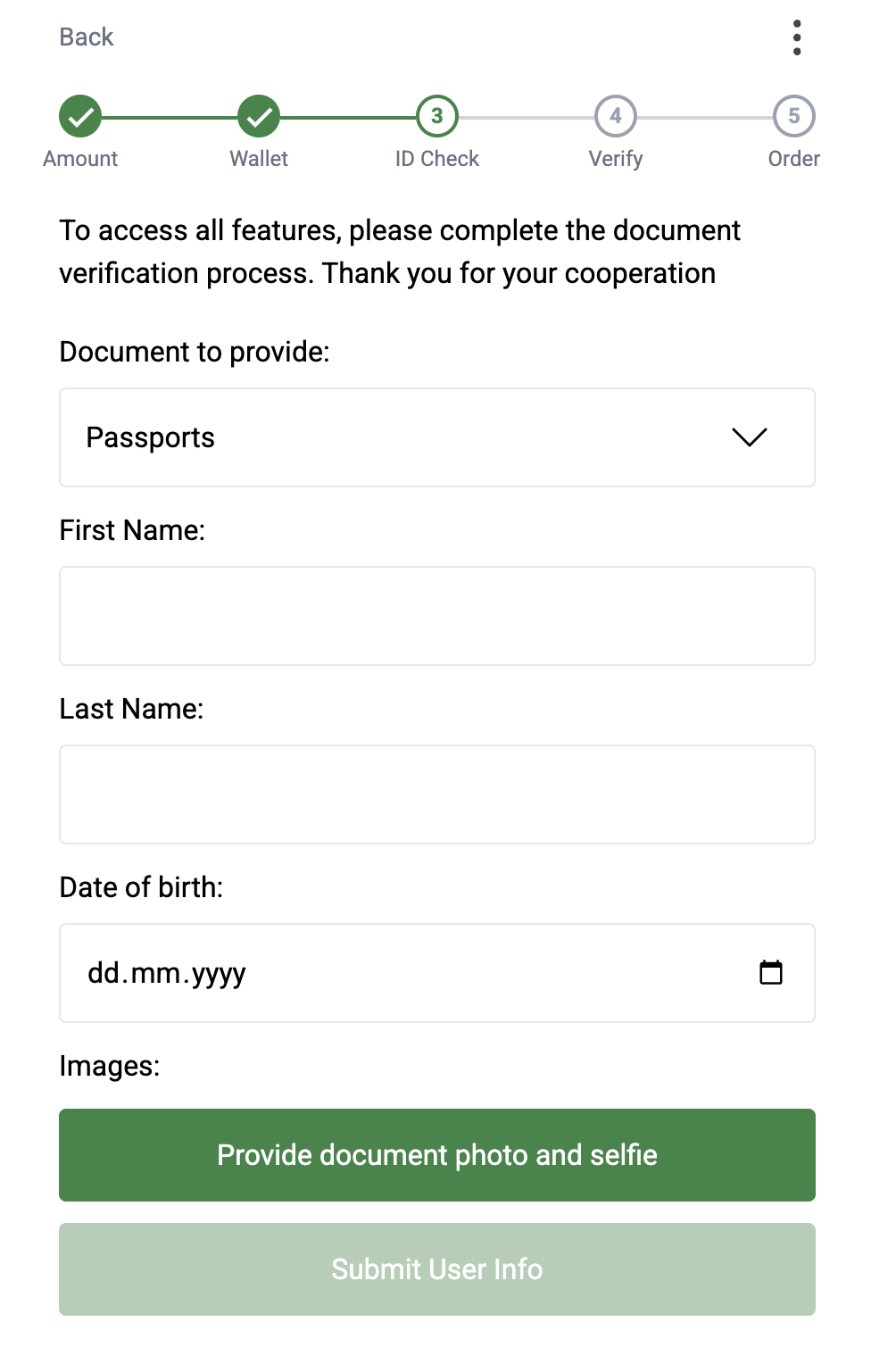
* If the order amount exceeds a certain threshold, the user is prompted to complete **KYC verification** by submitting ID document details, photos, and a selfie.
4. **Order Details**:\
The user reviews the order details, fills in any required additional information (e.g., phone number, bank type), and clicks **"Transfer Funds"** to create the order. This redirects them to the next page.
5. **Transfer Instructions**:\
The user receives instructions on how to transfer funds to the agent handling the order.\
After sending the funds, the user clicks **"Confirm"**. Once the transaction is approved, the cryptocurrency is delivered to the user's wallet.
Most of the provided pages can be skipped, so a user journey would be much shorter.
### Skipping the Amount page
To skip the Amount page, the next [URL parameters](/v1.5/on-ramp/url-parameters) must be predefined:
* countryIsoCode
* network
* asset
* currency
* amount
* source (from your merchant dashboard)
So, if you want to create an order for Nigeria via bank transfer for 2 CELO USDT, the URL will be the next:
[https://pay.fonbnk.com/wallet?source=xsdf\_2\&network=CELO\&asset=USDT\&amount=2\¤cy=crypto\&paymentChannel=bank\&countryIsoCode=NG](https://pay.fonbnk.com/wallet?network=CELO\&asset=USDT\&amount=2\¤cy=crypto\&paymentChannel=bank\&countryIsoCode=NG)\
\
You've skipped the Amount page by opening the wallet page with preconfigured order params.
### Skipping the Wallet page
{% hint style="warning" %}
In production, you must be a verified merchant to generate signatures and predefine the wallet address
{% endhint %}
To skip the wallet page, we need to add 2 more parameters to the existing ones:
* address
* signature
"address" param contains the user's wallet address, and a signature is a JWT token (HS256 encryption algorithm) generated using the "URL signature secret" value as a secret (from the merchant dashboard). You must add some unique value to the token payload to make each token unique because we don't allow to create more than 1 order using the same signature. During testing, you can generate a JWT signature using this website: .
An example of a token generation in typescript:
```typescript
import * as jsonwebtoken from 'jsonwebtoken';
import { v4 as uuid } from 'uuid';
const token = jsonwebtoken.sign(
{
uid: uuid(),
},
YOUR_SIGNATURE_SECRET,
{
algorithm: 'HS256',
},
);
```
So, if you want to skip the wallet page, the URL should look like this:\
[https://pay.fonbnk.com/auth?source=xsdf\_2\&network=CELO\&asset=USDT\&amount=2\¤cy=crypto\&paymentChannel=bank\&countryIsoCode=NG\&address=0x91b0a33dbcb10f8331eD3627B94e5a9B1591269f\&signature=eyJhbGciOiJIUzI1NiIsInR5cCI6IkpXVCJ9.eyJ1aWQiOiJ3ZmVuZmVrbndmZWtud2Zua2plMzIyMjEzMTIzMTIzMTIzIn0.bkFNaPYEeLNoUv7RhCWWROdbsGgJCQQp9Xpk628EoJA ]()\
You've skipped the Wallet page by opening the Auth page with preconfigured order params and wallet address with signature.
### Skipping the Auth page
To skip the auth page, you must log in on behalf of a user and provide his access and refresh tokens to the URL.
This step requires you to interact with our Merchant API. [Here](/v1.5/reference/signing-requests) you can find how to send requests.
You must call[ this endpoint](/v1.5/endpoints/user#post-api-user-tokens) with user email and country ISO code and in the response you'll get the access and refresh tokens.
```javascript
{
"accessToken": "eyJhbGciOiJIUzI1NiIsInR5cCI6IkpXVCJ9",
"refreshToken": "eyJhbGciOiJIUzI1NiIsInR5cCI6IkpXVCJ9"
}
```
{% hint style="warning" %}
This type of API calls are disabled for merchants by default. Please contact our support team to enable this feature for your merchant.
{% endhint %}
After getting the tokens, you must add them to the URL as "at" and "rt" params, so the URL would look like this:
[https://pay.fonbnk.com/swap?source=xsdf\_2\&network=CELO\&asset=USDT\&amount=2\¤cy=crypto\&paymentChannel=bank\&countryIsoCode=NG\&address=0x91b0a33dbcb10f8331eD3627B94e5a9B1591269f\&signature=eyJhbGciOiJIUzI1NiIsInR5cCI6IkpXVCJ9.eyJ1aWQiOiJ3ZmVuZmVrbndmZWtud2Zua2plMzIyMjEzMTIzMTIzMTIzIn0.bkFNaPYEeLNoUv7RhCWWROdbsGgJCQQp9Xpk628EoJA\&at=eyJhbGciOiJIUzI1NiIsInR5cCI6IkpXVCJ9\&rt=eyJhbGciOiJIUzI1NiIsInR5cCI6IkpXVCJ9 ]()\
\
You've skipped the Auth page by opening the Order page with preconfigured order params, wallet address with signature, and already logged-in user via access and refresh token URL params.
### Skipping KYC
KYC step can be skipped only by removing the KYC requirement from the merchant, so we don't ask for KYC for this merchant's orders. This can be done by contacting our support team and only if you do KYC on your side already.
### Skipping the Order page
To skip the order page you must predefine 2 more URL parameters:
* quoteId
* requiredFields
Both of these params you get from the [best offer API endpoint](/v1.5/endpoints/on-ramp#get-api-onramp-best-offer) with includeRequiredFields param present. The response will be like this:
```json
{
"quoteId": "6878df150d6289ffdedcd6f4",
...,
"requiredFields": {
"phoneNumber": {
"label": "Your phone number",
"sellerLabel": "Buyer's phone number",
"type": "phone",
"required": true
}
}
}
```
Now you must fill a required field object, stringify it and encode for URL safety and provide quoteId and requiredFields to the URL.\
\
Required fields encoding example:
```typescript
const values = {
phoneNumber: "2346034088631"
};
const encoded = encodeURIComponent(JSON.stringify(values));
// %7B%22phoneNumber%22%3A%222346034088631%22%7D
```
Now, you must add all the parameters to the /auto-order page, aslo the flow=onramp must be added because this page can be used for off-ramps too:
\
[https://pay.fonbnk.com/auto-order?source=xsdf\_2\&network=CELO\&asset=USDT\&amount=2\¤cy=crypto\&paymentChannel=bank\&countryIsoCode=NG\&address=0x91b0a33dbcb10f8331eD3627B94e5a9B1591269f\&signature=eyJhbGciOiJIUzI1NiIsInR5cCI6IkpXVCJ9.eyJ1aWQiOiJ3ZmVuZmVrbndmZWtud2Zua2plMzIyMjEzMTIzMTIzMTIzIn0.bkFNaPYEeLNoUv7RhCWWROdbsGgJCQQp9Xpk628EoJA\&at=eyJhbGciOiJIUzI1NiIsInR5cCI6IkpXVCJ9\&rt=eyJhbGciOiJIUzI1NiIsInR5cCI6IkpXVCJ9\"eId=6878df150d6289ffdedcd6f4\&requiredFields=%7B%22phoneNumber%22%3A%222346034088631%22%7D\&flow=onramp ]()\
\
When a user lands on this page, an order will be created automatically, and a user will see the transfer instructions page.
### Recommended way
You can use /auto-order page for all the cases above; just provide as much info as you can to this page and it'll automatically redirect to the appropriate page, don't forget to add the flow=onramp param there.
# Server to server integration
{% hint style="warning" %}
Full server to server integration is possible only after a merchant KYB process
{% endhint %}
It's possible to do a full on-ramp flow by using only merchant API. [Here](/v1.5/reference/signing-requests) you can find how to send API requests correctly.\
\
The full workflow should look like this:
1. [Get a list of supported countries](/v1.5/endpoints/on-ramp#get-api-onramp-payment-channels) and their payment channels.
2. [Get a list of supported blockchain assets](/v1.5/endpoints/util#get-api-util-assets).
3. Pick a country, payment channel, and blockchain asset. [Get order limits](/v1.5/endpoints/on-ramp#get-api-onramp-limits) using these values.
4. [Get the user's KYC status](/v1.5/endpoints/user#post-api-user-kyc-status) and check if they need to pass a KYC process. If they need a KYC, [submit the document information](/v1.5/endpoints/user#post-api-user-kyc-submit) and [check the KYC status](/v1.5/endpoints/user#post-api-user-kyc-status) until it's accepted.
5. [Get the best offer](/v1.5/endpoints/on-ramp#get-api-onramp-best-offer) , to get the quoteId, understand how much a user should pay, and what additional information is required from a user to create an order.
6. [Create an order](/v1.5/endpoints/on-ramp#post-api-onramp-order-create) using the user's email, desired amount, blockchain asset, country, payment channel, additional data required from a user, and quoteId. Some orders may require [verifying an OTP code sent to a user](/v1.5/endpoints/on-ramp#post-api-onramp-order-otp).
7. [Confirm that a user sent funds to an agent](/v1.5/endpoints/on-ramp#post-api-onramp-order-confirm).
### Getting countries, payment channels, blockchain assets and order limits
Let's [get a list of supported countries](/v1.5/endpoints/on-ramp#get-api-onramp-payment-channels) , the response would be like this:
```json
[
{
"name": "Nigeria",
"countryIsoCode": "NG",
"currencyIsoCode": "NGN",
"paymentChannels": [
{
"paymentChannel": "bank",
"description": "Bank transfer",
"requiresCarrier": false,
"carriers": []
},
{
"paymentChannel": "airtime",
"description": "Airtime",
"requiresCarrier": true,
"carriers": [
{
"id": "618e43914f57e07d255ff357",
"name": "Airtel Nigeria"
},
...
]
}
]
},
...
]
```
We see that Nigeria is supported for on-ramp and has payment channels: bank and airtime.
Let's pick this country and bank payment channel.\
\
Let's [get a list of supported blockchain assets](/v1.5/endpoints/util#get-api-util-assets):
```json
[
{
"network": "POLYGON",
"asset": "USDC",
"canOfframp": true,
"canOnramp": true
},
{
"network": "ETHEREUM",
"asset": "USDC",
"canOfframp": true,
"canOnramp": true
},
...
]
```
We see that POLYGON USDC is supported for on-ramp; let's pick it.
Now, let's [check order limits](/v1.5/endpoints/on-ramp#get-api-onramp-limits) for Nigeria, bank payment channel and POLYGON USDC asset.\
Request query params:
```
?countryIsoCode=NG&paymentChannel=bank&network=POLYGON&asset=USDC
```
Response:
```json
{
"minUsd": 1,
"maxUsd": 100,
"minLocalCurrency": 1534,
"maxLocalCurrency": 153376,
"minCrypto": 1,
"maxCrypto": 100
}
```
So, now we understand that a user can buy from 1 to 100 POLYGON USDC and can pay from 1534 to 153376 NGN.
### KYC
Let's [check a user's KYC status](/v1.5/endpoints/user#post-api-user-kyc-status) to determine if we need to sumbit a KYC documents.\
Request body:
```json
{
email: "example@mail.com",
countryIsoCode: "NG"
}
```
Response:
We see that there's no passedKycType field which means that the user haven't completed a KYC process in our system. Moreover, we see a list of supported documents for basic and advanced KYC.
The **kycRules** field indicates that we don't need a KYC for orders below $10, need a basic KYC for the $10-50(not including) range, and need an advanced KYC for the $50-100 range.
For demonstration purposes, let's at first complete the basic KYC and then the advanced one.\
Let's pick a basic document to submit:
```json
{
"_id": "67da909b739fc481aa525c45",
"type": "basic",
"title": "BVN",
"value": "BVN",
"requiredFields": {
"first_name": {
"type": "string",
"label": "First Name",
"required": true
},
"last_name": {
"type": "string",
"label": "Last Name",
"required": true
},
"dob": {
"type": "date",
"label": "Date of birth",
"required": true
},
"email": {
"type": "email",
"label": "Email",
"required": true
},
"id_number": {
"type": "string",
"label": "BVN Number",
"required": true,
"format": "00000000000",
"regexp": "^[0-9]{11}$"
}
}
}
```
We need to build an object with keys described under "requiredFields", like this:
```json
{
"first_name": "Joe",
"last_name": "Doe",
"dob": "2000-01-01T00:00:00.000Z",
"email": "example@mail.com",
"id_number": "00000000000"
}
```
[Then we submit it](/v1.5/endpoints/user#post-api-user-kyc-submit) using the user's email, countryIsoCode, document ID, and these fields.
Request body:
```json
{
"email": "example@mail.com",
"countryIsoCode": "NG",
"documentId": "67da909b739fc481aa525c45",
"userFields": {
"first_name": "Joe",
"last_name": "Doe",
"dob": "2000-01-01T00:00:00.000Z",
"email": "example@mail.com",
"id_number": "00000000012",
},
}
```
Let's [check a user's KYC status](/v1.5/endpoints/user#post-api-user-kyc-status) again:
```json
{
"passedKycType": "basic",
"kycStatus": "approved",
"kycStatusDescription": "Partial Match",
...
}
```
We see that a user passed the KYC and now has passedKycType = basic. If KYC check was still pending the response would be like the following:
```json
{
"kycStatus": "initiated",
}
```
Failed KYC would look like the following:
```json
{
"kycStatus": "rejected",
"kycStatusDescription": "Unable to verify ID - Result Not Found",
}
```
In case of rejected KYC you can try to submit a new one untill reachedKycLimit = true, thereafter, you need to contact our support team.
Now pick a document for an advanced KYC :
```json
{
"_id": "67da93c0dfd3a00f3380b857",
"type": "advanced",
"title": "Driving License",
"value": "DRIVERS_LICENSE",
"requiredFields": {
"first_name": {
"type": "string",
"label": "First Name",
"required": true
},
"last_name": {
"type": "string",
"label": "Last Name",
"required": true
},
"dob": {
"type": "date",
"label": "Date of birth",
"required": true
},
"email": {
"type": "email",
"label": "Email",
"required": true
},
"images": {
"type": "smile-identity-images",
"label": "Verification images",
"required": true
}
}
}
```
Everything is the same except the "images" field. It requires you to submit a photos of both sides of user's document and a user's selfie. Let's imagine that you took these photos and uploaded to the file storage under these URLs: , , , the request to submit the KYC would look like the following:
```json
{
"email": "example@mail.com",
"countryIsoCode": "NG",
"documentId": "67da909b739fc481aa525c45",
"userFields": {
"first_name": "Joe",
"last_name": "Doe",
"dob": "2000-01-01T00:00:00.000Z",
"email": "example@mail.com",
"images": [
{
"image_type_id": 0,
"image": "https://cdn.com/selfie.jpg"
},
{
"image_type_id": 1,
"image": "https://cdn.com/front.jpg"
},
{
"image_type_id": 5,
"image": "https://cdn.com/back.jpg"
}
]
},
}
```
The rest of the logic is the same
### Creating an order
Let's get [the best offer](/v1.5/endpoints/on-ramp#get-api-onramp-best-offer) using parameters picked in previous steps, the order will be for 5 POLYGON USDC.
Request query:
Response:
```json
{
"quoteId": "687a45186848159c27269e38",
"offer": {
"countryIsoCode": "NG",
"currencyIsoCode": "NGN",
"paymentChannel": "bank",
"exchangeRate": 1532.89,
"cryptoExchangeRate": 1532.89
},
"cashout": {
"localCurrencyAmount": 7664,
"totalAmountUsd": 5,
"totalAmountCrypto": 5,
"withdrawAmountUsd": 5,
"withdrawAmountCrypto": 5,
"feePercent": 0,
"feeAmountUsd": 0,
"feeAmountLocalCurrency": 0,
"feeAmountCrypto": 0,
"feePercentFonbnk": 0,
"feeAmountUsdFonbnk": 0,
"feeAmountLocalCurrencyFonbnk": 0,
"feeAmountCryptoFonbnk": 0,
"feePercentPartner": 0,
"feeAmountUsdPartner": 0,
"feeAmountLocalCurrencyPartner": 0,
"feeAmountCryptoPartner": 0,
"gasAmountUsd": 0.00112894,
"gasAmountCrypto": 0,
"gasAmountLocalCurrency": 2
},
"requiredFields": {
"buyerFirstName": {
"label": "Your bank account first name",
"type": "string",
"required": true,
"sellerLabel": "Buyer first name"
},
"buyerLastName": {
"label": "Your bank account last name",
"type": "string",
"required": true,
"sellerLabel": "Buyer last name"
},
"buyerEmail": {
"label": "Your email",
"type": "email",
"required": true,
"sellerLabel": "Buyer email"
},
"bankCode": {
"required": true,
"type": "enum",
"label": "Bank name",
"sellerLabel": "Bank name",
"options": [
{
"value": "120001",
"label": "9mobile 9Payment Service Bank"
},
{
"value": "50871",
"label": "Unical MFB"
},
...
]
},
"phoneNumber": {
"label": "Your phone number",
"sellerLabel": "Buyer's phone number",
"type": "phone",
"required": true
}
}
}
```
From the response, we understand that a user should pay 7664 NGN to receive 5 POLYGON USDC, also we see that the next additional data is required from a user: buyerFirstName, buyerLastName, buyerEmail, bankCode, phoneNumber.
Let's [create an order](/v1.5/endpoints/on-ramp#post-api-onramp-order-create) using all this data.
Request body:
```json
{
"quoteId": "687a45186848159c27269e38",
"email": "example@mail.com",
"network": "POLYGON",
"asset": "USDC",
"amount": 5,
"currency": "crypto",
"address": "0x91b0a33dbcb10f8331eD3627B94e5a9B1591269f",
"userIp": "145.234.234.55",
"redirectUrl": "https://your-website.con/fonbnk-success-page",
"extraFields": {
"buyerFirstName": "John",
"buyerLastName": "Doe",
"buyerEmail": "example@mail.com",
"bankCode": "120001",
"phoneNumber": "234567890123",
},
}
```
Response:
```json
{
"_id": "687a48eab6d730f80856e1ca",
"status": "swap_initiated",
"date": "2025-07-18T13:15:23.289Z",
"orderId": "687a48eab6d730f80856e1ca",
"email": "example@mail.com",
"localCurrencyAmount": 7664,
"currencyIsoCode": "NGN",
"countryIsoCode": "NG",
"paymentChannel": "bank",
"amount": 5,
"amountCrypto": 5,
"network": "POLYGON",
"asset": "USDC",
"address": "0x91b0a33dbcb10f8331eD3627B94e5a9B1591269f",
"memo": null,
"orderParams": null,
"resumeUrl": "https://sandbox-pay.fonbnk.com/ussd/687a48eab6d730f80856e1ca",
"carrierId": "618e43914f57e07d255ff351",
"feePercent": 0,
"feePercentFonbnk": 0,
"feePercentPartner": 0,
"feeAmountUsd": 0,
"feeAmountLocalCurrency": 0,
"feeAmountUsdFonbnk": 0,
"feeAmountLocalCurrencyFonbnk": 0,
"feeAmountUsdPartner": 0,
"feeAmountLocalCurrencyPartner": 0,
"gasAmountUsd": 0.00112894,
"transferInstructions": {
"type": "manual",
"instructionsText": "It is a sandbox offer. If you are using test account, please confirm the transfer from your side and seller will automatically confirm the transfer from his side within 1 minute.",
"warningText": "Created orders from non-test accounts will be automatically canceled after 5 minutes.",
"transferDetails": {
"bankAccountNumber": {
"label": "Agent's bank account number",
"value": "5158809613"
},
"bankName": {
"label": "Agent's bank name",
"value": "Fidelity Bank"
},
"bankAccountHolderName": {
"label": "Agent's bank account holder name",
"value": "SANDY BOXERRITTO"
},
"narration": {
"label": "Narration",
"description": "Transfer without narration will be ignored by the system.",
"value": "6JTQAC"
}
}
},
"gasAmountLocalCurrency": 1
}
```
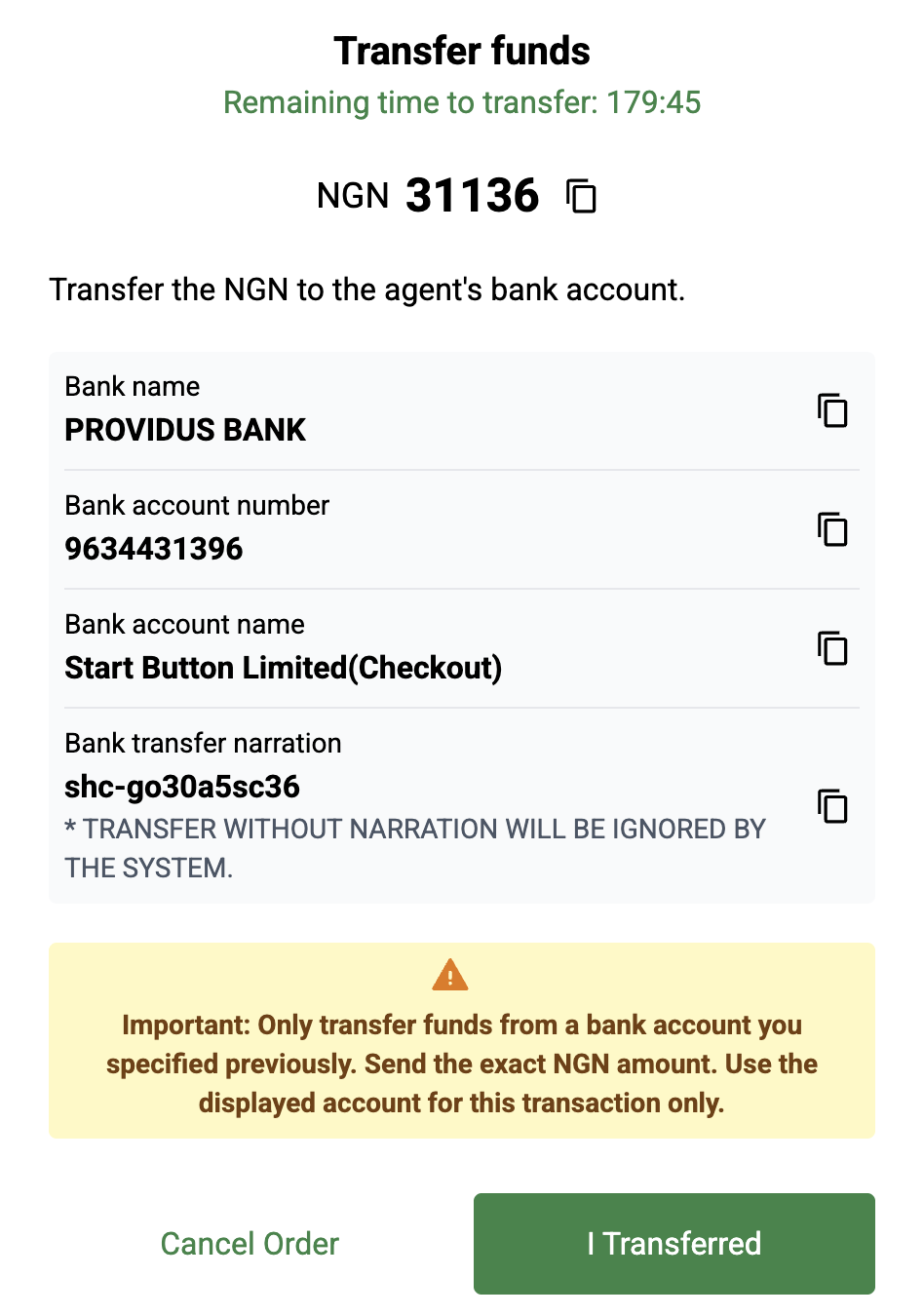
Order is created, now a user must pay to the agent using the "transferInstructions" details.
Here are possible types of transfer instructions:
**Manual**, a user pays manually to the provided details:
```json
{
"transferInstructions": {
"type": "manual",
"transferDetails": {
"bankAccountNumber": {
"label": "Agent's bank account number",
"value": "9637959770"
},
"bankName": {
"label": "Agent's bank name",
"value": "PROVIDUS BANK"
},
"bankAccountHolderName": {
"label": "Agent's bank account holder name",
"value": "Start Button Limited(Checkout)"
},
"narration": {
"label": "Narration",
"description": "TRANSFER WITHOUT NARRATION WILL BE IGNORED BY THE SYSTEM.",
"value": "shc-0x6on2w5js"
}
},
"instructionsText": "Transfer the NGN to the agent's bank account.",
"warningText": "Important: Only transfer funds from a bank account you specified previously. Send the exact NGN amount. Use the displayed account for this transaction only."
}
}
```
**STK Push**, user receives a mobile carrier popup and confirms a transfer:
```json
{
"transferInstructions": {
"type": "stk_push",
"instructionsText": "You’ll be prompted with a USSD dialog to proceed the transfer. If the transfer is unsuccessful or you don’t receive the USSD dialog, please retry the transfer"
}
}
```
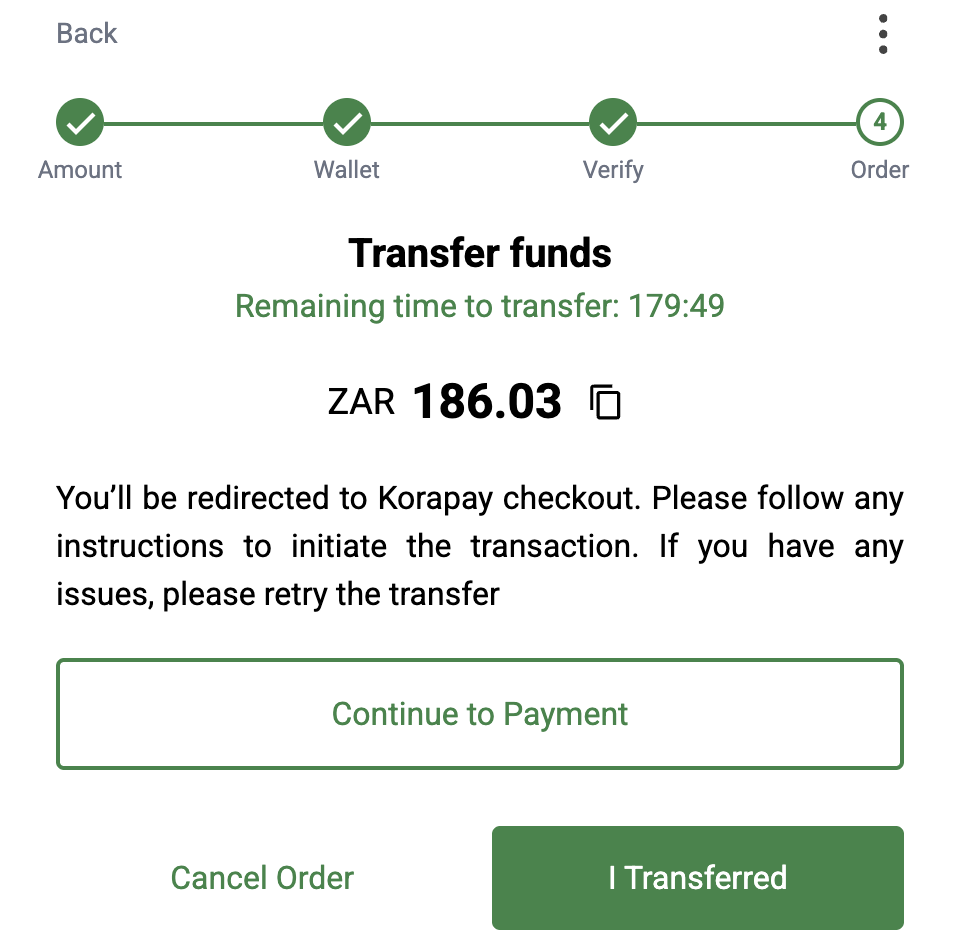
**Redirect**, user must open a specidied redirect URL and complete the transfer there. After the success they will be redirected to the URL specified during order creation.
```json
{
"transferInstructions": {
"type": "redirect",
"instructionsText": "You’ll be redirected to Flutterwave checkout. Enter the OTP code received to initiate the transaction. If you have any issues, please retry the transfer",
"paymentUrl": "https://checkout.flutterwave.com/captcha/verify/lang-en/9704816:565eee314972431349bd77403e57a741"
}
}
```
**USSD**, in that case, a user must execute the provided USSD code to complete the transfer. USSD code may include a {pin} placeholder; in that case you must ask the user to provide a pin code and replace the placeholder with it before execution.
```json
{
"transferInstructions": {
"type": "ussd",
"ussdCode": "*321*0701232567*1587*{pin}#",
"transferDetails": {
"phoneNumber": {
"label": "Agent's phone number",
"value": "254701232567"
}
},
"instructionsText": "Dial the USSD code and follow the instructions to complete the transfer. You have to replace {pin} placeholder with your PIN code if you dial USSD code manually.",
"warningText": "Important: Transfer airtime NGN to the agent from the phone number you specified during order creation."
}
}
```
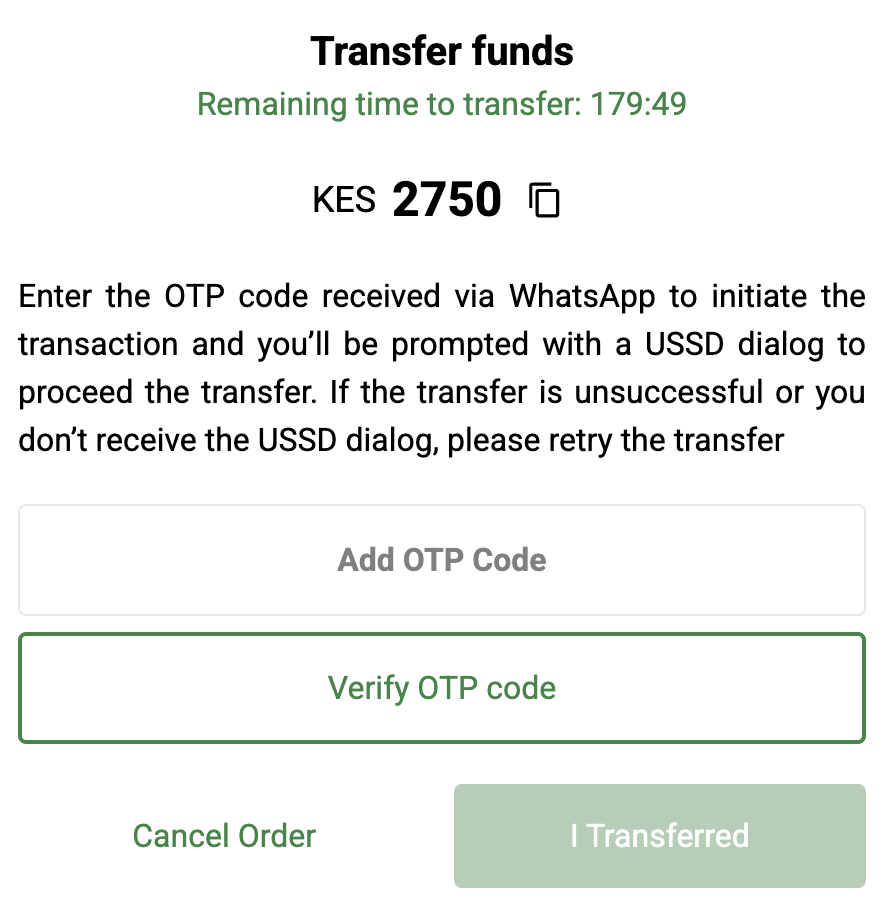
**STK Push with OTP**, in that case user receives an sms with an OTP code which must be sent to the [confirm OTP endpoint](/v1.5/endpoints/on-ramp#post-api-onramp-order-otp) , after that a user receives the STK Push and pays for the order
```json
{
"transferInstructions": {
"type": "otp_stk_push",
"transferDetails": {},
"isOtpRequired": true,
"instructionsText": "Enter the OTP code received to initiate the transaction and you’ll be prompted with a USSD dialog to proceed the transfer. If the transfer is unsuccessful or you don’t receive the USSD dialog, please retry the transfer",
"actionButtonText": "Verify OTP code"
}
}
```
After a user sends funds to the agent, you must [confirm the order](/v1.5/endpoints/on-ramp#post-api-onramp-order-confirm).
Request body:
```json
{
"orderId": "687a48eab6d730f80856e1ca"
}
```
The order flow is finished; now you need to wait for crypto to be sent to the user's wallet. You can do that either by waiting for a [webhook](/v1.5/on-ramp/webhook) or by [fetching the order](/v1.5/endpoints/on-ramp#get-api-onramp-order).
# Off-ramp
# How it works
Off-ramp widget allows user to exchange their crypto currency to his country's local currency.
How it works for end users:
1. Customer selects off-ramp type and specifies the amount of crypto he wants to exchange. System displays how much local currency he will receive.
2. Customer verifies his email by entering a code sent to him.
3. Customer provides his account details such as bank account number, bank name, etc.
4. System returns a wallet address where customer should send his crypto.
5. Customer sends crypto to the provided address and provides a transaction hash to the system.
6. System checks if the transaction is received and sends local currency to the customer's account.
{% @mermaid/diagram content="sequenceDiagram
User->>Widget: Specify amount of crypto to exchange
Widget->>User: Show the best offer
User->>Widget: Verify email
User->>Widget: Provide account details
User->>Widget: Create order
Widget->>User: Wallet address to send crypto
Note over User: Send crypto to the wallet
User->>Widget: Send transaction hash
Note over Widget: Check if funds are received
Widget->>User: Send local currency to the user account" %}
# URL Parameters
### Off-ramp URL[](https://docs.fonbnk.com/docs/offramp/query-params#off-ramp-url)
| Environment | URL |
| ----------- | ---------------------------------------- |
| Sandbox | |
| Production | |
### List of parameters[](https://docs.fonbnk.com/docs/offramp/query-params#list-of-parameters)
Here is the list of parameters that can be added to the URL:
| Parameter | Description |
| --------------- | ------------------------------------------------------------------------------------------------------------------------------------------------------------------------------------------------------------------------------------------------------------------------------------------------------------------------------------------------------------------------------------------------------------------------------------------------------------------------------------------------------------------------------------------------------- |
| network | Wallet network from which user will send crypto. Supported values: ARBITRUM, AVALANCHE, BASE, BNB, CELO, ETHEREUM, LISK, OPTIMISM, POLYGON, SOLANA, STELLAR, TON, TRON |
| asset | Wallet asset from which the user will send crypto.Supported values: **USDC**, **CUSD**, **USDT**, **CKES, CGHS**, depending on the network. The default value is **USDC** for all networks that support it, except CELO, which is CUSD for CELO. Supported network/asset pairs: AVALANCHE (USDC/USDT), POLYGON (USDC, USDT), CELO (CUSD, USDC, USDT, CKES, CGHS), STELLAR (USDC), SOLANA (USDC, USDT), BASE (USDC), ETHEREUM (USDC, USDT), LISK (USDT), OPTIMISM (USDC, USDT), BNB (USDC, USDT), ARBITRUM (USDC, USDT), TRON (USDT), TON (USDT, USDE) |
| amount | If a currency is not provided, it will be an amount of crypto user wants to exchange. If currency is **local** it will be the amount of local currency user wants to receive. |
| currency | Currency of the amount. Supported values: **crypto** or **local** |
| paymentChannel | Type of the off-ramp: **bank**, **airtime**, **mobile\_money**, **paybill** |
| countryIsoCode | default selected country iso code, example: **KE** for Kenya, **NG** for Nigeria |
| currencyIsoCode | currency iso code, example: **KES** for Kenya, **NGN** for Nigeria. Acts like a country parameter. |
| freezeAmount | Freezes the amount of order for the user, the user will not be able to change it. The amount is required in the URL for this parameter to work. |
| freezeWallet | Freezes the wallet of order for the user, the user will not be able to change it. The wallet is required in the URL for this parameter to work. |
| hideSwitch | if present, hides Buy/Sell switch at the top |
Parameters allowed only for [registered merchants](https://docs.fonbnk.com/integration-guide#generating-payment-urls-and-creating-orders):
| Parameter | Description |
| ----------- | ------------------------------------------------------------------------------------------------------------------------------------------------------------------------------------------------------------------------------------------------------------------------------------------------------------------------------------------------------------------------------------------------------------------------------------------------------------------ |
| orderParams | This parameter will be sent to a merchant webhook with order status changes |
| source |
parameter used to match an order to a merchant
\[Warning] In production, you must be a verified merchant to use this parameter. Please contact our team for a KYB process.
|
| signature |
A JWT token (HS256 encryption algorithm) is generated using the "URL signature secret" value as a secret. You must add some unique value to the token payload to make each token unique because we don't allow creating more than one order using the same signature.
\[Warning] In production, you must be a verified merchant to use this parameter. Please contact our team for a KYB process.
|
Here is an example of a URL with parameters:
{% code overflow="wrap" %}
```
https://pay.fonbnk.com/offramp?amount=1&network=POLYGON&asset=USDT
```
{% endcode %}
# Webhook
We can notify a merchant about the statuses of off-ramp orders associated with him.
We will make a **POST** request to a provided webhook URL with the next **application/json** contents:
**Webhook V1:**[****](https://docs.fonbnk.com/docs/offramp/webhook#webhook-v1)
type WebhookRequest = {
  data: {
    orderId: string,
    paymentChannel: "bank",
    status: OfframpStatus,
    date: string,
    cashout: {
      localCurrencyAmount: number, // how much the user will receive in local currency
      usdAmount: number, // how much user must send in USD
      feeAmountUsd: number, // total fee amount in USD
      feeAmountUsdFonbnk: number, // fee amount in USD for Fonbnk
      feeAmountUsdPartner: number, // fee amount in USD for partner
      feeAmountLocalCurrency: number, // total fee amount in local currency
      feeAmountLocalCurrencyFonbnk: number, // fee amount in local currency for Fonbnk
      feeAmountLocalCurrencyPartner: number, // fee amount in local currency for partner
    },
    exchangeRate: number,
    network: "AVALANCHE" | "POLYGON" | "CELO",
    asset: "USDC" | "CUSD",
    fromAddress: string,
    toAddress: string,
    userEmail: string,
    requiredFields: { label: string, type: 'number' | 'string' | 'date' | 'boolean' | 'email' | 'phone', value: string }[],// user account data
    orderParams?: string, // contents of orderParams query parameter during order creation
    countryIsoCode: string,
    currencyIsoCode: string,
  },
  hash: string,
};

enum OfframpStatus  {
  INITIATED = 'initiated',
  VALIDATING_TRANSACTION = 'validating_transaction', // user has sent us a transaction hash, waiting it to appear in a blockchain
  TRANSACTION_INVALID = 'transaction_invalid', // submited transaction hash is invalid (wrong amount, wrong creation time etc.)
  AWAITING_TRANSACTION_CONFIRMATION = 'awaiting_transaction_confirmation', //waiting for transaction confirmation
  TRANSACTION_CONFIRMED = 'transaction_confirmed', // user transaction was confirmed
  TRANSACTION_FAILED = 'transaction_failed', // user transaction is not confirmed in the blockchain
  OFFRAMP_SUCCESS = 'offramp_success',  // user has received the funds
  OFFRAMP_RETRY = "offramp_retry", // we are retrying the off-ramp after a failed attempt
  TRANSACTION_FAILED = 'transaction_failed', // user transaction failed
  OFFRAMP_PENDING = 'offramp_pending', // offramp in progress
  OFFRAMP_FAILED = 'offramp_failed', // offramp failed
  REFUNDING = 'refunding', // offramp failed, refund in progress
  REFUNDED = 'refunded', // offramp failed, refund was successful
  REFUND_FAILED = 'refund_failed', // offramp failed, refund failed
  EXPIRED = 'expired', // user did not send us a transaction hash in time
  CANCELLED = "cancelled" // user cancelled an order
}
**Webhook V2:**[****](https://docs.fonbnk.com/docs/offramp/webhook#webhook-v2)
Instead of sending hash inside - **WebhookRequest**, we will send it as a request **x-signature** header
```
Request headers:
x-signature: hash (string)
```
**Webhook verification:**[****](https://docs.fonbnk.com/docs/offramp/webhook#webhook-verification)
We send a hash field in our webhook to protect merchants from fraudulent requests. Each request should be verified by a secret provided in the dashboard.
Here is how it should be checked in pseudocode:
```
request.body.hash === SHA256(stringify(request.body.data), secret)
```
Here is how it should be checked in Node.js:
For Webhook V1 version:
```javascript
import { createHash } from 'crypto';
request.body.hash === createHash('sha256')
.update(JSON.stringify(request.body.data))
.update(createHash('sha256').update(__SECRET__, 'utf8').digest('hex'))
.digest('hex');
```
For Webhook V2 version:
```javascript
import { createHash } from 'crypto';
request 'x-signature' header === createHash('sha256')
.update(JSON.stringify(request.body))
.update(createHash('sha256').update(__SECRET__, 'utf8').digest('hex'))
.digest('hex');
```
{% hint style="info" %}
You can see how to make a signature in multiple programming languages [HERE](/v1.5/reference/signing-requests#request-examples)
{% endhint %}
# Servers
### API servers[](https://docs.fonbnk.com/docs/offramp/merchant-api#api-servers)
| Environment | Server URL |
| ----------- | ----------------------------------------------------------------- |
| Sandbox | [https://sandbox-api.fonbnk.com](https://sandbox-api.fonbnk.com/) |
| Production | [https://api.fonbnk.com](https://api.fonbnk.com/) |
# Signing requests
### Request Authentication[](https://docs.fonbnk.com/docs/pay-widget/merchant-api#request-authentication)
All requests should be signed using a HMAC256 algorithm and provided `clientId` and `clientSecret`.
### How to get the signature of the request?[](https://docs.fonbnk.com/docs/pay-widget/merchant-api#how-to-get-the-signature-of-the-request)
1. Generate a timestamp (Epoch Unix Timestamp) in milliseconds
2. Concatenate the timestamp and the endpoint that is called `{timestamp}:{endpoint}`
3. Decode the base64 encoded clientSecret
4. Compute the SHA256 hash of the concatenated string. Use decoded clientSecret as a key. Convert the result to base64
5. Add the clientId, signature, and timestamp to HTTP headers
The following pseudocode example demonstrates and explains how to sign a request
{% code overflow="wrap" %}
```
timestamp = CurrentTimestamp();
stringToSign = timestamp + ":" + endpoint;
signature = Base64 ( HMAC-SHA256 ( Base64-Decode ( clientSecret ), UTF8 ( concatenatedString ) ) );
```
{% endcode %}
## Request examples
The following examples send HTTP request to [get best on-ramp offer](https://docs.fonbnk.com/endpoints/on-ramp#get-api-onramp-best-offer) API endpoint:
{% tabs %}
{% tab title="Typescript" %}
{% code overflow="wrap" %}
```typescript
import crypto from 'crypto';
const BASE_URL = 'https://api.fonbnk.com';
const ENDPOINT = '/api/onramp/best-offer';
const CLIENT_ID = '';
const CLIENT_SECRET = '';
const generateSignature = ({
clientSecret,
timestamp,
endpoint,
}: {
clientSecret: string;
timestamp: string;
endpoint: string;
}) => {
let hmac = crypto.createHmac('sha256', Buffer.from(clientSecret, 'base64'));
let stringToSign = `${timestamp}:${endpoint}`;
hmac.update(stringToSign);
return hmac.digest('base64');
};
const main = async () => {
const timestamp = new Date().getTime();
const queryParams = new URLSearchParams({
countryIsoCode: 'NG',
amount: '10',
currency: 'crypto',
network: 'CELO',
asset: 'CUSD',
paymentChannel: 'bank',
});
const endpoint = `${ENDPOINT}?${queryParams.toString()}`;
const signature = generateSignature({
clientSecret: CLIENT_SECRET,
timestamp: timestamp.toString(),
endpoint,
});
const headers = {
'Content-Type': 'application/json',
'x-client-id': CLIENT_ID,
'x-timestamp': timestamp.toString(),
'x-signature': signature,
};
const response = await fetch(`${BASE_URL}${endpoint}`, {
method: 'GET',
headers,
});
const data = await response.json();
console.log(JSON.stringify(data, null, 2));
};
main().catch(console.error);
```
{% endcode %}
{% endtab %}
{% tab title="Python" %}
{% code overflow="wrap" %}
```python
import hmac
import base64
import time
import requests
from urllib.parse import urlencode
BASE_URL = 'https://api.fonbnk.com'
ENDPOINT = '/api/onramp/best-offer'
CLIENT_ID = ''
CLIENT_SECRET = ''
def pad_base64(base64_string):
return base64_string + '=' * (-len(base64_string) % 4)
def generate_signature(client_secret, timestamp, endpoint):
client_secret_padded = pad_base64(client_secret)
hmac_obj = hmac.new(base64.b64decode(client_secret_padded), f'{timestamp}:{endpoint}'.encode('utf-8'), 'sha256')
return base64.b64encode(hmac_obj.digest()).decode('utf-8')
def main():
timestamp = str(int(time.time() * 1000))
query_params = {
'countryIsoCode': 'NG',
'amount': '10',
'currency': 'crypto',
'network': 'CELO',
'asset': 'CUSD',
'paymentChannel': 'bank',
}
endpoint = f"{ENDPOINT}?{urlencode(query_params)}"
signature = generate_signature(CLIENT_SECRET, timestamp, endpoint)
headers = {
'Content-Type': 'application/json',
'x-client-id': CLIENT_ID,
'x-timestamp': timestamp,
'x-signature': signature,
}
response = requests.get(f"{BASE_URL}{endpoint}", headers=headers)
data = response.json()
print(data)
if __name__ == "__main__":
main()
```
{% endcode %}
{% endtab %}
{% tab title="GO" %}
{% code overflow="wrap" %}
```go
package main
import (
"crypto/hmac"
"crypto/sha256"
"encoding/base64"
"encoding/json"
"fmt"
"io/ioutil"
"net/http"
"net/url"
"strings"
"time"
)
const (
BASE_URL = "https://api.fonbnk.com"
ENDPOINT = "/api/onramp/price"
CLIENT_ID = ""
CLIENT_SECRET = ""
)
func padBase64(base64String string) string {
return base64String + strings.Repeat("=", (4-len(base64String)%4)%4)
}
func generateSignature(clientSecret, timestamp, endpoint string) (string, error) {
clientSecretPadded := padBase64(clientSecret)
decodedSecret, err := base64.StdEncoding.DecodeString(clientSecretPadded)
if err != nil {
return "", err
}
message := fmt.Sprintf("%s:%s", timestamp, endpoint)
h := hmac.New(sha256.New, decodedSecret)
h.Write([]byte(message))
signature := base64.StdEncoding.EncodeToString(h.Sum(nil))
return signature, nil
}
func main() {
timestamp := fmt.Sprintf("%d", time.Now().UnixNano()/int64(time.Millisecond))
queryParams := url.Values{
"countryIsoCode": {"NG"},
"amount": {"10"},
"currency": {"crypto"},
"network": {"CELO"},
"asset": {"CUSD"},
"paymentChannel": {"bank"},
}
endpoint := fmt.Sprintf("%s?%s", ENDPOINT, queryParams.Encode())
signature, err := generateSignature(CLIENT_SECRET, timestamp, endpoint)
if err != nil {
fmt.Println("Error generating signature:", err)
return
}
client := &http.Client{}
req, err := http.NewRequest("GET", BASE_URL+endpoint, nil)
if err != nil {
fmt.Println("Error creating request:", err)
return
}
req.Header.Set("Content-Type", "application/json")
req.Header.Set("x-client-id", CLIENT_ID)
req.Header.Set("x-timestamp", timestamp)
req.Header.Set("x-signature", signature)
resp, err := client.Do(req)
if err != nil {
fmt.Println("Error making request:", err)
return
}
defer resp.Body.Close()
body, err := ioutil.ReadAll(resp.Body)
if err != nil {
fmt.Println("Error reading response body:", err)
return
}
var data map[string]interface{}
if err := json.Unmarshal(body, &data); err != nil {
fmt.Println("Error unmarshalling response:", err)
return
}
fmt.Println(data)
}
```
{% endcode %}
{% endtab %}
{% tab title="PHP" %}
{% code overflow="wrap" %}
```php
'NG',
'amount' => '10',
'currency' => 'crypto',
'network' => 'CELO',
'asset' => 'CUSD',
'paymentChannel' => 'bank',
];
$endpoint = ENDPOINT . '?' . http_build_query($query_params);
$signature = generate_signature(CLIENT_SECRET, $timestamp, $endpoint);
$headers = [
'Content-Type: application/json',
'x-client-id: ' . CLIENT_ID,
'x-timestamp: ' . $timestamp,
'x-signature: ' . $signature,
];
$ch = curl_init();
curl_setopt($ch, CURLOPT_URL, BASE_URL . $endpoint);
curl_setopt($ch, CURLOPT_RETURNTRANSFER, 1);
curl_setopt($ch, CURLOPT_HTTPHEADER, $headers);
$response = curl_exec($ch);
curl_close($ch);
$data = json_decode($response, true);
print_r($data);
}
main();
?>
```
{% endcode %}
{% endtab %}
{% tab title="Java" %}
```java
import javax.crypto.Mac;
import javax.crypto.spec.SecretKeySpec;
import java.net.HttpURLConnection;
import java.net.URL;
import java.net.URLEncoder;
import java.nio.charset.StandardCharsets;
import java.util.Base64;
import java.util.HashMap;
import java.util.Map;
import java.util.Scanner;
public class Main {
private static final String BASE_URL = "https://api.fonbnk.com";
private static final String ENDPOINT = "/api/onramp/best-offer";
private static final String CLIENT_ID = "";
private static final String CLIENT_SECRET = "";
public static void main(String[] args) throws Exception {
long timestamp = System.currentTimeMillis();
Map queryParams = new HashMap<>();
queryParams.put("countryIsoCode", "NG");
queryParams.put("amount", "10");
queryParams.put("currency", "crypto");
queryParams.put("network", "CELO");
queryParams.put("asset", "CUSD");
queryParams.put("paymentChannel", "bank");
String endpoint = ENDPOINT + "?" + getQuery(queryParams);
String signature = generateSignature(CLIENT_SECRET, String.valueOf(timestamp), endpoint);
URL url = new URL(BASE_URL + endpoint);
HttpURLConnection connection = (HttpURLConnection) url.openConnection();
connection.setRequestMethod("GET");
connection.setRequestProperty("Content-Type", "application/json");
connection.setRequestProperty("x-client-id", CLIENT_ID);
connection.setRequestProperty("x-timestamp", String.valueOf(timestamp));
connection.setRequestProperty("x-signature", signature);
Scanner scanner = new Scanner(connection.getInputStream());
String response = scanner.useDelimiter("\\A").next();
System.out.println(response);
scanner.close();
}
private static String padBase64(String base64String) {
return base64String + "=".repeat((4 - base64String.length() % 4) % 4);
}
private static String generateSignature(String clientSecret, String timestamp, String endpoint) throws Exception {
String clientSecretPadded = padBase64(clientSecret);
SecretKeySpec secretKeySpec = new SecretKeySpec(Base64.getDecoder().decode(clientSecretPadded), "HmacSHA256");
Mac mac = Mac.getInstance("HmacSHA256");
mac.init(secretKeySpec);
String data = timestamp + ":" + endpoint;
byte[] hmacBytes = mac.doFinal(data.getBytes(StandardCharsets.UTF_8));
return Base64.getEncoder().encodeToString(hmacBytes);
}
private static String getQuery(Map params) throws Exception {
StringBuilder result = new StringBuilder();
for (Map.Entry entry : params.entrySet()) {
if (result.length() > 0) {
result.append("&");
}
result.append(URLEncoder.encode(entry.getKey(), "UTF-8"));
result.append("=");
result.append(URLEncoder.encode(entry.getValue(), "UTF-8"));
}
return result.toString();
}
}
```
{% endtab %}
{% tab title="Dart" %}
```dart
import 'dart:convert';
import 'package:crypto/crypto.dart';
import 'package:http/http.dart' as http;
void main() async {
const String BASE_URL = "https://api.fonbnk.com";
const String ENDPOINT = "/api/onramp/best-offer";
const String CLIENT_ID = "";
const String CLIENT_SECRET = "";
// Get the current timestamp in milliseconds
int timestamp = DateTime.now().millisecondsSinceEpoch;
// Create query parameters
Map queryParams = {
"countryIsoCode": "NG",
"amount": "10",
"currency": "crypto",
"network": "CELO",
"asset": "CUSD",
"paymentChannel": "bank",
};
// Generate the query string
String queryString = getQuery(queryParams);
// Create the endpoint with query parameters
String endpoint = ENDPOINT + "?" + queryString;
// Generate the signature
String signature = generateSignature(CLIENT_SECRET, timestamp.toString(), endpoint);
// Build the URL
String url = BASE_URL + endpoint;
// Set up the HTTP GET request
var headers = {
"Content-Type": "application/json",
"x-client-id": CLIENT_ID,
"x-timestamp": timestamp.toString(),
"x-signature": signature,
};
// Send the GET request
var response = await http.get(Uri.parse(url), headers: headers);
// Print the response body
print(response.body);
}
String getQuery(Map params) {
return params.entries
.map((entry) =>
Uri.encodeQueryComponent(entry.key) + "=" + Uri.encodeQueryComponent(entry.value))
.join("&");
}
String generateSignature(String clientSecret, String timestamp, String endpoint) {
// Use the custom lenient Base64 decoder
List secretKey = lenientBase64Decode(clientSecret);
Hmac hmac = Hmac(sha256, secretKey);
String data = '$timestamp:$endpoint';
Digest digest = hmac.convert(utf8.encode(data));
// Encode the signature using Base64
String signature = base64Encode(digest.bytes);
return signature;
}
List lenientBase64Decode(String input) {
// Base64 index table
const String base64Chars = 'ABCDEFGHIJKLMNOPQRSTUVWXYZabcdefghijklmnopqrstuvwxyz0123456789+/';
// Remove all characters that are not in the Base64 alphabet
String sanitizedInput = input.replaceAll(RegExp(r'[^A-Za-z0-9+/]'), '');
// Map each character to its Base64 index
List buffer = [];
int bits = 0;
int bitsCount = 0;
for (int i = 0; i < sanitizedInput.length; i++) {
int val = base64Chars.indexOf(sanitizedInput[i]);
if (val < 0) {
// Skip invalid characters
continue;
}
bits = (bits << 6) | val;
bitsCount += 6;
if (bitsCount >= 8) {
bitsCount -= 8;
int byte = (bits >> bitsCount) & 0xFF;
buffer.add(byte);
}
}
return buffer;
}
```
{% endtab %}
{% tab title="Elixir" %}
```elixir
Mix.install([
{:httpoison, "~> 1.8"},
{:jason, "~> 1.4"}
])
defmodule FonbnkClient do
@moduledoc """
A client for interacting with the Fonbnk API.
"""
@base_url "https://api.fonbnk.com"
@endpoint "/api/onramp/best-offer"
@client_id ""
@client_secret ""
def pad_base64(base64_string) do
pad_length = Integer.mod(-String.length(base64_string), 4)
base64_string <> String.duplicate("=", pad_length)
end
def generate_signature(client_secret, timestamp, endpoint) do
client_secret_padded = pad_base64(client_secret)
{:ok, client_secret_decoded} = Base.decode64(client_secret_padded)
message = "#{timestamp}:#{endpoint}"
hmac = :crypto.mac(:hmac, :sha256, client_secret_decoded, message)
Base.encode64(hmac)
end
def main do
timestamp = :os.system_time(:millisecond) |> Integer.to_string()
query_params = %{
"countryIsoCode" => "NG",
"amount" => "10",
"currency" => "crypto",
"network" => "CELO",
"asset" => "CUSD",
"paymentChannel" => "bank"
}
encoded_query = URI.encode_query(query_params)
endpoint = @endpoint <> "?" <> encoded_query
signature = generate_signature(@client_secret, timestamp, endpoint)
headers = [
{"Content-Type", "application/json"},
{"x-client-id", @client_id},
{"x-timestamp", timestamp},
{"x-signature", signature}
]
url = @base_url <> endpoint
case HTTPoison.get(url, headers) do
{:ok, %HTTPoison.Response{body: body, status_code: code}} when code in 200..299 ->
data = Jason.decode!(body)
IO.inspect(data)
{:ok, %HTTPoison.Response{body: body, status_code: code}} ->
IO.puts("HTTP Error #{code}: #{body}")
{:error, %HTTPoison.Error{reason: reason}} ->
IO.puts("Request Error: #{inspect(reason)}")
end
end
end
FonbnkClient.main()
```
{% endtab %}
{% endtabs %}
# Endpoints
# On Ramp
On-ramp
## Get best offer
> Returns the best offer for the provided country, network, asset, amount and payment channel.
```json
{"openapi":"3.1.0","info":{"title":"Fonbnk On-ramp API","version":"1.0.0"},"tags":[{"name":"on-ramp","description":"On-ramp"}],"servers":[{"url":"https://sandbox-api.fonbnk.com","description":"Development server"},{"url":"https://api.fonbnk.com","description":"Production server"}],"security":[{"ClientIdHeader":[]},{"TimestampHeader":[]},{"SignatureHeader":[]}],"components":{"securitySchemes":{"ClientIdHeader":{"type":"apiKey","in":"header","name":"x-client-id","description":"Your client ID"},"TimestampHeader":{"type":"apiKey","in":"header","name":"x-timestamp","description":"The Unix timestamp of the request signature"},"SignatureHeader":{"type":"apiKey","in":"header","name":"x-signature","description":"HMAC-SHA256 signature generated using your secret"}},"schemas":{"OnRampNetwork":{"type":"string","enum":["POLYGON","ETHEREUM","STELLAR","AVALANCHE","SOLANA","CELO","BASE","TON","TRON","LISK","ARBITRUM","OPTIMISM","BNB"]},"OnRampAsset":{"type":"string","enum":["USDC","USDT","CUSD","CKES","CGHS","USDE"]},"WidgetAmountCurrency":{"type":"string","enum":["local","crypto"]},"OnRampPaymentChannel":{"type":"string","enum":["bank","mobile_money","airtime"]},"OnRampBestOfferResponse":{"type":"object","properties":{"quoteId":{"type":"string","description":"Unique quote id"},"offer":{"type":"object","properties":{"paymentChannel":{"$ref":"#/components/schemas/OnRampPaymentChannel","description":"Type of the payment channel, e.g. bank, mobile_money, airtime"},"countryIsoCode":{"type":"string","description":"Country ISO code, e.g. NG for Nigeria, KE for Kenya"},"currencyIsoCode":{"type":"string","description":"Local currency ISO code, e.g. NGN for Nigerian Naira, KES for Kenyan Shilling"},"exchangeRate":{"type":"number","description":"Exchange rate for the order"},"cryptoExchangeRate":{"type":"number","description":"Exchange rate for the crypto amount"},"requiredFields":{"type":"object","description":"Data required to submit the order","additionalProperties":{"type":"object","properties":{"type":{"$ref":"#/components/schemas/RequiredFieldType"},"label":{"type":"string"},"required":{"type":"boolean"},"options":{"type":"array","items":{"type":"object","properties":{"value":{"type":"string"},"label":{"type":"string"}}}}}}}}},"cashout":{"type":"object","properties":{"localCurrencyAmount":{"type":"number","description":"Amount in local currency user must to pay"},"totalAmountUsd":{"type":"number","description":"Total amount of local currency in USD user must to pay"},"totalAmountCrypto":{"type":"number","description":"Total amount of local currency in crypto user must to pay"},"withdrawAmountUsd":{"type":"number","description":"Amount in USD user will receive after the order is completed"},"withdrawAmountCrypto":{"type":"number","description":"Amount in crypto user will receive after the order is completed"},"feePercent":{"type":"number","description":"Total fee percent (fonbnk fee + partner fee)"},"feeAmountUsd":{"type":"number","description":"Total fee amount in USD"},"feeAmountLocalCurrency":{"type":"number","description":"Total fee amount in local currency"},"feeAmountCrypto":{"type":"number","description":"Total fee amount in crypto"},"feePercentFonbnk":{"type":"number","description":"Fonbnk fee percent"},"feeAmountUsdFonbnk":{"type":"number","description":"Fonbnk fee amount in USD"},"feeAmountLocalCurrencyFonbnk":{"type":"number","description":"Fonbnk fee amount in local currency"},"feeAmountCryptoFonbnk":{"type":"number","description":"Fonbnk fee amount in crypto"},"feePercentPartner":{"type":"number","description":"Partner fee percent"},"feeAmountUsdPartner":{"type":"number","description":"Partner fee amount in USD"},"feeAmountLocalCurrencyPartner":{"type":"number","description":"Partner fee amount in local currency"},"feeAmountCryptoPartner":{"type":"number","description":"Partner fee amount in crypto"},"gasAmountUsd":{"type":"number","description":"Gas fee amount in USD"},"gasAmountLocalCurrency":{"type":"number","description":"Gas fee amount in local currency"},"gasAmountCrypto":{"type":"number","description":"Gas fee amount in crypto"}}}}},"RequiredFieldType":{"type":"string","enum":["number","string","date","boolean","email","enum"]}}},"paths":{"/api/onramp/best-offer":{"get":{"tags":["on-ramp"],"summary":"Get best offer","description":"Returns the best offer for the provided country, network, asset, amount and payment channel.","operationId":"getOnrampBestOffer","parameters":[{"name":"network","in":"query","required":true,"description":"blockchain network of the order","schema":{"$ref":"#/components/schemas/OnRampNetwork"}},{"name":"asset","in":"query","required":true,"description":"asset of the order","schema":{"$ref":"#/components/schemas/OnRampAsset"}},{"name":"currency","in":"query","required":true,"description":"Currency of the amount param","schema":{"$ref":"#/components/schemas/WidgetAmountCurrency"}},{"name":"amount","in":"query","required":true,"description":"Amount of local currency user wants to pay or amount of crypto user wants to receive depending on the currency param value","schema":{"type":"number"}},{"name":"countryIsoCode","in":"query","required":true,"description":"country ISO code, e.g. NG, KE etc.","schema":{"type":"string"}},{"name":"paymentChannel","in":"query","required":true,"description":"type of the payment channel user wants to use, e.g. bank, mobile_money, airtime to pay local currency","schema":{"$ref":"#/components/schemas/OnRampPaymentChannel"}},{"name":"carrierCode","in":"query","required":false,"description":"carrier code if applicable, e.g. for mobile_money or airtime orders","schema":{"type":"string"}}],"responses":{"200":{"description":"Successful response","content":{"application/json":{"schema":{"$ref":"#/components/schemas/OnRampBestOfferResponse"}}}}}}}}}
```
## Get payment channels
> Returns a list of supported countries and their payment channels
```json
{"openapi":"3.1.0","info":{"title":"Fonbnk On-ramp API","version":"1.0.0"},"tags":[{"name":"on-ramp","description":"On-ramp"}],"servers":[{"url":"https://sandbox-api.fonbnk.com","description":"Development server"},{"url":"https://api.fonbnk.com","description":"Production server"}],"security":[{"ClientIdHeader":[]},{"TimestampHeader":[]},{"SignatureHeader":[]}],"components":{"securitySchemes":{"ClientIdHeader":{"type":"apiKey","in":"header","name":"x-client-id","description":"Your client ID"},"TimestampHeader":{"type":"apiKey","in":"header","name":"x-timestamp","description":"The Unix timestamp of the request signature"},"SignatureHeader":{"type":"apiKey","in":"header","name":"x-signature","description":"HMAC-SHA256 signature generated using your secret"}},"schemas":{"OnRampPaymentChannelListResponse":{"type":"array","items":{"type":"object","properties":{"countryIsoCode":{"type":"string","description":"ISO code of the country, e.g. NG for Nigeria, KE for Kenya"},"currencyIsoCode":{"type":"string","description":"ISO code of the local currency, e.g. NGN for Nigerian Naira, KES for Kenyan Shilling"},"name":{"type":"string","description":"Name of the country, e.g. Nigeria, Kenya"},"paymentChannels":{"type":"array","description":"List of payment channels available for the country","items":{"type":"object","properties":{"paymentChannel":{"type":"string","description":"Type of the payment channel, e.g. bank, mobile_money, airtime"},"description":{"type":"string","description":"Description of the payment channel"},"requiresCarrier":{"type":"boolean","description":"Indicates if the payment channel requires a carrier ID"},"carriers":{"type":"array","description":"List of carriers available for the payment channel","items":{"type":"object","properties":{"id":{"type":"string","description":"Unique identifier of the carrier"},"name":{"type":"string","description":"Name of the carrier, e.g. Safaricom, MTN"},"code":{"type":"string","description":"Code of the carrier, e.g. ng_mtn, ke_safaricom"}}}}}}}}}}}},"paths":{"/api/onramp/payment-channels":{"get":{"tags":["on-ramp"],"summary":"Get payment channels","description":"Returns a list of supported countries and their payment channels","operationId":"getOnrampPaymentChannels","responses":{"200":{"description":"Successful response","content":{"application/json":{"schema":{"$ref":"#/components/schemas/OnRampPaymentChannelListResponse"}}}}}}}}}
```
## Get limits
> Returns minimum and maximum amount of order in crypto and local currency and applied fees for specific payment channel, country, network and asset.
```json
{"openapi":"3.1.0","info":{"title":"Fonbnk On-ramp API","version":"1.0.0"},"tags":[{"name":"on-ramp","description":"On-ramp"}],"servers":[{"url":"https://sandbox-api.fonbnk.com","description":"Development server"},{"url":"https://api.fonbnk.com","description":"Production server"}],"security":[{"ClientIdHeader":[]},{"TimestampHeader":[]},{"SignatureHeader":[]}],"components":{"securitySchemes":{"ClientIdHeader":{"type":"apiKey","in":"header","name":"x-client-id","description":"Your client ID"},"TimestampHeader":{"type":"apiKey","in":"header","name":"x-timestamp","description":"The Unix timestamp of the request signature"},"SignatureHeader":{"type":"apiKey","in":"header","name":"x-signature","description":"HMAC-SHA256 signature generated using your secret"}},"schemas":{"OnRampNetwork":{"type":"string","enum":["POLYGON","ETHEREUM","STELLAR","AVALANCHE","SOLANA","CELO","BASE","TON","TRON","LISK","ARBITRUM","OPTIMISM","BNB"]},"OnRampAsset":{"type":"string","enum":["USDC","USDT","CUSD","CKES","CGHS","USDE"]},"OnRampPaymentChannel":{"type":"string","enum":["bank","mobile_money","airtime"]},"OnRampLimitsResponse":{"type":"object","properties":{"minUsd":{"type":"number","description":"Minimum amount in USD for the order"},"maxUsd":{"type":"number","description":"Maximum amount in USD for the order"},"minLocalCurrency":{"type":"number","description":"Minimum amount in local currency for the order"},"maxLocalCurrency":{"type":"number","description":"Maximum amount in local currency for the order"},"minCrypto":{"type":"number","description":"Minimum amount in crypto for the order"},"maxCrypto":{"type":"number","description":"Maximum amount in crypto for the order"}}}}},"paths":{"/api/onramp/limits":{"get":{"tags":["on-ramp"],"summary":"Get limits","description":"Returns minimum and maximum amount of order in crypto and local currency and applied fees for specific payment channel, country, network and asset.","operationId":"getOnrampLimits","parameters":[{"name":"network","in":"query","required":true,"schema":{"$ref":"#/components/schemas/OnRampNetwork"}},{"name":"asset","in":"query","required":false,"schema":{"$ref":"#/components/schemas/OnRampAsset"}},{"name":"countryIsoCode","in":"query","required":true,"schema":{"type":"string"}},{"name":"paymentChannel","in":"query","required":true,"schema":{"$ref":"#/components/schemas/OnRampPaymentChannel"}},{"name":"carrierCode","in":"query","required":false,"schema":{"type":"string"}}],"responses":{"200":{"description":"Successful response","content":{"application/json":{"schema":{"$ref":"#/components/schemas/OnRampLimitsResponse"}}}}}}}}}
```
## Get list of supported assets
> Returns a list of supported blockchain assets for the on-ramp orders
```json
{"openapi":"3.1.0","info":{"title":"Fonbnk On-ramp API","version":"1.0.0"},"tags":[{"name":"on-ramp","description":"On-ramp"}],"servers":[{"url":"https://sandbox-api.fonbnk.com","description":"Development server"},{"url":"https://api.fonbnk.com","description":"Production server"}],"security":[{"ClientIdHeader":[]},{"TimestampHeader":[]},{"SignatureHeader":[]}],"components":{"securitySchemes":{"ClientIdHeader":{"type":"apiKey","in":"header","name":"x-client-id","description":"Your client ID"},"TimestampHeader":{"type":"apiKey","in":"header","name":"x-timestamp","description":"The Unix timestamp of the request signature"},"SignatureHeader":{"type":"apiKey","in":"header","name":"x-signature","description":"HMAC-SHA256 signature generated using your secret"}},"schemas":{"OnRampNetwork":{"type":"string","enum":["POLYGON","ETHEREUM","STELLAR","AVALANCHE","SOLANA","CELO","BASE","TON","TRON","LISK","ARBITRUM","OPTIMISM","BNB"]},"OnRampAsset":{"type":"string","enum":["USDC","USDT","CUSD","CKES","CGHS","USDE"]}}},"paths":{"/api/onramp/assets":{"get":{"tags":["on-ramp"],"summary":"Get list of supported assets","description":"Returns a list of supported blockchain assets for the on-ramp orders","operationId":"getOnrampAssets","responses":{"200":{"description":"Successful response","content":{"application/json":{"schema":{"type":"array","items":{"type":"object","properties":{"network":{"$ref":"#/components/schemas/OnRampNetwork"},"asset":{"$ref":"#/components/schemas/OnRampAsset"}}}}}}}}}}}}
```
## Get order
> Returns a single pay widget order by its ID or orderParams query parameter.
```json
{"openapi":"3.1.0","info":{"title":"Fonbnk On-ramp API","version":"1.0.0"},"tags":[{"name":"on-ramp","description":"On-ramp"}],"servers":[{"url":"https://sandbox-api.fonbnk.com","description":"Development server"},{"url":"https://api.fonbnk.com","description":"Production server"}],"security":[{"ClientIdHeader":[]},{"TimestampHeader":[]},{"SignatureHeader":[]}],"components":{"securitySchemes":{"ClientIdHeader":{"type":"apiKey","in":"header","name":"x-client-id","description":"Your client ID"},"TimestampHeader":{"type":"apiKey","in":"header","name":"x-timestamp","description":"The Unix timestamp of the request signature"},"SignatureHeader":{"type":"apiKey","in":"header","name":"x-signature","description":"HMAC-SHA256 signature generated using your secret"}},"schemas":{"OnRampOrder":{"type":"object","properties":{"_id":{"type":"string","description":"Order ID"},"status":{"$ref":"#/components/schemas/OnRampOrderStatus"},"date":{"type":"string","format":"date-time","description":"Date of order creation"},"orderId":{"type":"string","description":"Order ID"},"phoneNumber":{"type":"string","description":"User phone number, should include country code"},"email":{"type":"string","description":"User email address"},"localCurrencyAmount":{"type":"number","description":"Amount in local currency"},"currencyIsoCode":{"type":"string","description":"Local currency ISO code, e.g. NGN, KES"},"countryIsoCode":{"type":"string","description":"Country ISO code, e.g. NG"},"paymentChannel":{"$ref":"#/components/schemas/OnRampPaymentChannel","description":"Payment channel used for the order, e.g. bank, mobile_money, airtime"},"amount":{"type":"number","description":"Amount in USD"},"amountCrypto":{"type":"number","description":"Amount in crypto"},"network":{"$ref":"#/components/schemas/OnRampNetwork","description":"Blockchain network of the order, e.g. POLYGON, ETHEREUM, STELLAR"},"asset":{"$ref":"#/components/schemas/OnRampAsset","description":"Blockchain asset of the order, e.g. USDC, USDT, CUSD"},"address":{"type":"string","description":"User wallet address"},"memo":{"type":"string","description":"Memo for the Stellar, TON and other networks transactions that support it"},"hash":{"type":"string","description":"Transaction hash if available"},"orderParams":{"type":"string","description":"Value of the orderParams query param during order creation"},"resumeUrl":{"type":"string","description":"URL to resume the order in the pay widget"},"carrierId":{"type":"string","description":"Carrier ID if applicable, e.g. for mobile money orders"},"feePercent":{"type":"number","description":"total fee percent (fonbnk fee + partner fee)"},"feePercentFonbnk":{"type":"number","description":"fonbnk fee percent"},"feePercentPartner":{"type":"number","description":"partner fee percent"},"feeAmountUsd":{"type":"number","description":"Total fee amount in USD"},"feeAmountLocalCurrency":{"type":"number","description":"Total fee amount in local currency"},"feeAmountUsdFonbnk":{"type":"number","description":"Fonbnk fee amount in USD"},"feeAmountLocalCurrencyFonbnk":{"type":"number","description":"Fonbnk fee amount in local currency"},"feeAmountUsdPartner":{"type":"number","description":"Partner fee amount in USD"},"feeAmountLocalCurrencyPartner":{"type":"number","description":"Partner fee amount in local currency"},"gasAmountUsd":{"type":"number","description":"Gas fee amount in USD"},"gasAmountLocalCurrency":{"type":"number","description":"Gas fee amount in local currency"},"transferInstructions":{"type":"object","properties":{"type":{"type":"string","description":"Type of action required to complete the order","enum":["manual","redirect","stk_push","otp_stk_push","ussd"]},"ussdCode":{"type":"string","description":"USSD code a user needs to dial to complete the order, present only if type is \"ussd\". May include \"{pin}\" placeholder for user PIN, e.g. \"*123*{pin}#\" in this case it should be replaced with their PIN"},"paymentUrl":{"type":"string","description":"URL to redirect the user to complete the payment, present only if type is \"redirect\""},"instructionsText":{"type":"string","description":"Text with instructions for the user to complete the order"},"warningText":{"type":"string","description":"Warning text for the user"},"transferDetails":{"type":"object","properties":{"key":{"type":"object","properties":{"label":{"type":"string","description":"Label for the transfer detail"},"description":{"type":"string","description":"Description of the transfer detail"},"value":{"type":"string","description":"Value of the transfer detail, e.g. account number, phone number, etc."}}}}}}}}},"OnRampOrderStatus":{"type":"string","enum":["swap_initiated","swap_expired","swap_buyer_rejected","swap_buyer_confirmed","swap_seller_rejected","swap_seller_confirmed","pending","complete","failed"],"description":"- swap_initiated: user has created an order\n- swap_expired: an order has expired\n- swap_buyer_rejected: user has rejected an order\n- swap_buyer_confirmed: user has confirmed an order\n- swap_seller_rejected: agent has rejected an order, happens when agent don't receive a payment\n- swap_seller_confirmed: agent has confirmed an order\n- pending: crypto transaction is pending\n- complete: crypto transaction is complete\n- failed: crypto transaction has failed"},"OnRampPaymentChannel":{"type":"string","enum":["bank","mobile_money","airtime"]},"OnRampNetwork":{"type":"string","enum":["POLYGON","ETHEREUM","STELLAR","AVALANCHE","SOLANA","CELO","BASE","TON","TRON","LISK","ARBITRUM","OPTIMISM","BNB"]},"OnRampAsset":{"type":"string","enum":["USDC","USDT","CUSD","CKES","CGHS","USDE"]}}},"paths":{"/api/onramp/order":{"get":{"tags":["on-ramp"],"summary":"Get order","description":"Returns a single pay widget order by its ID or orderParams query parameter.","operationId":"getOnrampOrderById","parameters":[{"name":"orderId","in":"query","description":"id of the order which you could receive via a webhook or iframe events","required":false,"schema":{"type":"string"}},{"name":"orderParams","in":"query","required":false,"description":"Value which you provided in the orderParams parameter of the pay widget URL","schema":{"type":"string"}}],"responses":{"200":{"description":"Successful response","content":{"application/json":{"schema":{"$ref":"#/components/schemas/OnRampOrder"}}}}}}}}}
```
## Get orders
> Returns a paginated list of pay widget orders. Filters can be applied to the list by providing query parameters.
```json
{"openapi":"3.1.0","info":{"title":"Fonbnk On-ramp API","version":"1.0.0"},"tags":[{"name":"on-ramp","description":"On-ramp"}],"servers":[{"url":"https://sandbox-api.fonbnk.com","description":"Development server"},{"url":"https://api.fonbnk.com","description":"Production server"}],"security":[{"ClientIdHeader":[]},{"TimestampHeader":[]},{"SignatureHeader":[]}],"components":{"securitySchemes":{"ClientIdHeader":{"type":"apiKey","in":"header","name":"x-client-id","description":"Your client ID"},"TimestampHeader":{"type":"apiKey","in":"header","name":"x-timestamp","description":"The Unix timestamp of the request signature"},"SignatureHeader":{"type":"apiKey","in":"header","name":"x-signature","description":"HMAC-SHA256 signature generated using your secret"}},"schemas":{"OnRampNetwork":{"type":"string","enum":["POLYGON","ETHEREUM","STELLAR","AVALANCHE","SOLANA","CELO","BASE","TON","TRON","LISK","ARBITRUM","OPTIMISM","BNB"]},"OnRampPaymentChannel":{"type":"string","enum":["bank","mobile_money","airtime"]},"BuySwapStatus":{"type":"string","enum":["initiated","expired","buyer_confirmed","seller_confirmation_pending","seller_confirmation_failed","seller_confirmed","seller_rejected"],"description":"- initiated: The buy swap has been initiated\n- expired: The buy swap has expired\n- buyer_confirmed: The buyer has confirmed the buy swap\n- seller_confirmation_pending: The agent is yet to confirm the buy swap\n- seller_confirmation_failed: The agent has failed to confirm the buy swap\n- seller_confirmed: The agent has confirmed the buy swap\n- seller_rejected: The agent has rejected the buy swap"},"WithdrawalStatus":{"type":"string","enum":["pending","complete","failed"]},"PaginatedOnrampOrders":{"allOf":[{"$ref":"#/components/schemas/Paginated"},{"type":"object","properties":{"list":{"type":"array","items":{"$ref":"#/components/schemas/OnRampOrder"}}}}]},"Paginated":{"type":"object","properties":{"nextCursor":{"type":"string"}}},"OnRampOrder":{"type":"object","properties":{"_id":{"type":"string","description":"Order ID"},"status":{"$ref":"#/components/schemas/OnRampOrderStatus"},"date":{"type":"string","format":"date-time","description":"Date of order creation"},"orderId":{"type":"string","description":"Order ID"},"phoneNumber":{"type":"string","description":"User phone number, should include country code"},"email":{"type":"string","description":"User email address"},"localCurrencyAmount":{"type":"number","description":"Amount in local currency"},"currencyIsoCode":{"type":"string","description":"Local currency ISO code, e.g. NGN, KES"},"countryIsoCode":{"type":"string","description":"Country ISO code, e.g. NG"},"paymentChannel":{"$ref":"#/components/schemas/OnRampPaymentChannel","description":"Payment channel used for the order, e.g. bank, mobile_money, airtime"},"amount":{"type":"number","description":"Amount in USD"},"amountCrypto":{"type":"number","description":"Amount in crypto"},"network":{"$ref":"#/components/schemas/OnRampNetwork","description":"Blockchain network of the order, e.g. POLYGON, ETHEREUM, STELLAR"},"asset":{"$ref":"#/components/schemas/OnRampAsset","description":"Blockchain asset of the order, e.g. USDC, USDT, CUSD"},"address":{"type":"string","description":"User wallet address"},"memo":{"type":"string","description":"Memo for the Stellar, TON and other networks transactions that support it"},"hash":{"type":"string","description":"Transaction hash if available"},"orderParams":{"type":"string","description":"Value of the orderParams query param during order creation"},"resumeUrl":{"type":"string","description":"URL to resume the order in the pay widget"},"carrierId":{"type":"string","description":"Carrier ID if applicable, e.g. for mobile money orders"},"feePercent":{"type":"number","description":"total fee percent (fonbnk fee + partner fee)"},"feePercentFonbnk":{"type":"number","description":"fonbnk fee percent"},"feePercentPartner":{"type":"number","description":"partner fee percent"},"feeAmountUsd":{"type":"number","description":"Total fee amount in USD"},"feeAmountLocalCurrency":{"type":"number","description":"Total fee amount in local currency"},"feeAmountUsdFonbnk":{"type":"number","description":"Fonbnk fee amount in USD"},"feeAmountLocalCurrencyFonbnk":{"type":"number","description":"Fonbnk fee amount in local currency"},"feeAmountUsdPartner":{"type":"number","description":"Partner fee amount in USD"},"feeAmountLocalCurrencyPartner":{"type":"number","description":"Partner fee amount in local currency"},"gasAmountUsd":{"type":"number","description":"Gas fee amount in USD"},"gasAmountLocalCurrency":{"type":"number","description":"Gas fee amount in local currency"},"transferInstructions":{"type":"object","properties":{"type":{"type":"string","description":"Type of action required to complete the order","enum":["manual","redirect","stk_push","otp_stk_push","ussd"]},"ussdCode":{"type":"string","description":"USSD code a user needs to dial to complete the order, present only if type is \"ussd\". May include \"{pin}\" placeholder for user PIN, e.g. \"*123*{pin}#\" in this case it should be replaced with their PIN"},"paymentUrl":{"type":"string","description":"URL to redirect the user to complete the payment, present only if type is \"redirect\""},"instructionsText":{"type":"string","description":"Text with instructions for the user to complete the order"},"warningText":{"type":"string","description":"Warning text for the user"},"transferDetails":{"type":"object","properties":{"key":{"type":"object","properties":{"label":{"type":"string","description":"Label for the transfer detail"},"description":{"type":"string","description":"Description of the transfer detail"},"value":{"type":"string","description":"Value of the transfer detail, e.g. account number, phone number, etc."}}}}}}}}},"OnRampOrderStatus":{"type":"string","enum":["swap_initiated","swap_expired","swap_buyer_rejected","swap_buyer_confirmed","swap_seller_rejected","swap_seller_confirmed","pending","complete","failed"],"description":"- swap_initiated: user has created an order\n- swap_expired: an order has expired\n- swap_buyer_rejected: user has rejected an order\n- swap_buyer_confirmed: user has confirmed an order\n- swap_seller_rejected: agent has rejected an order, happens when agent don't receive a payment\n- swap_seller_confirmed: agent has confirmed an order\n- pending: crypto transaction is pending\n- complete: crypto transaction is complete\n- failed: crypto transaction has failed"},"OnRampAsset":{"type":"string","enum":["USDC","USDT","CUSD","CKES","CGHS","USDE"]}}},"paths":{"/api/onramp/orders":{"get":{"tags":["on-ramp"],"summary":"Get orders","description":"Returns a paginated list of pay widget orders. Filters can be applied to the list by providing query parameters.","operationId":"getOnrampOrders","parameters":[{"name":"cursor","in":"query","description":"this parameter should be provided in order to get a next page from the pagination, it should be taken from \"nextCursor\" response value","required":false,"schema":{"type":"string"}},{"name":"limit","in":"query","description":"number from 1 to 100, describes how many records should be in each pagination page","required":true,"schema":{"type":"integer"}},{"name":"network","in":"query","description":"blockchain network of orders","required":false,"schema":{"$ref":"#/components/schemas/OnRampNetwork"}},{"name":"address","in":"query","required":false,"schema":{"type":"string"}},{"name":"userPhoneNumber","in":"query","description":"phone number of the client, should include country code","required":false,"schema":{"type":"string"}},{"name":"userEmail","in":"query","description":"email of the client","required":false,"schema":{"type":"string"}},{"name":"paymentChannel","in":"query","required":false,"description":"type of the payment channel","schema":{"$ref":"#/components/schemas/OnRampPaymentChannel"}},{"name":"buySwapStatus","in":"query","description":"status of a buy swap","required":false,"schema":{"$ref":"#/components/schemas/BuySwapStatus"}},{"name":"withdrawalStatus","in":"query","description":"status of a crypto transfer","required":false,"schema":{"$ref":"#/components/schemas/WithdrawalStatus"}}],"responses":{"200":{"description":"Successful response","content":{"application/json":{"schema":{"$ref":"#/components/schemas/PaginatedOnrampOrders"}}}}}}}}}
```
## Create order
> Creates a new on-ramp order using a quote ID from the best offer endpoint
```json
{"openapi":"3.1.0","info":{"title":"Fonbnk On-ramp API","version":"1.0.0"},"tags":[{"name":"on-ramp","description":"On-ramp"}],"servers":[{"url":"https://sandbox-api.fonbnk.com","description":"Development server"},{"url":"https://api.fonbnk.com","description":"Production server"}],"security":[{"ClientIdHeader":[]},{"TimestampHeader":[]},{"SignatureHeader":[]}],"components":{"securitySchemes":{"ClientIdHeader":{"type":"apiKey","in":"header","name":"x-client-id","description":"Your client ID"},"TimestampHeader":{"type":"apiKey","in":"header","name":"x-timestamp","description":"The Unix timestamp of the request signature"},"SignatureHeader":{"type":"apiKey","in":"header","name":"x-signature","description":"HMAC-SHA256 signature generated using your secret"}},"schemas":{"OnRampNetwork":{"type":"string","enum":["POLYGON","ETHEREUM","STELLAR","AVALANCHE","SOLANA","CELO","BASE","TON","TRON","LISK","ARBITRUM","OPTIMISM","BNB"]},"WidgetAmountCurrency":{"type":"string","enum":["local","crypto"]},"OnRampAsset":{"type":"string","enum":["USDC","USDT","CUSD","CKES","CGHS","USDE"]},"OnRampOrder":{"type":"object","properties":{"_id":{"type":"string","description":"Order ID"},"status":{"$ref":"#/components/schemas/OnRampOrderStatus"},"date":{"type":"string","format":"date-time","description":"Date of order creation"},"orderId":{"type":"string","description":"Order ID"},"phoneNumber":{"type":"string","description":"User phone number, should include country code"},"email":{"type":"string","description":"User email address"},"localCurrencyAmount":{"type":"number","description":"Amount in local currency"},"currencyIsoCode":{"type":"string","description":"Local currency ISO code, e.g. NGN, KES"},"countryIsoCode":{"type":"string","description":"Country ISO code, e.g. NG"},"paymentChannel":{"$ref":"#/components/schemas/OnRampPaymentChannel","description":"Payment channel used for the order, e.g. bank, mobile_money, airtime"},"amount":{"type":"number","description":"Amount in USD"},"amountCrypto":{"type":"number","description":"Amount in crypto"},"network":{"$ref":"#/components/schemas/OnRampNetwork","description":"Blockchain network of the order, e.g. POLYGON, ETHEREUM, STELLAR"},"asset":{"$ref":"#/components/schemas/OnRampAsset","description":"Blockchain asset of the order, e.g. USDC, USDT, CUSD"},"address":{"type":"string","description":"User wallet address"},"memo":{"type":"string","description":"Memo for the Stellar, TON and other networks transactions that support it"},"hash":{"type":"string","description":"Transaction hash if available"},"orderParams":{"type":"string","description":"Value of the orderParams query param during order creation"},"resumeUrl":{"type":"string","description":"URL to resume the order in the pay widget"},"carrierId":{"type":"string","description":"Carrier ID if applicable, e.g. for mobile money orders"},"feePercent":{"type":"number","description":"total fee percent (fonbnk fee + partner fee)"},"feePercentFonbnk":{"type":"number","description":"fonbnk fee percent"},"feePercentPartner":{"type":"number","description":"partner fee percent"},"feeAmountUsd":{"type":"number","description":"Total fee amount in USD"},"feeAmountLocalCurrency":{"type":"number","description":"Total fee amount in local currency"},"feeAmountUsdFonbnk":{"type":"number","description":"Fonbnk fee amount in USD"},"feeAmountLocalCurrencyFonbnk":{"type":"number","description":"Fonbnk fee amount in local currency"},"feeAmountUsdPartner":{"type":"number","description":"Partner fee amount in USD"},"feeAmountLocalCurrencyPartner":{"type":"number","description":"Partner fee amount in local currency"},"gasAmountUsd":{"type":"number","description":"Gas fee amount in USD"},"gasAmountLocalCurrency":{"type":"number","description":"Gas fee amount in local currency"},"transferInstructions":{"type":"object","properties":{"type":{"type":"string","description":"Type of action required to complete the order","enum":["manual","redirect","stk_push","otp_stk_push","ussd"]},"ussdCode":{"type":"string","description":"USSD code a user needs to dial to complete the order, present only if type is \"ussd\". May include \"{pin}\" placeholder for user PIN, e.g. \"*123*{pin}#\" in this case it should be replaced with their PIN"},"paymentUrl":{"type":"string","description":"URL to redirect the user to complete the payment, present only if type is \"redirect\""},"instructionsText":{"type":"string","description":"Text with instructions for the user to complete the order"},"warningText":{"type":"string","description":"Warning text for the user"},"transferDetails":{"type":"object","properties":{"key":{"type":"object","properties":{"label":{"type":"string","description":"Label for the transfer detail"},"description":{"type":"string","description":"Description of the transfer detail"},"value":{"type":"string","description":"Value of the transfer detail, e.g. account number, phone number, etc."}}}}}}}}},"OnRampOrderStatus":{"type":"string","enum":["swap_initiated","swap_expired","swap_buyer_rejected","swap_buyer_confirmed","swap_seller_rejected","swap_seller_confirmed","pending","complete","failed"],"description":"- swap_initiated: user has created an order\n- swap_expired: an order has expired\n- swap_buyer_rejected: user has rejected an order\n- swap_buyer_confirmed: user has confirmed an order\n- swap_seller_rejected: agent has rejected an order, happens when agent don't receive a payment\n- swap_seller_confirmed: agent has confirmed an order\n- pending: crypto transaction is pending\n- complete: crypto transaction is complete\n- failed: crypto transaction has failed"},"OnRampPaymentChannel":{"type":"string","enum":["bank","mobile_money","airtime"]}}},"paths":{"/api/onramp/order/create":{"post":{"tags":["on-ramp"],"summary":"Create order","description":"Creates a new on-ramp order using a quote ID from the best offer endpoint","operationId":"createOnrampOrder","requestBody":{"required":true,"content":{"application/json":{"schema":{"type":"object","required":["quoteId","network","amount","currency","asset","email","userIp"],"properties":{"quoteId":{"type":"string","description":"Quote ID from the best offer endpoint"},"network":{"$ref":"#/components/schemas/OnRampNetwork"},"amount":{"type":"number","description":"Amount based on the currency parameter"},"currency":{"$ref":"#/components/schemas/WidgetAmountCurrency"},"asset":{"$ref":"#/components/schemas/OnRampAsset"},"address":{"type":"string","description":"Wallet address to receive the crypto"},"email":{"type":"string","format":"email","description":"User email address"},"orderParams":{"type":"string","description":"Optional parameter for order tracking"},"extraFields":{"type":"object","description":"Additional fields required for the order","additionalProperties":true},"userIp":{"type":"string","format":"ipv4","description":"User's IP address"},"redirectUrl":{"type":"string","format":"uri","description":"URL to redirect the user after completion of the transfer, applicable only for orders with transferInstructions.type = \"redirect\""}}}}}},"responses":{"200":{"description":"Order created successfully","content":{"application/json":{"schema":{"$ref":"#/components/schemas/OnRampOrder"}}}}}}}}}
```
## Verify OTP for order
> Verifies OTP code for an on-ramp order that requires OTP authentication.
```json
{"openapi":"3.1.0","info":{"title":"Fonbnk On-ramp API","version":"1.0.0"},"tags":[{"name":"on-ramp","description":"On-ramp"}],"servers":[{"url":"https://sandbox-api.fonbnk.com","description":"Development server"},{"url":"https://api.fonbnk.com","description":"Production server"}],"security":[{"ClientIdHeader":[]},{"TimestampHeader":[]},{"SignatureHeader":[]}],"components":{"securitySchemes":{"ClientIdHeader":{"type":"apiKey","in":"header","name":"x-client-id","description":"Your client ID"},"TimestampHeader":{"type":"apiKey","in":"header","name":"x-timestamp","description":"The Unix timestamp of the request signature"},"SignatureHeader":{"type":"apiKey","in":"header","name":"x-signature","description":"HMAC-SHA256 signature generated using your secret"}}},"paths":{"/api/onramp/order/otp":{"post":{"tags":["on-ramp"],"summary":"Verify OTP for order","description":"Verifies OTP code for an on-ramp order that requires OTP authentication.","operationId":"verifyOnrampOrderOtp","requestBody":{"required":true,"content":{"application/json":{"schema":{"type":"object","required":["orderId","otp"],"properties":{"orderId":{"type":"string","description":"ID of the order to verify OTP for"},"otp":{"type":"string","description":"OTP code received by the user"}}}}}}}}}}
```
## Confirm onramp order
> Confirms an onramp order
```json
{"openapi":"3.1.0","info":{"title":"Fonbnk On-ramp API","version":"1.0.0"},"tags":[{"name":"on-ramp","description":"On-ramp"}],"servers":[{"url":"https://sandbox-api.fonbnk.com","description":"Development server"},{"url":"https://api.fonbnk.com","description":"Production server"}],"security":[{"ApiKeyAuth":[]}],"components":{"securitySchemes":{},"schemas":{"OnRampOrder":{"type":"object","properties":{"_id":{"type":"string","description":"Order ID"},"status":{"$ref":"#/components/schemas/OnRampOrderStatus"},"date":{"type":"string","format":"date-time","description":"Date of order creation"},"orderId":{"type":"string","description":"Order ID"},"phoneNumber":{"type":"string","description":"User phone number, should include country code"},"email":{"type":"string","description":"User email address"},"localCurrencyAmount":{"type":"number","description":"Amount in local currency"},"currencyIsoCode":{"type":"string","description":"Local currency ISO code, e.g. NGN, KES"},"countryIsoCode":{"type":"string","description":"Country ISO code, e.g. NG"},"paymentChannel":{"$ref":"#/components/schemas/OnRampPaymentChannel","description":"Payment channel used for the order, e.g. bank, mobile_money, airtime"},"amount":{"type":"number","description":"Amount in USD"},"amountCrypto":{"type":"number","description":"Amount in crypto"},"network":{"$ref":"#/components/schemas/OnRampNetwork","description":"Blockchain network of the order, e.g. POLYGON, ETHEREUM, STELLAR"},"asset":{"$ref":"#/components/schemas/OnRampAsset","description":"Blockchain asset of the order, e.g. USDC, USDT, CUSD"},"address":{"type":"string","description":"User wallet address"},"memo":{"type":"string","description":"Memo for the Stellar, TON and other networks transactions that support it"},"hash":{"type":"string","description":"Transaction hash if available"},"orderParams":{"type":"string","description":"Value of the orderParams query param during order creation"},"resumeUrl":{"type":"string","description":"URL to resume the order in the pay widget"},"carrierId":{"type":"string","description":"Carrier ID if applicable, e.g. for mobile money orders"},"feePercent":{"type":"number","description":"total fee percent (fonbnk fee + partner fee)"},"feePercentFonbnk":{"type":"number","description":"fonbnk fee percent"},"feePercentPartner":{"type":"number","description":"partner fee percent"},"feeAmountUsd":{"type":"number","description":"Total fee amount in USD"},"feeAmountLocalCurrency":{"type":"number","description":"Total fee amount in local currency"},"feeAmountUsdFonbnk":{"type":"number","description":"Fonbnk fee amount in USD"},"feeAmountLocalCurrencyFonbnk":{"type":"number","description":"Fonbnk fee amount in local currency"},"feeAmountUsdPartner":{"type":"number","description":"Partner fee amount in USD"},"feeAmountLocalCurrencyPartner":{"type":"number","description":"Partner fee amount in local currency"},"gasAmountUsd":{"type":"number","description":"Gas fee amount in USD"},"gasAmountLocalCurrency":{"type":"number","description":"Gas fee amount in local currency"},"transferInstructions":{"type":"object","properties":{"type":{"type":"string","description":"Type of action required to complete the order","enum":["manual","redirect","stk_push","otp_stk_push","ussd"]},"ussdCode":{"type":"string","description":"USSD code a user needs to dial to complete the order, present only if type is \"ussd\". May include \"{pin}\" placeholder for user PIN, e.g. \"*123*{pin}#\" in this case it should be replaced with their PIN"},"paymentUrl":{"type":"string","description":"URL to redirect the user to complete the payment, present only if type is \"redirect\""},"instructionsText":{"type":"string","description":"Text with instructions for the user to complete the order"},"warningText":{"type":"string","description":"Warning text for the user"},"transferDetails":{"type":"object","properties":{"key":{"type":"object","properties":{"label":{"type":"string","description":"Label for the transfer detail"},"description":{"type":"string","description":"Description of the transfer detail"},"value":{"type":"string","description":"Value of the transfer detail, e.g. account number, phone number, etc."}}}}}}}}},"OnRampOrderStatus":{"type":"string","enum":["swap_initiated","swap_expired","swap_buyer_rejected","swap_buyer_confirmed","swap_seller_rejected","swap_seller_confirmed","pending","complete","failed"],"description":"- swap_initiated: user has created an order\n- swap_expired: an order has expired\n- swap_buyer_rejected: user has rejected an order\n- swap_buyer_confirmed: user has confirmed an order\n- swap_seller_rejected: agent has rejected an order, happens when agent don't receive a payment\n- swap_seller_confirmed: agent has confirmed an order\n- pending: crypto transaction is pending\n- complete: crypto transaction is complete\n- failed: crypto transaction has failed"},"OnRampPaymentChannel":{"type":"string","enum":["bank","mobile_money","airtime"]},"OnRampNetwork":{"type":"string","enum":["POLYGON","ETHEREUM","STELLAR","AVALANCHE","SOLANA","CELO","BASE","TON","TRON","LISK","ARBITRUM","OPTIMISM","BNB"]},"OnRampAsset":{"type":"string","enum":["USDC","USDT","CUSD","CKES","CGHS","USDE"]}}},"paths":{"/api/onramp/order/confirm":{"post":{"tags":["on-ramp"],"summary":"Confirm onramp order","description":"Confirms an onramp order","requestBody":{"required":true,"content":{"application/json":{"schema":{"type":"object","required":["orderId"],"properties":{"orderId":{"type":"string","description":"The ID of the order to confirm"}}}}}},"responses":{"200":{"description":"Order confirmed successfully","content":{"application/json":{"schema":{"$ref":"#/components/schemas/OnRampOrder"}}}}}}}}}
```
## Reject onramp order
> Rejects an onramp order
```json
{"openapi":"3.1.0","info":{"title":"Fonbnk On-ramp API","version":"1.0.0"},"tags":[{"name":"on-ramp","description":"On-ramp"}],"servers":[{"url":"https://sandbox-api.fonbnk.com","description":"Development server"},{"url":"https://api.fonbnk.com","description":"Production server"}],"security":[{"ApiKeyAuth":[]}],"components":{"securitySchemes":{},"schemas":{"OnRampOrder":{"type":"object","properties":{"_id":{"type":"string","description":"Order ID"},"status":{"$ref":"#/components/schemas/OnRampOrderStatus"},"date":{"type":"string","format":"date-time","description":"Date of order creation"},"orderId":{"type":"string","description":"Order ID"},"phoneNumber":{"type":"string","description":"User phone number, should include country code"},"email":{"type":"string","description":"User email address"},"localCurrencyAmount":{"type":"number","description":"Amount in local currency"},"currencyIsoCode":{"type":"string","description":"Local currency ISO code, e.g. NGN, KES"},"countryIsoCode":{"type":"string","description":"Country ISO code, e.g. NG"},"paymentChannel":{"$ref":"#/components/schemas/OnRampPaymentChannel","description":"Payment channel used for the order, e.g. bank, mobile_money, airtime"},"amount":{"type":"number","description":"Amount in USD"},"amountCrypto":{"type":"number","description":"Amount in crypto"},"network":{"$ref":"#/components/schemas/OnRampNetwork","description":"Blockchain network of the order, e.g. POLYGON, ETHEREUM, STELLAR"},"asset":{"$ref":"#/components/schemas/OnRampAsset","description":"Blockchain asset of the order, e.g. USDC, USDT, CUSD"},"address":{"type":"string","description":"User wallet address"},"memo":{"type":"string","description":"Memo for the Stellar, TON and other networks transactions that support it"},"hash":{"type":"string","description":"Transaction hash if available"},"orderParams":{"type":"string","description":"Value of the orderParams query param during order creation"},"resumeUrl":{"type":"string","description":"URL to resume the order in the pay widget"},"carrierId":{"type":"string","description":"Carrier ID if applicable, e.g. for mobile money orders"},"feePercent":{"type":"number","description":"total fee percent (fonbnk fee + partner fee)"},"feePercentFonbnk":{"type":"number","description":"fonbnk fee percent"},"feePercentPartner":{"type":"number","description":"partner fee percent"},"feeAmountUsd":{"type":"number","description":"Total fee amount in USD"},"feeAmountLocalCurrency":{"type":"number","description":"Total fee amount in local currency"},"feeAmountUsdFonbnk":{"type":"number","description":"Fonbnk fee amount in USD"},"feeAmountLocalCurrencyFonbnk":{"type":"number","description":"Fonbnk fee amount in local currency"},"feeAmountUsdPartner":{"type":"number","description":"Partner fee amount in USD"},"feeAmountLocalCurrencyPartner":{"type":"number","description":"Partner fee amount in local currency"},"gasAmountUsd":{"type":"number","description":"Gas fee amount in USD"},"gasAmountLocalCurrency":{"type":"number","description":"Gas fee amount in local currency"},"transferInstructions":{"type":"object","properties":{"type":{"type":"string","description":"Type of action required to complete the order","enum":["manual","redirect","stk_push","otp_stk_push","ussd"]},"ussdCode":{"type":"string","description":"USSD code a user needs to dial to complete the order, present only if type is \"ussd\". May include \"{pin}\" placeholder for user PIN, e.g. \"*123*{pin}#\" in this case it should be replaced with their PIN"},"paymentUrl":{"type":"string","description":"URL to redirect the user to complete the payment, present only if type is \"redirect\""},"instructionsText":{"type":"string","description":"Text with instructions for the user to complete the order"},"warningText":{"type":"string","description":"Warning text for the user"},"transferDetails":{"type":"object","properties":{"key":{"type":"object","properties":{"label":{"type":"string","description":"Label for the transfer detail"},"description":{"type":"string","description":"Description of the transfer detail"},"value":{"type":"string","description":"Value of the transfer detail, e.g. account number, phone number, etc."}}}}}}}}},"OnRampOrderStatus":{"type":"string","enum":["swap_initiated","swap_expired","swap_buyer_rejected","swap_buyer_confirmed","swap_seller_rejected","swap_seller_confirmed","pending","complete","failed"],"description":"- swap_initiated: user has created an order\n- swap_expired: an order has expired\n- swap_buyer_rejected: user has rejected an order\n- swap_buyer_confirmed: user has confirmed an order\n- swap_seller_rejected: agent has rejected an order, happens when agent don't receive a payment\n- swap_seller_confirmed: agent has confirmed an order\n- pending: crypto transaction is pending\n- complete: crypto transaction is complete\n- failed: crypto transaction has failed"},"OnRampPaymentChannel":{"type":"string","enum":["bank","mobile_money","airtime"]},"OnRampNetwork":{"type":"string","enum":["POLYGON","ETHEREUM","STELLAR","AVALANCHE","SOLANA","CELO","BASE","TON","TRON","LISK","ARBITRUM","OPTIMISM","BNB"]},"OnRampAsset":{"type":"string","enum":["USDC","USDT","CUSD","CKES","CGHS","USDE"]}}},"paths":{"/api/onramp/order/reject":{"post":{"tags":["on-ramp"],"summary":"Reject onramp order","description":"Rejects an onramp order","requestBody":{"required":true,"content":{"application/json":{"schema":{"type":"object","required":["orderId"],"properties":{"orderId":{"type":"string","description":"The ID of the order to reject"}}}}}},"responses":{"200":{"description":"Order rejected successfully","content":{"application/json":{"schema":{"$ref":"#/components/schemas/OnRampOrder"}}}}}}}}}
```
# Off Ramp
Off-ramp
## Get best offer
> Returns the best offer for the provided country, network, asset, amount and payment channel.
```json
{"openapi":"3.1.0","info":{"title":"Fonbnk On-ramp API","version":"1.0.0"},"tags":[{"name":"off-ramp","description":"Off-ramp"}],"servers":[{"url":"https://sandbox-api.fonbnk.com","description":"Development server"},{"url":"https://api.fonbnk.com","description":"Production server"}],"security":[{"ClientIdHeader":[]},{"TimestampHeader":[]},{"SignatureHeader":[]}],"components":{"securitySchemes":{"ClientIdHeader":{"type":"apiKey","in":"header","name":"x-client-id","description":"Your client ID"},"TimestampHeader":{"type":"apiKey","in":"header","name":"x-timestamp","description":"The Unix timestamp of the request signature"},"SignatureHeader":{"type":"apiKey","in":"header","name":"x-signature","description":"HMAC-SHA256 signature generated using your secret"}},"schemas":{"WidgetAmountCurrency":{"type":"string","enum":["local","crypto"]},"OffRampPaymentChannel":{"type":"string","enum":["bank","airtime","mobile_money","paybill"]},"OffRampNetwork":{"type":"string","enum":["AVALANCHE","POLYGON","CELO","ETHEREUM"]},"OffRampAsset":{"type":"string","enum":["USDC","USDT","CUSD","CKES","CGHS"]},"OfframpBestOfferResponse":{"type":"object","properties":{"quoteId":{"type":"string","description":"Unique quote id"},"offer":{"type":"object","properties":{"paymentChannel":{"$ref":"#/components/schemas/OffRampPaymentChannel","description":"Type of the payment channel, e.g. bank, mobile_money, airtime"},"countryIsoCode":{"type":"string","description":"Country ISO code, e.g. NG for Nigeria, KE for Kenya"},"currencyIsoCode":{"type":"string","description":"Local currency ISO code, e.g. NGN for Nigerian Naira, KES for Kenyan Shilling"},"exchangeRate":{"type":"number","description":"Exchange rate for the order"},"cryptoExchangeRate":{"type":"number","description":"Exchange rate for the crypto amount"},"requiredFields":{"type":"object","description":"Data required to submit the order","additionalProperties":{"type":"object","properties":{"type":{"$ref":"#/components/schemas/RequiredFieldType"},"label":{"type":"string"},"required":{"type":"boolean"},"options":{"type":"array","items":{"type":"object","properties":{"value":{"type":"string"},"label":{"type":"string"}}}}}}}}},"cashout":{"type":"object","properties":{"localCurrencyAmount":{"type":"number","description":"Amount in local currency user will receive"},"usdAmount":{"type":"number","description":"Amount in USD user must pay"},"feeAmountUsd":{"type":"number","description":"Total fee amount in USD"},"feeAmountUsdFonbnk":{"type":"number","description":"Fonbnk fee amount in USD"},"feeAmountUsdPartner":{"type":"number","description":"Partner fee amount in USD"},"feeAmountLocalCurrency":{"type":"number","description":"Total fee amount in local currency"},"feeAmountLocalCurrencyFonbnk":{"type":"number","description":"Fonbnk fee amount in local currency"},"feeAmountLocalCurrencyPartner":{"type":"number","description":"Partner fee amount in local currency"},"cryptoAmount":{"type":"number","description":"Amount in crypto user must pay"},"feeAmountCrypto":{"type":"number","description":"Total fee amount in crypto"},"feeAmountCryptoFonbnk":{"type":"number","description":"Fonbnk fee amount in crypto"},"feeAmountCryptoPartner":{"type":"number","description":"Partner fee amount in crypto"}}}}},"RequiredFieldType":{"type":"string","enum":["number","string","date","boolean","email","enum"]}}},"paths":{"/api/offramp/best-offer":{"get":{"tags":["off-ramp"],"summary":"Get best offer","description":"Returns the best offer for the provided country, network, asset, amount and payment channel.","operationId":"getOfframpBestOffer","parameters":[{"name":"amount","in":"query","description":"Amount of usd user wants to pay or amount of local currency user wants to receive depending on the currency param value","required":true,"schema":{"type":"number"}},{"name":"currency","in":"query","description":"Currency of the amount param","required":true,"schema":{"$ref":"#/components/schemas/WidgetAmountCurrency"}},{"name":"countryIsoCode","in":"query","description":"country ISO code, for example KE for Kenya, NG for Nigeria","required":true,"schema":{"type":"string"}},{"name":"paymentChannel","in":"query","required":true,"description":"type of the payment channel user wants to use, e.g. bank, mobile_money, airtime to receive local currency","schema":{"$ref":"#/components/schemas/OffRampPaymentChannel"}},{"name":"network","in":"query","required":true,"schema":{"$ref":"#/components/schemas/OffRampNetwork"}},{"name":"asset","in":"query","required":true,"schema":{"$ref":"#/components/schemas/OffRampAsset"}}],"responses":{"200":{"description":"Successful response","content":{"application/json":{"schema":{"$ref":"#/components/schemas/OfframpBestOfferResponse"}}}}}}}}}
```
## Get payment channels list
> Returns a list of supported countries and their payment channels
```json
{"openapi":"3.1.0","info":{"title":"Fonbnk On-ramp API","version":"1.0.0"},"tags":[{"name":"off-ramp","description":"Off-ramp"}],"servers":[{"url":"https://sandbox-api.fonbnk.com","description":"Development server"},{"url":"https://api.fonbnk.com","description":"Production server"}],"security":[{"ClientIdHeader":[]},{"TimestampHeader":[]},{"SignatureHeader":[]}],"components":{"securitySchemes":{"ClientIdHeader":{"type":"apiKey","in":"header","name":"x-client-id","description":"Your client ID"},"TimestampHeader":{"type":"apiKey","in":"header","name":"x-timestamp","description":"The Unix timestamp of the request signature"},"SignatureHeader":{"type":"apiKey","in":"header","name":"x-signature","description":"HMAC-SHA256 signature generated using your secret"}},"schemas":{"OffRampPaymentChannelsResponse":{"type":"object","properties":{"countryIsoCode":{"type":"string","description":"ISO code of the country, e.g. NG for Nigeria, KE for Kenya"},"currencyIsoCode":{"type":"string","description":"ISO code of the local currency, e.g. NGN for Nigerian Naira, KES for Kenyan Shilling"},"name":{"type":"string","description":"Name of the country, e.g. Nigeria, Kenya"},"paymentChannels":{"type":"array","description":"List of payment channels available for the country","items":{"type":"object","properties":{"paymentChannel":{"$ref":"#/components/schemas/OffRampPaymentChannel","description":"Type of the payment channel, e.g. bank, mobile_money, airtime"},"description":{"type":"string","description":"Description of the payment channel, e.g. Bank Transfer, Mobile Money"},"carriers":{"type":"array","description":"List of carriers available for the payment channel","items":{"type":"array","items":{"type":"object","properties":{"id":{"type":"string","description":"Unique identifier of the carrier"},"name":{"type":"string","description":"Name of the carrier, e.g. Safaricom, MTN"},"code":{"type":"string","description":"Code of the carrier, e.g. ng_mtn, ke_safaricom"}}}}}}}}}},"OffRampPaymentChannel":{"type":"string","enum":["bank","airtime","mobile_money","paybill"]}}},"paths":{"/api/offramp/payment-channels":{"get":{"tags":["off-ramp"],"summary":"Get payment channels list","description":"Returns a list of supported countries and their payment channels","operationId":"getOfframpPaymentChannels","responses":{"200":{"description":"Successful response","content":{"application/json":{"schema":{"type":"array","items":{"$ref":"#/components/schemas/OffRampPaymentChannelsResponse"}}}}}}}}}}
```
## Get off-ramp limits
> Returns minimum and maximum amount of order in USD and local currency with applied fees for specific payment channel, country, network and asset.
```json
{"openapi":"3.1.0","info":{"title":"Fonbnk On-ramp API","version":"1.0.0"},"tags":[{"name":"off-ramp","description":"Off-ramp"}],"servers":[{"url":"https://sandbox-api.fonbnk.com","description":"Development server"},{"url":"https://api.fonbnk.com","description":"Production server"}],"security":[{"ClientIdHeader":[]},{"TimestampHeader":[]},{"SignatureHeader":[]}],"components":{"securitySchemes":{"ClientIdHeader":{"type":"apiKey","in":"header","name":"x-client-id","description":"Your client ID"},"TimestampHeader":{"type":"apiKey","in":"header","name":"x-timestamp","description":"The Unix timestamp of the request signature"},"SignatureHeader":{"type":"apiKey","in":"header","name":"x-signature","description":"HMAC-SHA256 signature generated using your secret"}},"schemas":{"OffRampPaymentChannel":{"type":"string","enum":["bank","airtime","mobile_money","paybill"]},"OffRampNetwork":{"type":"string","enum":["AVALANCHE","POLYGON","CELO","ETHEREUM"]},"OffRampAsset":{"type":"string","enum":["USDC","USDT","CUSD","CKES","CGHS"]},"OffRampLimitsResponse":{"type":"object","properties":{"minUsd":{"type":"number"},"maxUsd":{"type":"number"},"minLocalCurrency":{"type":"number"},"maxLocalCurrency":{"type":"number"}}}}},"paths":{"/api/offramp/limits":{"get":{"tags":["off-ramp"],"summary":"Get off-ramp limits","description":"Returns minimum and maximum amount of order in USD and local currency with applied fees for specific payment channel, country, network and asset.","operationId":"getOfframpLimits","parameters":[{"name":"paymentChannel","in":"query","description":"payment channel type","required":true,"schema":{"$ref":"#/components/schemas/OffRampPaymentChannel"}},{"name":"countryIsoCode","in":"query","description":"country ISO code","required":true,"schema":{"type":"string"}},{"name":"network","in":"query","required":true,"schema":{"$ref":"#/components/schemas/OffRampNetwork"}},{"name":"asset","in":"query","required":true,"schema":{"$ref":"#/components/schemas/OffRampAsset"}}],"responses":{"200":{"description":"Successful response","content":{"application/json":{"schema":{"$ref":"#/components/schemas/OffRampLimitsResponse"}}}}}}}}}
```
## Get supported blockchain assets
> Returns a list of supported wallet networks and their assets for crypto wallet orders
```json
{"openapi":"3.1.0","info":{"title":"Fonbnk On-ramp API","version":"1.0.0"},"tags":[{"name":"off-ramp","description":"Off-ramp"}],"servers":[{"url":"https://sandbox-api.fonbnk.com","description":"Development server"},{"url":"https://api.fonbnk.com","description":"Production server"}],"security":[{"ClientIdHeader":[]},{"TimestampHeader":[]},{"SignatureHeader":[]}],"components":{"securitySchemes":{"ClientIdHeader":{"type":"apiKey","in":"header","name":"x-client-id","description":"Your client ID"},"TimestampHeader":{"type":"apiKey","in":"header","name":"x-timestamp","description":"The Unix timestamp of the request signature"},"SignatureHeader":{"type":"apiKey","in":"header","name":"x-signature","description":"HMAC-SHA256 signature generated using your secret"}},"schemas":{"OffRampWallet":{"type":"object","properties":{"network":{"$ref":"#/components/schemas/OffRampNetwork"},"asset":{"$ref":"#/components/schemas/OffRampAsset"}}},"OffRampNetwork":{"type":"string","enum":["AVALANCHE","POLYGON","CELO","ETHEREUM"]},"OffRampAsset":{"type":"string","enum":["USDC","USDT","CUSD","CKES","CGHS"]}}},"paths":{"/api/offramp/assets":{"get":{"tags":["off-ramp"],"summary":"Get supported blockchain assets","description":"Returns a list of supported wallet networks and their assets for crypto wallet orders","responses":{"200":{"description":"A list of supported wallet networks and their assets","content":{"application/json":{"schema":{"type":"array","items":{"$ref":"#/components/schemas/OffRampWallet"}}}}}}}}}}
```
## Get off-ramp order
> Returns a single order by its ID.
```json
{"openapi":"3.1.0","info":{"title":"Fonbnk On-ramp API","version":"1.0.0"},"tags":[{"name":"off-ramp","description":"Off-ramp"}],"servers":[{"url":"https://sandbox-api.fonbnk.com","description":"Development server"},{"url":"https://api.fonbnk.com","description":"Production server"}],"security":[{"ClientIdHeader":[]},{"TimestampHeader":[]},{"SignatureHeader":[]}],"components":{"securitySchemes":{"ClientIdHeader":{"type":"apiKey","in":"header","name":"x-client-id","description":"Your client ID"},"TimestampHeader":{"type":"apiKey","in":"header","name":"x-timestamp","description":"The Unix timestamp of the request signature"},"SignatureHeader":{"type":"apiKey","in":"header","name":"x-signature","description":"HMAC-SHA256 signature generated using your secret"}},"schemas":{"OffRampOrder":{"type":"object","properties":{"_id":{"type":"string","description":"Unique identifier of the off-ramp order"},"network":{"$ref":"#/components/schemas/OffRampNetwork","description":"Blockchain network of the off-ramp order, e.g. AVALANCHE, POLYGON, CELO, ETHEREUM"},"asset":{"$ref":"#/components/schemas/OffRampAsset","description":"Blockchain asset of the off-ramp order, e.g. USDC, USDT, CUSD, CKES"},"exchangeRate":{"type":"number","description":"Exchange rate for the off-ramp order"},"cashout":{"type":"object","properties":{"localCurrencyAmount":{"type":"number","description":"Amount in local currency user will receive after the order is completed"},"usdAmount":{"type":"number","description":"Amount in USD user paid"},"feeAmountUsd":{"type":"number","description":"Total fee amount in USD"},"feeAmountUsdFonbnk":{"type":"number","description":"Fonbnk fee amount in USD"},"feeAmountUsdPartner":{"type":"number","description":"Partner fee amount in USD"},"feeAmountLocalCurrency":{"type":"number","description":"Total fee amount in local currency"},"feeAmountLocalCurrencyFonbnk":{"type":"number","description":"Fonbnk fee amount in local currency"},"feeAmountLocalCurrencyPartner":{"type":"number","description":"Partner fee amount in local currency"},"cryptoAmount":{"type":"number","description":"Amount in crypto user paid"},"feeAmountCrypto":{"type":"number","description":"Total fee amount in crypto"},"feeAmountCryptoFonbnk":{"type":"number","description":"Fonbnk fee amount in crypto"},"feeAmountCryptoPartner":{"type":"number","description":"Partner fee amount in crypto"}}},"fromAddress":{"type":"string","description":"User wallet address from which the off-ramp order was initiated"},"toAddress":{"type":"string","description":"The wallet address to which the crypto was sent"},"status":{"$ref":"#/components/schemas/OffRampOrderStatus","description":"Status of the off-ramp order"},"createdAt":{"type":"string","format":"date-time","description":"Date and time when the off-ramp order was created"},"expiresAt":{"type":"string","format":"date-time","description":"Date and time when the off-ramp order expires if it is not paid in time"},"hash":{"type":"string","description":"Transaction hash if available"},"statusHistory":{"type":"array","description":"History of status changes for the off-ramp order","items":{"type":"object","properties":{"status":{"$ref":"#/components/schemas/OffRampOrderStatus","description":"Status of the off-ramp order at the time of the change"},"changedAt":{"type":"string","format":"date-time","description":"Date and time when the status was changed"}}}},"requiredFields":{"type":"object","description":"Fields that were provided by the user"},"countryIsoCode":{"type":"string","description":"Country ISO code, e.g. NG for Nigeria, KE for Kenya"},"userPhoneNumber":{"type":"string","description":"Phone number of the user, should include country code"},"userEmail":{"type":"string","description":"Email address of the user"},"currencyIsoCode":{"type":"string","description":"Local currency ISO code, e.g. NGN for Nigerian Naira, KES for Kenyan Shilling"},"offerRequiredFields":{"type":"array","description":"Pretty formatted required fields were provided by the user to display on the merchant side","items":{"type":"object","properties":{"label":{"type":"string","description":"Label of the required field"},"type":{"type":"string","description":"Type of the required field, e.g. number, string, date, boolean, email, enum"},"value":{"type":"string","description":"Value of the required field"}}}},"orderParams":{"type":"string","description":"Value of the orderParams query param during order creation"},"paymentChannel":{"$ref":"#/components/schemas/OffRampPaymentChannel","description":"Type of the payment channel used for the off-ramp order, e.g. bank, mobile_money, airtime"}}},"OffRampNetwork":{"type":"string","enum":["AVALANCHE","POLYGON","CELO","ETHEREUM"]},"OffRampAsset":{"type":"string","enum":["USDC","USDT","CUSD","CKES","CGHS"]},"OffRampOrderStatus":{"type":"string","enum":["initiated","awaiting_transaction_confirmation","transaction_confirmed","transaction_failed","offramp_success","offramp_pending","offramp_failed","offramp_retry","refunding","refunded","refund_failed","expired","cancelled","validating_transaction","transaction_invalid"],"description":"- initiated: The offramp order has been initiated\n- awaiting_transaction_confirmation: User sent the transaction hash and system is awaiting confirmation\n- transaction_confirmed: User transaction has been confirmed\n- transaction_failed: User transaction has failed\n- offramp_success: The offramp transaction has been successful\n- offramp_pending: The offramp transaction is pending\n- offramp_failed: The offramp transaction has failed\n- offramp_retry: The offramp transaction is being retried\n- refunding: The offramp transaction is being refunded\n- refunded: The offramp transaction has been refunded\n- refund_failed: The offramp transaction refund has failed\n- expired: The offramp order has expired\n- cancelled: The offramp order has been cancelled by the user\n- validating_transaction: The offramp transaction is being validated\n- transaction_invalid: The offramp transaction is invalid"},"OffRampPaymentChannel":{"type":"string","enum":["bank","airtime","mobile_money","paybill"]}}},"paths":{"/api/offramp/order/{id}":{"get":{"tags":["off-ramp"],"summary":"Get off-ramp order","description":"Returns a single order by its ID.","operationId":"getOfframpOrderById","parameters":[{"name":"id","in":"path","required":true,"description":"ID of the off-ramp order","schema":{"type":"string"}}],"responses":{"200":{"description":"Successful response","content":{"application/json":{"schema":{"$ref":"#/components/schemas/OffRampOrder"}}}}}}}}}
```
## Get off-ramp orders
> Returns a paginated list of orders. Filters can be applied to the list by providing query parameters.
```json
{"openapi":"3.1.0","info":{"title":"Fonbnk On-ramp API","version":"1.0.0"},"tags":[{"name":"off-ramp","description":"Off-ramp"}],"servers":[{"url":"https://sandbox-api.fonbnk.com","description":"Development server"},{"url":"https://api.fonbnk.com","description":"Production server"}],"security":[{"ClientIdHeader":[]},{"TimestampHeader":[]},{"SignatureHeader":[]}],"components":{"securitySchemes":{"ClientIdHeader":{"type":"apiKey","in":"header","name":"x-client-id","description":"Your client ID"},"TimestampHeader":{"type":"apiKey","in":"header","name":"x-timestamp","description":"The Unix timestamp of the request signature"},"SignatureHeader":{"type":"apiKey","in":"header","name":"x-signature","description":"HMAC-SHA256 signature generated using your secret"}},"schemas":{"OffRampNetwork":{"type":"string","enum":["AVALANCHE","POLYGON","CELO","ETHEREUM"]},"OffRampAsset":{"type":"string","enum":["USDC","USDT","CUSD","CKES","CGHS"]},"OffRampPaymentChannel":{"type":"string","enum":["bank","airtime","mobile_money","paybill"]},"OffRampOrderStatus":{"type":"string","enum":["initiated","awaiting_transaction_confirmation","transaction_confirmed","transaction_failed","offramp_success","offramp_pending","offramp_failed","offramp_retry","refunding","refunded","refund_failed","expired","cancelled","validating_transaction","transaction_invalid"],"description":"- initiated: The offramp order has been initiated\n- awaiting_transaction_confirmation: User sent the transaction hash and system is awaiting confirmation\n- transaction_confirmed: User transaction has been confirmed\n- transaction_failed: User transaction has failed\n- offramp_success: The offramp transaction has been successful\n- offramp_pending: The offramp transaction is pending\n- offramp_failed: The offramp transaction has failed\n- offramp_retry: The offramp transaction is being retried\n- refunding: The offramp transaction is being refunded\n- refunded: The offramp transaction has been refunded\n- refund_failed: The offramp transaction refund has failed\n- expired: The offramp order has expired\n- cancelled: The offramp order has been cancelled by the user\n- validating_transaction: The offramp transaction is being validated\n- transaction_invalid: The offramp transaction is invalid"},"Paginated":{"type":"object","properties":{"nextCursor":{"type":"string"}}},"OffRampOrder":{"type":"object","properties":{"_id":{"type":"string","description":"Unique identifier of the off-ramp order"},"network":{"$ref":"#/components/schemas/OffRampNetwork","description":"Blockchain network of the off-ramp order, e.g. AVALANCHE, POLYGON, CELO, ETHEREUM"},"asset":{"$ref":"#/components/schemas/OffRampAsset","description":"Blockchain asset of the off-ramp order, e.g. USDC, USDT, CUSD, CKES"},"exchangeRate":{"type":"number","description":"Exchange rate for the off-ramp order"},"cashout":{"type":"object","properties":{"localCurrencyAmount":{"type":"number","description":"Amount in local currency user will receive after the order is completed"},"usdAmount":{"type":"number","description":"Amount in USD user paid"},"feeAmountUsd":{"type":"number","description":"Total fee amount in USD"},"feeAmountUsdFonbnk":{"type":"number","description":"Fonbnk fee amount in USD"},"feeAmountUsdPartner":{"type":"number","description":"Partner fee amount in USD"},"feeAmountLocalCurrency":{"type":"number","description":"Total fee amount in local currency"},"feeAmountLocalCurrencyFonbnk":{"type":"number","description":"Fonbnk fee amount in local currency"},"feeAmountLocalCurrencyPartner":{"type":"number","description":"Partner fee amount in local currency"},"cryptoAmount":{"type":"number","description":"Amount in crypto user paid"},"feeAmountCrypto":{"type":"number","description":"Total fee amount in crypto"},"feeAmountCryptoFonbnk":{"type":"number","description":"Fonbnk fee amount in crypto"},"feeAmountCryptoPartner":{"type":"number","description":"Partner fee amount in crypto"}}},"fromAddress":{"type":"string","description":"User wallet address from which the off-ramp order was initiated"},"toAddress":{"type":"string","description":"The wallet address to which the crypto was sent"},"status":{"$ref":"#/components/schemas/OffRampOrderStatus","description":"Status of the off-ramp order"},"createdAt":{"type":"string","format":"date-time","description":"Date and time when the off-ramp order was created"},"expiresAt":{"type":"string","format":"date-time","description":"Date and time when the off-ramp order expires if it is not paid in time"},"hash":{"type":"string","description":"Transaction hash if available"},"statusHistory":{"type":"array","description":"History of status changes for the off-ramp order","items":{"type":"object","properties":{"status":{"$ref":"#/components/schemas/OffRampOrderStatus","description":"Status of the off-ramp order at the time of the change"},"changedAt":{"type":"string","format":"date-time","description":"Date and time when the status was changed"}}}},"requiredFields":{"type":"object","description":"Fields that were provided by the user"},"countryIsoCode":{"type":"string","description":"Country ISO code, e.g. NG for Nigeria, KE for Kenya"},"userPhoneNumber":{"type":"string","description":"Phone number of the user, should include country code"},"userEmail":{"type":"string","description":"Email address of the user"},"currencyIsoCode":{"type":"string","description":"Local currency ISO code, e.g. NGN for Nigerian Naira, KES for Kenyan Shilling"},"offerRequiredFields":{"type":"array","description":"Pretty formatted required fields were provided by the user to display on the merchant side","items":{"type":"object","properties":{"label":{"type":"string","description":"Label of the required field"},"type":{"type":"string","description":"Type of the required field, e.g. number, string, date, boolean, email, enum"},"value":{"type":"string","description":"Value of the required field"}}}},"orderParams":{"type":"string","description":"Value of the orderParams query param during order creation"},"paymentChannel":{"$ref":"#/components/schemas/OffRampPaymentChannel","description":"Type of the payment channel used for the off-ramp order, e.g. bank, mobile_money, airtime"}}}}},"paths":{"/api/offramp/orders":{"get":{"tags":["off-ramp"],"summary":"Get off-ramp orders","description":"Returns a paginated list of orders. Filters can be applied to the list by providing query parameters.","operationId":"getOfframpOrders","parameters":[{"name":"cursor","in":"query","description":"this parameter should be provided in order to get a next page from the pagination, it should be taken from \"nextCursor\" response value","required":false,"schema":{"type":"string"}},{"name":"limit","in":"query","description":"number from 1 to 100, describes how many records should be in each pagination page","required":true,"schema":{"type":"integer"}},{"name":"network","in":"query","required":false,"description":"blockchain network of orders","schema":{"$ref":"#/components/schemas/OffRampNetwork"}},{"name":"asset","in":"query","required":false,"description":"asset of orders","schema":{"$ref":"#/components/schemas/OffRampAsset"}},{"name":"fromAddress","in":"query","description":"address of a user wallet","required":false,"schema":{"type":"string"}},{"name":"userPhoneNumber","in":"query","description":"phone number of the client, should include country code","required":false,"schema":{"type":"string"}},{"name":"userEmail","in":"query","description":"email of the client","required":false,"schema":{"type":"string"}},{"name":"hash","in":"query","description":"hash of the user transaction","required":false,"schema":{"type":"string"}},{"name":"countryIsoCode","in":"query","description":"country ISO code, e.g. NG","required":false,"schema":{"type":"string"}},{"name":"paymentChannel","in":"query","description":"type of the payment channel","required":false,"schema":{"$ref":"#/components/schemas/OffRampPaymentChannel"}},{"name":"orderParams","in":"query","description":"value of the orderParams query param during order creation","required":false,"schema":{"type":"string"}},{"name":"status","in":"query","description":"status of the order","required":false,"schema":{"$ref":"#/components/schemas/OffRampOrderStatus"}}],"responses":{"200":{"description":"Successful response","content":{"application/json":{"schema":{"allOf":[{"$ref":"#/components/schemas/Paginated"},{"type":"object","properties":{"list":{"type":"array","items":{"$ref":"#/components/schemas/OffRampOrder"}}}}]}}}}}}}}}
```
# Util
Utility
## Check address
> Check if the provided wallet address was used in the Fonbnk system
```json
{"openapi":"3.1.0","info":{"title":"Fonbnk On-ramp API","version":"1.0.0"},"tags":[{"name":"util","description":"Utility"}],"servers":[{"url":"https://sandbox-api.fonbnk.com","description":"Development server"},{"url":"https://api.fonbnk.com","description":"Production server"}],"security":[{"ClientIdHeader":[]},{"TimestampHeader":[]},{"SignatureHeader":[]}],"components":{"securitySchemes":{"ClientIdHeader":{"type":"apiKey","in":"header","name":"x-client-id","description":"Your client ID"},"TimestampHeader":{"type":"apiKey","in":"header","name":"x-timestamp","description":"The Unix timestamp of the request signature"},"SignatureHeader":{"type":"apiKey","in":"header","name":"x-signature","description":"HMAC-SHA256 signature generated using your secret"}}},"paths":{"/api/util/check-address":{"post":{"tags":["util"],"summary":"Check address","description":"Check if the provided wallet address was used in the Fonbnk system","operationId":"checkAddress","requestBody":{"required":true,"content":{"application/json":{"schema":{"type":"object","required":["address"],"properties":{"address":{"type":"string"}}}}}},"responses":{"200":{"description":"Address usage status","content":{"application/json":{"schema":{"type":"object","properties":{"used":{"type":"boolean"}}}}}}}}}}}
```
## Get supported countries with KYC rules
> Returns a list of supported countries with KYC rules depends on order amount
```json
{"openapi":"3.1.0","info":{"title":"Fonbnk On-ramp API","version":"1.0.0"},"tags":[{"name":"util","description":"Utility"}],"servers":[{"url":"https://sandbox-api.fonbnk.com","description":"Development server"},{"url":"https://api.fonbnk.com","description":"Production server"}],"security":[{"ClientIdHeader":[]},{"TimestampHeader":[]},{"SignatureHeader":[]}],"components":{"securitySchemes":{"ClientIdHeader":{"type":"apiKey","in":"header","name":"x-client-id","description":"Your client ID"},"TimestampHeader":{"type":"apiKey","in":"header","name":"x-timestamp","description":"The Unix timestamp of the request signature"},"SignatureHeader":{"type":"apiKey","in":"header","name":"x-signature","description":"HMAC-SHA256 signature generated using your secret"}},"schemas":{"KycDocument":{"type":"object","properties":{"_id":{"type":"string"},"type":{"type":"string","enum":["basic","advanced"]},"title":{"type":"string"},"value":{"type":"string"},"requiredFields":{"type":"object","additionalProperties":{"$ref":"#/components/schemas/KycRequiredField"}}}},"KycRequiredField":{"type":"object","properties":{"type":{"$ref":"#/components/schemas/KycRequiredFieldType"},"label":{"type":"string"},"required":{"type":"boolean"},"format":{"type":"string"},"regexp":{"type":"string"},"regexpFlags":{"type":"string"}}},"KycRequiredFieldType":{"type":"string","enum":["number","string","date","boolean","email","phone","smile-identity-images"]},"KycType":{"type":"string","enum":["basic","advanced"]}}},"paths":{"/api/util/countries":{"get":{"tags":["util"],"summary":"Get supported countries with KYC rules","description":"Returns a list of supported countries with KYC rules depends on order amount","operationId":"countries","responses":{"200":{"description":"Successful response","content":{"application/json":{"schema":{"type":"array","items":{"type":"object","properties":{"countryIsoCode":{"type":"string","description":"ISO code of the country, e.g. NG for Nigeria, KE for Kenya"},"currencyIsoCode":{"type":"string","description":"ISO code of the local currency, e.g. NGN for Nigerian Naira, KES for Kenyan Shilling"},"name":{"type":"string","description":"Name of the country, e.g. Nigeria, Kenya"},"basicDocuments":{"type":"array","description":"List of documents required for basic KYC","items":{"$ref":"#/components/schemas/KycDocument","description":"Name of the document, e.g. \"National ID\", \"Passport\""}},"advancedDocuments":{"type":"array","description":"List of documents required for advanced KYC","items":{"$ref":"#/components/schemas/KycDocument","description":"Name of the document, e.g. \"National ID\", \"Passport\""}},"kycRules":{"type":"object","properties":{"onramp":{"type":"array","items":{"type":"object","properties":{"min":{"type":"number","description":"Minimum amount in USD for KYC"},"max":{"type":"number","description":"Maximum amount in USD for KYC (exclusive)"},"type":{"$ref":"#/components/schemas/KycType"}}}},"offramp":{"type":"array","items":{"type":"object","properties":{"min":{"type":"number","description":"Minimum amount in USD for KYC"},"max":{"type":"number","description":"Maximum amount in USD for KYC (exclusive)"},"type":{"$ref":"#/components/schemas/KycType"}}}}}}}}}}}}}}}}}
```
## Get supported carriers
> Returns a list of supported carriers
```json
{"openapi":"3.1.0","info":{"title":"Fonbnk On-ramp API","version":"1.0.0"},"tags":[{"name":"util","description":"Utility"}],"servers":[{"url":"https://sandbox-api.fonbnk.com","description":"Development server"},{"url":"https://api.fonbnk.com","description":"Production server"}],"security":[{"ClientIdHeader":[]},{"TimestampHeader":[]},{"SignatureHeader":[]}],"components":{"securitySchemes":{"ClientIdHeader":{"type":"apiKey","in":"header","name":"x-client-id","description":"Your client ID"},"TimestampHeader":{"type":"apiKey","in":"header","name":"x-timestamp","description":"The Unix timestamp of the request signature"},"SignatureHeader":{"type":"apiKey","in":"header","name":"x-signature","description":"HMAC-SHA256 signature generated using your secret"}}},"paths":{"/api/util/carriers":{"get":{"tags":["util"],"summary":"Get supported carriers","description":"Returns a list of supported carriers","operationId":"carriers","responses":{"200":{"description":"Successful response","content":{"application/json":{"schema":{"type":"array","items":{"type":"object","properties":{"countryIsoCode":{"type":"string","description":"ISO code of the country, e.g. NG for Nigeria, KE for Kenya"},"carriers":{"type":"array","description":"List of carriers available for the payment channel","items":{"type":"object","properties":{"name":{"type":"string","description":"Name of the carrier, e.g. Safaricom, MTN"},"code":{"type":"string","description":"Code of the carrier, e.g. ng_mtn, ke_safaricom"}}}}}}}}}}}}}}}
```
## Get supported blockchain assets
> Returns a list of supported blockchain assets for the off-ramp and on-ramp
```json
{"openapi":"3.1.0","info":{"title":"Fonbnk On-ramp API","version":"1.0.0"},"tags":[{"name":"util","description":"Utility"}],"servers":[{"url":"https://sandbox-api.fonbnk.com","description":"Development server"},{"url":"https://api.fonbnk.com","description":"Production server"}],"security":[{"ClientIdHeader":[]},{"TimestampHeader":[]},{"SignatureHeader":[]}],"components":{"securitySchemes":{"ClientIdHeader":{"type":"apiKey","in":"header","name":"x-client-id","description":"Your client ID"},"TimestampHeader":{"type":"apiKey","in":"header","name":"x-timestamp","description":"The Unix timestamp of the request signature"},"SignatureHeader":{"type":"apiKey","in":"header","name":"x-signature","description":"HMAC-SHA256 signature generated using your secret"}},"schemas":{"OnRampNetwork":{"type":"string","enum":["POLYGON","ETHEREUM","STELLAR","AVALANCHE","SOLANA","CELO","BASE","TON","TRON","LISK","ARBITRUM","OPTIMISM","BNB"]},"OnRampAsset":{"type":"string","enum":["USDC","USDT","CUSD","CKES","CGHS","USDE"]}}},"paths":{"/api/util/assets":{"get":{"tags":["util"],"summary":"Get supported blockchain assets","description":"Returns a list of supported blockchain assets for the off-ramp and on-ramp","operationId":"blockchainAssets","responses":{"200":{"description":"Successful response","content":{"application/json":{"schema":{"type":"array","items":{"type":"object","properties":{"network":{"$ref":"#/components/schemas/OnRampNetwork"},"asset":{"$ref":"#/components/schemas/OnRampAsset"},"canOnramp":{"type":"boolean"},"canOfframp":{"type":"boolean"}}}}}}}}}}}}
```
# User
User
## Generate user authentication tokens
> Generates authentication tokens for a user. Creates a new user if one doesn't exist with the provided email. This feature is disabled by default and can be enabled by contacting Fonbnk support.
```json
{"openapi":"3.1.0","info":{"title":"Fonbnk On-ramp API","version":"1.0.0"},"tags":[{"name":"user","description":"User"}],"servers":[{"url":"https://sandbox-api.fonbnk.com","description":"Development server"},{"url":"https://api.fonbnk.com","description":"Production server"}],"security":[{"ClientIdHeader":[]},{"TimestampHeader":[]},{"SignatureHeader":[]}],"components":{"securitySchemes":{"ClientIdHeader":{"type":"apiKey","in":"header","name":"x-client-id","description":"Your client ID"},"TimestampHeader":{"type":"apiKey","in":"header","name":"x-timestamp","description":"The Unix timestamp of the request signature"},"SignatureHeader":{"type":"apiKey","in":"header","name":"x-signature","description":"HMAC-SHA256 signature generated using your secret"}}},"paths":{"/api/user/tokens":{"post":{"tags":["user"],"summary":"Generate user authentication tokens","description":"Generates authentication tokens for a user. Creates a new user if one doesn't exist with the provided email. This feature is disabled by default and can be enabled by contacting Fonbnk support.","operationId":"generateUserTokens","requestBody":{"required":true,"content":{"application/json":{"schema":{"type":"object","required":["email","countryIsoCode"],"properties":{"email":{"type":"string","description":"Email of a user"},"countryIsoCode":{"type":"string","description":"Country code"}}}}}},"responses":{"200":{"description":"Successfully generated user tokens","content":{"application/json":{"schema":{"type":"object","properties":{"accessToken":{"type":"string","description":"JWT access token for user authentication"},"refreshToken":{"type":"string","description":"JWT refresh token for token renewal"}}}}}}}}}}}
```
## Get User KYC Status
> Retrieves the Know Your Customer (KYC) status for a given user. If the user does not exist, a new user will be created with the provided email and country ISO code. This feature is disabled by default and can be enabled by contacting Fonbnk support.
```json
{"openapi":"3.1.0","info":{"title":"Fonbnk On-ramp API","version":"1.0.0"},"tags":[{"name":"user","description":"User"}],"servers":[{"url":"https://sandbox-api.fonbnk.com","description":"Development server"},{"url":"https://api.fonbnk.com","description":"Production server"}],"security":[{"ClientIdHeader":[]},{"TimestampHeader":[]},{"SignatureHeader":[]}],"components":{"securitySchemes":{"ClientIdHeader":{"type":"apiKey","in":"header","name":"x-client-id","description":"Your client ID"},"TimestampHeader":{"type":"apiKey","in":"header","name":"x-timestamp","description":"The Unix timestamp of the request signature"},"SignatureHeader":{"type":"apiKey","in":"header","name":"x-signature","description":"HMAC-SHA256 signature generated using your secret"}},"schemas":{"KycStatus":{"type":"object","properties":{"passedKycType":{"type":"string","description":"The type of KYC the user has passed."},"kycStatus":{"type":"string","enum":["initiated","approved","rejected","invalid"],"description":"The current KYC status of the user."},"kycStatusDescription":{"type":"string","description":"A description of the KYC status."},"reachedKycLimit":{"type":"boolean","description":"Indicates if the user has reached their KYC limit."},"basicDocuments":{"type":"array","items":{"$ref":"#/components/schemas/KycDocument"}},"advancedDocuments":{"type":"array","items":{"$ref":"#/components/schemas/KycDocument"}},"kycRules":{"$ref":"#/components/schemas/KycRules"}}},"KycDocument":{"type":"object","properties":{"_id":{"type":"string"},"type":{"type":"string","enum":["basic","advanced"]},"title":{"type":"string"},"value":{"type":"string"},"requiredFields":{"type":"object","additionalProperties":{"$ref":"#/components/schemas/KycRequiredField"}}}},"KycRequiredField":{"type":"object","properties":{"type":{"$ref":"#/components/schemas/KycRequiredFieldType"},"label":{"type":"string"},"required":{"type":"boolean"},"format":{"type":"string"},"regexp":{"type":"string"},"regexpFlags":{"type":"string"}}},"KycRequiredFieldType":{"type":"string","enum":["number","string","date","boolean","email","phone","smile-identity-images"]},"KycRules":{"type":"object","properties":{"onramp":{"type":"array","items":{"type":"object","properties":{"min":{"type":"number"},"max":{"oneOf":[{"type":"number"},{"type":"string"}]},"type":{"type":"string","enum":["none","basic","advanced"]}}}},"offramp":{"type":"array","items":{"type":"object","properties":{"min":{"type":"number"},"max":{"oneOf":[{"type":"number"},{"type":"string"}]},"type":{"type":"string","enum":["none","basic","advanced"]}}}}}}}},"paths":{"/api/user/kyc/status":{"post":{"summary":"Get User KYC Status","description":"Retrieves the Know Your Customer (KYC) status for a given user. If the user does not exist, a new user will be created with the provided email and country ISO code. This feature is disabled by default and can be enabled by contacting Fonbnk support.\n","tags":["user"],"requestBody":{"required":true,"content":{"application/json":{"schema":{"type":"object","required":["email","countryIsoCode"],"properties":{"email":{"type":"string","format":"email","description":"The user's email address."},"countryIsoCode":{"type":"string","description":"The ISO 3166-1 alpha-2 country code for the user."}}}}}},"responses":{"200":{"description":"Successfully retrieved the user's KYC status.","content":{"application/json":{"schema":{"$ref":"#/components/schemas/KycStatus"}}}}}}}}}
```
## Submit User KYC Information
> Submits Know Your Customer (KYC) information for a user. This feature is disabled by default and can be enabled by contacting Fonbnk support.
```json
{"openapi":"3.1.0","info":{"title":"Fonbnk On-ramp API","version":"1.0.0"},"tags":[{"name":"user","description":"User"}],"servers":[{"url":"https://sandbox-api.fonbnk.com","description":"Development server"},{"url":"https://api.fonbnk.com","description":"Production server"}],"security":[{"ClientIdHeader":[]},{"TimestampHeader":[]},{"SignatureHeader":[]}],"components":{"securitySchemes":{"ClientIdHeader":{"type":"apiKey","in":"header","name":"x-client-id","description":"Your client ID"},"TimestampHeader":{"type":"apiKey","in":"header","name":"x-timestamp","description":"The Unix timestamp of the request signature"},"SignatureHeader":{"type":"apiKey","in":"header","name":"x-signature","description":"HMAC-SHA256 signature generated using your secret"}}},"paths":{"/api/user/kyc/submit":{"post":{"summary":"Submit User KYC Information","description":"Submits Know Your Customer (KYC) information for a user. This feature is disabled by default and can be enabled by contacting Fonbnk support.\n","tags":["user"],"requestBody":{"required":true,"content":{"application/json":{"schema":{"type":"object","required":["email","documentId","userFields"],"properties":{"email":{"type":"string","format":"email","description":"The email address of the user"},"documentId":{"type":"string","description":"ID of the KYC document type being submitted"},"userFields":{"type":"object","description":"KYC fields data for the user","additionalProperties":{"type":"string"}}}}}}},"responses":{"200":{"description":"Successfully submitted KYC information","content":{"application/json":{"schema":{"type":"object","properties":{"success":{"type":"boolean"}}}}}}}}}}}
```
# Models
## The KycRequiredFieldType object
```json
{"openapi":"3.1.0","info":{"title":"Fonbnk On-ramp API","version":"1.0.0"},"components":{"schemas":{"KycRequiredFieldType":{"type":"string","enum":["number","string","date","boolean","email","phone","smile-identity-images"]}}}}
```
## The OnRampNetwork object
```json
{"openapi":"3.1.0","info":{"title":"Fonbnk On-ramp API","version":"1.0.0"},"components":{"schemas":{"OnRampNetwork":{"type":"string","enum":["POLYGON","ETHEREUM","STELLAR","AVALANCHE","SOLANA","CELO","BASE","TON","TRON","LISK","ARBITRUM","OPTIMISM","BNB"]}}}}
```
## The OnRampAsset object
```json
{"openapi":"3.1.0","info":{"title":"Fonbnk On-ramp API","version":"1.0.0"},"components":{"schemas":{"OnRampAsset":{"type":"string","enum":["USDC","USDT","CUSD","CKES","CGHS","USDE"]}}}}
```
## The OnRampOrderStatus object
```json
{"openapi":"3.1.0","info":{"title":"Fonbnk On-ramp API","version":"1.0.0"},"components":{"schemas":{"OnRampOrderStatus":{"type":"string","enum":["swap_initiated","swap_expired","swap_buyer_rejected","swap_buyer_confirmed","swap_seller_rejected","swap_seller_confirmed","pending","complete","failed"],"description":"- swap_initiated: user has created an order\n- swap_expired: an order has expired\n- swap_buyer_rejected: user has rejected an order\n- swap_buyer_confirmed: user has confirmed an order\n- swap_seller_rejected: agent has rejected an order, happens when agent don't receive a payment\n- swap_seller_confirmed: agent has confirmed an order\n- pending: crypto transaction is pending\n- complete: crypto transaction is complete\n- failed: crypto transaction has failed"}}}}
```
## The BuySwapStatus object
```json
{"openapi":"3.1.0","info":{"title":"Fonbnk On-ramp API","version":"1.0.0"},"components":{"schemas":{"BuySwapStatus":{"type":"string","enum":["initiated","expired","buyer_confirmed","seller_confirmation_pending","seller_confirmation_failed","seller_confirmed","seller_rejected"],"description":"- initiated: The buy swap has been initiated\n- expired: The buy swap has expired\n- buyer_confirmed: The buyer has confirmed the buy swap\n- seller_confirmation_pending: The agent is yet to confirm the buy swap\n- seller_confirmation_failed: The agent has failed to confirm the buy swap\n- seller_confirmed: The agent has confirmed the buy swap\n- seller_rejected: The agent has rejected the buy swap"}}}}
```
## The OnRampPaymentChannel object
```json
{"openapi":"3.1.0","info":{"title":"Fonbnk On-ramp API","version":"1.0.0"},"components":{"schemas":{"OnRampPaymentChannel":{"type":"string","enum":["bank","mobile_money","airtime"]}}}}
```
## The WithdrawalStatus object
```json
{"openapi":"3.1.0","info":{"title":"Fonbnk On-ramp API","version":"1.0.0"},"components":{"schemas":{"WithdrawalStatus":{"type":"string","enum":["pending","complete","failed"]}}}}
```
## The OnRampOrder object
```json
{"openapi":"3.1.0","info":{"title":"Fonbnk On-ramp API","version":"1.0.0"},"components":{"schemas":{"OnRampOrder":{"type":"object","properties":{"_id":{"type":"string","description":"Order ID"},"status":{"$ref":"#/components/schemas/OnRampOrderStatus"},"date":{"type":"string","format":"date-time","description":"Date of order creation"},"orderId":{"type":"string","description":"Order ID"},"phoneNumber":{"type":"string","description":"User phone number, should include country code"},"email":{"type":"string","description":"User email address"},"localCurrencyAmount":{"type":"number","description":"Amount in local currency"},"currencyIsoCode":{"type":"string","description":"Local currency ISO code, e.g. NGN, KES"},"countryIsoCode":{"type":"string","description":"Country ISO code, e.g. NG"},"paymentChannel":{"$ref":"#/components/schemas/OnRampPaymentChannel","description":"Payment channel used for the order, e.g. bank, mobile_money, airtime"},"amount":{"type":"number","description":"Amount in USD"},"amountCrypto":{"type":"number","description":"Amount in crypto"},"network":{"$ref":"#/components/schemas/OnRampNetwork","description":"Blockchain network of the order, e.g. POLYGON, ETHEREUM, STELLAR"},"asset":{"$ref":"#/components/schemas/OnRampAsset","description":"Blockchain asset of the order, e.g. USDC, USDT, CUSD"},"address":{"type":"string","description":"User wallet address"},"memo":{"type":"string","description":"Memo for the Stellar, TON and other networks transactions that support it"},"hash":{"type":"string","description":"Transaction hash if available"},"orderParams":{"type":"string","description":"Value of the orderParams query param during order creation"},"resumeUrl":{"type":"string","description":"URL to resume the order in the pay widget"},"carrierId":{"type":"string","description":"Carrier ID if applicable, e.g. for mobile money orders"},"feePercent":{"type":"number","description":"total fee percent (fonbnk fee + partner fee)"},"feePercentFonbnk":{"type":"number","description":"fonbnk fee percent"},"feePercentPartner":{"type":"number","description":"partner fee percent"},"feeAmountUsd":{"type":"number","description":"Total fee amount in USD"},"feeAmountLocalCurrency":{"type":"number","description":"Total fee amount in local currency"},"feeAmountUsdFonbnk":{"type":"number","description":"Fonbnk fee amount in USD"},"feeAmountLocalCurrencyFonbnk":{"type":"number","description":"Fonbnk fee amount in local currency"},"feeAmountUsdPartner":{"type":"number","description":"Partner fee amount in USD"},"feeAmountLocalCurrencyPartner":{"type":"number","description":"Partner fee amount in local currency"},"gasAmountUsd":{"type":"number","description":"Gas fee amount in USD"},"gasAmountLocalCurrency":{"type":"number","description":"Gas fee amount in local currency"},"transferInstructions":{"type":"object","properties":{"type":{"type":"string","description":"Type of action required to complete the order","enum":["manual","redirect","stk_push","otp_stk_push","ussd"]},"ussdCode":{"type":"string","description":"USSD code a user needs to dial to complete the order, present only if type is \"ussd\". May include \"{pin}\" placeholder for user PIN, e.g. \"*123*{pin}#\" in this case it should be replaced with their PIN"},"paymentUrl":{"type":"string","description":"URL to redirect the user to complete the payment, present only if type is \"redirect\""},"instructionsText":{"type":"string","description":"Text with instructions for the user to complete the order"},"warningText":{"type":"string","description":"Warning text for the user"},"transferDetails":{"type":"object","properties":{"key":{"type":"object","properties":{"label":{"type":"string","description":"Label for the transfer detail"},"description":{"type":"string","description":"Description of the transfer detail"},"value":{"type":"string","description":"Value of the transfer detail, e.g. account number, phone number, etc."}}}}}}}}},"OnRampOrderStatus":{"type":"string","enum":["swap_initiated","swap_expired","swap_buyer_rejected","swap_buyer_confirmed","swap_seller_rejected","swap_seller_confirmed","pending","complete","failed"],"description":"- swap_initiated: user has created an order\n- swap_expired: an order has expired\n- swap_buyer_rejected: user has rejected an order\n- swap_buyer_confirmed: user has confirmed an order\n- swap_seller_rejected: agent has rejected an order, happens when agent don't receive a payment\n- swap_seller_confirmed: agent has confirmed an order\n- pending: crypto transaction is pending\n- complete: crypto transaction is complete\n- failed: crypto transaction has failed"},"OnRampPaymentChannel":{"type":"string","enum":["bank","mobile_money","airtime"]},"OnRampNetwork":{"type":"string","enum":["POLYGON","ETHEREUM","STELLAR","AVALANCHE","SOLANA","CELO","BASE","TON","TRON","LISK","ARBITRUM","OPTIMISM","BNB"]},"OnRampAsset":{"type":"string","enum":["USDC","USDT","CUSD","CKES","CGHS","USDE"]}}}}
```
## The Paginated object
```json
{"openapi":"3.1.0","info":{"title":"Fonbnk On-ramp API","version":"1.0.0"},"components":{"schemas":{"Paginated":{"type":"object","properties":{"nextCursor":{"type":"string"}}}}}}
```
## The PaginatedOnrampOrders object
```json
{"openapi":"3.1.0","info":{"title":"Fonbnk On-ramp API","version":"1.0.0"},"components":{"schemas":{"PaginatedOnrampOrders":{"allOf":[{"$ref":"#/components/schemas/Paginated"},{"type":"object","properties":{"list":{"type":"array","items":{"$ref":"#/components/schemas/OnRampOrder"}}}}]},"Paginated":{"type":"object","properties":{"nextCursor":{"type":"string"}}},"OnRampOrder":{"type":"object","properties":{"_id":{"type":"string","description":"Order ID"},"status":{"$ref":"#/components/schemas/OnRampOrderStatus"},"date":{"type":"string","format":"date-time","description":"Date of order creation"},"orderId":{"type":"string","description":"Order ID"},"phoneNumber":{"type":"string","description":"User phone number, should include country code"},"email":{"type":"string","description":"User email address"},"localCurrencyAmount":{"type":"number","description":"Amount in local currency"},"currencyIsoCode":{"type":"string","description":"Local currency ISO code, e.g. NGN, KES"},"countryIsoCode":{"type":"string","description":"Country ISO code, e.g. NG"},"paymentChannel":{"$ref":"#/components/schemas/OnRampPaymentChannel","description":"Payment channel used for the order, e.g. bank, mobile_money, airtime"},"amount":{"type":"number","description":"Amount in USD"},"amountCrypto":{"type":"number","description":"Amount in crypto"},"network":{"$ref":"#/components/schemas/OnRampNetwork","description":"Blockchain network of the order, e.g. POLYGON, ETHEREUM, STELLAR"},"asset":{"$ref":"#/components/schemas/OnRampAsset","description":"Blockchain asset of the order, e.g. USDC, USDT, CUSD"},"address":{"type":"string","description":"User wallet address"},"memo":{"type":"string","description":"Memo for the Stellar, TON and other networks transactions that support it"},"hash":{"type":"string","description":"Transaction hash if available"},"orderParams":{"type":"string","description":"Value of the orderParams query param during order creation"},"resumeUrl":{"type":"string","description":"URL to resume the order in the pay widget"},"carrierId":{"type":"string","description":"Carrier ID if applicable, e.g. for mobile money orders"},"feePercent":{"type":"number","description":"total fee percent (fonbnk fee + partner fee)"},"feePercentFonbnk":{"type":"number","description":"fonbnk fee percent"},"feePercentPartner":{"type":"number","description":"partner fee percent"},"feeAmountUsd":{"type":"number","description":"Total fee amount in USD"},"feeAmountLocalCurrency":{"type":"number","description":"Total fee amount in local currency"},"feeAmountUsdFonbnk":{"type":"number","description":"Fonbnk fee amount in USD"},"feeAmountLocalCurrencyFonbnk":{"type":"number","description":"Fonbnk fee amount in local currency"},"feeAmountUsdPartner":{"type":"number","description":"Partner fee amount in USD"},"feeAmountLocalCurrencyPartner":{"type":"number","description":"Partner fee amount in local currency"},"gasAmountUsd":{"type":"number","description":"Gas fee amount in USD"},"gasAmountLocalCurrency":{"type":"number","description":"Gas fee amount in local currency"},"transferInstructions":{"type":"object","properties":{"type":{"type":"string","description":"Type of action required to complete the order","enum":["manual","redirect","stk_push","otp_stk_push","ussd"]},"ussdCode":{"type":"string","description":"USSD code a user needs to dial to complete the order, present only if type is \"ussd\". May include \"{pin}\" placeholder for user PIN, e.g. \"*123*{pin}#\" in this case it should be replaced with their PIN"},"paymentUrl":{"type":"string","description":"URL to redirect the user to complete the payment, present only if type is \"redirect\""},"instructionsText":{"type":"string","description":"Text with instructions for the user to complete the order"},"warningText":{"type":"string","description":"Warning text for the user"},"transferDetails":{"type":"object","properties":{"key":{"type":"object","properties":{"label":{"type":"string","description":"Label for the transfer detail"},"description":{"type":"string","description":"Description of the transfer detail"},"value":{"type":"string","description":"Value of the transfer detail, e.g. account number, phone number, etc."}}}}}}}}},"OnRampOrderStatus":{"type":"string","enum":["swap_initiated","swap_expired","swap_buyer_rejected","swap_buyer_confirmed","swap_seller_rejected","swap_seller_confirmed","pending","complete","failed"],"description":"- swap_initiated: user has created an order\n- swap_expired: an order has expired\n- swap_buyer_rejected: user has rejected an order\n- swap_buyer_confirmed: user has confirmed an order\n- swap_seller_rejected: agent has rejected an order, happens when agent don't receive a payment\n- swap_seller_confirmed: agent has confirmed an order\n- pending: crypto transaction is pending\n- complete: crypto transaction is complete\n- failed: crypto transaction has failed"},"OnRampPaymentChannel":{"type":"string","enum":["bank","mobile_money","airtime"]},"OnRampNetwork":{"type":"string","enum":["POLYGON","ETHEREUM","STELLAR","AVALANCHE","SOLANA","CELO","BASE","TON","TRON","LISK","ARBITRUM","OPTIMISM","BNB"]},"OnRampAsset":{"type":"string","enum":["USDC","USDT","CUSD","CKES","CGHS","USDE"]}}}}
```
## The OnRampBestOfferResponse object
```json
{"openapi":"3.1.0","info":{"title":"Fonbnk On-ramp API","version":"1.0.0"},"components":{"schemas":{"OnRampBestOfferResponse":{"type":"object","properties":{"quoteId":{"type":"string","description":"Unique quote id"},"offer":{"type":"object","properties":{"paymentChannel":{"$ref":"#/components/schemas/OnRampPaymentChannel","description":"Type of the payment channel, e.g. bank, mobile_money, airtime"},"countryIsoCode":{"type":"string","description":"Country ISO code, e.g. NG for Nigeria, KE for Kenya"},"currencyIsoCode":{"type":"string","description":"Local currency ISO code, e.g. NGN for Nigerian Naira, KES for Kenyan Shilling"},"exchangeRate":{"type":"number","description":"Exchange rate for the order"},"cryptoExchangeRate":{"type":"number","description":"Exchange rate for the crypto amount"},"requiredFields":{"type":"object","description":"Data required to submit the order","additionalProperties":{"type":"object","properties":{"type":{"$ref":"#/components/schemas/RequiredFieldType"},"label":{"type":"string"},"required":{"type":"boolean"},"options":{"type":"array","items":{"type":"object","properties":{"value":{"type":"string"},"label":{"type":"string"}}}}}}}}},"cashout":{"type":"object","properties":{"localCurrencyAmount":{"type":"number","description":"Amount in local currency user must to pay"},"totalAmountUsd":{"type":"number","description":"Total amount of local currency in USD user must to pay"},"totalAmountCrypto":{"type":"number","description":"Total amount of local currency in crypto user must to pay"},"withdrawAmountUsd":{"type":"number","description":"Amount in USD user will receive after the order is completed"},"withdrawAmountCrypto":{"type":"number","description":"Amount in crypto user will receive after the order is completed"},"feePercent":{"type":"number","description":"Total fee percent (fonbnk fee + partner fee)"},"feeAmountUsd":{"type":"number","description":"Total fee amount in USD"},"feeAmountLocalCurrency":{"type":"number","description":"Total fee amount in local currency"},"feeAmountCrypto":{"type":"number","description":"Total fee amount in crypto"},"feePercentFonbnk":{"type":"number","description":"Fonbnk fee percent"},"feeAmountUsdFonbnk":{"type":"number","description":"Fonbnk fee amount in USD"},"feeAmountLocalCurrencyFonbnk":{"type":"number","description":"Fonbnk fee amount in local currency"},"feeAmountCryptoFonbnk":{"type":"number","description":"Fonbnk fee amount in crypto"},"feePercentPartner":{"type":"number","description":"Partner fee percent"},"feeAmountUsdPartner":{"type":"number","description":"Partner fee amount in USD"},"feeAmountLocalCurrencyPartner":{"type":"number","description":"Partner fee amount in local currency"},"feeAmountCryptoPartner":{"type":"number","description":"Partner fee amount in crypto"},"gasAmountUsd":{"type":"number","description":"Gas fee amount in USD"},"gasAmountLocalCurrency":{"type":"number","description":"Gas fee amount in local currency"},"gasAmountCrypto":{"type":"number","description":"Gas fee amount in crypto"}}}}},"OnRampPaymentChannel":{"type":"string","enum":["bank","mobile_money","airtime"]},"RequiredFieldType":{"type":"string","enum":["number","string","date","boolean","email","enum"]}}}}
```
## The OnRampPaymentChannelListResponse object
```json
{"openapi":"3.1.0","info":{"title":"Fonbnk On-ramp API","version":"1.0.0"},"components":{"schemas":{"OnRampPaymentChannelListResponse":{"type":"array","items":{"type":"object","properties":{"countryIsoCode":{"type":"string","description":"ISO code of the country, e.g. NG for Nigeria, KE for Kenya"},"currencyIsoCode":{"type":"string","description":"ISO code of the local currency, e.g. NGN for Nigerian Naira, KES for Kenyan Shilling"},"name":{"type":"string","description":"Name of the country, e.g. Nigeria, Kenya"},"paymentChannels":{"type":"array","description":"List of payment channels available for the country","items":{"type":"object","properties":{"paymentChannel":{"type":"string","description":"Type of the payment channel, e.g. bank, mobile_money, airtime"},"description":{"type":"string","description":"Description of the payment channel"},"requiresCarrier":{"type":"boolean","description":"Indicates if the payment channel requires a carrier ID"},"carriers":{"type":"array","description":"List of carriers available for the payment channel","items":{"type":"object","properties":{"id":{"type":"string","description":"Unique identifier of the carrier"},"name":{"type":"string","description":"Name of the carrier, e.g. Safaricom, MTN"},"code":{"type":"string","description":"Code of the carrier, e.g. ng_mtn, ke_safaricom"}}}}}}}}}}}}}
```
## The OnRampLimitsResponse object
```json
{"openapi":"3.1.0","info":{"title":"Fonbnk On-ramp API","version":"1.0.0"},"components":{"schemas":{"OnRampLimitsResponse":{"type":"object","properties":{"minUsd":{"type":"number","description":"Minimum amount in USD for the order"},"maxUsd":{"type":"number","description":"Maximum amount in USD for the order"},"minLocalCurrency":{"type":"number","description":"Minimum amount in local currency for the order"},"maxLocalCurrency":{"type":"number","description":"Maximum amount in local currency for the order"},"minCrypto":{"type":"number","description":"Minimum amount in crypto for the order"},"maxCrypto":{"type":"number","description":"Maximum amount in crypto for the order"}}}}}}
```
## The OffRampOrderStatus object
```json
{"openapi":"3.1.0","info":{"title":"Fonbnk On-ramp API","version":"1.0.0"},"components":{"schemas":{"OffRampOrderStatus":{"type":"string","enum":["initiated","awaiting_transaction_confirmation","transaction_confirmed","transaction_failed","offramp_success","offramp_pending","offramp_failed","offramp_retry","refunding","refunded","refund_failed","expired","cancelled","validating_transaction","transaction_invalid"],"description":"- initiated: The offramp order has been initiated\n- awaiting_transaction_confirmation: User sent the transaction hash and system is awaiting confirmation\n- transaction_confirmed: User transaction has been confirmed\n- transaction_failed: User transaction has failed\n- offramp_success: The offramp transaction has been successful\n- offramp_pending: The offramp transaction is pending\n- offramp_failed: The offramp transaction has failed\n- offramp_retry: The offramp transaction is being retried\n- refunding: The offramp transaction is being refunded\n- refunded: The offramp transaction has been refunded\n- refund_failed: The offramp transaction refund has failed\n- expired: The offramp order has expired\n- cancelled: The offramp order has been cancelled by the user\n- validating_transaction: The offramp transaction is being validated\n- transaction_invalid: The offramp transaction is invalid"}}}}
```
## The OffRampNetwork object
```json
{"openapi":"3.1.0","info":{"title":"Fonbnk On-ramp API","version":"1.0.0"},"components":{"schemas":{"OffRampNetwork":{"type":"string","enum":["AVALANCHE","POLYGON","CELO","ETHEREUM"]}}}}
```
## The OffRampAsset object
```json
{"openapi":"3.1.0","info":{"title":"Fonbnk On-ramp API","version":"1.0.0"},"components":{"schemas":{"OffRampAsset":{"type":"string","enum":["USDC","USDT","CUSD","CKES","CGHS"]}}}}
```
## The OffRampType object
```json
{"openapi":"3.1.0","info":{"title":"Fonbnk On-ramp API","version":"1.0.0"},"components":{"schemas":{"OffRampType":{"type":"string","enum":["bank","airtime","mobile_money","paybill"]}}}}
```
## The KycType object
```json
{"openapi":"3.1.0","info":{"title":"Fonbnk On-ramp API","version":"1.0.0"},"components":{"schemas":{"KycType":{"type":"string","enum":["basic","advanced"]}}}}
```
## The KycStatus object
```json
{"openapi":"3.1.0","info":{"title":"Fonbnk On-ramp API","version":"1.0.0"},"components":{"schemas":{"KycStatus":{"type":"object","properties":{"passedKycType":{"type":"string","description":"The type of KYC the user has passed."},"kycStatus":{"type":"string","enum":["initiated","approved","rejected","invalid"],"description":"The current KYC status of the user."},"kycStatusDescription":{"type":"string","description":"A description of the KYC status."},"reachedKycLimit":{"type":"boolean","description":"Indicates if the user has reached their KYC limit."},"basicDocuments":{"type":"array","items":{"$ref":"#/components/schemas/KycDocument"}},"advancedDocuments":{"type":"array","items":{"$ref":"#/components/schemas/KycDocument"}},"kycRules":{"$ref":"#/components/schemas/KycRules"}}},"KycDocument":{"type":"object","properties":{"_id":{"type":"string"},"type":{"type":"string","enum":["basic","advanced"]},"title":{"type":"string"},"value":{"type":"string"},"requiredFields":{"type":"object","additionalProperties":{"$ref":"#/components/schemas/KycRequiredField"}}}},"KycRequiredField":{"type":"object","properties":{"type":{"$ref":"#/components/schemas/KycRequiredFieldType"},"label":{"type":"string"},"required":{"type":"boolean"},"format":{"type":"string"},"regexp":{"type":"string"},"regexpFlags":{"type":"string"}}},"KycRequiredFieldType":{"type":"string","enum":["number","string","date","boolean","email","phone","smile-identity-images"]},"KycRules":{"type":"object","properties":{"onramp":{"type":"array","items":{"type":"object","properties":{"min":{"type":"number"},"max":{"oneOf":[{"type":"number"},{"type":"string"}]},"type":{"type":"string","enum":["none","basic","advanced"]}}}},"offramp":{"type":"array","items":{"type":"object","properties":{"min":{"type":"number"},"max":{"oneOf":[{"type":"number"},{"type":"string"}]},"type":{"type":"string","enum":["none","basic","advanced"]}}}}}}}}}
```
## The KycDocument object
```json
{"openapi":"3.1.0","info":{"title":"Fonbnk On-ramp API","version":"1.0.0"},"components":{"schemas":{"KycDocument":{"type":"object","properties":{"_id":{"type":"string"},"type":{"type":"string","enum":["basic","advanced"]},"title":{"type":"string"},"value":{"type":"string"},"requiredFields":{"type":"object","additionalProperties":{"$ref":"#/components/schemas/KycRequiredField"}}}},"KycRequiredField":{"type":"object","properties":{"type":{"$ref":"#/components/schemas/KycRequiredFieldType"},"label":{"type":"string"},"required":{"type":"boolean"},"format":{"type":"string"},"regexp":{"type":"string"},"regexpFlags":{"type":"string"}}},"KycRequiredFieldType":{"type":"string","enum":["number","string","date","boolean","email","phone","smile-identity-images"]}}}}
```
## The KycRequiredField object
```json
{"openapi":"3.1.0","info":{"title":"Fonbnk On-ramp API","version":"1.0.0"},"components":{"schemas":{"KycRequiredField":{"type":"object","properties":{"type":{"$ref":"#/components/schemas/KycRequiredFieldType"},"label":{"type":"string"},"required":{"type":"boolean"},"format":{"type":"string"},"regexp":{"type":"string"},"regexpFlags":{"type":"string"}}},"KycRequiredFieldType":{"type":"string","enum":["number","string","date","boolean","email","phone","smile-identity-images"]}}}}
```
## The KycRules object
```json
{"openapi":"3.1.0","info":{"title":"Fonbnk On-ramp API","version":"1.0.0"},"components":{"schemas":{"KycRules":{"type":"object","properties":{"onramp":{"type":"array","items":{"type":"object","properties":{"min":{"type":"number"},"max":{"oneOf":[{"type":"number"},{"type":"string"}]},"type":{"type":"string","enum":["none","basic","advanced"]}}}},"offramp":{"type":"array","items":{"type":"object","properties":{"min":{"type":"number"},"max":{"oneOf":[{"type":"number"},{"type":"string"}]},"type":{"type":"string","enum":["none","basic","advanced"]}}}}}}}}}
```
## The OffRampPaymentChannel object
```json
{"openapi":"3.1.0","info":{"title":"Fonbnk On-ramp API","version":"1.0.0"},"components":{"schemas":{"OffRampPaymentChannel":{"type":"string","enum":["bank","airtime","mobile_money","paybill"]}}}}
```
## The OffRampOrder object
```json
{"openapi":"3.1.0","info":{"title":"Fonbnk On-ramp API","version":"1.0.0"},"components":{"schemas":{"OffRampOrder":{"type":"object","properties":{"_id":{"type":"string","description":"Unique identifier of the off-ramp order"},"network":{"$ref":"#/components/schemas/OffRampNetwork","description":"Blockchain network of the off-ramp order, e.g. AVALANCHE, POLYGON, CELO, ETHEREUM"},"asset":{"$ref":"#/components/schemas/OffRampAsset","description":"Blockchain asset of the off-ramp order, e.g. USDC, USDT, CUSD, CKES"},"exchangeRate":{"type":"number","description":"Exchange rate for the off-ramp order"},"cashout":{"type":"object","properties":{"localCurrencyAmount":{"type":"number","description":"Amount in local currency user will receive after the order is completed"},"usdAmount":{"type":"number","description":"Amount in USD user paid"},"feeAmountUsd":{"type":"number","description":"Total fee amount in USD"},"feeAmountUsdFonbnk":{"type":"number","description":"Fonbnk fee amount in USD"},"feeAmountUsdPartner":{"type":"number","description":"Partner fee amount in USD"},"feeAmountLocalCurrency":{"type":"number","description":"Total fee amount in local currency"},"feeAmountLocalCurrencyFonbnk":{"type":"number","description":"Fonbnk fee amount in local currency"},"feeAmountLocalCurrencyPartner":{"type":"number","description":"Partner fee amount in local currency"},"cryptoAmount":{"type":"number","description":"Amount in crypto user paid"},"feeAmountCrypto":{"type":"number","description":"Total fee amount in crypto"},"feeAmountCryptoFonbnk":{"type":"number","description":"Fonbnk fee amount in crypto"},"feeAmountCryptoPartner":{"type":"number","description":"Partner fee amount in crypto"}}},"fromAddress":{"type":"string","description":"User wallet address from which the off-ramp order was initiated"},"toAddress":{"type":"string","description":"The wallet address to which the crypto was sent"},"status":{"$ref":"#/components/schemas/OffRampOrderStatus","description":"Status of the off-ramp order"},"createdAt":{"type":"string","format":"date-time","description":"Date and time when the off-ramp order was created"},"expiresAt":{"type":"string","format":"date-time","description":"Date and time when the off-ramp order expires if it is not paid in time"},"hash":{"type":"string","description":"Transaction hash if available"},"statusHistory":{"type":"array","description":"History of status changes for the off-ramp order","items":{"type":"object","properties":{"status":{"$ref":"#/components/schemas/OffRampOrderStatus","description":"Status of the off-ramp order at the time of the change"},"changedAt":{"type":"string","format":"date-time","description":"Date and time when the status was changed"}}}},"requiredFields":{"type":"object","description":"Fields that were provided by the user"},"countryIsoCode":{"type":"string","description":"Country ISO code, e.g. NG for Nigeria, KE for Kenya"},"userPhoneNumber":{"type":"string","description":"Phone number of the user, should include country code"},"userEmail":{"type":"string","description":"Email address of the user"},"currencyIsoCode":{"type":"string","description":"Local currency ISO code, e.g. NGN for Nigerian Naira, KES for Kenyan Shilling"},"offerRequiredFields":{"type":"array","description":"Pretty formatted required fields were provided by the user to display on the merchant side","items":{"type":"object","properties":{"label":{"type":"string","description":"Label of the required field"},"type":{"type":"string","description":"Type of the required field, e.g. number, string, date, boolean, email, enum"},"value":{"type":"string","description":"Value of the required field"}}}},"orderParams":{"type":"string","description":"Value of the orderParams query param during order creation"},"paymentChannel":{"$ref":"#/components/schemas/OffRampPaymentChannel","description":"Type of the payment channel used for the off-ramp order, e.g. bank, mobile_money, airtime"}}},"OffRampNetwork":{"type":"string","enum":["AVALANCHE","POLYGON","CELO","ETHEREUM"]},"OffRampAsset":{"type":"string","enum":["USDC","USDT","CUSD","CKES","CGHS"]},"OffRampOrderStatus":{"type":"string","enum":["initiated","awaiting_transaction_confirmation","transaction_confirmed","transaction_failed","offramp_success","offramp_pending","offramp_failed","offramp_retry","refunding","refunded","refund_failed","expired","cancelled","validating_transaction","transaction_invalid"],"description":"- initiated: The offramp order has been initiated\n- awaiting_transaction_confirmation: User sent the transaction hash and system is awaiting confirmation\n- transaction_confirmed: User transaction has been confirmed\n- transaction_failed: User transaction has failed\n- offramp_success: The offramp transaction has been successful\n- offramp_pending: The offramp transaction is pending\n- offramp_failed: The offramp transaction has failed\n- offramp_retry: The offramp transaction is being retried\n- refunding: The offramp transaction is being refunded\n- refunded: The offramp transaction has been refunded\n- refund_failed: The offramp transaction refund has failed\n- expired: The offramp order has expired\n- cancelled: The offramp order has been cancelled by the user\n- validating_transaction: The offramp transaction is being validated\n- transaction_invalid: The offramp transaction is invalid"},"OffRampPaymentChannel":{"type":"string","enum":["bank","airtime","mobile_money","paybill"]}}}}
```
## The RequiredFieldType object
```json
{"openapi":"3.1.0","info":{"title":"Fonbnk On-ramp API","version":"1.0.0"},"components":{"schemas":{"RequiredFieldType":{"type":"string","enum":["number","string","date","boolean","email","enum"]}}}}
```
## The OfframpBestOfferResponse object
```json
{"openapi":"3.1.0","info":{"title":"Fonbnk On-ramp API","version":"1.0.0"},"components":{"schemas":{"OfframpBestOfferResponse":{"type":"object","properties":{"quoteId":{"type":"string","description":"Unique quote id"},"offer":{"type":"object","properties":{"paymentChannel":{"$ref":"#/components/schemas/OffRampPaymentChannel","description":"Type of the payment channel, e.g. bank, mobile_money, airtime"},"countryIsoCode":{"type":"string","description":"Country ISO code, e.g. NG for Nigeria, KE for Kenya"},"currencyIsoCode":{"type":"string","description":"Local currency ISO code, e.g. NGN for Nigerian Naira, KES for Kenyan Shilling"},"exchangeRate":{"type":"number","description":"Exchange rate for the order"},"cryptoExchangeRate":{"type":"number","description":"Exchange rate for the crypto amount"},"requiredFields":{"type":"object","description":"Data required to submit the order","additionalProperties":{"type":"object","properties":{"type":{"$ref":"#/components/schemas/RequiredFieldType"},"label":{"type":"string"},"required":{"type":"boolean"},"options":{"type":"array","items":{"type":"object","properties":{"value":{"type":"string"},"label":{"type":"string"}}}}}}}}},"cashout":{"type":"object","properties":{"localCurrencyAmount":{"type":"number","description":"Amount in local currency user will receive"},"usdAmount":{"type":"number","description":"Amount in USD user must pay"},"feeAmountUsd":{"type":"number","description":"Total fee amount in USD"},"feeAmountUsdFonbnk":{"type":"number","description":"Fonbnk fee amount in USD"},"feeAmountUsdPartner":{"type":"number","description":"Partner fee amount in USD"},"feeAmountLocalCurrency":{"type":"number","description":"Total fee amount in local currency"},"feeAmountLocalCurrencyFonbnk":{"type":"number","description":"Fonbnk fee amount in local currency"},"feeAmountLocalCurrencyPartner":{"type":"number","description":"Partner fee amount in local currency"},"cryptoAmount":{"type":"number","description":"Amount in crypto user must pay"},"feeAmountCrypto":{"type":"number","description":"Total fee amount in crypto"},"feeAmountCryptoFonbnk":{"type":"number","description":"Fonbnk fee amount in crypto"},"feeAmountCryptoPartner":{"type":"number","description":"Partner fee amount in crypto"}}}}},"OffRampPaymentChannel":{"type":"string","enum":["bank","airtime","mobile_money","paybill"]},"RequiredFieldType":{"type":"string","enum":["number","string","date","boolean","email","enum"]}}}}
```
## The WidgetAmountCurrency object
```json
{"openapi":"3.1.0","info":{"title":"Fonbnk On-ramp API","version":"1.0.0"},"components":{"schemas":{"WidgetAmountCurrency":{"type":"string","enum":["local","crypto"]}}}}
```
## The OffRampLimitsResponse object
```json
{"openapi":"3.1.0","info":{"title":"Fonbnk On-ramp API","version":"1.0.0"},"components":{"schemas":{"OffRampLimitsResponse":{"type":"object","properties":{"minUsd":{"type":"number"},"maxUsd":{"type":"number"},"minLocalCurrency":{"type":"number"},"maxLocalCurrency":{"type":"number"}}}}}}
```
## The OffRampPaymentChannelsResponse object
```json
{"openapi":"3.1.0","info":{"title":"Fonbnk On-ramp API","version":"1.0.0"},"components":{"schemas":{"OffRampPaymentChannelsResponse":{"type":"object","properties":{"countryIsoCode":{"type":"string","description":"ISO code of the country, e.g. NG for Nigeria, KE for Kenya"},"currencyIsoCode":{"type":"string","description":"ISO code of the local currency, e.g. NGN for Nigerian Naira, KES for Kenyan Shilling"},"name":{"type":"string","description":"Name of the country, e.g. Nigeria, Kenya"},"paymentChannels":{"type":"array","description":"List of payment channels available for the country","items":{"type":"object","properties":{"paymentChannel":{"$ref":"#/components/schemas/OffRampPaymentChannel","description":"Type of the payment channel, e.g. bank, mobile_money, airtime"},"description":{"type":"string","description":"Description of the payment channel, e.g. Bank Transfer, Mobile Money"},"carriers":{"type":"array","description":"List of carriers available for the payment channel","items":{"type":"array","items":{"type":"object","properties":{"id":{"type":"string","description":"Unique identifier of the carrier"},"name":{"type":"string","description":"Name of the carrier, e.g. Safaricom, MTN"},"code":{"type":"string","description":"Code of the carrier, e.g. ng_mtn, ke_safaricom"}}}}}}}}}},"OffRampPaymentChannel":{"type":"string","enum":["bank","airtime","mobile_money","paybill"]}}}}
```
## The OffRampWallet object
```json
{"openapi":"3.1.0","info":{"title":"Fonbnk On-ramp API","version":"1.0.0"},"components":{"schemas":{"OffRampWallet":{"type":"object","properties":{"network":{"$ref":"#/components/schemas/OffRampNetwork"},"asset":{"$ref":"#/components/schemas/OffRampAsset"}}},"OffRampNetwork":{"type":"string","enum":["AVALANCHE","POLYGON","CELO","ETHEREUM"]},"OffRampAsset":{"type":"string","enum":["USDC","USDT","CUSD","CKES","CGHS"]}}}}
```
# Intro
## Introduction
Welcome to the Fonbnk Pay Widget Documentation!
### Overview
The Fonbnk Pay Widget is a secure and efficient way to facilitate both on-ramp and off-ramp transactions in crypto. It supports integrated and non-integrated methods, making it versatile for various use cases. This documentation will guide you through the setup, integration, and usage of the Fonbnk Pay Widget.
### Key Features
* **P2P Platform**: Connects buyers and sellers of mobile money (Airtime, M-PESA, Bank, etc.).
* **Crypto Payments**: Facilitates transactions in crypto.
* **Multiple Integration Options**: Supports standalone, iframe/webview, and webhook integrations.
* **Customizable**: Configure the widget using URL parameters to suit your needs.
### How on-ramp works
1. **Customer Selection**: The customer selects the source of their fund and the amount of crypto they want to receive.
2. **Wallet Details**: The customer provides their wallet details.
3. **Funds Transfer**: The customer transfers funds to an agent and confirms the order.
4. **Order Confirmation**: The agent confirms the order, and the system sends crypto to the customer's wallet.
### How off-ramp works
Fonbnk Pay Widget also supports off-ramp transactions, allowing users to convert their crypto back into traditional fiat currency. Here’s how the off-ramp process works for end users:
1. **Customer Selection**: The customer selects the amount of crypto they want to convert to fiat.
2. **Wallet Details**: The customer provides their wallet details for receiving the crypto.
3. **Funds Transfer**: The customer transfers the crypto to an agent and confirms the order.
4. **Order Confirmation**: The agent confirms the receipt of crypto, and the system initiates the transfer of fiat currency to the customer's bank account or other specified method.
This process ensures a secure and efficient way for users to convert their crypto holdings into fiat currency.
### Getting Started
To get started, choose the integration type that best suits your needs and follow the detailed guides provided in this documentation. Whether you are setting up a simple donation link or a complex merchant integration, the Fonbnk Pay Widget offers a flexible solution for accepting and converting crypto payments.
Explore the documentation to learn more about the features, configurations, and best practices for using the Fonbnk Pay Widget.
# Integration Guide
### Video tutorial
{% embed url="" %}
### Setting Up Your Sandbox Environment
To begin integrating with our system, the first step is to register a merchant account in the sandbox environment. Follow this link to initiate the registration process: .
Configuring Webhook Integration
Once you have a sandbox account, navigate to the **Settings** page on the dashboard. Here, you can configure a webhook URL to receive notifications regarding order status changes.
Webhook setup in the merchant dashboard
{% hint style="info" %}
Learn more about the webhook structure and signature [here](/v1/on-ramp/webhook).
{% endhint %}
You can also test your webhook integration using the **Simulate the webhook request** feature. Provide a URL and click the **Send Request** button to have the dashboard send a test notification to the specified URL.
Webhook simulation in the merchant dashboard
{% hint style="info" %}
If you want to preview webhook notifications without setting up a server, you can use the [webhooks service](https://webhook.site/).
{% endhint %}
### Generating Payment URLs and Creating Orders
To create sandbox orders, utilize the sandbox pay widget, which can be accessed at [Sandbox Pay Widget](https://sandbox-pay.fonbnk.com/). To associate an order with your merchant account, you must include the **source** parameter in the pay widget URL. You can find the **source** parameter value in the **Additional Details** section of the **Settings** page on the dashboard.
Source param in the merchant dashboard
Additionally, you must provide a unique **signature** parameter, which is a JWT token (HS256 encryption algorithm) generated using "URL signature secret" value as a secret. You must add some unique value to the token payload to make each token unique because we don't allow to create more than 1 order using the same signature. During testing, you can generate a JWT signature using this website, . You can also provide [URL configuration parameters](/v1/on-ramp/url-parameters) in the JWT token payload.\
An example of a token generation in typescript:
```typescript
import * as jsonwebtoken from 'jsonwebtoken';
import { v4 as uuid } from 'uuid';
const token = jsonwebtoken.sign(
{
uid: uuid(),
},
YOUR_SIGNATURE_SECRET,
{
algorithm: 'HS256',
},
);
```
With the provided **source** parameter, the pay widget URL will look like this: .
To create an order in the sandbox environment, you must use one of the following accounts if you want an order to be automatically confirmed.
Country
Email
Password
Nigeria
sandbox-NG@fonbnk.com
ZoA8dA9CXF
Kenya
sandbox-KE@fonbnk.com
ZoA8dA9CXF
Ghana
sandbox-GH@fonbnk.com
ZoA8dA9CXF
Any supported country
sandbox-{countryCode}@fonbnk.com
ZoA8dA9CXF
You can register your email, but orders will be automatically rejected.
Make sure to use the **Login with Password** flow:
{% hint style="warning" %}
Warning
During sandbox testing, do not use real money. Simply confirm the order, and it will be marked as paid.
{% endhint %}
If the correct **source** parameter is present in the URL, the order will be displayed in the **Orders** tab of the dashboard:
Merchant dashboard on-ramp orders list
Webhook requests will also be visible in the **Webhooks** tab of the dashboard:
Merchant dashboard on-ramp webhooks
### Merchant API
For those who wish to access pay widget-related data from their back-end, our merchant API is available. You can find the API documentation here.
### Transitioning to Production
To create a live merchant account, proceed to register it here: . The live pay widget can be accessed at .
{% hint style="warning" %}
After registering, you'll need to contact our support team and complete a KYB process. Thereafter, you'll be able to receive webhooks and preconfigure user wallet addresses.
{% endhint %}
# On-ramp
# How it works
Fonbnk Pay Widget is a secure and efficient way to accept payments in stable coins from customers in an integrated and non-integrated way.
It's a P2P platform that connects people who want to sell mobile money(Airtime, M-PESA, Bank, etc.) with people who would like to buy it.
How it works for end users:
1. A customer selects his funds source (Airtime, M-PESA, Bank, etc.) and the amount of crypto he would like to receive
2. Customer provides his wallet details
3. Customer transfers funds to an agent we found for him and confirms the order
4. An agent confirms the order and the system sends USDC to a customer's wallet
{% @mermaid/diagram content="sequenceDiagram
User->>Widget: Specify amount of USDC/cUSD to buy
Widget->>User: Show the best offer
User->>Widget: Specify wallet details
User->>Widget: Verify email
User->>Widget: Create order
Widget->>User: Provide transfer funds instructions
Note over User: Send funds to an agent
User->>Widget: Confirm that funds are sent
Note over Agent: Check if funds are received
Agent->>Widget: Confirm that funds are received
Widget->>User: Send USDC/cUSD to user wallet" %}
Example of a flow:
Pay Widget supports configuration via [URL parameters](/v1/on-ramp/url-parameters). Merchants can force the widget to use specific wallet address, memo, crypto amount, etc. This allows integrating the widget as a payment system.
# URL Parameters
### List of parameters
Here is the list of parameters that can be added to the URL:
| Parameter | Description |
| --------------- | -------------------------------------------------------------------------------------------------------------------------------------------------------------------------------------------------------------------------------------------------------------------------------------------------------------------------------------------------------------------------------------------------------------------------------------------------------------------------------------------------------------------------------------------------------------------------------------------------------------------------------------------------------------------------------------------------------------------------------------------------------------------------------------------------------------------------------------------------------------------------------------------------------------------------------------------------------------------------------------------------------------------------------------------------------------------------------------------------------------------------------------------------------------------------------------------- |
| address |
Address of the wallet you want to receive crypto to \[Warning] In production, you must be a verified merchant to use this parameter, also a valid signature parameter should be present. Please contact our team for a KYB process.
|
| network | Wallet network. Supported values: POLYGON, ETHEREUM, STELLAR, AVALANCHE, SOLANA, CELO, BASE, LISK |
| asset | Wallet asset. Supported values: **USDC**, **CUSD**, **USDT**, **USDC\_E, CKES** depending on network. The default value is **USDC** for all networks that support it except CELO, for CELO it's **CUSD**. Supported network/asset pairs: AVALANCHE (USDC), POLYGON (USDC, USDC\_E, USDT), CELO (CUSD, USDC, USDT, CKES), STELLAR (USDC), SOLANA (USDC), BASE (USDC), ETHEREUM (USDC), LISK (USDT) |
| memo | Memo for the transaction |
| amount | If a currency is not provided, it will be an amount of crypto received after fees. If currency is **airtime,** it will be the amount of airtime a user should spend. |
| minAmount | Minimum amount of order in crypto |
| currency | Currency of the amount. Supported values: **airtime** or **usdc** |
| country | default selected country iso code, example: **KE** for Kenya, **NG** for Nigeria |
| currencyIso | currency iso code, example: **KES** for Kenya, **NGN** for Nigeria. Acts like a country parameter. |
| freezeAmount | Freezes the amount of order for the user, the user will not be able to change it. The amount is required in the URL for this parameter to work. |
| freezeWallet |
Freezes the wallet of order for the user, the user will not be able to change it. The wallet is required in the URL for this parameter to work. \[Warning] In production, you must be a verified merchant to use this parameter, also a valid signature parameter should be present. Please contact our team for a KYB process.
|
| provider | Default user funds source to select, supported values: **carrier**, **mpesa**, **mobile\_money**, **bank\_transfer** |
| carrier | id of a mobile carrier to select by default |
| callbackUrl |
if present, "Back to website" link will be displayed on the success page. When a user clicks on it, we will redirect him to the provided URL. It supports placeholders which will be replaced by order data: {orderId}, {transactionHash}, {usdcAmount}, {airtimeAmount}, {network}, {address}. For example the next URL will be converted to something like . \[Warning] provided URL should be encoded, example
|
| callbackBtnText | Text of the button that is displayed when **callbackUrl** is provided. Default is: "Back to website" |
| email | user's email |
| closeBtn | text of the button that will be displayed on the success page. If not provided, the button will not be displayed. On click, it will send a *close-iframe* iframe event, so an integrator can close the widget. |
| redirectUrl |
if present, user will be redirected to this URL on order fail or success. It supports placeholders which will be replaced by order data: {orderId}, {transactionHash}, {usdcAmount}, {airtimeAmount}, {network}, {address}, {status}, {failReason}. {status} placeholder can the next values: success or fail. Fail reason placeholder can the next values: transaction\_failure or agent\_rejected. For example the next URL will be converted to something like . \[Warning] provided URL should be encoded, example
|
| quoteId | id of a quote returned from the [price API request](https://docs.fonbnk.com/docs/pay-widget/merchant-api#get-expected-price). |
| hideSwitch | if present, hides the Buy/Sell switch at the top |
Parameters allowed only for [registered merchants](https://docs.fonbnk.com/docs/pay-widget/use-cases#registered-merchant-integration-with-webhooks):
| Parameter | Description |
| ----------- | ------------------------------------------------------------------------------------------------------------------------------------------------------------------------------------------------------------------------------------------------------------------------------------------------------------------------------------------------------------------------------------------------------------------------------------------------------------------------------ |
| orderParams | This parameter will be sent to a merchant webhook after the success of the crypto transfer. |
| source |
parameter used to match an order to a merchant if the merchant operates by a huge amount of wallets and can't provide them in the merchant dashboard. Merchants should request our support to assign a source to their accounts. \[Warning] In production, you must be a verified merchant to use this parameter, also a valid signature parameter should be present. Please contact our team for a KYB process.
|
Here is an example of a URL with parameters:
{% code overflow="wrap" %}
```
https://pay.fonbnk.com?amount=1&network=POLYGON&asset=USDT
```
{% endcode %}
[ ](https://docs.fonbnk.com/docs/pay-widget/integration-guide)
# Webhook
We can notify a [registered pay widget merchant](/v1/integration-guide) about the statuses of orders associated with him.
We will make a **POST** request to a provided webhook URL with the next **application/json** contents:
**Webhook V1:**[****](https://docs.fonbnk.com/docs/pay-widget/webhook#webhook-v1)
{% code overflow="wrap" %}
```typescript
type WebhookRequest = {
"data": {
"status":
| "swap_initiated" // user has created an order
| "swap_expired" // an order has expired
| "swap_buyer_rejected" // user has rejected an order
| "swap_buyer_confirmed" // user has confirmed an order
| "swap_seller_rejected" // agent has rejected an order, happens when agent don't receive a payment
| "swap_seller_confirmed" // agent has confirmed an order
| "pending" // USDC/cUSD transaction is pending
| "complete" // USDC/cUSD transaction is complete
| "failed", // USDC/cUSD transaction has failed
"date": string, // date when event has happened
"orderId": string, // order id in our system
"email": string, // customer's email
"localCurrencyAmount": number, // amount of local currency user paid
"localCurrencyIsoCode": string, // ISO code of local currency user paid, e.g. KES, NGN etc.
"countryIsoCode": string, // ISO code of country user paid from, e.g. KE, NG etc.
"provider": // payment provider user paid with
| "carrier"
| "mpesa"
| "mobile_money"
| "bank_transfer"
"amount": number, // amount of USD user received
"amountCrypto": number, // amount of crypto user received
"network": // network user received USDC/cUSD on
| "POLYGON"
| "ETHEREUM"
| "STELLAR"
| "AVALANCHE"
| "SOLANA"
| "BASE"
| "CELO"
| "LISK",
"asset": "USDC" | "CUSD" | "USDT" | "USDC_E", // asset user received
"address": string, // address user received USDC/cUSD on
"orderParams"?: string // Content of a orderParams query parameter provided to a pay widget URL. It might be useful for matching a merchant system user to an order user.
"hash"?: string, // transaction hash
"resumeUrl": string, // URL where user can resume his order, it point either to the transfer instructions page or to the status page
},
"hash": string, // SHA256 encrypted request.data string to validate a webhook request
};
```
{% endcode %}
**Webhook V2:**[****](https://docs.fonbnk.com/docs/pay-widget/webhook#webhook-v2)
Instead of sending hash inside - **WebhookRequest**, we will send it as a request **x-signature** header
```
Request headers:
x-signature: hash (string)
```
**Webhook verification:**[****](https://docs.fonbnk.com/docs/pay-widget/webhook#webhook-verification)
We send a hash field in our webhook to protect merchants from fraudulent requests. Each request should be verified by a secret provided in the dashboard.
Here is how it should be checked in pseudocode:
```
request.body.hash === SHA256(stringify(request.body.data), secret)
```
Here is how it should be checked in Node.js:
For Webhook V1 version:
```javascript
import { createHash } from 'crypto';
request.body.hash === createHash('sha256')
.update(JSON.stringify(request.body.data))
.update(createHash('sha256').update(__SECRET__, 'utf8').digest('hex'))
.digest('hex');
```
For Webhook V2 version:
```javascript
import { createHash } from 'crypto';
request 'x-signature' header === createHash('sha256')
.update(JSON.stringify(request.body))
.update(createHash('sha256').update(__SECRET__, 'utf8').digest('hex'))
.digest('hex');
```
{% hint style="info" %}
You can see how to make a signature in multiple programming languages [HERE](/v1/reference/signing-requests#request-examples)
{% endhint %}
# Off-ramp
# How it works
Off-ramp widget allows user to exchange their crypto currency to his country's local currency.
How it works for end users:
1. Customer selects off-ramp type (only bank transfer is supported now) and specifies the amount of crypto he wants to exchange. System displays how much local currency he will receive.
2. Customer verifies his email by entering a code sent to him.
3. Customer provides his account details such as bank account number, bank name, etc.
4. System returns a wallet address where customer should send his crypto.
5. Customer sends crypto to the provided address and provides a transaction hash to the system.
6. System checks if the transaction is received and sends local currency to the customer's account.
{% @mermaid/diagram content="sequenceDiagram
User->>Widget: Specify amount of crypto to exchange
Widget->>User: Show the best offer
User->>Widget: Verify email
User->>Widget: Provide account details
User->>Widget: Create order
Widget->>User: Wallet address to send crypto
Note over User: Send crypto to the wallet
User->>Widget: Send transaction hash
Note over Widget: Check if funds are received
Widget->>User: Send local currency to the user account" %}
# URL Parameters
### Off-ramp URL[](https://docs.fonbnk.com/docs/offramp/query-params#off-ramp-url)
| Environment | URL |
| ----------- | ---------------------------------------- |
| Sandbox | |
| Production | |
### List of parameters[](https://docs.fonbnk.com/docs/offramp/query-params#list-of-parameters)
Here is the list of parameters that can be added to the URL:
| Parameter | Description |
| --------------- | ----------------------------------------------------------------------------------------------------------------------------------------------------------------------------------------------------------------------------------- |
| network | Wallet network from which user will send crypto. Supported values: **POLYGON**, **AVALANCHE**, **CELO**, **ETHEREUM** |
| asset | Wallet asset from which user will send crypto. Supported values: **USDC**,**CUSD** depending on network. Supported network/asset pairs: AVALANCHE (USDC, USDT), POLYGON (USDC, USDT), CELO (CUSD, USDT, USDC), ETHEREUM(USDC, USDT) |
| amount | If a currency is not provided, it will be an amount of crypto user wants to exchange. If currency is **local** it will be the amount of local currency user wants to receive. |
| offrampCurrency | Currency of the amount. Supported values: **usd** or **local** |
| offrampType | Type of the off-ramp: **bank**, **airtime**, **mobile\_money**, **paybill** |
| country | default selected country iso code, example: **KE** for Kenya, **NG** for Nigeria |
| currencyIso | currency iso code, example: **KES** for Kenya, **NGN** for Nigeria. Acts like a country parameter. |
| freezeAmount | Freezes the amount of order for the user, the user will not be able to change it. The amount is required in the URL for this parameter to work. |
| freezeWallet | Freezes the wallet of order for the user, the user will not be able to change it. The wallet is required in the URL for this parameter to work. |
| orderParams | This parameter will be sent to a merchant webhook with order status changes |
| source | parameter used to match an order to a merchant |
| hideSwitch | if present, hides Buy/Sell switch at the top |
# Webhook
We can notify a merchant about the statuses of off-ramp orders associated with him.
We will make a **POST** request to a provided webhook URL with the next **application/json** contents:
**Webhook V1:**[****](https://docs.fonbnk.com/docs/offramp/webhook#webhook-v1)
type WebhookRequest = {
  data: {
    orderId: string,
    offrampType: "bank",
    status: OfframpStatus,
    date: string,
    cashout: {
      localCurrencyAmount: number, // how much the user will receive in local currency
      usdAmount: number, // how much user must send in USD
      feeAmountUsd: number, // total fee amount in USD
      feeAmountUsdFonbnk: number, // fee amount in USD for Fonbnk
      feeAmountUsdPartner: number, // fee amount in USD for partner
      feeAmountLocalCurrency: number, // total fee amount in local currency
      feeAmountLocalCurrencyFonbnk: number, // fee amount in local currency for Fonbnk
      feeAmountLocalCurrencyPartner: number, // fee amount in local currency for partner
    },
    exchangeRate: number,
    network: "AVALANCHE" | "POLYGON" | "CELO",
    asset: "USDC" | "CUSD",
    fromAddress: string,
    toAddress: string,
    userEmail: string,
    requiredFields: { label: string, type: 'number' | 'string' | 'date' | 'boolean' | 'email' | 'phone', value: string }[],// user account data
    orderParams?: string, // contents of orderParams query parameter during order creation
    countryIsoCode: string,
    currencyIsoCode: string,
  },
  hash: string,
};

enum OfframpStatus  {
  INITIATED = 'initiated',
  VALIDATING_TRANSACTION = 'validating_transaction', // user has sent us a transaction hash, waiting it to appear in a blockchain
  TRANSACTION_INVALID = 'transaction_invalid', // submited transaction hash is invalid (wrong amount, wrong creation time etc.)
  AWAITING_TRANSACTION_CONFIRMATION = 'awaiting_transaction_confirmation', //waiting for transaction confirmation
  TRANSACTION_CONFIRMED = 'transaction_confirmed', // user transaction was confirmed
  TRANSACTION_FAILED = 'transaction_failed', // user transaction is not confirmed in the blockchain
  OFFRAMP_SUCCESS = 'offramp_success',  // user has received the funds
  OFFRAMP_RETRY = "offramp_retry", // we are retrying the off-ramp after a failed attempt
  TRANSACTION_FAILED = 'transaction_failed', // user transaction failed
  OFFRAMP_PENDING = 'offramp_pending', // offramp in progress
  OFFRAMP_FAILED = 'offramp_failed', // offramp failed
  REFUNDING = 'refunding', // offramp failed, refund in progress
  REFUNDED = 'refunded', // offramp failed, refund was successful
  REFUND_FAILED = 'refund_failed', // offramp failed, refund failed
  EXPIRED = 'expired', // user did not send us a transaction hash in time
  CANCELLED = "cancelled" // user cancelled an order
}
**Webhook V2:**[****](https://docs.fonbnk.com/docs/offramp/webhook#webhook-v2)
Instead of sending hash inside - **WebhookRequest**, we will send it as a request **x-signature** header
```
Request headers:
x-signature: hash (string)
```
**Webhook verification:**[****](https://docs.fonbnk.com/docs/offramp/webhook#webhook-verification)
We send a hash field in our webhook to protect merchants from fraudulent requests. Each request should be verified by a secret provided in the dashboard.
Here is how it should be checked in pseudocode:
```
request.body.hash === SHA256(stringify(request.body.data), secret)
```
Here is how it should be checked in Node.js:
For Webhook V1 version:
```javascript
import { createHash } from 'crypto';
request.body.hash === createHash('sha256')
.update(JSON.stringify(request.body.data))
.update(createHash('sha256').update(__SECRET__, 'utf8').digest('hex'))
.digest('hex');
```
For Webhook V2 version:
```javascript
import { createHash } from 'crypto';
request 'x-signature' header === createHash('sha256')
.update(JSON.stringify(request.body))
.update(createHash('sha256').update(__SECRET__, 'utf8').digest('hex'))
.digest('hex');
```
{% hint style="info" %}
You can see how to make a signature in multiple programming languages [HERE](/v1/reference/signing-requests#request-examples)
{% endhint %}
# Servers
### API servers[](https://docs.fonbnk.com/docs/offramp/merchant-api#api-servers)
| Environment | Server URL |
| ----------- | --------------------------------------------------------------------- |
| Sandbox | [https://sandbox-api.fonbnk.com](https://sandbox-api.fonbnk.com/) |
| Production | [https://aten.fonbnk-services.com](https://aten.fonbnk-services.com/) |
# Signing requests
### Request Authentication[](https://docs.fonbnk.com/docs/pay-widget/merchant-api#request-authentication)
All requests should be signed using a HMAC256 algorithm and provided `clientId` and `clientSecret`.
### How to get the signature of the request?[](https://docs.fonbnk.com/docs/pay-widget/merchant-api#how-to-get-the-signature-of-the-request)
1. Generate a timestamp (Epoch Unix Timestamp) in milliseconds
2. Concatenate the timestamp and the endpoint that is called `{timestamp}:{endpoint}`
3. Decode the base64 encoded clientSecret
4. Compute the SHA256 hash of the concatenated string. Use decoded clientSecret as a key. Convert the result to base64
5. Add the clientId, signature, and timestamp to HTTP headers
The following pseudocode example demonstrates and explains how to sign a request
{% code overflow="wrap" %}
```
timestamp = CurrentTimestamp();
stringToSign = timestamp + ":" + endpoint;
signature = Base64 ( HMAC-SHA256 ( Base64-Decode ( clientSecret ), UTF8 ( concatenatedString ) ) );
```
{% endcode %}
## Request examples
The following examples send HTTP request to [get price](broken://pages/O9Fcrf8qVbJBqoo8JVhk) on-ramp API endpoint:
{% tabs %}
{% tab title="Typescript" %}
{% code overflow="wrap" %}
```typescript
import crypto from 'crypto';
const BASE_URL = 'https://aten.fonbnk-services.com';
const ENDPOINT = '/api/pay-widget-merchant/price';
const CLIENT_ID = '';
const CLIENT_SECRET = '';
const generateSignature = ({
clientSecret,
timestamp,
endpoint,
}: {
clientSecret: string;
timestamp: string;
endpoint: string;
}) => {
let hmac = crypto.createHmac('sha256', Buffer.from(clientSecret, 'base64'));
let stringToSign = `${timestamp}:${endpoint}`;
hmac.update(stringToSign);
return hmac.digest('base64');
};
const main = async () => {
const timestamp = new Date().getTime();
const queryParams = new URLSearchParams({
country: 'NG',
amount: '10',
currency: 'usdc',
network: 'CELO',
asset: 'CUSD',
provider: 'bank_transfer',
});
const endpoint = `${ENDPOINT}?${queryParams.toString()}`;
const signature = generateSignature({
clientSecret: CLIENT_SECRET,
timestamp: timestamp.toString(),
endpoint,
});
const headers = {
'Content-Type': 'application/json',
'x-client-id': CLIENT_ID,
'x-timestamp': timestamp.toString(),
'x-signature': signature,
};
const response = await fetch(`${BASE_URL}${endpoint}`, {
method: 'GET',
headers,
});
const data = await response.json();
console.log(JSON.stringify(data, null, 2));
};
main().catch(console.error);
```
{% endcode %}
{% endtab %}
{% tab title="Python" %}
{% code overflow="wrap" %}
```python
import hmac
import base64
import time
import requests
from urllib.parse import urlencode
BASE_URL = 'https://aten.fonbnk-services.com'
ENDPOINT = '/api/pay-widget-merchant/price'
CLIENT_ID = ''
CLIENT_SECRET = ''
def pad_base64(base64_string):
return base64_string + '=' * (-len(base64_string) % 4)
def generate_signature(client_secret, timestamp, endpoint):
client_secret_padded = pad_base64(client_secret)
hmac_obj = hmac.new(base64.b64decode(client_secret_padded), f'{timestamp}:{endpoint}'.encode('utf-8'), 'sha256')
return base64.b64encode(hmac_obj.digest()).decode('utf-8')
def main():
timestamp = str(int(time.time() * 1000))
query_params = {
'country': 'NG',
'amount': '10',
'currency': 'usdc',
'network': 'CELO',
'asset': 'CUSD',
'provider': 'bank_transfer',
}
endpoint = f"{ENDPOINT}?{urlencode(query_params)}"
signature = generate_signature(CLIENT_SECRET, timestamp, endpoint)
headers = {
'Content-Type': 'application/json',
'x-client-id': CLIENT_ID,
'x-timestamp': timestamp,
'x-signature': signature,
}
response = requests.get(f"{BASE_URL}{endpoint}", headers=headers)
data = response.json()
print(data)
if __name__ == "__main__":
main()
```
{% endcode %}
{% endtab %}
{% tab title="GO" %}
{% code overflow="wrap" %}
```go
package main
import (
"crypto/hmac"
"crypto/sha256"
"encoding/base64"
"encoding/json"
"fmt"
"io/ioutil"
"net/http"
"net/url"
"strings"
"time"
)
const (
BASE_URL = "https://aten.fonbnk-services.com"
ENDPOINT = "/api/pay-widget-merchant/price"
CLIENT_ID = ""
CLIENT_SECRET = ""
)
func padBase64(base64String string) string {
return base64String + strings.Repeat("=", (4-len(base64String)%4)%4)
}
func generateSignature(clientSecret, timestamp, endpoint string) (string, error) {
clientSecretPadded := padBase64(clientSecret)
decodedSecret, err := base64.StdEncoding.DecodeString(clientSecretPadded)
if err != nil {
return "", err
}
message := fmt.Sprintf("%s:%s", timestamp, endpoint)
h := hmac.New(sha256.New, decodedSecret)
h.Write([]byte(message))
signature := base64.StdEncoding.EncodeToString(h.Sum(nil))
return signature, nil
}
func main() {
timestamp := fmt.Sprintf("%d", time.Now().UnixNano()/int64(time.Millisecond))
queryParams := url.Values{
"country": {"NG"},
"amount": {"10"},
"currency": {"usdc"},
"network": {"CELO"},
"asset": {"CUSD"},
"provider": {"bank_transfer"},
}
endpoint := fmt.Sprintf("%s?%s", ENDPOINT, queryParams.Encode())
signature, err := generateSignature(CLIENT_SECRET, timestamp, endpoint)
if err != nil {
fmt.Println("Error generating signature:", err)
return
}
client := &http.Client{}
req, err := http.NewRequest("GET", BASE_URL+endpoint, nil)
if err != nil {
fmt.Println("Error creating request:", err)
return
}
req.Header.Set("Content-Type", "application/json")
req.Header.Set("x-client-id", CLIENT_ID)
req.Header.Set("x-timestamp", timestamp)
req.Header.Set("x-signature", signature)
resp, err := client.Do(req)
if err != nil {
fmt.Println("Error making request:", err)
return
}
defer resp.Body.Close()
body, err := ioutil.ReadAll(resp.Body)
if err != nil {
fmt.Println("Error reading response body:", err)
return
}
var data map[string]interface{}
if err := json.Unmarshal(body, &data); err != nil {
fmt.Println("Error unmarshalling response:", err)
return
}
fmt.Println(data)
}
```
{% endcode %}
{% endtab %}
{% tab title="PHP" %}
{% code overflow="wrap" %}
```php
'NG',
'amount' => '10',
'currency' => 'usdc',
'network' => 'CELO',
'asset' => 'CUSD',
'provider' => 'bank_transfer',
];
$endpoint = ENDPOINT . '?' . http_build_query($query_params);
$signature = generate_signature(CLIENT_SECRET, $timestamp, $endpoint);
$headers = [
'Content-Type: application/json',
'x-client-id: ' . CLIENT_ID,
'x-timestamp: ' . $timestamp,
'x-signature: ' . $signature,
];
$ch = curl_init();
curl_setopt($ch, CURLOPT_URL, BASE_URL . $endpoint);
curl_setopt($ch, CURLOPT_RETURNTRANSFER, 1);
curl_setopt($ch, CURLOPT_HTTPHEADER, $headers);
$response = curl_exec($ch);
curl_close($ch);
$data = json_decode($response, true);
print_r($data);
}
main();
?>
```
{% endcode %}
{% endtab %}
{% tab title="Java" %}
```java
import javax.crypto.Mac;
import javax.crypto.spec.SecretKeySpec;
import java.net.HttpURLConnection;
import java.net.URL;
import java.net.URLEncoder;
import java.nio.charset.StandardCharsets;
import java.util.Base64;
import java.util.HashMap;
import java.util.Map;
import java.util.Scanner;
public class Main {
private static final String BASE_URL = "https://aten.fonbnk-services.com";
private static final String ENDPOINT = "/api/pay-widget-merchant/price";
private static final String CLIENT_ID = "";
private static final String CLIENT_SECRET = "";
public static void main(String[] args) throws Exception {
long timestamp = System.currentTimeMillis();
Map queryParams = new HashMap<>();
queryParams.put("country", "NG");
queryParams.put("amount", "10");
queryParams.put("currency", "usdc");
queryParams.put("network", "CELO");
queryParams.put("asset", "CUSD");
queryParams.put("provider", "bank_transfer");
String endpoint = ENDPOINT + "?" + getQuery(queryParams);
String signature = generateSignature(CLIENT_SECRET, String.valueOf(timestamp), endpoint);
URL url = new URL(BASE_URL + endpoint);
HttpURLConnection connection = (HttpURLConnection) url.openConnection();
connection.setRequestMethod("GET");
connection.setRequestProperty("Content-Type", "application/json");
connection.setRequestProperty("x-client-id", CLIENT_ID);
connection.setRequestProperty("x-timestamp", String.valueOf(timestamp));
connection.setRequestProperty("x-signature", signature);
Scanner scanner = new Scanner(connection.getInputStream());
String response = scanner.useDelimiter("\\A").next();
System.out.println(response);
scanner.close();
}
private static String padBase64(String base64String) {
return base64String + "=".repeat((4 - base64String.length() % 4) % 4);
}
private static String generateSignature(String clientSecret, String timestamp, String endpoint) throws Exception {
String clientSecretPadded = padBase64(clientSecret);
SecretKeySpec secretKeySpec = new SecretKeySpec(Base64.getDecoder().decode(clientSecretPadded), "HmacSHA256");
Mac mac = Mac.getInstance("HmacSHA256");
mac.init(secretKeySpec);
String data = timestamp + ":" + endpoint;
byte[] hmacBytes = mac.doFinal(data.getBytes(StandardCharsets.UTF_8));
return Base64.getEncoder().encodeToString(hmacBytes);
}
private static String getQuery(Map params) throws Exception {
StringBuilder result = new StringBuilder();
for (Map.Entry entry : params.entrySet()) {
if (result.length() > 0) {
result.append("&");
}
result.append(URLEncoder.encode(entry.getKey(), "UTF-8"));
result.append("=");
result.append(URLEncoder.encode(entry.getValue(), "UTF-8"));
}
return result.toString();
}
}
```
{% endtab %}
{% tab title="Dart" %}
```dart
import 'dart:convert';
import 'package:crypto/crypto.dart';
import 'package:http/http.dart' as http;
void main() async {
const String BASE_URL = "https://aten.fonbnk-services.com";
const String ENDPOINT = "/api/pay-widget-merchant/price";
const String CLIENT_ID = "";
const String CLIENT_SECRET = "";
// Get the current timestamp in milliseconds
int timestamp = DateTime.now().millisecondsSinceEpoch;
// Create query parameters
Map queryParams = {
"country": "NG",
"amount": "10",
"currency": "usdc",
"network": "CELO",
"asset": "CUSD",
"provider": "bank_transfer",
};
// Generate the query string
String queryString = getQuery(queryParams);
// Create the endpoint with query parameters
String endpoint = ENDPOINT + "?" + queryString;
// Generate the signature
String signature = generateSignature(CLIENT_SECRET, timestamp.toString(), endpoint);
// Build the URL
String url = BASE_URL + endpoint;
// Set up the HTTP GET request
var headers = {
"Content-Type": "application/json",
"x-client-id": CLIENT_ID,
"x-timestamp": timestamp.toString(),
"x-signature": signature,
};
// Send the GET request
var response = await http.get(Uri.parse(url), headers: headers);
// Print the response body
print(response.body);
}
String getQuery(Map params) {
return params.entries
.map((entry) =>
Uri.encodeQueryComponent(entry.key) + "=" + Uri.encodeQueryComponent(entry.value))
.join("&");
}
String generateSignature(String clientSecret, String timestamp, String endpoint) {
// Use the custom lenient Base64 decoder
List secretKey = lenientBase64Decode(clientSecret);
Hmac hmac = Hmac(sha256, secretKey);
String data = '$timestamp:$endpoint';
Digest digest = hmac.convert(utf8.encode(data));
// Encode the signature using Base64
String signature = base64Encode(digest.bytes);
return signature;
}
List lenientBase64Decode(String input) {
// Base64 index table
const String base64Chars = 'ABCDEFGHIJKLMNOPQRSTUVWXYZabcdefghijklmnopqrstuvwxyz0123456789+/';
// Remove all characters that are not in the Base64 alphabet
String sanitizedInput = input.replaceAll(RegExp(r'[^A-Za-z0-9+/]'), '');
// Map each character to its Base64 index
List buffer = [];
int bits = 0;
int bitsCount = 0;
for (int i = 0; i < sanitizedInput.length; i++) {
int val = base64Chars.indexOf(sanitizedInput[i]);
if (val < 0) {
// Skip invalid characters
continue;
}
bits = (bits << 6) | val;
bitsCount += 6;
if (bitsCount >= 8) {
bitsCount -= 8;
int byte = (bits >> bitsCount) & 0xFF;
buffer.add(byte);
}
}
return buffer;
}
```
{% endtab %}
{% tab title="Elixir" %}
```elixir
Mix.install([
{:httpoison, "~> 1.8"},
{:jason, "~> 1.4"}
])
defmodule FonbnkClient do
@moduledoc """
A client for interacting with the Fonbnk API.
"""
@base_url "https://aten.fonbnk-services.com"
@endpoint "/api/pay-widget-merchant/price"
@client_id ""
@client_secret ""
def pad_base64(base64_string) do
pad_length = Integer.mod(-String.length(base64_string), 4)
base64_string <> String.duplicate("=", pad_length)
end
def generate_signature(client_secret, timestamp, endpoint) do
client_secret_padded = pad_base64(client_secret)
{:ok, client_secret_decoded} = Base.decode64(client_secret_padded)
message = "#{timestamp}:#{endpoint}"
hmac = :crypto.mac(:hmac, :sha256, client_secret_decoded, message)
Base.encode64(hmac)
end
def main do
timestamp = :os.system_time(:millisecond) |> Integer.to_string()
query_params = %{
"country" => "NG",
"amount" => "10",
"currency" => "usdc",
"network" => "CELO",
"asset" => "CUSD",
"provider" => "bank_transfer"
}
encoded_query = URI.encode_query(query_params)
endpoint = @endpoint <> "?" <> encoded_query
signature = generate_signature(@client_secret, timestamp, endpoint)
headers = [
{"Content-Type", "application/json"},
{"x-client-id", @client_id},
{"x-timestamp", timestamp},
{"x-signature", signature}
]
url = @base_url <> endpoint
case HTTPoison.get(url, headers) do
{:ok, %HTTPoison.Response{body: body, status_code: code}} when code in 200..299 ->
data = Jason.decode!(body)
IO.inspect(data)
{:ok, %HTTPoison.Response{body: body, status_code: code}} ->
IO.puts("HTTP Error #{code}: #{body}")
{:error, %HTTPoison.Error{reason: reason}} ->
IO.puts("Request Error: #{inspect(reason)}")
end
end
end
FonbnkClient.main()
```
{% endtab %}
{% endtabs %}
# Endpoints
# On Ramp
On-ramp
## Get list of supported assets
> Returns a list of supported blockchain assets for the on-ramp
```json
{"openapi":"3.1.0","info":{"title":"Fonbnk On-ramp API","version":"1.0.0"},"tags":[{"name":"on-ramp","description":"On-ramp"}],"servers":[{"url":"https://sandbox-api.fonbnk.com","description":"Development server"},{"url":"https://aten.fonbnk-services.com","description":"Production server"}],"security":[{"ClientIdHeader":[]},{"TimestampHeader":[]},{"SignatureHeader":[]}],"components":{"securitySchemes":{"ClientIdHeader":{"type":"apiKey","in":"header","name":"x-client-id"},"TimestampHeader":{"type":"apiKey","in":"header","name":"x-timestamp"},"SignatureHeader":{"type":"apiKey","in":"header","name":"x-signature"}},"schemas":{"OnrampNetwork":{"type":"string","enum":["POLYGON","ETHEREUM","STELLAR","AVALANCHE","SOLANA","ALGORAND","CELO","BASE","TON","LISK","ARBITRUM","OPTIMISM","BNB"]},"OnrampAsset":{"type":"string","enum":["USDC","USDC_E","USDT","CUSD","CKES"]}}},"paths":{"/api/pay-widget-merchant/assets":{"get":{"tags":["on-ramp"],"summary":"Get list of supported assets","description":"Returns a list of supported blockchain assets for the on-ramp","operationId":"getOnrampAssets","responses":{"200":{"description":"Successful response","content":{"application/json":{"schema":{"type":"array","items":{"type":"object","properties":{"network":{"$ref":"#/components/schemas/OnrampNetwork"},"asset":{"$ref":"#/components/schemas/OnrampAsset"}}}}}}}}}}}}
```
## Get order
> Returns a single pay widget order by its ID or orderParams query parameter.
```json
{"openapi":"3.1.0","info":{"title":"Fonbnk On-ramp API","version":"1.0.0"},"tags":[{"name":"on-ramp","description":"On-ramp"}],"servers":[{"url":"https://sandbox-api.fonbnk.com","description":"Development server"},{"url":"https://aten.fonbnk-services.com","description":"Production server"}],"security":[{"ClientIdHeader":[]},{"TimestampHeader":[]},{"SignatureHeader":[]}],"components":{"securitySchemes":{"ClientIdHeader":{"type":"apiKey","in":"header","name":"x-client-id"},"TimestampHeader":{"type":"apiKey","in":"header","name":"x-timestamp"},"SignatureHeader":{"type":"apiKey","in":"header","name":"x-signature"}},"schemas":{"OnrampOrder":{"type":"object","properties":{"_id":{"type":"string","description":"Order ID"},"walletType":{"$ref":"#/components/schemas/OnrampNetwork","description":"Network type"},"asset":{"$ref":"#/components/schemas/OnrampAsset","description":"Asset type"},"walletAddress":{"type":"string","description":"User wallet address"},"feePercent":{"type":"number","description":"total fee percent (fonbnk fee + partner fee)"},"fonbnkFeePercent":{"type":"number"},"partnerFeePercent":{"type":"number"},"gasUsdAmount":{"type":"number"},"merchantId":{"type":"string"},"createdAt":{"type":"string","format":"date-time"},"buySwap":{"type":"object","properties":{"_id":{"type":"string"},"buyerUserPhone":{"type":"string"},"buyerUserEmail":{"type":"string"},"sellerUserPhone":{"type":"string"},"amount":{"type":"number","description":"Amount in cents"},"airtimeAmount":{"type":"number"},"status":{"$ref":"#/components/schemas/BuySwapStatus"},"provider":{"$ref":"#/components/schemas/OnRampProvider"},"expiresAt":{"type":"string","format":"date-time"},"createdAt":{"type":"string","format":"date-time"},"buyerConfirmedAt":{"type":"string","format":"date-time"},"countryIsoCode":{"type":"string"}}},"withdrawal":{"type":"object","properties":{"_id":{"type":"string"},"status":{"$ref":"#/components/schemas/WithdrawalStatus"},"withdrawAmount":{"description":"Amount in USD","type":"number"},"withdrawCryptoAmount":{"description":"Amount in crypto","type":"number"},"transactionHash":{"type":"string"}}},"feeAmount":{"type":"number","description":"Total fee amount in USD"},"localCurrencyFeeAmount":{"type":"number","description":"Total fee amount in local currency"},"fonbnkFeeAmount":{"type":"number"},"localCurrencyFonbnkFeeAmount":{"type":"number"},"partnerFeeAmount":{"type":"number"},"localCurrencyPartnerFeeAmount":{"type":"number"},"networkFeeAmount":{"type":"number"},"localCurrencyNetworkFeeAmount":{"type":"number"},"resumeUrl":{"type":"string"}}},"OnrampNetwork":{"type":"string","enum":["POLYGON","ETHEREUM","STELLAR","AVALANCHE","SOLANA","ALGORAND","CELO","BASE","TON","LISK","ARBITRUM","OPTIMISM","BNB"]},"OnrampAsset":{"type":"string","enum":["USDC","USDC_E","USDT","CUSD","CKES"]},"BuySwapStatus":{"type":"string","enum":["initiated","expired","buyer_confirmed","seller_confirmation_pending","seller_confirmation_failed","seller_confirmed","seller_rejected"],"description":"- initiated: The buy swap has been initiated\n- expired: The buy swap has expired\n- buyer_confirmed: The buyer has confirmed the buy swap\n- seller_confirmation_pending: The agent is yet to confirm the buy swap\n- seller_confirmation_failed: The agent has failed to confirm the buy swap\n- seller_confirmed: The agent has confirmed the buy swap\n- seller_rejected: The agent has rejected the buy swap"},"OnRampProvider":{"type":"string","enum":["bank_transfer","mobile_money","mpesa","carrier"]},"WithdrawalStatus":{"type":"string","enum":["pending","complete","failed"]}}},"paths":{"/api/pay-widget-merchant/order":{"get":{"tags":["on-ramp"],"summary":"Get order","description":"Returns a single pay widget order by its ID or orderParams query parameter.","operationId":"getOnrampOrderById","parameters":[{"name":"orderId","in":"query","description":"id of the order which you could receive via a webhook or iframe events","required":false,"schema":{"type":"string"}},{"name":"orderParams","in":"query","required":false,"description":"Value which you provided in the orderParams parameter of the pay widget URL","schema":{"type":"string"}}],"responses":{"200":{"description":"Successful response","content":{"application/json":{"schema":{"$ref":"#/components/schemas/OnrampOrder"}}}}}}}}}
```
## Get orders
> Returns a paginated list of pay widget orders. Filters can be applied to the list by providing query parameters.
```json
{"openapi":"3.1.0","info":{"title":"Fonbnk On-ramp API","version":"1.0.0"},"tags":[{"name":"on-ramp","description":"On-ramp"}],"servers":[{"url":"https://sandbox-api.fonbnk.com","description":"Development server"},{"url":"https://aten.fonbnk-services.com","description":"Production server"}],"security":[{"ClientIdHeader":[]},{"TimestampHeader":[]},{"SignatureHeader":[]}],"components":{"securitySchemes":{"ClientIdHeader":{"type":"apiKey","in":"header","name":"x-client-id"},"TimestampHeader":{"type":"apiKey","in":"header","name":"x-timestamp"},"SignatureHeader":{"type":"apiKey","in":"header","name":"x-signature"}},"schemas":{"OnrampNetwork":{"type":"string","enum":["POLYGON","ETHEREUM","STELLAR","AVALANCHE","SOLANA","ALGORAND","CELO","BASE","TON","LISK","ARBITRUM","OPTIMISM","BNB"]},"OnRampProvider":{"type":"string","enum":["bank_transfer","mobile_money","mpesa","carrier"]},"BuySwapStatus":{"type":"string","enum":["initiated","expired","buyer_confirmed","seller_confirmation_pending","seller_confirmation_failed","seller_confirmed","seller_rejected"],"description":"- initiated: The buy swap has been initiated\n- expired: The buy swap has expired\n- buyer_confirmed: The buyer has confirmed the buy swap\n- seller_confirmation_pending: The agent is yet to confirm the buy swap\n- seller_confirmation_failed: The agent has failed to confirm the buy swap\n- seller_confirmed: The agent has confirmed the buy swap\n- seller_rejected: The agent has rejected the buy swap"},"WithdrawalStatus":{"type":"string","enum":["pending","complete","failed"]},"PaginatedOnrampOrders":{"allOf":[{"$ref":"#/components/schemas/Paginated"},{"type":"object","properties":{"list":{"type":"array","items":{"$ref":"#/components/schemas/OnrampOrder"}}}}]},"Paginated":{"type":"object","properties":{"nextCursor":{"type":"string"}}},"OnrampOrder":{"type":"object","properties":{"_id":{"type":"string","description":"Order ID"},"walletType":{"$ref":"#/components/schemas/OnrampNetwork","description":"Network type"},"asset":{"$ref":"#/components/schemas/OnrampAsset","description":"Asset type"},"walletAddress":{"type":"string","description":"User wallet address"},"feePercent":{"type":"number","description":"total fee percent (fonbnk fee + partner fee)"},"fonbnkFeePercent":{"type":"number"},"partnerFeePercent":{"type":"number"},"gasUsdAmount":{"type":"number"},"merchantId":{"type":"string"},"createdAt":{"type":"string","format":"date-time"},"buySwap":{"type":"object","properties":{"_id":{"type":"string"},"buyerUserPhone":{"type":"string"},"buyerUserEmail":{"type":"string"},"sellerUserPhone":{"type":"string"},"amount":{"type":"number","description":"Amount in cents"},"airtimeAmount":{"type":"number"},"status":{"$ref":"#/components/schemas/BuySwapStatus"},"provider":{"$ref":"#/components/schemas/OnRampProvider"},"expiresAt":{"type":"string","format":"date-time"},"createdAt":{"type":"string","format":"date-time"},"buyerConfirmedAt":{"type":"string","format":"date-time"},"countryIsoCode":{"type":"string"}}},"withdrawal":{"type":"object","properties":{"_id":{"type":"string"},"status":{"$ref":"#/components/schemas/WithdrawalStatus"},"withdrawAmount":{"description":"Amount in USD","type":"number"},"withdrawCryptoAmount":{"description":"Amount in crypto","type":"number"},"transactionHash":{"type":"string"}}},"feeAmount":{"type":"number","description":"Total fee amount in USD"},"localCurrencyFeeAmount":{"type":"number","description":"Total fee amount in local currency"},"fonbnkFeeAmount":{"type":"number"},"localCurrencyFonbnkFeeAmount":{"type":"number"},"partnerFeeAmount":{"type":"number"},"localCurrencyPartnerFeeAmount":{"type":"number"},"networkFeeAmount":{"type":"number"},"localCurrencyNetworkFeeAmount":{"type":"number"},"resumeUrl":{"type":"string"}}},"OnrampAsset":{"type":"string","enum":["USDC","USDC_E","USDT","CUSD","CKES"]}}},"paths":{"/api/pay-widget-merchant/orders":{"get":{"tags":["on-ramp"],"summary":"Get orders","description":"Returns a paginated list of pay widget orders. Filters can be applied to the list by providing query parameters.","operationId":"getOnrampOrders","parameters":[{"name":"cursor","in":"query","description":"this parameter should be provided in order to get a next page from the pagination, it should be taken from \"nextCursor\" response value","required":false,"schema":{"type":"string"}},{"name":"limit","in":"query","description":"number from 1 to 100, describes how many records should be in each pagination page","required":true,"schema":{"type":"integer"}},{"name":"walletType","in":"query","description":"wallet type of orders","required":false,"schema":{"$ref":"#/components/schemas/OnrampNetwork"}},{"name":"walletAddress","in":"query","required":false,"schema":{"type":"string"}},{"name":"userPhoneNumber","in":"query","description":"phone number of the client, should include country code","required":false,"schema":{"type":"string"}},{"name":"userEmail","in":"query","description":"email of the client","required":false,"schema":{"type":"string"}},{"name":"swapProvider","in":"query","required":false,"schema":{"$ref":"#/components/schemas/OnRampProvider"}},{"name":"buySwapStatus","in":"query","description":"status of a buy swap","required":false,"schema":{"$ref":"#/components/schemas/BuySwapStatus"}},{"name":"withdrawalStatus","in":"query","description":"status of a crypto transfer","required":false,"schema":{"$ref":"#/components/schemas/WithdrawalStatus"}}],"responses":{"200":{"description":"Successful response","content":{"application/json":{"schema":{"$ref":"#/components/schemas/PaginatedOnrampOrders"}}}}}}}}}
```
## Get price
> Returns expected price in USDC, cUSD etc. for a given amount of mobile money and vice versa.
```json
{"openapi":"3.1.0","info":{"title":"Fonbnk On-ramp API","version":"1.0.0"},"tags":[{"name":"on-ramp","description":"On-ramp"}],"servers":[{"url":"https://sandbox-api.fonbnk.com","description":"Development server"},{"url":"https://aten.fonbnk-services.com","description":"Production server"}],"security":[{"ClientIdHeader":[]},{"TimestampHeader":[]},{"SignatureHeader":[]}],"components":{"securitySchemes":{"ClientIdHeader":{"type":"apiKey","in":"header","name":"x-client-id"},"TimestampHeader":{"type":"apiKey","in":"header","name":"x-timestamp"},"SignatureHeader":{"type":"apiKey","in":"header","name":"x-signature"}},"schemas":{"OnrampNetwork":{"type":"string","enum":["POLYGON","ETHEREUM","STELLAR","AVALANCHE","SOLANA","ALGORAND","CELO","BASE","TON","LISK","ARBITRUM","OPTIMISM","BNB"]},"OnrampAsset":{"type":"string","enum":["USDC","USDC_E","USDT","CUSD","CKES"]},"OnrampCurrency":{"type":"string","enum":["usdc","local"]},"OnRampProvider":{"type":"string","enum":["bank_transfer","mobile_money","mpesa","carrier"]},"OnrampPriceResponse":{"type":"object","properties":{"quoteId":{"type":"string","description":"Unique quote id"},"cryptoTotalAmount":{"type":"number","description":"Amount of crypto user should receive before fees"},"cryptoWithdrawAmount":{"type":"number","description":"Amount of crypto user should receive after fees"},"cryptoFeeAmount":{"type":"number","description":"Total fee amount (fonbnk fee + partner fee) in crypto"},"cryptoGasAmount":{"type":"number","description":"Network fee in crypto"},"localCurrencyAmount":{"type":"number","description":"Amount of local currency user should pay"},"feePercent":{"type":"number","description":"Total fee percent (fonbnk fee + partner fee)"},"fonbnkFeePercent":{"type":"number"},"partnerFeePercent":{"type":"number"},"totalAmount":{"type":"number","description":"Amount of funds user will receive before fees"},"withdrawAmount":{"type":"number","description":"Amount of funds user will receive after fees"},"feeAmount":{"type":"number","description":"Total fee amount (fonbnk fee + partner fee)"},"localCurrencyFeeAmount":{"type":"number","description":"Total fee amount in local currency (fonbnk fee + partner fee)"},"fonbnkFeeAmount":{"type":"number"},"localCurrencyFonbnkFeeAmount":{"type":"number"},"partnerFeeAmount":{"type":"number"},"localCurrencyPartnerFeeAmount":{"type":"number"},"networkFeeAmount":{"type":"number"},"localCurrencyNetworkFeeAmount":{"type":"number"},"usdcTotalAmount":{"type":"number","description":"Amount of usd user will receive before fees (deprecated)"},"usdcWithdrawAmount":{"type":"number","description":"Amount of usd user will receive after fees (deprecated)"},"usdcFeeAmount":{"type":"number","description":"Fonbnk service fee (deprecated)"},"usdcGasAmount":{"type":"number","description":"Network fee (deprecated)"}}}}},"paths":{"/api/pay-widget-merchant/price":{"get":{"tags":["on-ramp"],"summary":"Get price","description":"Returns expected price in USDC, cUSD etc. for a given amount of mobile money and vice versa.","operationId":"getPrice","parameters":[{"name":"network","in":"query","required":true,"schema":{"$ref":"#/components/schemas/OnrampNetwork"}},{"name":"asset","in":"query","required":true,"schema":{"$ref":"#/components/schemas/OnrampAsset"}},{"name":"currency","in":"query","required":true,"schema":{"$ref":"#/components/schemas/OnrampCurrency"}},{"name":"amount","in":"query","required":true,"schema":{"type":"number"}},{"name":"country","in":"query","required":true,"description":"country ISO code, e.g. NG","schema":{"type":"string"}},{"name":"provider","in":"query","required":true,"schema":{"$ref":"#/components/schemas/OnRampProvider"}},{"name":"carrierId","in":"query","required":false,"schema":{"type":"string"}}],"responses":{"200":{"description":"Successful response","content":{"application/json":{"schema":{"$ref":"#/components/schemas/OnrampPriceResponse"}}}}}}}}}
```
## Get providers
> Returns a list of providers. Optionally includes limitations data.
```json
{"openapi":"3.1.0","info":{"title":"Fonbnk On-ramp API","version":"1.0.0"},"tags":[{"name":"on-ramp","description":"On-ramp"}],"servers":[{"url":"https://sandbox-api.fonbnk.com","description":"Development server"},{"url":"https://aten.fonbnk-services.com","description":"Production server"}],"security":[{"ClientIdHeader":[]},{"TimestampHeader":[]},{"SignatureHeader":[]}],"components":{"securitySchemes":{"ClientIdHeader":{"type":"apiKey","in":"header","name":"x-client-id"},"TimestampHeader":{"type":"apiKey","in":"header","name":"x-timestamp"},"SignatureHeader":{"type":"apiKey","in":"header","name":"x-signature"}},"schemas":{"OnrampNetwork":{"type":"string","enum":["POLYGON","ETHEREUM","STELLAR","AVALANCHE","SOLANA","ALGORAND","CELO","BASE","TON","LISK","ARBITRUM","OPTIMISM","BNB"]},"OnrampProvidersListResponse":{"type":"array","items":{"type":"object","properties":{"countryIsoCode":{"type":"string"},"currencyIsoCode":{"type":"string"},"providers":{"type":"array","items":{"type":"object","properties":{"name":{"type":"string"},"description":{"type":"string"},"requiresCarrier":{"type":"boolean"},"limits":{"$ref":"#/components/schemas/OnrampProviderLimitations"},"carriers":{"type":"array","items":{"type":"object","properties":{"id":{"type":"string"},"name":{"type":"string"},"limits":{"$ref":"#/components/schemas/OnrampProviderLimitations"}}}}}}}}}},"OnrampProviderLimitations":{"type":"object","properties":{"AVALANCHE":{"$ref":"#/components/schemas/OnrampProviderLimit"},"CELO":{"$ref":"#/components/schemas/OnrampProviderLimit"},"POLYGON":{"$ref":"#/components/schemas/OnrampProviderLimit"},"STELLAR":{"$ref":"#/components/schemas/OnrampProviderLimit"},"SOLANA":{"$ref":"#/components/schemas/OnrampProviderLimit"},"BASE":{"$ref":"#/components/schemas/OnrampProviderLimit"},"TON":{"$ref":"#/components/schemas/OnrampProviderLimit"}}},"OnrampProviderLimit":{"type":"object","properties":{"cryptoLimits":{"type":"object","properties":{"min":{"type":"number"},"max":{"type":"number"}}},"fees":{"type":"object","properties":{"feePercent":{"type":"number"},"fonbnkFeePercent":{"type":"number"},"partnerFeePercent":{"type":"number"},"gasAmount":{"type":"number"},"minFee":{"type":"number"}}},"localCurrency":{"type":"object","properties":{"type":{"type":"string","enum":["open_range","fixed_list"]},"max":{"type":"number"},"min":{"type":"number"},"step":{"type":"number"},"withCents":{"type":"boolean"},"values":{"type":"array","items":{"type":"number"}}}}}}}},"paths":{"/api/pay-widget-merchant/providers":{"get":{"tags":["on-ramp"],"summary":"Get providers","description":"Returns a list of providers. Optionally includes limitations data.","operationId":"getProviders","parameters":[{"name":"includeLimits","in":"query","description":"Should limitations data be included in the response. Defaults to true. If limitations are not included the request will be much faster.","required":false,"schema":{"type":"boolean","default":true}},{"name":"network","in":"query","required":false,"schema":{"$ref":"#/components/schemas/OnrampNetwork"}}],"responses":{"200":{"description":"Successful response","content":{"application/json":{"schema":{"$ref":"#/components/schemas/OnrampProvidersListResponse"}}}}}}}}}
```
## Get limits
> Returns minimum and maximum amount of order in crypto and local currency and applied fees.
```json
{"openapi":"3.1.0","info":{"title":"Fonbnk On-ramp API","version":"1.0.0"},"tags":[{"name":"on-ramp","description":"On-ramp"}],"servers":[{"url":"https://sandbox-api.fonbnk.com","description":"Development server"},{"url":"https://aten.fonbnk-services.com","description":"Production server"}],"security":[{"ClientIdHeader":[]},{"TimestampHeader":[]},{"SignatureHeader":[]}],"components":{"securitySchemes":{"ClientIdHeader":{"type":"apiKey","in":"header","name":"x-client-id"},"TimestampHeader":{"type":"apiKey","in":"header","name":"x-timestamp"},"SignatureHeader":{"type":"apiKey","in":"header","name":"x-signature"}},"schemas":{"OnrampNetwork":{"type":"string","enum":["POLYGON","ETHEREUM","STELLAR","AVALANCHE","SOLANA","ALGORAND","CELO","BASE","TON","LISK","ARBITRUM","OPTIMISM","BNB"]},"OnrampAsset":{"type":"string","enum":["USDC","USDC_E","USDT","CUSD","CKES"]},"OnRampProvider":{"type":"string","enum":["bank_transfer","mobile_money","mpesa","carrier"]},"OnrampLimitsResponse":{"type":"object","properties":{"cryptoLimits":{"type":"object","properties":{"min":{"type":"number"},"max":{"type":"number"}}},"localCurrencyLimits":{"oneOf":[{"type":"object","properties":{"type":{"type":"string","enum":["open_range","fixed_list"]},"min":{"type":"number"},"max":{"type":"number"},"step":{"type":"number"},"withCents":{"type":"boolean"},"values":{"type":"array","items":{"type":"number"}}}},{"type":"object","properties":{"type":{"type":"string","enum":["fixed_list"]},"values":{"type":"array","items":{"type":"number"}},"withCents":{"type":"boolean"}}}]},"fees":{"type":"object","properties":{"feePercent":{"type":"number"},"fonbnkFeePercent":{"type":"number"},"partnerFeePercent":{"type":"number"},"gasAmount":{"type":"number"},"minFee":{"type":"number"}}}}}}},"paths":{"/api/pay-widget-merchant/limits":{"get":{"tags":["on-ramp"],"summary":"Get limits","description":"Returns minimum and maximum amount of order in crypto and local currency and applied fees.","operationId":"getLimits","parameters":[{"name":"network","in":"query","required":true,"schema":{"$ref":"#/components/schemas/OnrampNetwork"}},{"name":"asset","in":"query","required":false,"schema":{"$ref":"#/components/schemas/OnrampAsset"}},{"name":"country","in":"query","required":true,"schema":{"type":"string"}},{"name":"provider","in":"query","required":true,"schema":{"$ref":"#/components/schemas/OnRampProvider"}},{"name":"carrierId","in":"query","required":false,"schema":{"type":"string"}}],"responses":{"200":{"description":"Successful response","content":{"application/json":{"schema":{"$ref":"#/components/schemas/OnrampLimitsResponse"}}}}}}}}}
```
# Off Ramp
Off-ramp
## Get off-ramp order
> Returns a single order by its ID.
```json
{"openapi":"3.1.0","info":{"title":"Fonbnk On-ramp API","version":"1.0.0"},"tags":[{"name":"off-ramp","description":"Off-ramp"}],"servers":[{"url":"https://sandbox-api.fonbnk.com","description":"Development server"},{"url":"https://aten.fonbnk-services.com","description":"Production server"}],"security":[{"ClientIdHeader":[]},{"TimestampHeader":[]},{"SignatureHeader":[]}],"components":{"securitySchemes":{"ClientIdHeader":{"type":"apiKey","in":"header","name":"x-client-id"},"TimestampHeader":{"type":"apiKey","in":"header","name":"x-timestamp"},"SignatureHeader":{"type":"apiKey","in":"header","name":"x-signature"}},"schemas":{"OfframpOrder":{"type":"object","properties":{"_id":{"type":"string"},"offerId":{"type":"string"},"paymentType":{"$ref":"#/components/schemas/OfframpPaymentType"},"network":{"$ref":"#/components/schemas/OfframpNetwork"},"asset":{"$ref":"#/components/schemas/OfframpAsset"},"exchangeRate":{"type":"number"},"cashout":{"type":"object","properties":{"localCurrencyAmount":{"type":"number"},"usdAmount":{"type":"number"},"feeAmountUsd":{"type":"number"},"feeAmountUsdFonbnk":{"type":"number"},"feeAmountUsdPartner":{"type":"number"},"feeAmountLocalCurrency":{"type":"number"},"feeAmountLocalCurrencyFonbnk":{"type":"number"},"feeAmountLocalCurrencyPartner":{"type":"number"},"cryptoAmount":{"type":"number"},"feeAmountCrypto":{"type":"number"},"feeAmountCryptoFonbnk":{"type":"number"},"feeAmountCryptoPartner":{"type":"number"}}},"fromAddress":{"type":"string"},"toAddress":{"type":"string"},"status":{"$ref":"#/components/schemas/OfframpOrderStatus"},"createdAt":{"type":"string","format":"date-time"},"expiresAt":{"type":"string","format":"date-time"},"hash":{"type":"string"},"statusHistory":{"type":"array","items":{"type":"object","properties":{"status":{"$ref":"#/components/schemas/OfframpOrderStatus"},"changedAt":{"type":"string","format":"date-time"}}}},"requiredFields":{"type":"object","description":"Fields that was required to be filled by the user"},"countryIsoCode":{"type":"string"},"userPhoneNumber":{"type":"string"},"userEmail":{"type":"string"},"currencyIsoCode":{"type":"string"},"offerRequiredFields":{"type":"array","items":{"type":"object","properties":{"label":{"type":"string"},"type":{"type":"string"},"value":{"type":"string"}}}},"orderParams":{"type":"string"}}},"OfframpPaymentType":{"type":"string","enum":["CRYPTO_WALLET","VIRTUAL_WALLET"],"description":"- CRYPTO_WALLET: User will pay with a crypto wallet\n- VIRTUAL_WALLET: Order will be paid from a merchant's virtual wallet"},"OfframpNetwork":{"type":"string","enum":["AVALANCHE","POLYGON","CELO","ETHEREUM"]},"OfframpAsset":{"type":"string","enum":["USDC","USDT","CUSD","CKES"]},"OfframpOrderStatus":{"type":"string","enum":["initiated","awaiting_transaction_confirmation","transaction_confirmed","transaction_failed","offramp_success","offramp_pending","offramp_failed","offramp_retry","refunding","refunded","refund_failed","expired","cancelled","validating_transaction","transaction_invalid"],"description":"- initiated: The offramp order has been initiated\n- awaiting_transaction_confirmation: User sent the transaction hash and system is awaiting confirmation\n- transaction_confirmed: User transaction has been confirmed\n- transaction_failed: User transaction has failed\n- offramp_success: The offramp transaction has been successful\n- offramp_pending: The offramp transaction is pending\n- offramp_failed: The offramp transaction has failed\n- offramp_retry: The offramp transaction is being retried\n- refunding: The offramp transaction is being refunded\n- refunded: The offramp transaction has been refunded\n- refund_failed: The offramp transaction refund has failed\n- expired: The offramp order has expired\n- cancelled: The offramp order has been cancelled by the user\n- validating_transaction: The offramp transaction is being validated\n- transaction_invalid: The offramp transaction is invalid"}}},"paths":{"/api/offramp/order/{id}":{"get":{"tags":["off-ramp"],"summary":"Get off-ramp order","description":"Returns a single order by its ID.","operationId":"getOfframpOrderById","parameters":[{"name":"id","in":"path","required":true,"schema":{"type":"string"}}],"responses":{"200":{"description":"Successful response","content":{"application/json":{"schema":{"$ref":"#/components/schemas/OfframpOrder"}}}}}}}}}
```
## Get off-ramp orders
> Returns a paginated list of orders. Filters can be applied to the list by providing query parameters.
```json
{"openapi":"3.1.0","info":{"title":"Fonbnk On-ramp API","version":"1.0.0"},"tags":[{"name":"off-ramp","description":"Off-ramp"}],"servers":[{"url":"https://sandbox-api.fonbnk.com","description":"Development server"},{"url":"https://aten.fonbnk-services.com","description":"Production server"}],"security":[{"ClientIdHeader":[]},{"TimestampHeader":[]},{"SignatureHeader":[]}],"components":{"securitySchemes":{"ClientIdHeader":{"type":"apiKey","in":"header","name":"x-client-id"},"TimestampHeader":{"type":"apiKey","in":"header","name":"x-timestamp"},"SignatureHeader":{"type":"apiKey","in":"header","name":"x-signature"}},"schemas":{"OfframpPaymentType":{"type":"string","enum":["CRYPTO_WALLET","VIRTUAL_WALLET"],"description":"- CRYPTO_WALLET: User will pay with a crypto wallet\n- VIRTUAL_WALLET: Order will be paid from a merchant's virtual wallet"},"OfframpNetwork":{"type":"string","enum":["AVALANCHE","POLYGON","CELO","ETHEREUM"]},"OfframpAsset":{"type":"string","enum":["USDC","USDT","CUSD","CKES"]},"OfframpType":{"type":"string","enum":["bank","airtime","mobile_money","paybill"]},"OfframpOrderStatus":{"type":"string","enum":["initiated","awaiting_transaction_confirmation","transaction_confirmed","transaction_failed","offramp_success","offramp_pending","offramp_failed","offramp_retry","refunding","refunded","refund_failed","expired","cancelled","validating_transaction","transaction_invalid"],"description":"- initiated: The offramp order has been initiated\n- awaiting_transaction_confirmation: User sent the transaction hash and system is awaiting confirmation\n- transaction_confirmed: User transaction has been confirmed\n- transaction_failed: User transaction has failed\n- offramp_success: The offramp transaction has been successful\n- offramp_pending: The offramp transaction is pending\n- offramp_failed: The offramp transaction has failed\n- offramp_retry: The offramp transaction is being retried\n- refunding: The offramp transaction is being refunded\n- refunded: The offramp transaction has been refunded\n- refund_failed: The offramp transaction refund has failed\n- expired: The offramp order has expired\n- cancelled: The offramp order has been cancelled by the user\n- validating_transaction: The offramp transaction is being validated\n- transaction_invalid: The offramp transaction is invalid"},"Paginated":{"type":"object","properties":{"nextCursor":{"type":"string"}}},"OfframpOrder":{"type":"object","properties":{"_id":{"type":"string"},"offerId":{"type":"string"},"paymentType":{"$ref":"#/components/schemas/OfframpPaymentType"},"network":{"$ref":"#/components/schemas/OfframpNetwork"},"asset":{"$ref":"#/components/schemas/OfframpAsset"},"exchangeRate":{"type":"number"},"cashout":{"type":"object","properties":{"localCurrencyAmount":{"type":"number"},"usdAmount":{"type":"number"},"feeAmountUsd":{"type":"number"},"feeAmountUsdFonbnk":{"type":"number"},"feeAmountUsdPartner":{"type":"number"},"feeAmountLocalCurrency":{"type":"number"},"feeAmountLocalCurrencyFonbnk":{"type":"number"},"feeAmountLocalCurrencyPartner":{"type":"number"},"cryptoAmount":{"type":"number"},"feeAmountCrypto":{"type":"number"},"feeAmountCryptoFonbnk":{"type":"number"},"feeAmountCryptoPartner":{"type":"number"}}},"fromAddress":{"type":"string"},"toAddress":{"type":"string"},"status":{"$ref":"#/components/schemas/OfframpOrderStatus"},"createdAt":{"type":"string","format":"date-time"},"expiresAt":{"type":"string","format":"date-time"},"hash":{"type":"string"},"statusHistory":{"type":"array","items":{"type":"object","properties":{"status":{"$ref":"#/components/schemas/OfframpOrderStatus"},"changedAt":{"type":"string","format":"date-time"}}}},"requiredFields":{"type":"object","description":"Fields that was required to be filled by the user"},"countryIsoCode":{"type":"string"},"userPhoneNumber":{"type":"string"},"userEmail":{"type":"string"},"currencyIsoCode":{"type":"string"},"offerRequiredFields":{"type":"array","items":{"type":"object","properties":{"label":{"type":"string"},"type":{"type":"string"},"value":{"type":"string"}}}},"orderParams":{"type":"string"}}}}},"paths":{"/api/offramp/orders":{"get":{"tags":["off-ramp"],"summary":"Get off-ramp orders","description":"Returns a paginated list of orders. Filters can be applied to the list by providing query parameters.","operationId":"getOfframpOrders","parameters":[{"name":"cursor","in":"query","description":"this parameter should be provided in order to get a next page from the pagination, it should be taken from \"nextCursor\" response value","required":false,"schema":{"type":"string"}},{"name":"limit","in":"query","description":"number from 1 to 100, describes how many records should be in each pagination page","required":true,"schema":{"type":"integer"}},{"name":"paymentType","in":"query","description":"payment type of orders","required":false,"schema":{"$ref":"#/components/schemas/OfframpPaymentType"}},{"name":"network","in":"query","required":false,"schema":{"$ref":"#/components/schemas/OfframpNetwork"}},{"name":"asset","in":"query","required":false,"schema":{"$ref":"#/components/schemas/OfframpAsset"}},{"name":"fromAddress","in":"query","description":"address of a user wallet","required":false,"schema":{"type":"string"}},{"name":"userPhoneNumber","in":"query","description":"phone number of the client, should include country code","required":false,"schema":{"type":"string"}},{"name":"userEmail","in":"query","description":"email of the client","required":false,"schema":{"type":"string"}},{"name":"hash","in":"query","description":"hash of the user transaction","required":false,"schema":{"type":"string"}},{"name":"countryIsoCode","in":"query","description":"country ISO code, e.g. NG","required":false,"schema":{"type":"string"}},{"name":"offrampType","in":"query","description":"type of the offramp","required":false,"schema":{"$ref":"#/components/schemas/OfframpType"}},{"name":"orderParams","in":"query","description":"value of the orderParams query param during order creation","required":false,"schema":{"type":"string"}},{"name":"status","in":"query","description":"status of the order","required":false,"schema":{"$ref":"#/components/schemas/OfframpOrderStatus"}}],"responses":{"200":{"description":"Successful response","content":{"application/json":{"schema":{"allOf":[{"$ref":"#/components/schemas/Paginated"},{"type":"object","properties":{"list":{"type":"array","items":{"$ref":"#/components/schemas/OfframpOrder"}}}}]}}}}}}}}}
```
## Get best offer
> Returns the best offer for the provided country, network, asset, amount and off-ramp type.
```json
{"openapi":"3.1.0","info":{"title":"Fonbnk On-ramp API","version":"1.0.0"},"tags":[{"name":"off-ramp","description":"Off-ramp"}],"servers":[{"url":"https://sandbox-api.fonbnk.com","description":"Development server"},{"url":"https://aten.fonbnk-services.com","description":"Production server"}],"security":[{"ClientIdHeader":[]},{"TimestampHeader":[]},{"SignatureHeader":[]}],"components":{"securitySchemes":{"ClientIdHeader":{"type":"apiKey","in":"header","name":"x-client-id"},"TimestampHeader":{"type":"apiKey","in":"header","name":"x-timestamp"},"SignatureHeader":{"type":"apiKey","in":"header","name":"x-signature"}},"schemas":{"OfframpAmountCurrency":{"type":"string","enum":["local","usd"]},"OfframpType":{"type":"string","enum":["bank","airtime","mobile_money","paybill"]},"OfframpNetwork":{"type":"string","enum":["AVALANCHE","POLYGON","CELO","ETHEREUM"]},"OfframpAsset":{"type":"string","enum":["USDC","USDT","CUSD","CKES"]},"BestOfframpOfferResponse":{"type":"object","properties":{"offer":{"type":"object","properties":{"_id":{"type":"string"},"countryIsoCode":{"type":"string"},"currencyIsoCode":{"type":"string"},"exchangeRate":{"type":"number"},"cryptoExchangeRate":{"type":"number"},"requiredFields":{"type":"object","properties":{"fieldName":{"type":"object","properties":{"type":{"ref":"#/components/schemas/RequiredFieldType"},"label":{"type":"string"},"required":{"type":"boolean"},"options":{"type":"array","items":{"type":"object","properties":{"value":{"type":"string"},"label":{"type":"string"}}}}}}}},"type":{"$ref":"#/components/schemas/OfframpType"}}},"cashout":{"type":"object","properties":{"localCurrencyAmount":{"type":"number"},"usdAmount":{"type":"number"},"feeAmountUsd":{"type":"number"},"feeAmountUsdFonbnk":{"type":"number"},"feeAmountUsdPartner":{"type":"number"},"feeAmountLocalCurrency":{"type":"number"},"feeAmountLocalCurrencyFonbnk":{"type":"number"},"feeAmountLocalCurrencyPartner":{"type":"number"},"cryptoAmount":{"type":"number"},"feeAmountCrypto":{"type":"number"},"feeAmountCryptoFonbnk":{"type":"number"},"feeAmountCryptoPartner":{"type":"number"}}}}}}},"paths":{"/api/offramp/best-offer":{"get":{"tags":["off-ramp"],"summary":"Get best offer","description":"Returns the best offer for the provided country, network, asset, amount and off-ramp type.","operationId":"getBestOffer","parameters":[{"name":"amount","in":"query","description":"Amount of usd user wants to pay or amount of local currency user wants to receive depending on the currency param value","required":true,"schema":{"type":"number"}},{"name":"currency","in":"query","description":"Currency of the amount param","required":true,"schema":{"$ref":"#/components/schemas/OfframpAmountCurrency"}},{"name":"country","in":"query","description":"country ISO code, for example KE for Kenya, NG for Nigeria","required":true,"schema":{"type":"string"}},{"name":"type","in":"query","required":true,"schema":{"$ref":"#/components/schemas/OfframpType"}},{"name":"network","in":"query","required":true,"schema":{"$ref":"#/components/schemas/OfframpNetwork"}},{"name":"asset","in":"query","required":true,"schema":{"$ref":"#/components/schemas/OfframpAsset"}}],"responses":{"200":{"description":"Successful response","content":{"application/json":{"schema":{"$ref":"#/components/schemas/BestOfframpOfferResponse"}}}}}}}}}
```
## Get off-ramp limits
> Returns minimum and maximum amount of order in USD and local currency with applied fees.
```json
{"openapi":"3.1.0","info":{"title":"Fonbnk On-ramp API","version":"1.0.0"},"tags":[{"name":"off-ramp","description":"Off-ramp"}],"servers":[{"url":"https://sandbox-api.fonbnk.com","description":"Development server"},{"url":"https://aten.fonbnk-services.com","description":"Production server"}],"security":[{"ClientIdHeader":[]},{"TimestampHeader":[]},{"SignatureHeader":[]}],"components":{"securitySchemes":{"ClientIdHeader":{"type":"apiKey","in":"header","name":"x-client-id"},"TimestampHeader":{"type":"apiKey","in":"header","name":"x-timestamp"},"SignatureHeader":{"type":"apiKey","in":"header","name":"x-signature"}},"schemas":{"OfframpType":{"type":"string","enum":["bank","airtime","mobile_money","paybill"]},"OfframpNetwork":{"type":"string","enum":["AVALANCHE","POLYGON","CELO","ETHEREUM"]},"OfframpAsset":{"type":"string","enum":["USDC","USDT","CUSD","CKES"]},"OfframpLimitsResponse":{"type":"object","properties":{"minUsd":{"type":"number"},"maxUsd":{"type":"number"},"minLocalCurrency":{"type":"number"},"maxLocalCurrency":{"type":"number"}}}}},"paths":{"/api/offramp/limits":{"get":{"tags":["off-ramp"],"summary":"Get off-ramp limits","description":"Returns minimum and maximum amount of order in USD and local currency with applied fees.","operationId":"getOfframpLimits","parameters":[{"name":"type","in":"query","description":"offramp type","required":true,"schema":{"$ref":"#/components/schemas/OfframpType"}},{"name":"country","in":"query","description":"country ISO code","required":true,"schema":{"type":"string"}},{"name":"network","in":"query","required":true,"schema":{"$ref":"#/components/schemas/OfframpNetwork"}},{"name":"asset","in":"query","required":true,"schema":{"$ref":"#/components/schemas/OfframpAsset"}}],"responses":{"200":{"description":"Successful response","content":{"application/json":{"schema":{"$ref":"#/components/schemas/OfframpLimitsResponse"}}}}}}}}}
```
## Get supported countries
> Returns a list of supported countries and their offramp types
```json
{"openapi":"3.1.0","info":{"title":"Fonbnk On-ramp API","version":"1.0.0"},"tags":[{"name":"off-ramp","description":"Off-ramp"}],"servers":[{"url":"https://sandbox-api.fonbnk.com","description":"Development server"},{"url":"https://aten.fonbnk-services.com","description":"Production server"}],"security":[{"ClientIdHeader":[]},{"TimestampHeader":[]},{"SignatureHeader":[]}],"components":{"securitySchemes":{"ClientIdHeader":{"type":"apiKey","in":"header","name":"x-client-id"},"TimestampHeader":{"type":"apiKey","in":"header","name":"x-timestamp"},"SignatureHeader":{"type":"apiKey","in":"header","name":"x-signature"}},"schemas":{"OfframpSupportedCountry":{"type":"object","properties":{"countryIsoCode":{"type":"string"},"currencyIsoCode":{"type":"string"},"name":{"type":"string"},"offrampTypes":{"type":"array","items":{"type":"object","properties":{"type":{"$ref":"#/components/schemas/OfframpType"},"name":{"type":"string"},"carriers":{"type":"array","items":{"type":"array","items":{"type":"object","properties":{"id":{"type":"string"},"name":{"type":"string"}}}}}}}}}},"OfframpType":{"type":"string","enum":["bank","airtime","mobile_money","paybill"]}}},"paths":{"/api/offramp/countries":{"get":{"tags":["off-ramp"],"summary":"Get supported countries","description":"Returns a list of supported countries and their offramp types","operationId":"getSupportedCountries","responses":{"200":{"description":"Successful response","content":{"application/json":{"schema":{"type":"array","items":{"$ref":"#/components/schemas/OfframpSupportedCountry"}}}}}}}}}}
```
## Get supported blockchain assets
> Returns a list of supported wallet networks and their assets for crypto wallet orders
```json
{"openapi":"3.1.0","info":{"title":"Fonbnk On-ramp API","version":"1.0.0"},"tags":[{"name":"off-ramp","description":"Off-ramp"}],"servers":[{"url":"https://sandbox-api.fonbnk.com","description":"Development server"},{"url":"https://aten.fonbnk-services.com","description":"Production server"}],"security":[{"ClientIdHeader":[]},{"TimestampHeader":[]},{"SignatureHeader":[]}],"components":{"securitySchemes":{"ClientIdHeader":{"type":"apiKey","in":"header","name":"x-client-id"},"TimestampHeader":{"type":"apiKey","in":"header","name":"x-timestamp"},"SignatureHeader":{"type":"apiKey","in":"header","name":"x-signature"}},"schemas":{"OfframpWallet":{"type":"object","properties":{"network":{"$ref":"#/components/schemas/OfframpNetwork"},"asset":{"$ref":"#/components/schemas/OfframpAsset"}}},"OfframpNetwork":{"type":"string","enum":["AVALANCHE","POLYGON","CELO","ETHEREUM"]},"OfframpAsset":{"type":"string","enum":["USDC","USDT","CUSD","CKES"]}}},"paths":{"/api/offramp/wallets":{"get":{"tags":["off-ramp"],"summary":"Get supported blockchain assets","description":"Returns a list of supported wallet networks and their assets for crypto wallet orders","responses":{"200":{"description":"A list of supported wallet networks and their assets","content":{"application/json":{"schema":{"type":"array","items":{"$ref":"#/components/schemas/OfframpWallet"}}}}}}}}}}
```
## Validate user required fields
> The get best offer endpoint returns the required fields that need to be provided by a user. This endpoint allows you to validate the fields provided by a user. Endpoint might return a list of user information that can help a user to verify the correctness of the provided information.
```json
{"openapi":"3.1.0","info":{"title":"Fonbnk On-ramp API","version":"1.0.0"},"tags":[{"name":"off-ramp","description":"Off-ramp"}],"servers":[{"url":"https://sandbox-api.fonbnk.com","description":"Development server"},{"url":"https://aten.fonbnk-services.com","description":"Production server"}],"security":[{"ClientIdHeader":[]},{"TimestampHeader":[]},{"SignatureHeader":[]}],"components":{"securitySchemes":{"ClientIdHeader":{"type":"apiKey","in":"header","name":"x-client-id"},"TimestampHeader":{"type":"apiKey","in":"header","name":"x-timestamp"},"SignatureHeader":{"type":"apiKey","in":"header","name":"x-signature"}},"schemas":{"OfframpValidateFieldsRequest":{"type":"object","properties":{"offerId":{"type":"string","description":"ID of the offer returned from get best offer endpoint"},"requiredFields":{"type":"object","additionalProperties":{"type":"string"},"description":"Object with user required fields"}},"required":["offerId","requiredFields"]},"OfframpValidateFieldsResponse":{"type":"object","properties":{"details":{"type":"array","items":{"type":"object","properties":{"label":{"type":"string"},"value":{"type":"string"}}}}}}}},"paths":{"/api/offramp/validate-fields":{"post":{"tags":["off-ramp"],"summary":"Validate user required fields","description":"The get best offer endpoint returns the required fields that need to be provided by a user. This endpoint allows you to validate the fields provided by a user. Endpoint might return a list of user information that can help a user to verify the correctness of the provided information.","operationId":"validateUserRequiredFields","requestBody":{"required":true,"content":{"application/json":{"schema":{"$ref":"#/components/schemas/OfframpValidateFieldsRequest"}}}},"responses":{"200":{"description":"Validation successful","content":{"application/json":{"schema":{"$ref":"#/components/schemas/OfframpValidateFieldsResponse"}}}}}}}}}
```
## Create order
> Creates an order for a provided user details.
```json
{"openapi":"3.1.0","info":{"title":"Fonbnk On-ramp API","version":"1.0.0"},"tags":[{"name":"off-ramp","description":"Off-ramp"}],"servers":[{"url":"https://sandbox-api.fonbnk.com","description":"Development server"},{"url":"https://aten.fonbnk-services.com","description":"Production server"}],"security":[{"ClientIdHeader":[]},{"TimestampHeader":[]},{"SignatureHeader":[]}],"components":{"securitySchemes":{"ClientIdHeader":{"type":"apiKey","in":"header","name":"x-client-id"},"TimestampHeader":{"type":"apiKey","in":"header","name":"x-timestamp"},"SignatureHeader":{"type":"apiKey","in":"header","name":"x-signature"}},"schemas":{"CreateOrderRequest":{"type":"object","properties":{"offerId":{"type":"string","description":"ID of the offer returned from get best offer endpoint"},"requiredFields":{"type":"object","additionalProperties":{"type":"string"},"description":"Object with user required fields"},"paymentType":{"$ref":"#/components/schemas/OfframpPaymentType"},"network":{"$ref":"#/components/schemas/OfframpNetwork"},"asset":{"$ref":"#/components/schemas/OfframpAsset"},"address":{"type":"string","description":"Address of the wallet from which funds will be sent"},"currency":{"$ref":"#/components/schemas/OfframpAmountCurrency"},"amount":{"type":"number","description":"Amount of usd user wants to pay or amount of local currency user wants to receive depending on the currency param value"},"ip":{"type":"string","description":"IP address of a user"},"orderParams":{"type":"string","description":"OrderParams that need to be associated with an order"}},"required":["offerId","requiredFields","paymentType","network","asset","address","currency","amount"]},"OfframpPaymentType":{"type":"string","enum":["CRYPTO_WALLET","VIRTUAL_WALLET"],"description":"- CRYPTO_WALLET: User will pay with a crypto wallet\n- VIRTUAL_WALLET: Order will be paid from a merchant's virtual wallet"},"OfframpNetwork":{"type":"string","enum":["AVALANCHE","POLYGON","CELO","ETHEREUM"]},"OfframpAsset":{"type":"string","enum":["USDC","USDT","CUSD","CKES"]},"OfframpAmountCurrency":{"type":"string","enum":["local","usd"]},"OfframpOrder":{"type":"object","properties":{"_id":{"type":"string"},"offerId":{"type":"string"},"paymentType":{"$ref":"#/components/schemas/OfframpPaymentType"},"network":{"$ref":"#/components/schemas/OfframpNetwork"},"asset":{"$ref":"#/components/schemas/OfframpAsset"},"exchangeRate":{"type":"number"},"cashout":{"type":"object","properties":{"localCurrencyAmount":{"type":"number"},"usdAmount":{"type":"number"},"feeAmountUsd":{"type":"number"},"feeAmountUsdFonbnk":{"type":"number"},"feeAmountUsdPartner":{"type":"number"},"feeAmountLocalCurrency":{"type":"number"},"feeAmountLocalCurrencyFonbnk":{"type":"number"},"feeAmountLocalCurrencyPartner":{"type":"number"},"cryptoAmount":{"type":"number"},"feeAmountCrypto":{"type":"number"},"feeAmountCryptoFonbnk":{"type":"number"},"feeAmountCryptoPartner":{"type":"number"}}},"fromAddress":{"type":"string"},"toAddress":{"type":"string"},"status":{"$ref":"#/components/schemas/OfframpOrderStatus"},"createdAt":{"type":"string","format":"date-time"},"expiresAt":{"type":"string","format":"date-time"},"hash":{"type":"string"},"statusHistory":{"type":"array","items":{"type":"object","properties":{"status":{"$ref":"#/components/schemas/OfframpOrderStatus"},"changedAt":{"type":"string","format":"date-time"}}}},"requiredFields":{"type":"object","description":"Fields that was required to be filled by the user"},"countryIsoCode":{"type":"string"},"userPhoneNumber":{"type":"string"},"userEmail":{"type":"string"},"currencyIsoCode":{"type":"string"},"offerRequiredFields":{"type":"array","items":{"type":"object","properties":{"label":{"type":"string"},"type":{"type":"string"},"value":{"type":"string"}}}},"orderParams":{"type":"string"}}},"OfframpOrderStatus":{"type":"string","enum":["initiated","awaiting_transaction_confirmation","transaction_confirmed","transaction_failed","offramp_success","offramp_pending","offramp_failed","offramp_retry","refunding","refunded","refund_failed","expired","cancelled","validating_transaction","transaction_invalid"],"description":"- initiated: The offramp order has been initiated\n- awaiting_transaction_confirmation: User sent the transaction hash and system is awaiting confirmation\n- transaction_confirmed: User transaction has been confirmed\n- transaction_failed: User transaction has failed\n- offramp_success: The offramp transaction has been successful\n- offramp_pending: The offramp transaction is pending\n- offramp_failed: The offramp transaction has failed\n- offramp_retry: The offramp transaction is being retried\n- refunding: The offramp transaction is being refunded\n- refunded: The offramp transaction has been refunded\n- refund_failed: The offramp transaction refund has failed\n- expired: The offramp order has expired\n- cancelled: The offramp order has been cancelled by the user\n- validating_transaction: The offramp transaction is being validated\n- transaction_invalid: The offramp transaction is invalid"}}},"paths":{"/api/offramp/create-order":{"post":{"tags":["off-ramp"],"summary":"Create order","description":"Creates an order for a provided user details.","operationId":"createOfframpOrder","requestBody":{"required":true,"content":{"application/json":{"schema":{"$ref":"#/components/schemas/CreateOrderRequest"}}}},"responses":{"200":{"description":"Order created successfully","content":{"application/json":{"schema":{"$ref":"#/components/schemas/OfframpOrder"}}}}}}}}}
```
## Confirm order
> Confirms an order by providing a transaction hash for crypto orders and order ID returned from the create order endpoint.
```json
{"openapi":"3.1.0","info":{"title":"Fonbnk On-ramp API","version":"1.0.0"},"tags":[{"name":"off-ramp","description":"Off-ramp"}],"servers":[{"url":"https://sandbox-api.fonbnk.com","description":"Development server"},{"url":"https://aten.fonbnk-services.com","description":"Production server"}],"security":[{"ClientIdHeader":[]},{"TimestampHeader":[]},{"SignatureHeader":[]}],"components":{"securitySchemes":{"ClientIdHeader":{"type":"apiKey","in":"header","name":"x-client-id"},"TimestampHeader":{"type":"apiKey","in":"header","name":"x-timestamp"},"SignatureHeader":{"type":"apiKey","in":"header","name":"x-signature"}},"schemas":{"ConfirmOrderRequest":{"type":"object","properties":{"orderId":{"type":"string","description":"ID of the order returned from create order endpoint"},"hash":{"type":"string","description":"Transaction hash for crypto orders"}},"required":["orderId","hash"]},"OfframpOrder":{"type":"object","properties":{"_id":{"type":"string"},"offerId":{"type":"string"},"paymentType":{"$ref":"#/components/schemas/OfframpPaymentType"},"network":{"$ref":"#/components/schemas/OfframpNetwork"},"asset":{"$ref":"#/components/schemas/OfframpAsset"},"exchangeRate":{"type":"number"},"cashout":{"type":"object","properties":{"localCurrencyAmount":{"type":"number"},"usdAmount":{"type":"number"},"feeAmountUsd":{"type":"number"},"feeAmountUsdFonbnk":{"type":"number"},"feeAmountUsdPartner":{"type":"number"},"feeAmountLocalCurrency":{"type":"number"},"feeAmountLocalCurrencyFonbnk":{"type":"number"},"feeAmountLocalCurrencyPartner":{"type":"number"},"cryptoAmount":{"type":"number"},"feeAmountCrypto":{"type":"number"},"feeAmountCryptoFonbnk":{"type":"number"},"feeAmountCryptoPartner":{"type":"number"}}},"fromAddress":{"type":"string"},"toAddress":{"type":"string"},"status":{"$ref":"#/components/schemas/OfframpOrderStatus"},"createdAt":{"type":"string","format":"date-time"},"expiresAt":{"type":"string","format":"date-time"},"hash":{"type":"string"},"statusHistory":{"type":"array","items":{"type":"object","properties":{"status":{"$ref":"#/components/schemas/OfframpOrderStatus"},"changedAt":{"type":"string","format":"date-time"}}}},"requiredFields":{"type":"object","description":"Fields that was required to be filled by the user"},"countryIsoCode":{"type":"string"},"userPhoneNumber":{"type":"string"},"userEmail":{"type":"string"},"currencyIsoCode":{"type":"string"},"offerRequiredFields":{"type":"array","items":{"type":"object","properties":{"label":{"type":"string"},"type":{"type":"string"},"value":{"type":"string"}}}},"orderParams":{"type":"string"}}},"OfframpPaymentType":{"type":"string","enum":["CRYPTO_WALLET","VIRTUAL_WALLET"],"description":"- CRYPTO_WALLET: User will pay with a crypto wallet\n- VIRTUAL_WALLET: Order will be paid from a merchant's virtual wallet"},"OfframpNetwork":{"type":"string","enum":["AVALANCHE","POLYGON","CELO","ETHEREUM"]},"OfframpAsset":{"type":"string","enum":["USDC","USDT","CUSD","CKES"]},"OfframpOrderStatus":{"type":"string","enum":["initiated","awaiting_transaction_confirmation","transaction_confirmed","transaction_failed","offramp_success","offramp_pending","offramp_failed","offramp_retry","refunding","refunded","refund_failed","expired","cancelled","validating_transaction","transaction_invalid"],"description":"- initiated: The offramp order has been initiated\n- awaiting_transaction_confirmation: User sent the transaction hash and system is awaiting confirmation\n- transaction_confirmed: User transaction has been confirmed\n- transaction_failed: User transaction has failed\n- offramp_success: The offramp transaction has been successful\n- offramp_pending: The offramp transaction is pending\n- offramp_failed: The offramp transaction has failed\n- offramp_retry: The offramp transaction is being retried\n- refunding: The offramp transaction is being refunded\n- refunded: The offramp transaction has been refunded\n- refund_failed: The offramp transaction refund has failed\n- expired: The offramp order has expired\n- cancelled: The offramp order has been cancelled by the user\n- validating_transaction: The offramp transaction is being validated\n- transaction_invalid: The offramp transaction is invalid"}}},"paths":{"/api/offramp/confirm-order":{"post":{"tags":["off-ramp"],"summary":"Confirm order","description":"Confirms an order by providing a transaction hash for crypto orders and order ID returned from the create order endpoint.","operationId":"confirmOfframpOrder","requestBody":{"required":true,"content":{"application/json":{"schema":{"$ref":"#/components/schemas/ConfirmOrderRequest"}}}},"responses":{"200":{"description":"Order confirmed successfully","content":{"application/json":{"schema":{"$ref":"#/components/schemas/OfframpOrder"}}}}}}}}}
```
# Util
Utility
## Check address
> Check if the provided wallet address was used in the Fonbnk system
```json
{"openapi":"3.1.0","info":{"title":"Fonbnk On-ramp API","version":"1.0.0"},"tags":[{"name":"util","description":"Utility"}],"servers":[{"url":"https://sandbox-api.fonbnk.com","description":"Development server"},{"url":"https://aten.fonbnk-services.com","description":"Production server"}],"security":[{"ClientIdHeader":[]},{"TimestampHeader":[]},{"SignatureHeader":[]}],"components":{"securitySchemes":{"ClientIdHeader":{"type":"apiKey","in":"header","name":"x-client-id"},"TimestampHeader":{"type":"apiKey","in":"header","name":"x-timestamp"},"SignatureHeader":{"type":"apiKey","in":"header","name":"x-signature"}}},"paths":{"/api/util/check-address":{"post":{"tags":["util"],"summary":"Check address","description":"Check if the provided wallet address was used in the Fonbnk system","operationId":"checkAddress","requestBody":{"required":true,"content":{"application/json":{"schema":{"type":"object","properties":{"address":{"type":"string"}}}}}},"responses":{"200":{"description":"Address usage status","content":{"application/json":{"schema":{"type":"object","properties":{"used":{"type":"boolean"}}}}}}}}}}}
```
## Get supported blockchain assets
> Returns a list of supported blockchain assets for the off-ramp and on-ramp
```json
{"openapi":"3.1.0","info":{"title":"Fonbnk On-ramp API","version":"1.0.0"},"tags":[{"name":"util","description":"Utility"}],"servers":[{"url":"https://sandbox-api.fonbnk.com","description":"Development server"},{"url":"https://aten.fonbnk-services.com","description":"Production server"}],"security":[{"ClientIdHeader":[]},{"TimestampHeader":[]},{"SignatureHeader":[]}],"components":{"securitySchemes":{"ClientIdHeader":{"type":"apiKey","in":"header","name":"x-client-id"},"TimestampHeader":{"type":"apiKey","in":"header","name":"x-timestamp"},"SignatureHeader":{"type":"apiKey","in":"header","name":"x-signature"}},"schemas":{"OnrampNetwork":{"type":"string","enum":["POLYGON","ETHEREUM","STELLAR","AVALANCHE","SOLANA","ALGORAND","CELO","BASE","TON","LISK","ARBITRUM","OPTIMISM","BNB"]},"OnrampAsset":{"type":"string","enum":["USDC","USDC_E","USDT","CUSD","CKES"]}}},"paths":{"/api/util/assets":{"get":{"tags":["util"],"summary":"Get supported blockchain assets","description":"Returns a list of supported blockchain assets for the off-ramp and on-ramp","operationId":"blockchainAssets","responses":{"200":{"description":"Successful response","content":{"application/json":{"schema":{"type":"array","items":{"type":"object","properties":{"network":{"$ref":"#/components/schemas/OnrampNetwork"},"asset":{"$ref":"#/components/schemas/OnrampAsset"},"canOnramp":{"type":"boolean"},"canOfframp":{"type":"boolean"}}}}}}}}}}}}
```
# Kyc
KYC
## Get KYC state
> Returns kyc state of the user with the provided phone number, also returns supported documents for KYC submission
```json
{"openapi":"3.1.0","info":{"title":"Fonbnk On-ramp API","version":"1.0.0"},"tags":[{"name":"kyc","description":"KYC"}],"servers":[{"url":"https://sandbox-api.fonbnk.com","description":"Development server"},{"url":"https://aten.fonbnk-services.com","description":"Production server"}],"security":[{"ClientIdHeader":[]},{"TimestampHeader":[]},{"SignatureHeader":[]}],"components":{"securitySchemes":{"ClientIdHeader":{"type":"apiKey","in":"header","name":"x-client-id"},"TimestampHeader":{"type":"apiKey","in":"header","name":"x-timestamp"},"SignatureHeader":{"type":"apiKey","in":"header","name":"x-signature"}},"schemas":{"KycStateResponse":{"type":"object","properties":{"kycUrl":{"type":"string","description":"URL to the KYC form"},"offrampKycRules":{"type":"array","items":{"description":"Type of the off-ramp","type":{"$ref":"#/components/schemas/OfframpType"}},"minAmount":{"type":"number","description":"Minimum amount of order in USD for KYC to be required"}},"onrampKycRules":{"type":"array","items":{"description":"Type of the on-ramp","type":{"$ref":"#/components/schemas/OnRampProvider"}},"minAmount":{"type":"number","description":"Minimum amount of order in USD for KYC to be required"}},"passedKyc":{"type":"boolean","description":"Indicates if the user has passed KYC"},"kycStatus":{"type":"enum","description":"Status of the last KYC","enum":["initiated","approved","rejected","invalid"],"kycStatusDescription":{"type":"string","description":"Description of the last KYC status"},"reachedKycLimit":{"type":"boolean","description":"Indicates if the user has reached the KYC limit"},"documentTypes":{"type":"array","items":{"type":"object","properties":{"title":{"type":"string","description":"Title of the document"},"value":{"type":"string","description":"ID of the document"},"requiredFields":{"type":"object","description":"Required fields for the document","properties":{"fieldName":{"type":"object","properties":{"type":{"ref":"#/components/schemas/RequiredFieldType"},"label":{"type":"string"},"required":{"type":"boolean"},"options":{"type":"array","items":{"type":"object","properties":{"value":{"type":"string"},"label":{"type":"string"}}}},"format":{"type":"string","description":"Format of the field, should be used as an input placeholder"},"regexp":{"type":"string","description":"Regular expression to validate the field"},"regexpFlags":{"type":"string","description":"Regular expression flags"}}}}}}}}}}},"OfframpType":{"type":"string","enum":["bank","airtime","mobile_money","paybill"]},"OnRampProvider":{"type":"string","enum":["bank_transfer","mobile_money","mpesa","carrier"]}}},"paths":{"/api/kyc/state":{"get":{"tags":["kyc"],"summary":"Get KYC state","description":"Returns kyc state of the user with the provided phone number, also returns supported documents for KYC submission","operationId":"getKycState","parameters":[{"name":"phoneNumber","in":"query","required":false,"schema":{"type":"string"}},{"name":"email","in":"query","required":false,"schema":{"type":"string"}}],"responses":{"200":{"description":"Successful response","content":{"application/json":{"schema":{"$ref":"#/components/schemas/KycStateResponse"}}}}}}}}}
```
# Models
## The OnrampNetwork object
```json
{"openapi":"3.1.0","info":{"title":"Fonbnk On-ramp API","version":"1.0.0"},"components":{"schemas":{"OnrampNetwork":{"type":"string","enum":["POLYGON","ETHEREUM","STELLAR","AVALANCHE","SOLANA","ALGORAND","CELO","BASE","TON","LISK","ARBITRUM","OPTIMISM","BNB"]}}}}
```
## The OnrampAsset object
```json
{"openapi":"3.1.0","info":{"title":"Fonbnk On-ramp API","version":"1.0.0"},"components":{"schemas":{"OnrampAsset":{"type":"string","enum":["USDC","USDC_E","USDT","CUSD","CKES"]}}}}
```
## The BuySwapStatus object
```json
{"openapi":"3.1.0","info":{"title":"Fonbnk On-ramp API","version":"1.0.0"},"components":{"schemas":{"BuySwapStatus":{"type":"string","enum":["initiated","expired","buyer_confirmed","seller_confirmation_pending","seller_confirmation_failed","seller_confirmed","seller_rejected"],"description":"- initiated: The buy swap has been initiated\n- expired: The buy swap has expired\n- buyer_confirmed: The buyer has confirmed the buy swap\n- seller_confirmation_pending: The agent is yet to confirm the buy swap\n- seller_confirmation_failed: The agent has failed to confirm the buy swap\n- seller_confirmed: The agent has confirmed the buy swap\n- seller_rejected: The agent has rejected the buy swap"}}}}
```
## The OnRampProvider object
```json
{"openapi":"3.1.0","info":{"title":"Fonbnk On-ramp API","version":"1.0.0"},"components":{"schemas":{"OnRampProvider":{"type":"string","enum":["bank_transfer","mobile_money","mpesa","carrier"]}}}}
```
## The WithdrawalStatus object
```json
{"openapi":"3.1.0","info":{"title":"Fonbnk On-ramp API","version":"1.0.0"},"components":{"schemas":{"WithdrawalStatus":{"type":"string","enum":["pending","complete","failed"]}}}}
```
## The OnrampOrder object
```json
{"openapi":"3.1.0","info":{"title":"Fonbnk On-ramp API","version":"1.0.0"},"components":{"schemas":{"OnrampOrder":{"type":"object","properties":{"_id":{"type":"string","description":"Order ID"},"walletType":{"$ref":"#/components/schemas/OnrampNetwork","description":"Network type"},"asset":{"$ref":"#/components/schemas/OnrampAsset","description":"Asset type"},"walletAddress":{"type":"string","description":"User wallet address"},"feePercent":{"type":"number","description":"total fee percent (fonbnk fee + partner fee)"},"fonbnkFeePercent":{"type":"number"},"partnerFeePercent":{"type":"number"},"gasUsdAmount":{"type":"number"},"merchantId":{"type":"string"},"createdAt":{"type":"string","format":"date-time"},"buySwap":{"type":"object","properties":{"_id":{"type":"string"},"buyerUserPhone":{"type":"string"},"buyerUserEmail":{"type":"string"},"sellerUserPhone":{"type":"string"},"amount":{"type":"number","description":"Amount in cents"},"airtimeAmount":{"type":"number"},"status":{"$ref":"#/components/schemas/BuySwapStatus"},"provider":{"$ref":"#/components/schemas/OnRampProvider"},"expiresAt":{"type":"string","format":"date-time"},"createdAt":{"type":"string","format":"date-time"},"buyerConfirmedAt":{"type":"string","format":"date-time"},"countryIsoCode":{"type":"string"}}},"withdrawal":{"type":"object","properties":{"_id":{"type":"string"},"status":{"$ref":"#/components/schemas/WithdrawalStatus"},"withdrawAmount":{"description":"Amount in USD","type":"number"},"withdrawCryptoAmount":{"description":"Amount in crypto","type":"number"},"transactionHash":{"type":"string"}}},"feeAmount":{"type":"number","description":"Total fee amount in USD"},"localCurrencyFeeAmount":{"type":"number","description":"Total fee amount in local currency"},"fonbnkFeeAmount":{"type":"number"},"localCurrencyFonbnkFeeAmount":{"type":"number"},"partnerFeeAmount":{"type":"number"},"localCurrencyPartnerFeeAmount":{"type":"number"},"networkFeeAmount":{"type":"number"},"localCurrencyNetworkFeeAmount":{"type":"number"},"resumeUrl":{"type":"string"}}},"OnrampNetwork":{"type":"string","enum":["POLYGON","ETHEREUM","STELLAR","AVALANCHE","SOLANA","ALGORAND","CELO","BASE","TON","LISK","ARBITRUM","OPTIMISM","BNB"]},"OnrampAsset":{"type":"string","enum":["USDC","USDC_E","USDT","CUSD","CKES"]},"BuySwapStatus":{"type":"string","enum":["initiated","expired","buyer_confirmed","seller_confirmation_pending","seller_confirmation_failed","seller_confirmed","seller_rejected"],"description":"- initiated: The buy swap has been initiated\n- expired: The buy swap has expired\n- buyer_confirmed: The buyer has confirmed the buy swap\n- seller_confirmation_pending: The agent is yet to confirm the buy swap\n- seller_confirmation_failed: The agent has failed to confirm the buy swap\n- seller_confirmed: The agent has confirmed the buy swap\n- seller_rejected: The agent has rejected the buy swap"},"OnRampProvider":{"type":"string","enum":["bank_transfer","mobile_money","mpesa","carrier"]},"WithdrawalStatus":{"type":"string","enum":["pending","complete","failed"]}}}}
```
## The Paginated object
```json
{"openapi":"3.1.0","info":{"title":"Fonbnk On-ramp API","version":"1.0.0"},"components":{"schemas":{"Paginated":{"type":"object","properties":{"nextCursor":{"type":"string"}}}}}}
```
## The PaginatedOnrampOrders object
```json
{"openapi":"3.1.0","info":{"title":"Fonbnk On-ramp API","version":"1.0.0"},"components":{"schemas":{"PaginatedOnrampOrders":{"allOf":[{"$ref":"#/components/schemas/Paginated"},{"type":"object","properties":{"list":{"type":"array","items":{"$ref":"#/components/schemas/OnrampOrder"}}}}]},"Paginated":{"type":"object","properties":{"nextCursor":{"type":"string"}}},"OnrampOrder":{"type":"object","properties":{"_id":{"type":"string","description":"Order ID"},"walletType":{"$ref":"#/components/schemas/OnrampNetwork","description":"Network type"},"asset":{"$ref":"#/components/schemas/OnrampAsset","description":"Asset type"},"walletAddress":{"type":"string","description":"User wallet address"},"feePercent":{"type":"number","description":"total fee percent (fonbnk fee + partner fee)"},"fonbnkFeePercent":{"type":"number"},"partnerFeePercent":{"type":"number"},"gasUsdAmount":{"type":"number"},"merchantId":{"type":"string"},"createdAt":{"type":"string","format":"date-time"},"buySwap":{"type":"object","properties":{"_id":{"type":"string"},"buyerUserPhone":{"type":"string"},"buyerUserEmail":{"type":"string"},"sellerUserPhone":{"type":"string"},"amount":{"type":"number","description":"Amount in cents"},"airtimeAmount":{"type":"number"},"status":{"$ref":"#/components/schemas/BuySwapStatus"},"provider":{"$ref":"#/components/schemas/OnRampProvider"},"expiresAt":{"type":"string","format":"date-time"},"createdAt":{"type":"string","format":"date-time"},"buyerConfirmedAt":{"type":"string","format":"date-time"},"countryIsoCode":{"type":"string"}}},"withdrawal":{"type":"object","properties":{"_id":{"type":"string"},"status":{"$ref":"#/components/schemas/WithdrawalStatus"},"withdrawAmount":{"description":"Amount in USD","type":"number"},"withdrawCryptoAmount":{"description":"Amount in crypto","type":"number"},"transactionHash":{"type":"string"}}},"feeAmount":{"type":"number","description":"Total fee amount in USD"},"localCurrencyFeeAmount":{"type":"number","description":"Total fee amount in local currency"},"fonbnkFeeAmount":{"type":"number"},"localCurrencyFonbnkFeeAmount":{"type":"number"},"partnerFeeAmount":{"type":"number"},"localCurrencyPartnerFeeAmount":{"type":"number"},"networkFeeAmount":{"type":"number"},"localCurrencyNetworkFeeAmount":{"type":"number"},"resumeUrl":{"type":"string"}}},"OnrampNetwork":{"type":"string","enum":["POLYGON","ETHEREUM","STELLAR","AVALANCHE","SOLANA","ALGORAND","CELO","BASE","TON","LISK","ARBITRUM","OPTIMISM","BNB"]},"OnrampAsset":{"type":"string","enum":["USDC","USDC_E","USDT","CUSD","CKES"]},"BuySwapStatus":{"type":"string","enum":["initiated","expired","buyer_confirmed","seller_confirmation_pending","seller_confirmation_failed","seller_confirmed","seller_rejected"],"description":"- initiated: The buy swap has been initiated\n- expired: The buy swap has expired\n- buyer_confirmed: The buyer has confirmed the buy swap\n- seller_confirmation_pending: The agent is yet to confirm the buy swap\n- seller_confirmation_failed: The agent has failed to confirm the buy swap\n- seller_confirmed: The agent has confirmed the buy swap\n- seller_rejected: The agent has rejected the buy swap"},"OnRampProvider":{"type":"string","enum":["bank_transfer","mobile_money","mpesa","carrier"]},"WithdrawalStatus":{"type":"string","enum":["pending","complete","failed"]}}}}
```
## The OnrampPriceResponse object
```json
{"openapi":"3.1.0","info":{"title":"Fonbnk On-ramp API","version":"1.0.0"},"components":{"schemas":{"OnrampPriceResponse":{"type":"object","properties":{"quoteId":{"type":"string","description":"Unique quote id"},"cryptoTotalAmount":{"type":"number","description":"Amount of crypto user should receive before fees"},"cryptoWithdrawAmount":{"type":"number","description":"Amount of crypto user should receive after fees"},"cryptoFeeAmount":{"type":"number","description":"Total fee amount (fonbnk fee + partner fee) in crypto"},"cryptoGasAmount":{"type":"number","description":"Network fee in crypto"},"localCurrencyAmount":{"type":"number","description":"Amount of local currency user should pay"},"feePercent":{"type":"number","description":"Total fee percent (fonbnk fee + partner fee)"},"fonbnkFeePercent":{"type":"number"},"partnerFeePercent":{"type":"number"},"totalAmount":{"type":"number","description":"Amount of funds user will receive before fees"},"withdrawAmount":{"type":"number","description":"Amount of funds user will receive after fees"},"feeAmount":{"type":"number","description":"Total fee amount (fonbnk fee + partner fee)"},"localCurrencyFeeAmount":{"type":"number","description":"Total fee amount in local currency (fonbnk fee + partner fee)"},"fonbnkFeeAmount":{"type":"number"},"localCurrencyFonbnkFeeAmount":{"type":"number"},"partnerFeeAmount":{"type":"number"},"localCurrencyPartnerFeeAmount":{"type":"number"},"networkFeeAmount":{"type":"number"},"localCurrencyNetworkFeeAmount":{"type":"number"},"usdcTotalAmount":{"type":"number","description":"Amount of usd user will receive before fees (deprecated)"},"usdcWithdrawAmount":{"type":"number","description":"Amount of usd user will receive after fees (deprecated)"},"usdcFeeAmount":{"type":"number","description":"Fonbnk service fee (deprecated)"},"usdcGasAmount":{"type":"number","description":"Network fee (deprecated)"}}}}}}
```
## The OnrampCurrency object
```json
{"openapi":"3.1.0","info":{"title":"Fonbnk On-ramp API","version":"1.0.0"},"components":{"schemas":{"OnrampCurrency":{"type":"string","enum":["usdc","local"]}}}}
```
## The OnrampProviderLimit object
```json
{"openapi":"3.1.0","info":{"title":"Fonbnk On-ramp API","version":"1.0.0"},"components":{"schemas":{"OnrampProviderLimit":{"type":"object","properties":{"cryptoLimits":{"type":"object","properties":{"min":{"type":"number"},"max":{"type":"number"}}},"fees":{"type":"object","properties":{"feePercent":{"type":"number"},"fonbnkFeePercent":{"type":"number"},"partnerFeePercent":{"type":"number"},"gasAmount":{"type":"number"},"minFee":{"type":"number"}}},"localCurrency":{"type":"object","properties":{"type":{"type":"string","enum":["open_range","fixed_list"]},"max":{"type":"number"},"min":{"type":"number"},"step":{"type":"number"},"withCents":{"type":"boolean"},"values":{"type":"array","items":{"type":"number"}}}}}}}}}
```
## The OnrampProviderLimitations object
```json
{"openapi":"3.1.0","info":{"title":"Fonbnk On-ramp API","version":"1.0.0"},"components":{"schemas":{"OnrampProviderLimitations":{"type":"object","properties":{"AVALANCHE":{"$ref":"#/components/schemas/OnrampProviderLimit"},"CELO":{"$ref":"#/components/schemas/OnrampProviderLimit"},"POLYGON":{"$ref":"#/components/schemas/OnrampProviderLimit"},"STELLAR":{"$ref":"#/components/schemas/OnrampProviderLimit"},"SOLANA":{"$ref":"#/components/schemas/OnrampProviderLimit"},"BASE":{"$ref":"#/components/schemas/OnrampProviderLimit"},"TON":{"$ref":"#/components/schemas/OnrampProviderLimit"}}},"OnrampProviderLimit":{"type":"object","properties":{"cryptoLimits":{"type":"object","properties":{"min":{"type":"number"},"max":{"type":"number"}}},"fees":{"type":"object","properties":{"feePercent":{"type":"number"},"fonbnkFeePercent":{"type":"number"},"partnerFeePercent":{"type":"number"},"gasAmount":{"type":"number"},"minFee":{"type":"number"}}},"localCurrency":{"type":"object","properties":{"type":{"type":"string","enum":["open_range","fixed_list"]},"max":{"type":"number"},"min":{"type":"number"},"step":{"type":"number"},"withCents":{"type":"boolean"},"values":{"type":"array","items":{"type":"number"}}}}}}}}}
```
## The OnrampProvidersListResponse object
```json
{"openapi":"3.1.0","info":{"title":"Fonbnk On-ramp API","version":"1.0.0"},"components":{"schemas":{"OnrampProvidersListResponse":{"type":"array","items":{"type":"object","properties":{"countryIsoCode":{"type":"string"},"currencyIsoCode":{"type":"string"},"providers":{"type":"array","items":{"type":"object","properties":{"name":{"type":"string"},"description":{"type":"string"},"requiresCarrier":{"type":"boolean"},"limits":{"$ref":"#/components/schemas/OnrampProviderLimitations"},"carriers":{"type":"array","items":{"type":"object","properties":{"id":{"type":"string"},"name":{"type":"string"},"limits":{"$ref":"#/components/schemas/OnrampProviderLimitations"}}}}}}}}}},"OnrampProviderLimitations":{"type":"object","properties":{"AVALANCHE":{"$ref":"#/components/schemas/OnrampProviderLimit"},"CELO":{"$ref":"#/components/schemas/OnrampProviderLimit"},"POLYGON":{"$ref":"#/components/schemas/OnrampProviderLimit"},"STELLAR":{"$ref":"#/components/schemas/OnrampProviderLimit"},"SOLANA":{"$ref":"#/components/schemas/OnrampProviderLimit"},"BASE":{"$ref":"#/components/schemas/OnrampProviderLimit"},"TON":{"$ref":"#/components/schemas/OnrampProviderLimit"}}},"OnrampProviderLimit":{"type":"object","properties":{"cryptoLimits":{"type":"object","properties":{"min":{"type":"number"},"max":{"type":"number"}}},"fees":{"type":"object","properties":{"feePercent":{"type":"number"},"fonbnkFeePercent":{"type":"number"},"partnerFeePercent":{"type":"number"},"gasAmount":{"type":"number"},"minFee":{"type":"number"}}},"localCurrency":{"type":"object","properties":{"type":{"type":"string","enum":["open_range","fixed_list"]},"max":{"type":"number"},"min":{"type":"number"},"step":{"type":"number"},"withCents":{"type":"boolean"},"values":{"type":"array","items":{"type":"number"}}}}}}}}}
```
## The OnrampLimitsResponse object
```json
{"openapi":"3.1.0","info":{"title":"Fonbnk On-ramp API","version":"1.0.0"},"components":{"schemas":{"OnrampLimitsResponse":{"type":"object","properties":{"cryptoLimits":{"type":"object","properties":{"min":{"type":"number"},"max":{"type":"number"}}},"localCurrencyLimits":{"oneOf":[{"type":"object","properties":{"type":{"type":"string","enum":["open_range","fixed_list"]},"min":{"type":"number"},"max":{"type":"number"},"step":{"type":"number"},"withCents":{"type":"boolean"},"values":{"type":"array","items":{"type":"number"}}}},{"type":"object","properties":{"type":{"type":"string","enum":["fixed_list"]},"values":{"type":"array","items":{"type":"number"}},"withCents":{"type":"boolean"}}}]},"fees":{"type":"object","properties":{"feePercent":{"type":"number"},"fonbnkFeePercent":{"type":"number"},"partnerFeePercent":{"type":"number"},"gasAmount":{"type":"number"},"minFee":{"type":"number"}}}}}}}}
```
## The OfframpOrderStatus object
```json
{"openapi":"3.1.0","info":{"title":"Fonbnk On-ramp API","version":"1.0.0"},"components":{"schemas":{"OfframpOrderStatus":{"type":"string","enum":["initiated","awaiting_transaction_confirmation","transaction_confirmed","transaction_failed","offramp_success","offramp_pending","offramp_failed","offramp_retry","refunding","refunded","refund_failed","expired","cancelled","validating_transaction","transaction_invalid"],"description":"- initiated: The offramp order has been initiated\n- awaiting_transaction_confirmation: User sent the transaction hash and system is awaiting confirmation\n- transaction_confirmed: User transaction has been confirmed\n- transaction_failed: User transaction has failed\n- offramp_success: The offramp transaction has been successful\n- offramp_pending: The offramp transaction is pending\n- offramp_failed: The offramp transaction has failed\n- offramp_retry: The offramp transaction is being retried\n- refunding: The offramp transaction is being refunded\n- refunded: The offramp transaction has been refunded\n- refund_failed: The offramp transaction refund has failed\n- expired: The offramp order has expired\n- cancelled: The offramp order has been cancelled by the user\n- validating_transaction: The offramp transaction is being validated\n- transaction_invalid: The offramp transaction is invalid"}}}}
```
## The OfframpNetwork object
```json
{"openapi":"3.1.0","info":{"title":"Fonbnk On-ramp API","version":"1.0.0"},"components":{"schemas":{"OfframpNetwork":{"type":"string","enum":["AVALANCHE","POLYGON","CELO","ETHEREUM"]}}}}
```
## The OfframpAsset object
```json
{"openapi":"3.1.0","info":{"title":"Fonbnk On-ramp API","version":"1.0.0"},"components":{"schemas":{"OfframpAsset":{"type":"string","enum":["USDC","USDT","CUSD","CKES"]}}}}
```
## The OfframpType object
```json
{"openapi":"3.1.0","info":{"title":"Fonbnk On-ramp API","version":"1.0.0"},"components":{"schemas":{"OfframpType":{"type":"string","enum":["bank","airtime","mobile_money","paybill"]}}}}
```
## The OfframpPaymentType object
```json
{"openapi":"3.1.0","info":{"title":"Fonbnk On-ramp API","version":"1.0.0"},"components":{"schemas":{"OfframpPaymentType":{"type":"string","enum":["CRYPTO_WALLET","VIRTUAL_WALLET"],"description":"- CRYPTO_WALLET: User will pay with a crypto wallet\n- VIRTUAL_WALLET: Order will be paid from a merchant's virtual wallet"}}}}
```
## The OfframpOrder object
```json
{"openapi":"3.1.0","info":{"title":"Fonbnk On-ramp API","version":"1.0.0"},"components":{"schemas":{"OfframpOrder":{"type":"object","properties":{"_id":{"type":"string"},"offerId":{"type":"string"},"paymentType":{"$ref":"#/components/schemas/OfframpPaymentType"},"network":{"$ref":"#/components/schemas/OfframpNetwork"},"asset":{"$ref":"#/components/schemas/OfframpAsset"},"exchangeRate":{"type":"number"},"cashout":{"type":"object","properties":{"localCurrencyAmount":{"type":"number"},"usdAmount":{"type":"number"},"feeAmountUsd":{"type":"number"},"feeAmountUsdFonbnk":{"type":"number"},"feeAmountUsdPartner":{"type":"number"},"feeAmountLocalCurrency":{"type":"number"},"feeAmountLocalCurrencyFonbnk":{"type":"number"},"feeAmountLocalCurrencyPartner":{"type":"number"},"cryptoAmount":{"type":"number"},"feeAmountCrypto":{"type":"number"},"feeAmountCryptoFonbnk":{"type":"number"},"feeAmountCryptoPartner":{"type":"number"}}},"fromAddress":{"type":"string"},"toAddress":{"type":"string"},"status":{"$ref":"#/components/schemas/OfframpOrderStatus"},"createdAt":{"type":"string","format":"date-time"},"expiresAt":{"type":"string","format":"date-time"},"hash":{"type":"string"},"statusHistory":{"type":"array","items":{"type":"object","properties":{"status":{"$ref":"#/components/schemas/OfframpOrderStatus"},"changedAt":{"type":"string","format":"date-time"}}}},"requiredFields":{"type":"object","description":"Fields that was required to be filled by the user"},"countryIsoCode":{"type":"string"},"userPhoneNumber":{"type":"string"},"userEmail":{"type":"string"},"currencyIsoCode":{"type":"string"},"offerRequiredFields":{"type":"array","items":{"type":"object","properties":{"label":{"type":"string"},"type":{"type":"string"},"value":{"type":"string"}}}},"orderParams":{"type":"string"}}},"OfframpPaymentType":{"type":"string","enum":["CRYPTO_WALLET","VIRTUAL_WALLET"],"description":"- CRYPTO_WALLET: User will pay with a crypto wallet\n- VIRTUAL_WALLET: Order will be paid from a merchant's virtual wallet"},"OfframpNetwork":{"type":"string","enum":["AVALANCHE","POLYGON","CELO","ETHEREUM"]},"OfframpAsset":{"type":"string","enum":["USDC","USDT","CUSD","CKES"]},"OfframpOrderStatus":{"type":"string","enum":["initiated","awaiting_transaction_confirmation","transaction_confirmed","transaction_failed","offramp_success","offramp_pending","offramp_failed","offramp_retry","refunding","refunded","refund_failed","expired","cancelled","validating_transaction","transaction_invalid"],"description":"- initiated: The offramp order has been initiated\n- awaiting_transaction_confirmation: User sent the transaction hash and system is awaiting confirmation\n- transaction_confirmed: User transaction has been confirmed\n- transaction_failed: User transaction has failed\n- offramp_success: The offramp transaction has been successful\n- offramp_pending: The offramp transaction is pending\n- offramp_failed: The offramp transaction has failed\n- offramp_retry: The offramp transaction is being retried\n- refunding: The offramp transaction is being refunded\n- refunded: The offramp transaction has been refunded\n- refund_failed: The offramp transaction refund has failed\n- expired: The offramp order has expired\n- cancelled: The offramp order has been cancelled by the user\n- validating_transaction: The offramp transaction is being validated\n- transaction_invalid: The offramp transaction is invalid"}}}}
```
## The RequiredFieldType object
```json
{"openapi":"3.1.0","info":{"title":"Fonbnk On-ramp API","version":"1.0.0"},"components":{"schemas":{"RequiredFieldType":{"type":"string","enum":["number","string","date","boolean","email","enum"]}}}}
```
## The BestOfframpOfferResponse object
```json
{"openapi":"3.1.0","info":{"title":"Fonbnk On-ramp API","version":"1.0.0"},"components":{"schemas":{"BestOfframpOfferResponse":{"type":"object","properties":{"offer":{"type":"object","properties":{"_id":{"type":"string"},"countryIsoCode":{"type":"string"},"currencyIsoCode":{"type":"string"},"exchangeRate":{"type":"number"},"cryptoExchangeRate":{"type":"number"},"requiredFields":{"type":"object","properties":{"fieldName":{"type":"object","properties":{"type":{"ref":"#/components/schemas/RequiredFieldType"},"label":{"type":"string"},"required":{"type":"boolean"},"options":{"type":"array","items":{"type":"object","properties":{"value":{"type":"string"},"label":{"type":"string"}}}}}}}},"type":{"$ref":"#/components/schemas/OfframpType"}}},"cashout":{"type":"object","properties":{"localCurrencyAmount":{"type":"number"},"usdAmount":{"type":"number"},"feeAmountUsd":{"type":"number"},"feeAmountUsdFonbnk":{"type":"number"},"feeAmountUsdPartner":{"type":"number"},"feeAmountLocalCurrency":{"type":"number"},"feeAmountLocalCurrencyFonbnk":{"type":"number"},"feeAmountLocalCurrencyPartner":{"type":"number"},"cryptoAmount":{"type":"number"},"feeAmountCrypto":{"type":"number"},"feeAmountCryptoFonbnk":{"type":"number"},"feeAmountCryptoPartner":{"type":"number"}}}}},"OfframpType":{"type":"string","enum":["bank","airtime","mobile_money","paybill"]}}}}
```
## The OfframpAmountCurrency object
```json
{"openapi":"3.1.0","info":{"title":"Fonbnk On-ramp API","version":"1.0.0"},"components":{"schemas":{"OfframpAmountCurrency":{"type":"string","enum":["local","usd"]}}}}
```
## The OfframpLimitsResponse object
```json
{"openapi":"3.1.0","info":{"title":"Fonbnk On-ramp API","version":"1.0.0"},"components":{"schemas":{"OfframpLimitsResponse":{"type":"object","properties":{"minUsd":{"type":"number"},"maxUsd":{"type":"number"},"minLocalCurrency":{"type":"number"},"maxLocalCurrency":{"type":"number"}}}}}}
```
## The OfframpSupportedCountry object
```json
{"openapi":"3.1.0","info":{"title":"Fonbnk On-ramp API","version":"1.0.0"},"components":{"schemas":{"OfframpSupportedCountry":{"type":"object","properties":{"countryIsoCode":{"type":"string"},"currencyIsoCode":{"type":"string"},"name":{"type":"string"},"offrampTypes":{"type":"array","items":{"type":"object","properties":{"type":{"$ref":"#/components/schemas/OfframpType"},"name":{"type":"string"},"carriers":{"type":"array","items":{"type":"array","items":{"type":"object","properties":{"id":{"type":"string"},"name":{"type":"string"}}}}}}}}}},"OfframpType":{"type":"string","enum":["bank","airtime","mobile_money","paybill"]}}}}
```
## The OfframpWallet object
```json
{"openapi":"3.1.0","info":{"title":"Fonbnk On-ramp API","version":"1.0.0"},"components":{"schemas":{"OfframpWallet":{"type":"object","properties":{"network":{"$ref":"#/components/schemas/OfframpNetwork"},"asset":{"$ref":"#/components/schemas/OfframpAsset"}}},"OfframpNetwork":{"type":"string","enum":["AVALANCHE","POLYGON","CELO","ETHEREUM"]},"OfframpAsset":{"type":"string","enum":["USDC","USDT","CUSD","CKES"]}}}}
```
## The OfframpValidateFieldsRequest object
```json
{"openapi":"3.1.0","info":{"title":"Fonbnk On-ramp API","version":"1.0.0"},"components":{"schemas":{"OfframpValidateFieldsRequest":{"type":"object","properties":{"offerId":{"type":"string","description":"ID of the offer returned from get best offer endpoint"},"requiredFields":{"type":"object","additionalProperties":{"type":"string"},"description":"Object with user required fields"}},"required":["offerId","requiredFields"]}}}}
```
## The OfframpValidateFieldsResponse object
```json
{"openapi":"3.1.0","info":{"title":"Fonbnk On-ramp API","version":"1.0.0"},"components":{"schemas":{"OfframpValidateFieldsResponse":{"type":"object","properties":{"details":{"type":"array","items":{"type":"object","properties":{"label":{"type":"string"},"value":{"type":"string"}}}}}}}}}
```
## The CreateOrderRequest object
```json
{"openapi":"3.1.0","info":{"title":"Fonbnk On-ramp API","version":"1.0.0"},"components":{"schemas":{"CreateOrderRequest":{"type":"object","properties":{"offerId":{"type":"string","description":"ID of the offer returned from get best offer endpoint"},"requiredFields":{"type":"object","additionalProperties":{"type":"string"},"description":"Object with user required fields"},"paymentType":{"$ref":"#/components/schemas/OfframpPaymentType"},"network":{"$ref":"#/components/schemas/OfframpNetwork"},"asset":{"$ref":"#/components/schemas/OfframpAsset"},"address":{"type":"string","description":"Address of the wallet from which funds will be sent"},"currency":{"$ref":"#/components/schemas/OfframpAmountCurrency"},"amount":{"type":"number","description":"Amount of usd user wants to pay or amount of local currency user wants to receive depending on the currency param value"},"ip":{"type":"string","description":"IP address of a user"},"orderParams":{"type":"string","description":"OrderParams that need to be associated with an order"}},"required":["offerId","requiredFields","paymentType","network","asset","address","currency","amount"]},"OfframpPaymentType":{"type":"string","enum":["CRYPTO_WALLET","VIRTUAL_WALLET"],"description":"- CRYPTO_WALLET: User will pay with a crypto wallet\n- VIRTUAL_WALLET: Order will be paid from a merchant's virtual wallet"},"OfframpNetwork":{"type":"string","enum":["AVALANCHE","POLYGON","CELO","ETHEREUM"]},"OfframpAsset":{"type":"string","enum":["USDC","USDT","CUSD","CKES"]},"OfframpAmountCurrency":{"type":"string","enum":["local","usd"]}}}}
```
## The ConfirmOrderRequest object
```json
{"openapi":"3.1.0","info":{"title":"Fonbnk On-ramp API","version":"1.0.0"},"components":{"schemas":{"ConfirmOrderRequest":{"type":"object","properties":{"orderId":{"type":"string","description":"ID of the order returned from create order endpoint"},"hash":{"type":"string","description":"Transaction hash for crypto orders"}},"required":["orderId","hash"]}}}}
```
## The KycStateResponse object
```json
{"openapi":"3.1.0","info":{"title":"Fonbnk On-ramp API","version":"1.0.0"},"components":{"schemas":{"KycStateResponse":{"type":"object","properties":{"kycUrl":{"type":"string","description":"URL to the KYC form"},"offrampKycRules":{"type":"array","items":{"description":"Type of the off-ramp","type":{"$ref":"#/components/schemas/OfframpType"}},"minAmount":{"type":"number","description":"Minimum amount of order in USD for KYC to be required"}},"onrampKycRules":{"type":"array","items":{"description":"Type of the on-ramp","type":{"$ref":"#/components/schemas/OnRampProvider"}},"minAmount":{"type":"number","description":"Minimum amount of order in USD for KYC to be required"}},"passedKyc":{"type":"boolean","description":"Indicates if the user has passed KYC"},"kycStatus":{"type":"enum","description":"Status of the last KYC","enum":["initiated","approved","rejected","invalid"],"kycStatusDescription":{"type":"string","description":"Description of the last KYC status"},"reachedKycLimit":{"type":"boolean","description":"Indicates if the user has reached the KYC limit"},"documentTypes":{"type":"array","items":{"type":"object","properties":{"title":{"type":"string","description":"Title of the document"},"value":{"type":"string","description":"ID of the document"},"requiredFields":{"type":"object","description":"Required fields for the document","properties":{"fieldName":{"type":"object","properties":{"type":{"ref":"#/components/schemas/RequiredFieldType"},"label":{"type":"string"},"required":{"type":"boolean"},"options":{"type":"array","items":{"type":"object","properties":{"value":{"type":"string"},"label":{"type":"string"}}}},"format":{"type":"string","description":"Format of the field, should be used as an input placeholder"},"regexp":{"type":"string","description":"Regular expression to validate the field"},"regexpFlags":{"type":"string","description":"Regular expression flags"}}}}}}}}}}},"OfframpType":{"type":"string","enum":["bank","airtime","mobile_money","paybill"]},"OnRampProvider":{"type":"string","enum":["bank_transfer","mobile_money","mpesa","carrier"]}}}}
```
# About
On-ramp and off-ramp for Africa, Latin America and South East Asia.
Welcome to the Fonbnk documentation.
Fonbnk moves money between local currency and crypto in [20 countries](/supported-countries-and-cryptocurrencies). A user pays with a bank transfer, mobile money, a digital wallet or airtime, and receives crypto — or the other way round. We find the counterparty, hold the rate, run KYC, and settle.
### Pick your integration
| | [Pay Widget](/widget-integration/getting-started) | [Server to server](/server-to-server/getting-started) |
| --------------- | ------------------------------------------------- | -------------------------------------------------------------- |
| What it is | Our hosted checkout, opened at a URL you build | Our REST API, called from your backend |
| You build | A link or an iframe | The whole user journey |
| Who owns the UI | Fonbnk | You |
| KYC screens | Handled for you | You collect and submit the documents |
| Good for | Getting live in a day, or embedding a checkout | Full control of the experience, aggregators, automated payouts |
The two are not exclusive. A common shape is the API for pricing and the widget for the payment itself — create a quote server-side, then hand the `quoteId` to the widget so the price you advertised is the price the user gets.
### What you can build
* **On-ramp** — a user pays local currency, crypto lands in their wallet. [How it works](/how-it-works)
* **Off-ramp** — a user sends crypto, local currency lands in their bank or mobile money account.
* **Collections** — a user pays local currency and **your** USD merchant balance is credited.
* **Payouts** — you spend your USD balance to pay users in their local currency.
The five order shapes and how to call them are on [Flow examples](/server-to-server/integration-guide/flow-examples).
### Start here
1. Register on the [sandbox dashboard](https://sandbox-dashboard.fonbnk.com/login) and get your keys.
2. Read [How it works](/how-it-works) for the end-user journey.
3. Follow [Widget integration](/widget-integration/getting-started) or [Server to server](/server-to-server/getting-started).
{% hint style="info" %}
Everything works in sandbox with simulated money, including forced failures, underpayments and overpayments. Build there first — moving to production is a change of base URL and keys. See [Servers](/server-to-server/servers).
{% endhint %}
# How it works
### On-ramp
An on-ramp allows a user to exchange their local currency for cryptocurrency. How it works for end users:
1. A customer selects his funds source (Airtime, Mobile Money, Bank, etc.) and the amount of crypto he would like to receive
2. Customer provides his wallet details
3. Customer transfers funds to an agent we found for him and confirms the order
4. An agent confirms the order and the system sends crypto to a customer's wallet
{% @mermaid/diagram content="sequenceDiagram
User->>Widget: Specify the amount of crypto to buy
Widget->>User: Show the best offer
User->>Widget: Specify wallet details
User->>Widget: Verify email
User->>Widget: Create order
Widget->>User: Provide transfer funds instructions
Note over User: Send funds to an agent
User->>Widget: Confirm that funds are sent
Note over Agent: Check if funds are received
Agent->>Widget: Confirm that funds are received
Widget->>User: Send crypto to user wallet" %}
Example of Nigeria bank on-ramp:
{% embed url="" %}
### Off-ramp
An off-ramp allows a user to exchange their cryptocurrency for their country's local currency . How it works for end users:
1. Customer selects off-ramp type and specifies the amount of crypto he wants to exchange. System displays how much local currency he will receive.
2. Customer verifies his email by entering a code sent to him.
3. Customer provides his account details such as bank account number, bank name, etc.
4. System returns a wallet address where customer should send his crypto.
5. Customer sends crypto to the provided address and provides a transaction hash to the system.
6. System checks if the transaction is received and sends local currency to the customer's account.
{% @mermaid/diagram content="sequenceDiagram
User->>Widget: Specify amount of crypto to exchange
Widget->>User: Show the best offer
User->>Widget: Verify email
User->>Widget: Provide account details
User->>Widget: Create order
Widget->>User: Wallet address to send crypto
Note over User: Send crypto to the wallet
User->>Widget: Send transaction hash
Note over Widget: Check if funds are received
Widget->>User: Send local currency to the user account
" %}
Example of the Kenya Mobile Money off-ramp:
{% embed url="" %}
# Supported countries and cryptocurrencies
The countries, payment channels, carriers and assets that are live today.
{% hint style="warning" %}
This page is a snapshot for planning. The live answer is always [Get available currencies](/server-to-server/api-endpoints/get-available-currencies) — it reflects which providers are enabled and healthy right now, which this table cannot. Build against the endpoint, not against this page.
{% endhint %}
### Countries and payment channels
**On-ramp** means the user pays local currency. **Off-ramp** means the user receives it.
Country
countryIsoCode
currencyIsoCode
On-ramp channels
Off-ramp channels
Notes
Nigeria
NG
NGN
bank
bank, airtime
On-ramp KYC needs a BVN on file — see KYC flow
Kenya
KE
KES
mobile_money
mobile_money, bank, paybill, buy_goods, airtime
paybill and buy_goods are off-ramp only
Ghana
GH
GHS
mobile_money
mobile_money, airtime
South Africa
ZA
ZAR
bank
bank, airtime
Bank transfers can take up to two business days, so a Friday order may only settle Monday or Tuesday. Currently the only country where off-ramp KYC is switched on. The live bank offer is redirect, not manual.
Tanzania
TZ
TZS
mobile_money
mobile_money, airtime
Uganda
UG
UGX
mobile_money
mobile_money, airtime
Zambia
ZM
ZMW
mobile_money
mobile_money, airtime
Brazil
BR
BRL
bank
bank
Philippines
PH
PHP
bank
bank
Ivory Coast
CI
XOF
mobile_money, digital_wallet
mobile_money, digital_wallet, airtime
Beta. Mobile money here is a redirect channel, not an STK push.
Senegal
SN
XOF
mobile_money, digital_wallet
mobile_money, digital_wallet, airtime
Beta
Benin
BJ
XOF
mobile_money
mobile_money, airtime
Burkina Faso
BF
XOF
mobile_money
mobile_money, airtime
Beta
Cameroon
CM
XAF
mobile_money
mobile_money, airtime
Gabon
GA
XAF
mobile_money
mobile_money
Beta
Republic of the Congo
CG
XAF
mobile_money
mobile_money
Democratic Republic of the Congo
CD
CDF
mobile_money
mobile_money
Beta
Gambia
GM
GMD
mobile_money, digital_wallet
mobile_money, digital_wallet
Beta
Rwanda
RW
RWF
—
airtime
Beta. Mobile money is configured but currently off
Malawi
MW
MWK
—
airtime
Beta
Things to note:
* **XOF and XAF are shared.** Several countries use the same currency code, so `currencyIsoCode` alone does not identify a country. Always send `countryIsoCode` too.
* **Airtime is off-ramp only, everywhere.** A user can be paid out in airtime; they cannot pay with it.
* **`digital_wallet` is a distinct channel** from `mobile_money`, and it is `redirect`-based. See [Fiat payment channels](/fiat-payment-channels).
* **Beta** means the country is live but young: fewer providers behind it, so an outage is more likely to take the whole country out rather than shift to another provider.
* A channel listed here can still answer `isDepositAllowed: false` at any moment if its provider is unhealthy. That is what the endpoint is for.
### Mobile carriers
The `code` column is what you pass as `carrierCode`. Mobile money, airtime and some digital wallet channels need it; bank does not. Some digital wallet offers carry no carriers at all.
| Country | Carrier codes |
| -------------------------- | -------------------------------------------------- |
| Nigeria (NG) | `ng_mtn`, `ng_airtel`, `ng_glo`, `ng_9mobile` |
| Kenya (KE) | `ke_safaricom`, `ke_airtel`, `ke_telkom` |
| Ghana (GH) | `gh_mtn`, `gh_vodafone`, `gh_airtel_tigo` |
| South Africa (ZA) | `za_vodacom` |
| Tanzania (TZ) | `tz_vodacom`, `tz_airtel`, `tz_tigo`, `tz_halotel` |
| Uganda (UG) | `ug_mtn`, `ug_airtel` |
| Zambia (ZM) | `zm_mtn`, `zm_airtel`, `zm_zamtel` |
| Ivory Coast (CI) | `ci_mtn`, `ci_orange`, `ci_moov`, `ci_wave` |
| Senegal (SN) | `sn_orange`, `sn_expresso`, `sn_wave` |
| Benin (BJ) | `bj_mtn`, `bj_moov` |
| Burkina Faso (BF) | `bf_orange`, `bf_moov` |
| Cameroon (CM) | `cm_mtn`, `cm_orange` |
| Gabon (GA) | `gb_airtel` |
| Republic of the Congo (CG) | `cg_mtn`, `cg_airtel` |
| DR Congo (CD) | `cd_vodacom`, `cd_orange`, `cd_airtel` |
| Gambia (GM) | `gm_africell` |
| Rwanda (RW) | `rw_mtn`, `rw_airtel` |
| Malawi (MW) | `mw_airtel`, `mw_tnm` |
{% hint style="info" %}
Two traps in that table.
Gabon's carrier code really is `gb_airtel`, not `ga_airtel`. Send it exactly as the API returns it.
A carrier being configured for a country does not make it orderable. `sn_wave` is the current example: every Senegalese offer carrying it is switched off, so the live Senegalese wallet route does not use it. Take the carrier list from `carriers` on [Get available currencies](/server-to-server/api-endpoints/get-available-currencies), which is per channel, rather than from the country.
{% endhint %}
### Networks and assets
The `currencyCode` you pass to the API is `NETWORK_ASSET`, for example `POLYGON_USDT`.
| Network | Assets |
| --------- | ------------------------------------ |
| ARBITRUM | NATIVE, USDC, USDT |
| AVALANCHE | NATIVE, USDC, USDT |
| BASE | NATIVE, USDC, XDUS |
| BNB | NATIVE, USDC, USDT |
| CELO | NATIVE, CUSD, USDC, USDT, CKES, CGHS |
| ETHEREUM | NATIVE, USDC, USDT, RLUSD, XDUS |
| LISK | USDT |
| OPTIMISM | NATIVE, USDC, USDT |
| POLYGON | NATIVE, USDC, USDT, XDUS |
| SOLANA | NATIVE, USDC, USDT |
| STELLAR | NATIVE, USDC |
| TEMPO | PATHUSD, USDC\_E |
| TON | NATIVE, USDT, USDE |
| TRON | NATIVE, USDT |
| XRP | RLUSD |
`NATIVE` is the network's own coin — ETH on Ethereum, SOL on Solana, CELO on Celo, and so on. It has no contract address.
Almost every pair works in both directions, on-ramp and off-ramp. Two do not, as things stand:
* **STELLAR\_NATIVE** cannot be paid out, so it is off-ramp only — a user can sell XLM but not buy it.
* **TEMPO\_USDC\_E** cannot be deposited, so it is on-ramp only — a user can buy it but not sell it.
Both are one flag away from changing in either direction, which is the argument for reading `isDepositAllowed` and `isPayoutAllowed` per pair instead of trusting a list.
### Contract addresses
Production addresses. Sandbox uses different ones, so read `currencyDetails.contractAddress` from [Get available currencies](/server-to-server/api-endpoints/get-available-currencies) rather than hard-coding either set.
| currencyCode | Contract |
| --------------- | ---------------------------------------------------------- |
| ARBITRUM\_USDC | `0xaf88d065e77c8cC2239327C5EDb3A432268e5831` |
| ARBITRUM\_USDT | `0xFd086bC7CD5C481DCC9C85ebE478A1C0b69FCbb9` |
| AVALANCHE\_USDC | `0xB97EF9Ef8734C71904D8002F8b6Bc66Dd9c48a6E` |
| AVALANCHE\_USDT | `0x9702230A8Ea53601f5cD2dc00fDBc13d4dF4A8c7` |
| BASE\_USDC | `0x833589fCD6eDb6E08f4c7C32D4f71b54bdA02913` |
| BASE\_XDUS | `0x293d36b129F1E6538A036318499d83BD06eB17E9` |
| BNB\_USDC | `0x8AC76a51cc950d9822D68b83fE1Ad97B32Cd580d` |
| BNB\_USDT | `0x55d398326f99059fF775485246999027B3197955` |
| CELO\_CUSD | `0x765DE816845861e75A25fCA122bb6898B8B1282a` |
| CELO\_USDC | `0xcebA9300f2b948710d2653dD7B07f33A8B32118C` |
| CELO\_USDT | `0x48065fbbe25f71c9282ddf5e1cd6d6a887483d5e` |
| CELO\_CKES | `0x456a3d042c0dbd3db53d5489e98dfb038553b0d0` |
| CELO\_CGHS | `0xfAeA5F3404bbA20D3cc2f8C4B0A888F55a3c7313` |
| ETHEREUM\_USDC | `0xA0b86991c6218b36c1d19D4a2e9Eb0cE3606eB48` |
| ETHEREUM\_USDT | `0xdac17f958d2ee523a2206206994597c13d831ec7` |
| ETHEREUM\_RLUSD | `0x8292bb45bf1ee4d140127049757c2e0ff06317ed` |
| ETHEREUM\_XDUS | `0xa8719F9F4c23266a214112AAf4902c1000c02E7c` |
| LISK\_USDT | `0x05D032ac25d322df992303dCa074EE7392C117b9` |
| OPTIMISM\_USDC | `0x0b2C639c533813f4Aa9D7837CAf62653d097Ff85` |
| OPTIMISM\_USDT | `0x94b008aA00579c1307B0EF2c499aD98a8ce58e58` |
| POLYGON\_USDC | `0x3c499c542cEF5E3811e1192ce70d8cC03d5c3359` |
| POLYGON\_USDT | `0xc2132D05D31c914a87C6611C10748AEb04B58e8F` |
| POLYGON\_XDUS | `0xa8719F9F4c23266a214112AAf4902c1000c02E7c` |
| SOLANA\_USDC | `EPjFWdd5AufqSSqeM2qN1xzybapC8G4wEGGkZwyTDt1v` |
| SOLANA\_USDT | `Es9vMFrzaCERmJfrF4H2FYD4KCoNkY11McCe8BenwNYB` |
| STELLAR\_USDC | `GA5ZSEJYB37JRC5AVCIA5MOP4RHTM335X2KGX3IHOJAPP5RE34K4KZVN` |
| TEMPO\_PATHUSD | `0x20c0000000000000000000000000000000000000` |
| TEMPO\_USDC\_E | `0x20c000000000000000000000b9537d11c60e8b50` |
| TON\_USDT | `EQCxE6mUtQJKFnGfaROTKOt1lZbDiiX1kCixRv7Nw2Id_sDs` |
| TON\_USDE | `EQAIb6KmdfdDR7CN1GBqVJuP25iCnLKCvBlJ07Evuu2dzP5f` |
| TRON\_USDT | `TR7NHqjeKQxGTCi8q8ZY4pL8otSzgjLj6t` |
| XRP\_RLUSD | `524C555344000000000000000000000000000000` |
{% hint style="info" %}
Some networks route by a memo or tag rather than by address alone — Stellar and TON are the ones the Pay Widget handles, via its `memo` [URL param](/widget-integration/url-params). Over the API, `blockchainMemo` is offered in `fieldsToCreateOrder` on every crypto payout; fill it in whenever the destination needs one. A transfer to an exchange without the right memo is usually unrecoverable.
{% endhint %}
# Fiat transfer types
How a user actually hands over the money once an order exists.
When an order is created we return transfer instructions telling the user how to pay. The `type` field decides what your UI has to do.
| Type | The user… | You… | Live today |
| -------------- | ------------------------------------------------------ | -------------------------------------------------- | --------------------------- |
| `manual` | copies the details and pays from their own banking app | show `transferDetails`, then confirm the order | yes |
| `stk_push` | approves a prompt on their phone with their PIN | can re-send the prompt if it does not arrive | yes |
| `redirect` | finishes on our partner's payment page | send them to `paymentUrl` | yes |
| `otp_stk_push` | enters an OTP code first, then approves the prompt | submit the OTP, then optionally re-send the prompt | only through a pinned quote |
| `ussd` | dials a USSD code shown on screen | show `ussdCode` | no live offer at the moment |
The field-by-field shape of each is on [Types](/server-to-server/types), and worked API examples are on [Transfer types explanation](/server-to-server/integration-guide/transfer-types-explanation).
Handle all five if you can — which types a channel serves changes as we add providers. What you must not do is assume a type is reachable because it is listed on [Get available currencies](/server-to-server/api-endpoints/get-available-currencies): that list is built from every offer on the channel, including ones that are switched off.
## Manual
We show a list of details and the user makes the transfer themselves. For bank transfers this includes a **narration** they must copy exactly — it is how we recognise the payment.
Nigeria on-ramp, manual bank transfer:
{% embed url="" %}
## STK push
An **STK push** is a native prompt from the mobile carrier. It asks the user to confirm a mobile money transfer by entering their PIN — nothing to copy, nothing to type.
On `otp_stk_push`, the user first verifies their phone number with a code sent by SMS or WhatsApp; the prompt follows once that code is accepted.
Prompts get lost, so both types carry a retry budget: `intermediateActionMaxAttempts`, `intermediateActionAttempts` and `intermediateActionNextAttemptAvailableAt`. Show the user a retry button and drive it with [Trigger order intermediate action](/server-to-server/api-endpoints/trigger-order-intermediate-action).
Kenya mobile money on-ramp, STK push:
{% embed url="" %}
{% hint style="info" %}
**`otp_stk_push` is the one you meet in the sandbox.** It lives on a single offer — Kenyan mobile money — and that offer is held back from ordinary offer search, so a plain order will not land on it. To exercise the OTP path, pin it with `deposit.transferType` on [Create quote](/server-to-server/api-endpoints/create-quote) and create the order from that quote. Everything else about it, including the retry budget, works as described here.
{% endhint %}
## Redirect
The user finishes the payment on our partner's site. Send them to `transferInstructions.paymentUrl` and they return when they are done. Some redirect offers ask you for a `redirectUrl` in `fieldsToCreateOrder` — the page to bring them back to.
Redirect is not only a bank thing: Ivorian mobile money is a redirect channel today, and so are the Senegalese, Ivorian and Gambian digital wallets. Do not tie your UI to the channel — read the `type`.
## USSD
We show a USSD code in `ussdCode` for the user to dial on their phone. No prompt arrives — they start the transfer themselves from the handset.
{% hint style="info" %}
The type is implemented, but **no live offer serves it right now**, so you will not receive `ussd` instructions today. It is documented because a provider can turn it on without a release on our side, and because a client that switches on `type` should not fall over when it does.
{% endhint %}
{% hint style="warning" %}
**One live type per channel, as things stand.** Every live production channel currently serves exactly one deposit transfer type, so you usually do not need to choose. `transferTypes` on [Get available currencies](/server-to-server/api-endpoints/get-available-currencies) can list more than that, because it is collected from every offer including the disabled ones — South African bank still lists `manual` even though its only live offer is a `redirect` one. Pin a type with `deposit.transferType` on [Create quote](/server-to-server/api-endpoints/create-quote) only when you mean to exclude the others, and be ready for no offer to match.
{% endhint %}
# Fiat payment channels
The ways a user can pay, or be paid, in local currency.
A payment channel is how the local currency moves. Which channels exist depends on the country, and several work in only one direction.
| Channel | On-ramp | Off-ramp | Where |
| ---------------- | ------- | -------- | ------------------------------------------------------ |
| `bank` | yes | yes | NG, ZA, BR, PH — and KE for off-ramp only |
| `mobile_money` | yes | yes | KE, GH, TZ, UG, ZM and most of West and Central Africa |
| `digital_wallet` | yes | yes | CI, SN, GM |
| `airtime` | no | yes | most countries |
| `paybill` | no | yes | KE |
| `buy_goods` | no | yes | KE |
Which are live per country is on [Supported countries and cryptocurrencies](/supported-countries-and-cryptocurrencies); the live answer is [Get available currencies](/server-to-server/api-endpoints/get-available-currencies).
{% hint style="info" %}
**Do not hard-code the fields a channel needs.** Every quote returns `fieldsToCreateOrder` for both legs, and that is the contract — it changes with the country and with which provider routes the order. The lists below are what you will typically see, not a promise.
The same goes for the transfer type. A channel is not tied to one — which one you get depends on the provider routing that country, so read `transferInstructions.type` and branch on it rather than on the channel.
{% endhint %}
### Bank
**Flows:** on-ramp and off-ramp
[**Transfer types**](/fiat-transfer-types)**:** `manual`, `redirect`
Typical fields: `bankCode` (an enum of banks — its `options` may carry `iconUrl` and `featured`), `bankAccountNumber`, `phoneNumber`, and depending on the provider `fullName` or `bankAccountHolderName`. A `redirect` bank offer also asks for `redirectUrl` — the page to send the user back to once they finish on the provider's site.
Both types are live: Nigeria, Brazil and the Philippines are `manual` today, South Africa is `redirect`.
For a `manual` on-ramp we return the bank account to pay into and a **transfer narration**. The narration is how we recognise the payment: a transfer without it, or from a different account than the one the user gave, will not be matched.

Nigeria bank on-ramp:
{% embed url="" %}
Nigeria bank off-ramp:
{% embed url="" %}
### Mobile money
**Flows:** on-ramp and off-ramp
[**Transfer types**](/fiat-transfer-types)**:** `stk_push`, `redirect`, `otp_stk_push`
Mobile money is digital cash held against a phone number. It is regulated like a bank account: you can pay in, send, and withdraw as physical cash. It is not the same as airtime, which is prepaid credit for calls, SMS and data.
Typical fields: `phoneNumber`, `carrierCode`, and often `fullName`.
Most mobile money on-ramps are an **STK push** — a prompt from the user's carrier asking them to approve the transfer with their PIN, which you drive through [Trigger order intermediate action](/server-to-server/api-endpoints/trigger-order-intermediate-action). But not all: Ivorian mobile money is a `redirect` channel today, where the user finishes on the provider's page and there is no prompt to re-send. `otp_stk_push`, where the user confirms a code by SMS or WhatsApp before the prompt arrives, sits on one held-back offer — see [Fiat transfer types](/fiat-transfer-types).

Kenya mobile money on-ramp:
{% embed url="" %}
Kenya mobile money off-ramp:
{% embed url="" %}
### Digital wallet
**Flows:** on-ramp and off-ramp
[**Transfer types**](/fiat-transfer-types)**:** `redirect`
Wallets like Wave that are not carrier mobile money. Live in Ivory Coast, Senegal and Gambia.
Typical fields: `phoneNumber` and `fullName`, plus `redirectUrl` on some on-ramp offers. Some digital wallet offers carry no `carriers` list at all, so do not build a wallet picker that requires one — take the field list from the quote.
On-ramp always goes through the provider's own page, so the transfer type is `redirect`: send the user to `transferInstructions.paymentUrl` and they come back when they are done.
### Airtime
**Flows:** off-ramp only
Typical fields: `phoneNumber`, `carrierCode`.
Once the user's crypto arrives, the equivalent value is topped up to their mobile line automatically. There is no confirmation step for them.
Nigeria airtime off-ramp:
{% embed url="" %}
### Paybill and Buy goods
**Flows:** off-ramp only, Kenya only
These pay a Kenyan M-PESA merchant instead of a personal wallet, so a user can settle a bill or pay a till directly from crypto.
* `paybill` takes `payBillNumber` and `bankAccountNumber` (the account reference at that paybill).
* `buy_goods` takes `buyGoodsNumber` (the till number).
# KYC
Which countries require KYC, at what amounts, and what the user has to submit.
Most orders require the user to pass Know Your Customer checks. What is required depends on three things: the **country**, the **amount**, and the **direction** — on-ramp and off-ramp are governed separately.
### The two levels
**basic** — the user picks an ID type and gives their first name, last name, date of birth and ID number. Verified against the national registry, usually in seconds.
**advanced** — the user picks an ID type and gives their first name, last name and date of birth, then submits photos instead of a number:
* a selfie
* the front of the document
* the back of the document, where it has one
Advanced is the higher level: passing it satisfies any rule that asks for basic.
{% hint style="info" %}
**Basic does not cross borders.** A basic pass counts only in the country it was earned in. A user who passed basic in Kenya and then orders in Ghana is asked for advanced. Advanced counts everywhere.
{% endhint %}
### Requirements by country
Amounts are in USD, measured on the leg the rule applies to.
| Country | On-ramp (user pays fiat) | Off-ramp (user sells crypto) |
| -------------------------- | ------------------------------------------------------------------------------------------------------------------ | ---------------------------------------------------- |
| Nigeria (NG) | **basic** on every order | none |
| Kenya (KE) | **basic** below $100, **advanced** from $100 | none |
| Ghana (GH) | **basic** below $100, **advanced** from $100 | none |
| South Africa (ZA) | **basic** from $3, **advanced** from $100 | **basic** from $3 |
| Zambia (ZM) | **basic** below $100, **advanced** from $100 | none |
| Tanzania (TZ) | **advanced** on every order | none |
| Uganda (UG) | **advanced** on every order | none |
| Brazil (BR) | **advanced** on every order | none |
| Philippines (PH) | **advanced** on every order | none |
| Senegal (SN) | **advanced** on every order | none |
| Burkina Faso (BF) | **advanced** on every order | none |
| Benin (BJ) | **advanced** on every order | none |
| Cameroon (CM) | **advanced** on every order | none |
| Gabon (GA) | **advanced** on every order | none |
| Republic of the Congo (CG) | **advanced** on every order | none |
| Rwanda (RW) | **advanced** on every order | none |
| Gambia (GM) | **advanced** on every order | none |
| Ivory Coast (CI) | **advanced** from $2 | none |
| DR Congo (CD) | none | none |
| Malawi (MW) | none | none |
"On every order" means the threshold starts at $1, which is also the platform's minimum order, so in practice every order in that country trips it.
Several of these countries do carry crypto-deposit rules in their configuration, but they are switched off — see [Off-ramp is different](#off-ramp-is-different) below. That is why the off-ramp column reads `none` almost everywhere.
{% hint style="warning" %}
These are the rules in force today, and they change — by country, at short notice, and sometimes per merchant. Read them at runtime from `kycSettings` on [Get user KYC state](/server-to-server/api-endpoints/get-user-kyc-state) rather than encoding this table. Better still, send the order amounts on that call and act on the single `requiredKycType` it returns.
{% endhint %}
### Two kinds of threshold
Every entry above comes from one or both of these mechanisms, and `kycSettings` shows which:
**Per-order.** The rule sets a USD range and fires when the order falls inside it. This is what the table shows.
**Lifetime allowance.** The rule sets a total, and fires once the user's lifetime **successful** volume in that direction passes it. Most countries carry a $1 allowance ($2 in Ivory Coast), which is why an unverified user can occasionally complete one very small order and then be asked to verify.
When both fire, the higher level wins.
{% hint style="info" %}
**The allowance reaches below the per-order floor.** When you pre-check with amounts, the order you are about to create is counted into the lifetime total first, and the test is strictly greater than. South Africa reads "basic from $3" per order and carries a $1 allowance, so a brand-new user's **$2** order clears the per-order rule and still needs basic: $0 + $2 is more than $1. The table's floors are the per-order rule alone; the answer for a real order is `requiredKycType`.
{% endhint %}
### Off-ramp is different
Selling crypto needs no KYC in most countries. Whether it applies is a per-country switch, and today **South Africa** is the only country where it is on.
When the switch is off, [Get user KYC state](/server-to-server/api-endpoints/get-user-kyc-state) strips that country's crypto-deposit rules from `kycSettings` before you see them — so nothing you read there needs direction filtering. Everything else in the response still needs matching: each rule names its own `operationType` and `currencyType` and applies only to the leg that matches both. The `offrampKycRequired` field on the same response tells you which case you are in.
{% hint style="info" %}
Do not hard-code "off-ramp needs no KYC". It is one flag per country and it can be turned on for any of them. Read `offrampKycRequired`, or just send the amounts and trust `requiredKycType`.
{% endhint %}
### Nigeria needs a BVN
A Nigerian **on-ramp** requires a BVN on file, whatever else the user has passed. The rule is direction-scoped: on an off-ramp it applies only where `offrampKycRequired` is on, and Nigeria's is off — so a Nigerian off-ramp needs no BVN and no KYC at all, exactly as the table says.
[Get user KYC state](/server-to-server/api-endpoints/get-user-kyc-state) flags the block with `isNgBvnBlocked`. It has no order type to work from, so it reports the block in both directions; scope it yourself.
`isNgBvnSupportLocked` narrows it to the users who may not self-serve the BVN: anyone whose `passedKycType` is `basic` without an approved Nigerian BVN on file. That includes a basic earned abroad and a basic earned in Nigeria on a document we no longer accept. Those users need manual review. So does a user who has passed **advanced** and is still BVN-blocked: they are offered the form but the submission is refused, because advanced is the top tier. Send both groups to support. See [KYC flow](/server-to-server/kyc-flow).
One more Nigerian quirk: the BVN is the **only** enabled Nigerian document. If a Nigerian order ever comes back needing `advanced`, there is nothing for the user to submit and support has to handle it.
### Skipping KYC
If you already run KYC on your own users, we can switch ours off for your account. Then [Get user KYC state](/server-to-server/api-endpoints/get-user-kyc-state) returns empty KYC fields with a `message` explaining why, and you can skip the whole flow. Contact support to arrange it.
### Three tries, for good
A user gets three KYC submissions in total. `reachedKycLimit` on [Get user KYC state](/server-to-server/api-endpoints/get-user-kyc-state) turns `true` at the third one and stays that way: approved and rejected records keep their slots, so waiting does not free anything. Only support, voiding a record, can. Build the retry UI accordingly — do not tell the user to come back later.
### What the user sees
**Basic KYC form**
**Advanced KYC form**
### Doing it yourself over the API
The Pay Widget runs all of this for you. If you are building a server-to-server integration, you collect and submit the documents — see [KYC flow](/server-to-server/kyc-flow) for the decision logic and [Submit user KYC](/server-to-server/api-endpoints/submit-user-kyc) for the request format.
# Getting started
### 1. Register
{% hint style="info" %}
Start in sandbox. It behaves the same but moves no real money.
{% endhint %}
| Environment | URL |
| ----------- | -------------------------------------------- |
| Sandbox | |
| Production | |
Sandbox and production accounts are separate. Register in both when you are ready to go live.
### 2. Get your widget credentials
Go to **Navigation → Integration**. Two things configure the widget:
* **Source** — the value you pass as the `source` URL parameter, which matches orders to your account.
* A **URL signature secret** — the key you sign the `signature` JWT with. You create it there, and you can rotate it; it is not a fixed value to copy once. Keep it server-side.
### 3. Set your webhook URL
Go to **Navigation → Webhooks → Settings** and set the URL to receive order updates at.
{% hint style="info" %}
A URL from is enough to see the payloads while you are building.
{% endhint %}
### 4. Build a widget URL
| Environment | Widget |
| ----------- | ----------------------------------------------------------------- |
| Sandbox | [https://sandbox-pay.fonbnk.com](https://sandbox-pay.fonbnk.com/) |
| Production | [https://pay.fonbnk.com](https://pay.fonbnk.com/) |
The root path opens the buy (on-ramp) flow; `/offramp` opens sell.
Next: [Signing the URL](/widget-integration/signing-the-url), then [URL params](/widget-integration/url-params) for everything you can configure. [Integration examples](/widget-integration/integration-examples) has three complete URLs to copy, and [Skipping screens](/widget-integration/skipping-screens) shows how to shorten the journey.
If your users arrive from inside a wallet app or a crypto browser, see [Native wallet integration](/widget-integration/native-wallet-integration) — we can brand the connect step for your environment.
{% hint style="warning" %}
In production, `source`, `signature`, `address` and `freezeWallet` need a verified merchant account. Contact us to start KYB before you plan a launch around them.
{% endhint %}
# Signing the URL
The Pay Widget is configured by URL query parameters. Two of them identify you:
1. **source** — the "Source" value from your merchant dashboard.
2. **signature** — a JWT signed with a URL signature secret from your merchant dashboard.
### Generating the signature
Sign a JWT with the **HS256** algorithm, using your URL signature secret as the key. Put a unique value in the payload so each token is distinct. During testing you can generate one at .
You can also carry widget configuration parameters in the token payload instead of the query string, which keeps them out of the visible URL.
```typescript
import * as jsonwebtoken from 'jsonwebtoken';
import { v4 as uuid } from 'uuid';
const signature = jsonwebtoken.sign(
{
uid: uuid(),
},
YOUR_SIGNATURE_SECRET,
{
algorithm: 'HS256',
},
);
```
{% hint style="warning" %}
The secret is a signing key. It belongs on your server — never in client-side code, and never in the URL itself. You can create and rotate secrets from the dashboard.
{% endhint %}
With `source` and `signature` in hand, move on to [URL params](/widget-integration/url-params) to configure the widget.
# URL params
Every query parameter that configures the Pay Widget.
The Pay Widget is configured through URL query parameters.
{% hint style="warning" %}
**Values are matched exactly, in lower case, and a value we do not recognise is dropped silently** — no error, no warning. The widget then falls back to a default, which is not always the one you would expect. The rows below say what each fallback is; read them before you hard-code a value.
**Deep links need `countryIsoCode`.** Any URL that opens a screen past the first one — `/wallet`, `/auth`, `/swap`, `/auto-order` — sends the user back to the start if it is missing, discarding the rest of your parameters.
{% endhint %}
### Identity
| Parameter | Flows | Description |
| --------- | ------------------ | ------------------------------------------------------------------------------------------------------------------------------------------------------------------------------------------------------------------------------------------------------------------------------------------------------ |
| source | on-ramp / off-ramp |
The "Source" value from your merchant dashboard. Matches the order to your account. \[Warning] In production you must be a verified merchant to use it. Contact us for KYB.
|
| signature | on-ramp / off-ramp |
A JWT (HS256) signed with a URL signature secret from your merchant dashboard. You can also carry configuration parameters in the token payload. \[Warning] In production you must be a verified merchant to use it. Contact us for KYB.
Wallet asset. It must be one the network carries — the matrix is on Supported countries and cryptocurrencies. Omit it and the widget picks the network's first available asset. With freezeWallet set, an unavailable pair shows a configuration error instead of falling back.
|
| memo | on-ramp | Memo for the networks the widget routes by memo — Stellar and TON. A transfer to an exchange without the right memo is usually unrecoverable. |
| address | on-ramp |
The wallet to deliver crypto to. \[Warning] In production you must be a verified merchant, and a valid signature must be present. Contact us for KYB.
|
| amount | on-ramp / off-ramp | The amount, interpreted by `currency`. With no `currency` it is an amount of crypto to receive after fees. |
| currency | on-ramp / off-ramp |
What amount means: local or crypto, lower case. \[Warning] Any other value — including LOCAL — is dropped, and an absent currency means crypto. So amount=50000\¤cy=LOCAL quietly asks for 50,000 units of crypto.
|
| countryIsoCode | on-ramp / off-ramp | Country to preselect, e.g. `KE`, `NG`. Required in practice on any deep link. |
| currencyIsoCode | on-ramp / off-ramp | An alternative to `countryIsoCode`, supported for nine currencies only: `NGN`, `KES`, `GHS`, `UGX`, `ZAR`, `TZS`, `RWF`, `ZMW`, `MWK`. Upper case, exact. Anything else — including `XOF` and `XAF` — is ignored. Prefer `countryIsoCode`. |
| paymentChannel | on-ramp / off-ramp | Channel to preselect, lower case: `bank`, `mobile_money`, `airtime`, `digital_wallet`, `paybill`, `buy_goods`. An unrecognised value is dropped and the country's first channel is selected instead. |
| carrierCode | on-ramp / off-ramp | Mobile carrier to preselect, e.g. `ng_mtn`, `ke_safaricom`. Codes are on [Supported countries and cryptocurrencies](/supported-countries-and-cryptocurrencies). |
| quoteId | on-ramp / off-ramp | A quote ID from [Create quote](/server-to-server/api-endpoints/create-quote), to show your own pricing and hold it through the widget. |
### Locking the user in
| Parameter | Flows | Description |
| ------------ | ------------------ | ------------------------------------------------------------------------------------------------------------------------------------------------------------------------------------------------------------------------------------------------------------------ |
| freezeAmount | on-ramp / off-ramp | Stops the user changing the amount. Requires `amount`. |
| freezeWallet | on-ramp |
Stops the user changing the wallet. Requires address. \[Warning] In production you must be a verified merchant, and a valid signature must be present. Contact us for KYB.
|
| hideSwitch | on-ramp / off-ramp | Hides the Buy/Sell toggle at the top. |
### Skipping screens
The full recipe is on [Skipping screens](/widget-integration/skipping-screens).
| Parameter | Flows | Description |
| -------------- | ------------------ | ----------------------------------------------------------------------------------------------------------------------------------------------------------------------------------------------------------------------------------------------------------------------------------------------- |
| email | on-ramp / off-ramp | Pre-fills the user's email on the auth screen. |
| at | on-ramp / off-ramp | Access token from [Generate user auth tokens](/server-to-server/api-endpoints/generate-user-auth-tokens). **Only takes effect together with `rt`.** |
| rt | on-ramp / off-ramp | The matching refresh token. Required alongside `at` — either one alone is ignored. |
| requiredFields | on-ramp / off-ramp | URL-encoded JSON of the `fieldsToCreateOrder` values, so the order screen can be skipped. Needs `quoteId`. A field value containing a literal `%` is not supported. |
| flow | on-ramp / off-ramp |
onramp or offramp. Mandatory on /auto-order. \[Warning] Without it, or with any other value, the widget discards every skip and drops the user on the on-ramp Amount screen with no error.
|
### After the order
| Parameter | Flows | Description |
| --------------- | ------------------ | --------------------------------------------------------------------------------------------------------------------------------------------------------------------------------------------------------------------------------------------------------------------------------------------------------------------------------------------------------------------------------------------------------------------------------------------------------------------------------------------------------------------------------------------------------------------------------------------------------------------------------------------------------------------------------------------------------------------------------------------------------------------------------------------------- |
| callbackUrl | on-ramp |
Shows a "Back to website" link on the success page pointing here. Supports placeholders replaced with order data: {orderId}, {transactionHash}, {usdcAmount}, {airtimeAmount}, {network}, {address}. So becomes . \[Warning] URL-encode the value. Each placeholder is replaced once, so do not repeat a token in one URL, and a value that is unavailable renders as an empty string.
|
| callbackBtnText | on-ramp | Label for that link. Defaults to "Back to website". |
| closeBtn | on-ramp | Label for a button on the success page. Omit it and no button appears. The button is display-only — clicking it does not notify an embedding page. |
| orderParams | on-ramp / off-ramp | Your own reference. Echoed back on the order, and on the primary webhook as `merchantOrderParams` (the legacy on-ramp and off-ramp webhook payloads name it `orderParams`). |
### Attribution
| Parameter | Flows | Description |
| ------------- | ------------------ | ---------------------- |
| utm\_source | on-ramp / off-ramp | Recorded on the order. |
| utm\_medium | on-ramp / off-ramp | Recorded on the order. |
| utm\_campaign | on-ramp / off-ramp | Recorded on the order. |
{% hint style="info" %}
`orderParams` is the field to reconcile against — it comes back on the [webhook](/server-to-server/webhooks) and is queryable on [Get order](/server-to-server/api-endpoints/get-order). The UTM params are for your own analytics.
{% endhint %}
# Integration examples
This page assumes you have a registered merchant and know how to [sign the URL](/widget-integration/signing-the-url). Every parameter used here is documented on [URL params](/widget-integration/url-params).
### On-ramp to a predefined address
The user pays fiat and we deliver 10 Polygon USDT to a wallet you choose. Neither the wallet nor the amount is theirs to change:
* `source`
* `signature`
* `network` — POLYGON
* `asset` — USDT
* `address` — 0x41018795fA95783117242244303fd7e26e964eE8
* `amount` — 10
* `currency` — crypto
* `freezeWallet` — true, so the user cannot change the wallet
* `freezeAmount` — true, so the user cannot change the amount
{% code overflow="wrap" %}
```
https://sandbox-pay.fonbnk.com?source=...&signature=...&network=POLYGON&asset=USDT&address=0x41018795fA95783117242244303fd7e26e964eE8&amount=10¤cy=crypto&freezeWallet=true&freezeAmount=true
```
{% endcode %}
When the user creates an order from this URL you receive [webhooks](/server-to-server/webhooks) at the endpoint configured in your dashboard.
### Off-ramp to a specific fiat type
The user sells Celo CUSD and receives 50,000 NGN. Note the `/offramp` path — that is what selects the sell flow:
* `source`
* `signature`
* `network` — CELO
* `asset` — CUSD
* `amount` — 50000
* `currency` — local
* `countryIsoCode` — NG
{% code overflow="wrap" %}
```
https://sandbox-pay.fonbnk.com/offramp?source=...&signature=...&network=CELO&asset=CUSD&amount=50000¤cy=local&countryIsoCode=NG
```
{% endcode %}
### On-ramp using a quote
You are an on-ramp aggregator: you want to show our price in your own UI and have it hold when the user reaches the widget. Fetch a quote from [Create quote](/server-to-server/api-endpoints/create-quote) and pass its `quoteId`.
Here the user converts 1,000 KES of M-PESA into Tron USDT:
* `source`
* `signature`
* `quoteId` — the quote ID from the API response
* `network` — TRON
* `asset` — USDT
* `amount` — 1000
* `currency` — local
* `paymentChannel` — mobile\_money
* `countryIsoCode` — KE
{% code overflow="wrap" %}
```
https://sandbox-pay.fonbnk.com?source=...&signature=..."eId=...&network=TRON&asset=USDT&amount=1000¤cy=local&countryIsoCode=KE&paymentChannel=mobile_money
```
{% endcode %}
{% hint style="warning" %}
A quote expires. Fetch it when the user is ready to be sent to the widget, not when your page loads — `quoteExpiresAt` on the quote tells you how long you have.
{% endhint %}
### Going further
All three examples still show the widget's own screens. To skip them — amount, wallet, auth, even the order form — see [Skipping screens](/widget-integration/skipping-screens).
# Skipping screens
Pre-fill what you already know and drop the widget screens you do not need.
### The full journey
The two directions do not have the same screens, and the on-ramp has one the off-ramp does not.
**On-ramp** — the user buys crypto:
1. **Amount** (`/`) — pick a country, a payment channel, a cryptocurrency and an amount.
2. **Wallet** (`/wallet`) — connect via MetaMask, WalletConnect or another supported option, or paste an address.
3. **Login** (`/auth`, then `/otp`) — enter an email and the one-time code sent to it.
4. **KYC** (`/onramp/kyc`) — only when the order needs it.
5. **Order** (`/swap`) — review the order, fill in whatever the payment channel needs (phone number, bank, and so on), and create it.
6. **Pay** — the transfer instructions, then confirm.
7. **Status** (`/swap-status`) — the crypto lands once the payment clears.
**Off-ramp** — the user sells crypto:
1. **Amount** (`/offramp`)
2. **Login** (`/offramp/auth`, then `/offramp/otp`)
3. **KYC** (`/offramp/kyc`) — only where the country requires off-ramp KYC.
4. **Order** (`/offramp/create`)
5. **Pay** (`/offramp/pay`)
6. **Status** (`/offramp/status`)
There is **no Wallet screen on the off-ramp** — the user sends the crypto from wherever they hold it, so there is nothing to connect. Every path below is the on-ramp one unless it says otherwise.
Each screen can be skipped by supplying what it would have asked for. Skip from the front: you cannot skip the Wallet screen while still showing Amount.
{% hint style="warning" %}
**Use the sandbox host while you build.** The widget is `https://sandbox-pay.fonbnk.com` in sandbox and `https://pay.fonbnk.com` in production, with separate credentials and separate users — the URLs on this page use the sandbox host. In production you must be a verified merchant to sign URLs or predefine a wallet address.
{% endhint %}
### Skipping the Amount page
Supply everything the amount screen collects and open `/wallet` directly:
* `countryIsoCode`
* `paymentChannel`
* `network`
* `asset`
* `currency`
* `amount`
* `source` and `signature`
The `signature` is a JWT (HS256) signed with your "URL signature secret" from the merchant dashboard. It proves the link came from you. For testing you can generate one at .
```typescript
import * as jsonwebtoken from 'jsonwebtoken';
import { v4 as uuid } from 'uuid';
const token = jsonwebtoken.sign(
{
uid: uuid(),
},
YOUR_SIGNATURE_SECRET,
{
algorithm: 'HS256',
},
);
```
A Nigerian bank order for 2 CELO USDT:
{% code overflow="wrap" %}
```
https://sandbox-pay.fonbnk.com/wallet?source=xsdf_2&signature=...&network=CELO&asset=USDT&amount=2¤cy=crypto&paymentChannel=bank&countryIsoCode=NG
```
{% endcode %}
### Skipping the Wallet page
On-ramp only. Add `address` — the user's wallet — and open `/auth` instead:
{% code overflow="wrap" %}
```
https://sandbox-pay.fonbnk.com/auth?source=xsdf_2&signature=eyJhbGciOiJIUzI1NiIsInR5cCI6IkpXVCJ9.eyJ1aWQiOiJ3ZmVuZmVrbndmZWtud2Zua2plMzIyMjEzMTIzMTIzMTIzIn0.bkFNaPYEeLNoUv7RhCWWROdbsGgJCQQp9Xpk628EoJA&network=CELO&asset=USDT&amount=2¤cy=crypto&paymentChannel=bank&countryIsoCode=NG&address=0x91b0a33dbcb10f8331eD3627B94e5a9B1591269f
```
{% endcode %}
### Skipping the Login page
Log the user in on their behalf and pass their tokens. Call [Generate user auth tokens](/server-to-server/api-endpoints/generate-user-auth-tokens) with their email and country — see [Signing requests](/server-to-server/signing-requests) for how to sign the call:
```json
{
"accessToken": "eyJhbGciOiJIUzI1NiIsInR5cCI6IkpXVCJ9...",
"refreshToken": "eyJhbGciOiJIUzI1NiIsInR5cCI6IkpXVCJ9..."
}
```
{% hint style="warning" %}
This endpoint is disabled for merchants by default. Contact support to have it enabled for your account.
{% endhint %}
Pass them as `at` and `rt` — **both, or neither**: a lone `at` is ignored and the user is asked to log in anyway. Then open `/swap` (`/offramp/create` on the off-ramp):
{% code overflow="wrap" %}
```
https://sandbox-pay.fonbnk.com/swap?source=xsdf_2&signature=...&network=CELO&asset=USDT&amount=2¤cy=crypto&paymentChannel=bank&countryIsoCode=NG&address=0x91b0a33dbcb10f8331eD3627B94e5a9B1591269f&at=...&rt=...
```
{% endcode %}
### Skipping KYC
KYC cannot be skipped from the URL. It can only be switched off for your whole account, and only if you already run KYC on your own users. Contact support to arrange it. See [KYC](/kyc).
### Skipping the Order page
Two more parameters, both derived from a quote:
* `quoteId`
* `requiredFields`
Call [Create quote](/server-to-server/api-endpoints/create-quote). Its response carries `deposit.fieldsToCreateOrder` and `payout.fieldsToCreateOrder` — collect every field marked `required: true` from **both**, put them in one flat object, then stringify and URL-encode it:
```typescript
const values = {
phoneNumber: "2348012345678",
bankCode: "1",
bankAccountNumber: "1234567890",
blockchainWalletAddress: "0x91b0a33dbcb10f8331eD3627B94e5a9B1591269f",
};
const encoded = encodeURIComponent(JSON.stringify(values));
```
Send everything to `/auto-order`, and include `flow` — that page serves both directions, so it has to be told which one:
{% code overflow="wrap" %}
```
https://sandbox-pay.fonbnk.com/auto-order?source=xsdf_2&signature=...&flow=onramp&network=CELO&asset=USDT&amount=2¤cy=crypto&paymentChannel=bank&countryIsoCode=NG&address=0x91b0a33dbcb10f8331eD3627B94e5a9B1591269f&at=...&rt=..."eId=6878df150d6289ffdedcd6f4&requiredFields=%7B%22phoneNumber%22%3A%222348012345678%22%2C%22bankCode%22%3A%221%22%2C%22bankAccountNumber%22%3A%221234567890%22%2C%22blockchainWalletAddress%22%3A%220x91b0a33dbcb10f8331eD3627B94e5a9B1591269f%22%7D
```
{% endcode %}
That `requiredFields` value is the four fields above, encoded. The order is created as the page loads and the user lands straight on the transfer instructions.
{% hint style="warning" %}
**Keep `%` out of the values.** The widget decodes `requiredFields` once on the way in and once again before parsing it, so a value that contains a literal percent sign — a bank account name like `50% Holdings`, say — fails to decode. The failure is silent: the page catches it and drops the user on the Amount screen with every skip discarded. Everything the payment channels ask for today is digits or an address, so this bites rarely; if you must pass free text, check it first.
{% endhint %}
### The recommended way
Use `/auto-order` for all of the above. Give it everything you know, always with `flow`, and it works out which screen the user still needs.
It checks in this order, and sends the user to the first thing that is missing:
1. `network` and `asset` — missing, and the user goes to Amount.
2. A quote — it creates one (or uses your `quoteId`); if that fails, Amount.
3. **Login** — no valid `at`/`rt`, and the user goes to Login, even on the on-ramp where the Wallet screen comes first on screen.
4. `address` — on-ramp only; missing, and the user goes to Wallet.
5. KYC — required, and the user goes to the KYC screen.
6. Otherwise the order is created and the user lands on the transfer instructions.
{% hint style="warning" %}
**`flow` is not optional in practice.** If it is missing or is not exactly `onramp` or `offramp`, `/auto-order` throws internally, catches it, and forwards the user to the **on-ramp Amount screen** — discarding every skip you passed. A user who should have landed on transfer instructions starts from scratch instead, in the wrong direction. Send it, lower case, every time.
{% endhint %}
# Native wallet integration
We want to ensure a seamless payment and connection experience for users, regardless of the platform they are coming from.
Our website fully supports standard [EIP-1193](https://eips.ethereum.org/EIPS/eip-1193) Ethereum provider injection. This means if your mobile application (via WebView) or browser extension injects a standard provider into `window.ethereum`, your users can immediately interact with our dApp without any additional configuration.
### Partner UI customization
While standard injection works out-of-the-box, we offer an enhanced integration tier for our partners.
We understand the value of brand consistency. When a user accesses our site specifically through your application's WebView, a generic "Connect Wallet" button may not feel like a native part of the experience.
To solve this, we support UI injection customization. By adding a specific, pre-agreed property (flag) to your injected `window.ethereum` object, our frontend can detect your specific environment.
When detected, we can replace standard buttons like "Connect Wallet" with a customized button tailored to your brand — using your name, logo, and color palette.
**Example**
Instead of a generic connect button, a user opening our site inside the "Trust Wallet" app could see a branded experience like the one below:
### How to get started
If you are a wallet provider or have an app with an embedded crypto browser and want to provide this native feel for your users:
1. Contact us: reach out to our partnerships team at .
2. Define the flag: we will agree on a unique string identifier to look for on the `window.ethereum` object (e.g. `window.ethereum.isAlphaWallet = true`).
3. Provide assets: send us your preferred button label text, hex colour codes, and SVG logo icon.
We will handle the implementation on our end to ensure your users feel right at home when transacting on our platform.
# Getting Started
{% hint style="info" %}
You can also try the API from [our Postman collection](https://documenter.getpostman.com/view/27894063/2sB3dMwVxZ#155ccb69-7bd2-45f7-a3d5-3b29f4263fbe).
{% endhint %}
### 1. Register
{% hint style="info" %}
Start in sandbox. It is the same API with simulated money.
{% endhint %}
| Environment | URL |
| ----------- | -------------------------------------------- |
| Sandbox | |
| Production | |
Sandbox and production accounts are separate. Register in both when you are ready to go live.
### 2. Get your API keys
Go to **Navigation → Integration**. Two values matter:
* **Client ID** — sent as the `x-client-id` header
* **API signature secret** — the key you sign each request with; never send it
### 3. Set your webhook URL
Go to **Navigation → Webhooks → Settings** and set the URL to receive order updates at. Webhooks are how you learn an order settled — polling is the fallback.
{% hint style="info" %}
A URL from is enough to see the payloads while you are building.
{% endhint %}
The same page has an opt-in for the `auth` and `kyc` events. See [Webhooks](/server-to-server/webhooks).
### 4. Make your first call
Every request must be signed. Read [Signing requests](/server-to-server/signing-requests) — there are working examples in seven languages — then point them at the hosts on [Servers](/server-to-server/servers).
[Get available currencies](/server-to-server/api-endpoints/get-available-currencies) is the easiest first call: it needs no parameters and tells you everything you can trade.
### 5. Build the flow
[Integration guide](/server-to-server/integration-guide) has the call sequence; [Flow examples](/server-to-server/integration-guide/flow-examples) walks each order shape end to end.
# Integration guide
The call sequence for a server-to-server order, start to finish.
A typical order takes six calls. The rest is watching it settle.
1. Call [Get available currencies](/server-to-server/api-endpoints/get-available-currencies) to list the currencies, channels and legal pairs.
2. Call [Get order limits](/server-to-server/api-endpoints/get-order-limits) for the deposit/payout pair the user picked. Use `step` and `supportsDecimals` to drive your amount input.
3. Call [Get user KYC state](/server-to-server/api-endpoints/get-user-kyc-state) — with the order's USD amounts, so the answer accounts for this order and not just the user's history.
* If `requiredKycType` exceeds `passedKycType`, call [Submit user KYC](/server-to-server/api-endpoints/submit-user-kyc) and wait for `passedKycType` to reach the tier.
* The full decision flow, including the Nigerian BVN gate, is on [KYC flow](/server-to-server/kyc-flow).
4. Call [Create quote](/server-to-server/api-endpoints/create-quote) with the deposit/payout configuration.
* Use `deposit.fieldsToCreateOrder` and `payout.fieldsToCreateOrder` to build your form and collect every required field.
5. Call [Create order](/server-to-server/api-endpoints/create-order) with the `quoteId` and those fields.
6. Show `order.deposit.transferInstructions` and let the user pay.
* On `stk_push` or `otp_stk_push`, drive the prompt with [Trigger order intermediate action](/server-to-server/api-endpoints/trigger-order-intermediate-action).
* On `redirect`, send the user to `transferInstructions.paymentUrl`.
* On `manual`, show `transferDetails` and let them pay from their own app.
7. Call [Confirm order](/server-to-server/api-endpoints/confirm-order), including any `fieldsToConfirmOrder`.
8. Handle the `order-status-change` [webhook](/server-to-server/webhooks). Use [Get order](/server-to-server/api-endpoints/get-order) to read state at any point.
{% hint style="warning" %}
**Creating orders needs a capability on your account.** [Create order](/server-to-server/api-endpoints/create-order), [Confirm order](/server-to-server/api-endpoints/confirm-order), [Cancel order](/server-to-server/api-endpoints/cancel-order), [Trigger order intermediate action](/server-to-server/api-endpoints/trigger-order-intermediate-action) and both KYC endpoints require the end-user-creation capability. Without it they return `403` with the message "This feature is not available for this merchant, please contact support". The discovery calls and [Create quote](/server-to-server/api-endpoints/create-quote) are **not** gated, so you can get all the way to a price before you find out. Ask support to enable it before you start building.
{% endhint %}
{% hint style="info" %}
Steps 1 and 2 tell you the bounds. If you also want the rules behind them — the per-user and platform volume caps and how much is already used — call [Get limits](/server-to-server/api-endpoints/get-limits).
{% endhint %}
Worked end-to-end examples for each order shape are on [Flow examples](/server-to-server/integration-guide/flow-examples).
```mermaid
sequenceDiagram
autonumber
actor User
participant Merchant as Merchant System
participant Fonbnk as Fonbnk API
participant Agent as Fonbnk Agent
Note over User,Merchant: Phase 1 - discovery
User->>Merchant: Opens "Buy Crypto"
Merchant->>Fonbnk: Get available currencies
Fonbnk-->>Merchant: Supported pairs (NGN, KES, POLYGON_USDT)
Merchant-->>User: Populates dropdowns
User->>Merchant: Selects NGN (bank) to POLYGON_USDT
Merchant->>Fonbnk: Get order limits
Fonbnk-->>Merchant: Min and max for that pair
Note over User,Merchant: Phase 2 - KYC
User->>Merchant: Enters amount (50000 NGN)
Merchant->>Fonbnk: Get user KYC state with the amounts
Fonbnk-->>Merchant: requiredKycType
opt Upgrade required
Merchant-->>User: Prompt for ID documents
User->>Merchant: Uploads ID
Merchant->>Fonbnk: Submit user KYC
loop Until passedKycType reaches the tier
Merchant->>Fonbnk: Get user KYC state
Fonbnk-->>Merchant: passedKycType
end
end
Note over User,Merchant: Phase 3 - quote
Merchant->>Fonbnk: Create quote
Fonbnk-->>Merchant: Quote plus fieldsToCreateOrder
Merchant-->>User: Shows price, asks for wallet address
User->>Merchant: Confirms and enters address
Note over User,Agent: Phase 4 - order and payment
Merchant->>Fonbnk: Create order
Fonbnk-->>Merchant: Order (deposit_awaiting) with transferInstructions
Merchant-->>User: Shows payment instructions
User->>Agent: Transfers NGN with the narration
Merchant->>Fonbnk: Confirm order
Fonbnk-->>Merchant: Updated order
Fonbnk->>Agent: Verify incoming transaction
Agent-->>Fonbnk: Funds received
Note over Merchant,Fonbnk: Phase 5 - completion
Fonbnk-)Merchant: POST webhook (payout_successful)
Merchant->>User: Notify "USDT sent"
```
# Transfer types explanation
What the user has to do once an order exists, and what each shape looks like.
Once an order is created the user has to pay. `order.deposit.transferInstructions.type` says how, and each type carries different data:
* **manual** – the user makes the transfer themselves from the details we give. Carries `transferDetails`.
* **redirect** – the user finishes on a third-party payment page. Carries `paymentUrl`.
* **stk\_push** – the user gets a prompt on their phone and approves it with their PIN. Carries the intermediate-action fields below. If the prompt does not arrive, call [Trigger order intermediate action](/server-to-server/api-endpoints/trigger-order-intermediate-action) to send another.
* **otp\_stk\_push** – same as `stk_push`, but first the user verifies their phone number with a code sent by SMS or WhatsApp. Submit that code to [Trigger order intermediate action](/server-to-server/api-endpoints/trigger-order-intermediate-action); the prompt follows. Adds `fieldsForIntermediateAction` and `otpChannel`.
* **ussd** – the user dials a code on their handset. Carries `ussdCode`.
{% hint style="info" %}
**Which of the five you will actually meet.** `manual`, `stk_push` and `redirect` are all live — and the type follows the provider, not the channel, so Ivorian mobile money is `redirect` today while Kenyan mobile money is `stk_push`. `otp_stk_push` sits on a single offer that is held back from ordinary offer search, so you only reach it by pinning `deposit.transferType` on [Create quote](/server-to-server/api-endpoints/create-quote). No live offer serves `ussd` at the moment.
Branch on the `type` you are given rather than on the channel, and handle all five: the mapping changes as providers are added.
{% endhint %}
The intermediate-action fields on `stk_push` and `otp_stk_push`:
| Field | What it tells you |
| ------------------------------------------ | --------------------------------------------------- |
| `isIntermediateActionAvailable` | whether you may call the endpoint at all |
| `intermediateActionMaxAttempts` | the total budget |
| `intermediateActionAttempts` | how many have been used |
| `intermediateActionNextAttemptAvailableAt` | the earliest time you may try again |
| `intermediateActionTimeoutMs` | how long to wait before treating an attempt as lost |
| `intermediateActionButtonText` | a ready-made label for your retry button |
| `intermediateActionExecuted` | whether the action has already gone through |
Full field lists are on [Types](/server-to-server/types).
### Example of the manual transfer
A fiat (bank) → crypto order created through [Create order](/server-to-server/api-endpoints/create-order). The order.deposit.transferInstructions could look like this:
{% code overflow="wrap" %}
```json
{
"type": "manual",
"instructionsText": "Transfer the NGN to the agent's bank account.",
"warningText": "Important: Only transfer funds from a bank account you specified previously. Send the exact NGN amount. Use the displayed account for this transaction only.",
"transferDetails": [
{
"id": "recipientBankName",
"label": "Bank name",
"value": "PROVIDUS BANK"
},
{
"id": "recipientBankAccountNumber",
"label": "Bank account number",
"value": "9670555843"
},
{
"id": "recipientBankAccountName",
"label": "Bank account name",
"value": "Start Button Limited(Checkout)"
},
{
"id": "bankTransferNarration",
"label": "Bank transfer narration",
"description": "TRANSFER WITHOUT NARRATION WILL BE IGNORED BY THE SYSTEM.",
"value": "shc-pshr4upg8s"
},
{
"id": "amountToSend",
"label": "Amount to send",
"value": "14800"
}
],
"fieldsToConfirmOrder": []
}
```
{% endcode %}
Which says:
* The type is manual, so the user makes the transfer themselves.
* They must send 14800 NGN to account 9670555843 with the narration shc-pshr4upg8s. Both the amount and the narration have to match, and the money has to come from the account they gave you.
* The `recipient*` details are the agent's account, not the account the user gave you.
* `fieldsToConfirmOrder` is empty, so [Confirm order](/server-to-server/api-endpoints/confirm-order) needs only the order ID.
### Example of the stk\_push transfer
A fiat (mobile money) → crypto order:
```json
{
"type": "stk_push",
"instructionsText": "You’ll be prompted with a USSD dialog to proceed the transfer. If the transfer is unsuccessful or you don’t receive the USSD dialog, please retry the transfer",
"warningText": "",
"intermediateActionButtonText": "Retry USSD prompt initialization",
"intermediateActionMaxAttempts": 3,
"intermediateActionAttempts": 1,
"intermediateActionNextAttemptAvailableAt": "2025-12-01T11:54:49.260Z",
"intermediateActionTimeoutMs": 60000,
"isIntermediateActionAvailable": true,
"transferDetails": [
{
"id": "amountToSend",
"label": "Amount to send",
"value": "635"
}
],
"fieldsToConfirmOrder": []
}
```
Which says:
* The user should already have a prompt on their phone asking them to send 635.
* One of three attempts is used. If nothing arrived, you can send another after 2025-12-01T11:54:49.260Z — two more times — by calling [Trigger order intermediate action](/server-to-server/api-endpoints/trigger-order-intermediate-action) with just the order ID.
* Do not spend the last attempt on a whim: calling once the budget is exhausted expires the order.
### Example of the otp\_stk\_push transfer
A fiat (mobile money) → crypto order where the phone number has to be verified first. You will only see this on an order created from a quote that pinned `transferType: "otp_stk_push"`:
{% code overflow="wrap" %}
```json
{
"type": "otp_stk_push",
"instructionsText": "Enter the OTP code received via WhatsApp to initiate the transaction and you’ll be prompted with a USSD dialog to proceed the transfer. If the transfer is unsuccessful or you don’t receive the USSD dialog, please retry the transfer",
"warningText": "",
"intermediateActionButtonText": "Verify OTP code",
"intermediateActionMaxAttempts": 3,
"intermediateActionAttempts": 1,
"intermediateActionNextAttemptAvailableAt": "1970-01-01T00:00:00.000Z",
"intermediateActionTimeoutMs": 30000,
"isIntermediateActionAvailable": true,
"transferDetails": [
{
"id": "amountToSend",
"label": "Amount to send",
"value": "310000"
}
],
"fieldsToConfirmOrder": [],
"fieldsForIntermediateAction": [
{
"key": "otpCode",
"label": "OTP code",
"type": "number",
"required": true
}
],
"intermediateActionRequired": true,
"intermediateActionExecuted": false,
"otpChannel": "whatsapp"
}
```
{% endcode %}
Which says:
* We already sent the code over whatsapp. Ask the user for it. `otpChannel` can also be `sms`, `ussd` or `email`.
* Post it as otpCode to [Trigger order intermediate action](/server-to-server/api-endpoints/trigger-order-intermediate-action). The USSD prompt follows.
* `intermediateActionNextAttemptAvailableAt` is the epoch, so you may call immediately. `intermediateActionExecuted` is `false`, so nothing has been submitted yet.
### Example of the redirect transfer
Redirect is not a bank-only shape: Ivorian mobile money and the Senegalese, Ivorian and Gambian digital wallets are all redirect channels today.
{% code overflow="wrap" %}
```json
{
"type": "redirect",
"paymentUrl": "https://partner.example.com/pay/9c1f2e...",
"redirectedToPaymentUrl": false,
"intermediateActionButtonText": "Continue to payment",
"instructionsText": "You will be redirected to our partner to finish the payment.",
"warningText": "",
"transferDetails": [
{
"id": "amountToSend",
"label": "Amount to send",
"value": "50000"
}
],
"fieldsToConfirmOrder": []
}
```
{% endcode %}
Send the user to `paymentUrl`. Some redirect offers also ask you for a `redirectUrl` in `fieldsToCreateOrder` — the page to bring them back to when they finish.
### Example of the ussd transfer
The shape is implemented but no live offer serves it right now, so treat this as future-proofing rather than something to test against:
{% code overflow="wrap" %}
```json
{
"type": "ussd",
"ussdCode": "*234*1*9670555843*14800#",
"instructionsText": "Dial the code below on your phone to complete the transfer.",
"transferDetails": [
{
"id": "amountToSend",
"label": "Amount to send",
"value": "14800"
}
],
"fieldsToConfirmOrder": []
}
```
{% endcode %}
Show `ussdCode` and let the user dial it. No prompt arrives — they start the transfer themselves from the handset.
# Flow examples
End-to-end walkthroughs of the order shapes the API supports.
Every order has a **deposit** leg (what comes in) and a **payout** leg (what goes out). The pair you pick decides the flow. Each walkthrough below runs the same core calls — currencies, limits, KYC, quote, order, confirm — with the values for that pair filled in.
| Flow | Deposit leg | Payout leg | Use it when |
| ---------------------------------------------------------------------------------------------------------- | ------------------ | ------------------ | -------------------------------------------------------------------------------------- |
| [Fiat to Crypto](/server-to-server/integration-guide/flow-examples/fiat-to-crypto) | `fiat` | `crypto` | A user pays local currency and receives crypto in their own wallet. |
| [Crypto to Fiat](/server-to-server/integration-guide/flow-examples/crypto-to-fiat) | `crypto` | `fiat` | A user sends crypto and receives local currency in their bank or mobile money account. |
| [Fiat to Merchant balance](/server-to-server/integration-guide/flow-examples/fiat-to-merchant-balance) | `fiat` | `merchant_balance` | A user pays local currency and **you** are credited in USD. Collections. |
| [Merchant balance to Fiat](/server-to-server/integration-guide/flow-examples/merchant-balance-to-fiat) | `merchant_balance` | `fiat` | You spend your USD balance to pay a user in local currency. Payouts and disbursements. |
| [Crypto to Merchant balance](/server-to-server/integration-guide/flow-examples/crypto-to-merchant-balance) | `crypto` | `merchant_balance` | A user sends crypto and you are credited in USD. |
There is a sixth legal pair, **merchant balance to crypto** — spending your USD balance to send a user crypto. It works the same way as the others and has no walkthrough of its own yet; follow [Merchant balance to Fiat](/server-to-server/integration-guide/flow-examples/merchant-balance-to-fiat) and swap the payout leg for a crypto one.
Which pairs are legal is not guesswork: every entry from [Get available currencies](/server-to-server/api-endpoints/get-available-currencies) carries a `pairs` array listing the currency types it can be matched with.
{% hint style="info" %}
Topping up or withdrawing **your own** balance with crypto is a different mechanism, not one of these order shapes — it runs on its own endpoints under [Merchant balance](/server-to-server/api-endpoints/merchant-balance). The difference is which flow the order belongs to: these six are the regular order flow, those are a separate merchant-balance-crypto flow with their own limits and their own approval step.
{% endhint %}
Before you follow one of these, read [Integration guide](/server-to-server/integration-guide) for the call sequence and [Transfer types explanation](/server-to-server/integration-guide/transfer-types-explanation) for what the user has to do once the order exists.
# Fiat to Crypto
An NGN (fiat) deposit paying out POLYGON\_USDT (crypto) — the classic on-ramp.
{% stepper %}
{% step %}
#### Call [Get available currencies](/server-to-server/api-endpoints/get-available-currencies)
{% code title="Example response (trimmed to the two entries we need)" overflow="wrap" expandable="true" %}
```json
[
{
"currencyType": "fiat",
"currencyCode": "NGN",
"paymentChannels": [
{
"name": "Bank transfer",
"type": "bank",
"transferTypes": ["manual"],
"isDepositAllowed": true,
"isPayoutAllowed": true
},
{
"name": "Airtime",
"type": "airtime",
"transferTypes": [],
"isDepositAllowed": false,
"isPayoutAllowed": true,
"carriers": [
{ "code": "ng_mtn", "name": "MTN Nigeria" },
{ "code": "ng_airtel", "name": "Airtel Nigeria" },
{ "code": "ng_glo", "name": "Glo Mobile Nigeria" },
{ "code": "ng_9mobile", "name": "9Mobile Nigeria" }
]
}
],
"currencyDetails": { "countryIsoCode": "NG" },
"pairs": ["crypto", "merchant_balance"]
},
{
"currencyType": "crypto",
"currencyCode": "POLYGON_USDT",
"paymentChannels": [
{
"name": "Crypto",
"type": "crypto",
"transferTypes": ["manual"],
"isDepositAllowed": true,
"isPayoutAllowed": true
}
],
"currencyDetails": {
"network": "POLYGON",
"asset": "USDT",
"contractAddress": "0xc2132D05D31c914a87C6611C10748AEb04B58e8F"
},
"pairs": ["fiat", "merchant_balance"]
}
]
```
{% endcode %}
NGN takes deposits over `bank` and pays out over `bank` or `airtime` — airtime is payout-only, so it cannot be the deposit leg. POLYGON\_USDT allows both directions, and NGN's `pairs` includes `crypto`. So NGN → POLYGON\_USDT over `bank` is legal.
{% endstep %}
{% step %}
#### Call [Get order limits](/server-to-server/api-endpoints/get-order-limits)
* depositPaymentChannel: "bank"
* depositCurrencyType: "fiat"
* depositCurrencyCode: "NGN"
* depositCountryIsoCode: "NG"
* payoutPaymentChannel: "crypto"
* payoutCurrencyType: "crypto"
* payoutCurrencyCode: "POLYGON\_USDT"
{% code title="Example response" overflow="wrap" %}
```json
{
"deposit": {
"min": 1556,
"max": 311184,
"minUsd": 1,
"maxUsd": 200,
"step": 1,
"supportsDecimals": false
},
"payout": {
"min": 1,
"max": 200,
"minUsd": 1,
"maxUsd": 200,
"step": 0.000001,
"supportsDecimals": true
}
}
```
{% endcode %}
The user wants 100 POLYGON\_USDT, which is inside the payout window. Check their KYC tier with the [KYC flow](/server-to-server/kyc-flow) — pass the amounts so the answer covers this order.
{% endstep %}
{% step %}
#### Call [Create quote](/server-to-server/api-endpoints/create-quote)
Set the amount on **one** leg only. Here it is the payout, because the user asked for a crypto amount.
{% code title="Example request" %}
```json
{
"deposit": {
"paymentChannel": "bank",
"currencyType": "fiat",
"currencyCode": "NGN",
"countryIsoCode": "NG"
},
"payout": {
"paymentChannel": "crypto",
"currencyType": "crypto",
"currencyCode": "POLYGON_USDT",
"amount": 100
}
}
```
{% endcode %}
{% code title="Example response (cashout trimmed)" overflow="wrap" expandable="true" %}
```json
{
"quoteId": "68628fa56ff494df5f39faf5",
"quoteExpiresAt": "2026-08-20T10:10:10.000Z",
"deposit": {
"paymentChannel": "bank",
"currencyType": "fiat",
"currencyCode": "NGN",
"currencyDetails": { "countryIsoCode": "NG" },
"cashout": {
"exchangeRate": 1500,
"exchangeRateAfterFees": 1531.1269,
"amountBeforeFees": 153128,
"amountAfterFees": 150015,
"amountBeforeFeesUsd": 102.085333,
"amountAfterFeesUsd": 100.01,
"chargedFees": [
{ "id": "provider_fee", "type": "flat_amount", "recipient": "provider", "amount": 50 },
{ "id": "service_fee", "type": "percentage", "recipient": "platform", "amount": 3063 }
],
"totalChargedFees": 3113,
"totalChargedFeesUsd": 2.075333,
"chargedFeesPerRecipient": { "provider": 50, "platform": 3063 }
},
"fieldsToCreateOrder": [
{ "key": "phoneNumber", "label": "Phone Number", "required": true, "type": "phone" },
{
"key": "bankCode",
"label": "Bank name",
"required": true,
"type": "enum",
"options": [
{ "value": "120001:02", "label": "9Payment Service Bank" },
{ "value": "801:02", "label": "Abbey Mortgage Bank" }
]
},
{ "key": "bankAccountNumber", "label": "Bank Account Number", "required": true, "type": "string" }
],
"transferType": "manual"
},
"payout": {
"paymentChannel": "crypto",
"currencyType": "crypto",
"currencyCode": "POLYGON_USDT",
"currencyDetails": {
"network": "POLYGON",
"asset": "USDT",
"contractAddress": "0xc2132D05D31c914a87C6611C10748AEb04B58e8F"
},
"cashout": {
"exchangeRate": 1,
"exchangeRateAfterFees": 1.0001,
"amountBeforeFees": 100.01,
"amountAfterFees": 100,
"amountBeforeFeesUsd": 100.01,
"amountAfterFeesUsd": 100,
"chargedFees": [
{ "id": "gas", "type": "flat_amount", "recipient": "blockchain", "amount": 0.01 }
],
"totalChargedFees": 0.01,
"totalChargedFeesUsd": 0.01,
"chargedFeesPerRecipient": { "blockchain": 0.01 }
},
"fieldsToCreateOrder": [
{ "key": "blockchainWalletAddress", "label": "Your wallet address", "required": true, "type": "string" }
]
}
}
```
{% endcode %}
To receive 100 POLYGON\_USDT the user must deposit 153,128 NGN. Collect the required fields from both legs:
* `phoneNumber`
* `bankCode` (from the enum options)
* `bankAccountNumber`
* `blockchainWalletAddress`
{% endstep %}
{% step %}
#### Call [Create order](/server-to-server/api-endpoints/create-order)
{% code title="Example request" overflow="wrap" expandable="true" %}
```json
{
"quoteId": "68628fa56ff494df5f39faf5",
"userCountryIsoCode": "NG",
"userEmail": "someuser@example.com",
"userIp": "174.3.2.22",
"deposit": {
"paymentChannel": "bank",
"currencyType": "fiat",
"currencyCode": "NGN",
"countryIsoCode": "NG"
},
"payout": {
"paymentChannel": "crypto",
"currencyType": "crypto",
"currencyCode": "POLYGON_USDT",
"amount": 100
},
"fieldsToCreateOrder": {
"phoneNumber": "2348012345678",
"bankCode": "120001:02",
"bankAccountNumber": "1234567890",
"blockchainWalletAddress": "0x5b7ae3c6c87f4a3f94b35c77233b13191ebfad20"
}
}
```
{% endcode %}
{% code title="Example response (transfer instructions excerpt)" overflow="wrap" expandable="true" %}
```json
{
"quoteUsed": true,
"order": {
"_id": "68728fa56ff494df5f39faf5",
"countryIsoCode": "NG",
"userId": "57a28fa56ff494df5f39faf5",
"userEmail": "someuser@example.com",
"status": "deposit_awaiting",
"deposit": {
"transferInstructions": {
"type": "manual",
"instructionsText": "Transfer the NGN to the agent's bank account.",
"warningText": "Only transfer from the bank account you gave us, and include the narration.",
"transferDetails": [
{ "id": "recipientBankName", "label": "Bank name", "value": "Sterling Bank" },
{ "id": "recipientBankAccountNumber", "label": "Bank account number", "value": "9012345678" },
{ "id": "recipientBankAccountName", "label": "Bank account name", "value": "Fonbnk Agent Ltd" },
{ "id": "amountToSend", "label": "Amount to send", "value": "153128" },
{
"id": "bankTransferNarration",
"label": "Bank transfer narration",
"description": "TRANSFER WITHOUT NARRATION WILL BE IGNORED BY THE SYSTEM.",
"value": "shc-pshr4upg8s"
}
],
"fieldsToConfirmOrder": []
}
},
"payout": { "...": "see Get order for the full object" },
"expiresAt": "2026-08-20T13:10:10.000Z"
}
}
```
{% endcode %}
The `recipient*` details are the **agent's** account — where the user sends the money. They are not the `bankAccountNumber` you collected, which is the user's own account and only identifies who is paying.
{% endstep %}
{% step %}
#### The user transfers the exact amount, with the narration
The narration is how the payment is matched. A transfer without it, or from a different account than the one they gave, will not be recognised.
{% endstep %}
{% step %}
#### Call [Confirm order](/server-to-server/api-endpoints/confirm-order)
`fieldsToConfirmOrder` is empty here, so the order ID is all you need.
{% code title="Example request" %}
```json
{
"orderId": "68728fa56ff494df5f39faf5"
}
```
{% endcode %}
{% endstep %}
{% step %}
#### We validate the deposit and send the payout
{% endstep %}
{% step %}
#### Wait for "payout\_successful"
Handle the `order-status-change` [webhook](/server-to-server/webhooks), or poll [Get order](/server-to-server/api-endpoints/get-order).
{% endstep %}
{% endstepper %}
# Crypto to Fiat
A POLYGON\_USDT (crypto) deposit paying out NGN (fiat) — the classic off-ramp.
{% hint style="info" %}
Every response on this page is a **sandbox** capture, so the contract address, the bank list and the rates are sandbox values. Production addresses are on [Supported countries and cryptocurrencies](/supported-countries-and-cryptocurrencies); read yours from [Get available currencies](/server-to-server/api-endpoints/get-available-currencies) rather than either.
{% endhint %}
{% stepper %}
{% step %}
#### Call [Get available currencies](/server-to-server/api-endpoints/get-available-currencies)
{% code title="Example response (trimmed to the two entries we need)" overflow="wrap" expandable="true" %}
```json
[
{
"currencyType": "crypto",
"currencyCode": "POLYGON_USDT",
"paymentChannels": [
{
"name": "Crypto",
"type": "crypto",
"transferTypes": ["manual"],
"isDepositAllowed": true,
"isPayoutAllowed": true
}
],
"currencyDetails": {
"network": "POLYGON",
"asset": "USDT",
"contractAddress": "0x3b3a06b48119c035a2e86afdb69d9ad930643b3d"
},
"pairs": ["fiat", "merchant_balance"]
},
{
"currencyType": "fiat",
"currencyCode": "NGN",
"paymentChannels": [
{
"name": "Bank transfer",
"type": "bank",
"transferTypes": ["manual"],
"isDepositAllowed": true,
"isPayoutAllowed": true
},
{
"name": "Airtime",
"type": "airtime",
"transferTypes": [],
"isDepositAllowed": false,
"isPayoutAllowed": true,
"carriers": [
{ "code": "ng_mtn", "name": "MTN Nigeria" },
{ "code": "ng_airtel", "name": "Airtel Nigeria" },
{ "code": "ng_glo", "name": "Glo Mobile Nigeria" },
{ "code": "ng_9mobile", "name": "9Mobile Nigeria" }
]
}
],
"currencyDetails": { "countryIsoCode": "NG" },
"pairs": ["crypto", "merchant_balance"]
}
]
```
{% endcode %}
POLYGON\_USDT allows deposits, and NGN's `bank` channel has `isPayoutAllowed: true`. So POLYGON\_USDT → NGN over `bank` is legal. `airtime` would work as a payout too — add a `carrierCode` if you use it.
{% endstep %}
{% step %}
#### Call [Get order limits](/server-to-server/api-endpoints/get-order-limits)
* depositPaymentChannel: "crypto"
* depositCurrencyType: "crypto"
* depositCurrencyCode: "POLYGON\_USDT"
* payoutPaymentChannel: "bank"
* payoutCurrencyType: "fiat"
* payoutCurrencyCode: "NGN"
* payoutCountryIsoCode: "NG"
{% code title="Example response" overflow="wrap" %}
```json
{
"deposit": {
"min": 1,
"max": 500,
"minUsd": 1,
"maxUsd": 500,
"step": 0.000001,
"supportsDecimals": true
},
"payout": {
"min": 1409,
"max": 704460,
"minUsd": 1,
"maxUsd": 500,
"step": 1,
"supportsDecimals": false
}
}
```
{% endcode %}
The user can send 1 to 500 POLYGON\_USDT and receive 1,409 to 704,460 NGN. Note that the NGN leg is whole units only — `supportsDecimals: false`, `step: 1`.
The user wants 30,000 NGN. Check their KYC tier with the [KYC flow](/server-to-server/kyc-flow), passing the amounts. Off-ramp KYC is a per-country switch and South Africa is currently the only country where it is on, so a Nigerian off-ramp needs none — but read `offrampKycRequired` rather than assuming. See [KYC](/kyc).
{% endstep %}
{% step %}
#### Call [Create quote](/server-to-server/api-endpoints/create-quote)
The amount goes on the payout leg, because the user asked for an NGN figure.
{% code title="Example request" %}
```json
{
"deposit": {
"paymentChannel": "crypto",
"currencyType": "crypto",
"currencyCode": "POLYGON_USDT"
},
"payout": {
"paymentChannel": "bank",
"currencyType": "fiat",
"currencyCode": "NGN",
"countryIsoCode": "NG",
"amount": 30000
}
}
```
{% endcode %}
{% code title="Example response" overflow="wrap" expandable="true" %}
```json
{
"quoteId": "692d9874a60e2135463730cf",
"quoteExpiresAt": "2025-12-01T14:00:28.208Z",
"deposit": {
"paymentChannel": "crypto",
"currencyType": "crypto",
"currencyCode": "POLYGON_USDT",
"currencyDetails": {
"network": "POLYGON",
"asset": "USDT",
"contractAddress": "0x3b3a06b48119c035a2e86afdb69d9ad930643b3d"
},
"cashout": {
"amountBeforeFees": 21.272315,
"amountAfterFees": 21.272315,
"amountBeforeFeesUsd": 21.272315,
"amountAfterFeesUsd": 21.272315,
"chargedFees": [],
"chargedFeesUsd": [],
"totalChargedFees": 0,
"totalChargedFeesUsd": 0,
"exchangeRate": 1,
"exchangeRateAfterFees": 1,
"chargedFeesPerRecipient": {},
"chargedFeesPerRecipientUsd": {},
"feeSettings": []
},
"fieldsToCreateOrder": [
{
"key": "blockchainWalletAddress",
"type": "string",
"label": "Your wallet address",
"required": false
},
{
"key": "depositSandboxForcedFlow",
"type": "enum",
"label": "Sandbox deposit forced flow",
"required": false,
"defaultValue": "deposit_success",
"options": [
{ "label": "Deposit success", "value": "deposit_success" },
{ "label": "Deposit invalid", "value": "deposit_invalid" }
]
}
],
"transferType": "manual"
},
"payout": {
"paymentChannel": "bank",
"currencyType": "fiat",
"currencyCode": "NGN",
"currencyDetails": { "countryIsoCode": "NG" },
"cashout": {
"amountBeforeFees": 31088,
"amountAfterFees": 30000,
"amountBeforeFeesUsd": 21.272315,
"amountAfterFeesUsd": 20.527839,
"chargedFees": [
{ "id": "service_fee", "type": "percentage", "recipient": "platform", "amount": 777.2 },
{ "id": "merchant_fee", "type": "percentage", "recipient": "merchant", "amount": 310.88 }
],
"chargedFeesUsd": [
{ "id": "service_fee", "type": "percentage", "recipient": "platform", "amount": 0.531808 },
{ "id": "merchant_fee", "type": "percentage", "recipient": "merchant", "amount": 0.212723 }
],
"totalChargedFees": 1088.08,
"totalChargedFeesUsd": 0.744531,
"exchangeRate": 1461.43,
"exchangeRateAfterFees": 1514.4312,
"chargedFeesPerRecipient": { "platform": 777.2, "merchant": 310.88 },
"chargedFeesPerRecipientUsd": { "platform": 0.531808, "merchant": 0.212723 },
"feeSettings": [
{ "id": "service_fee", "recipient": "platform", "type": "percentage", "value": 2.5, "min": 0, "max": "Infinity" },
{ "id": "merchant_fee", "recipient": "merchant", "type": "percentage", "value": 1, "min": 0, "max": "Infinity" }
]
},
"fieldsToCreateOrder": [
{ "key": "phoneNumber", "label": "Phone Number", "required": true, "type": "phone" },
{
"key": "bankCode",
"label": "Bank name",
"required": true,
"type": "enum",
"options": [
{ "label": "Sandbox Bank", "value": "1" },
{ "label": "Sandbox Bank 2", "value": "2" },
{ "label": "Sandbox Bank 3", "value": "3" }
]
},
{ "key": "bankAccountNumber", "label": "Bank Account Number", "required": true, "type": "string" },
{
"key": "payoutSandboxForcedFlow",
"type": "enum",
"label": "Sandbox payout forced flow",
"required": false,
"defaultValue": "payout_success",
"options": [
{ "label": "Payout success", "value": "payout_success" },
{ "label": "Payout failed", "value": "payout_failed" }
]
}
]
}
}
```
{% endcode %}
To receive 30,000 NGN the user must deposit **21.272315** POLYGON\_USDT — that is `deposit.cashout.amountBeforeFees`. Collect the fields marked `required` on both legs:
* `phoneNumber`
* `bankCode` (from the enum options)
* `bankAccountNumber`
{% hint style="info" %}
`blockchainWalletAddress` is **not** required on a crypto *deposit* leg — it is `required: false` there, and `required: true` only when crypto is the payout. Send it anyway if you know it: it comes back in the transfer details as `senderWalletAddress`, which is what the user sees as "your wallet address". It is a display value, not a filter — the deposit is recognised from the transaction hash you confirm with.
{% endhint %}
{% endstep %}
{% step %}
#### Call [Create order](/server-to-server/api-endpoints/create-order)
{% code title="Example request" overflow="wrap" expandable="true" %}
```json
{
"quoteId": "692d9874a60e2135463730cf",
"userCountryIsoCode": "NG",
"userEmail": "someuser@example.com",
"userIp": "223.134.123.12",
"deposit": {
"paymentChannel": "crypto",
"currencyType": "crypto",
"currencyCode": "POLYGON_USDT"
},
"payout": {
"paymentChannel": "bank",
"currencyType": "fiat",
"currencyCode": "NGN",
"countryIsoCode": "NG",
"amount": 30000
},
"fieldsToCreateOrder": {
"blockchainWalletAddress": "0x5b7ae3c6c87f4a3f94b35c77233b13191ebfad20",
"phoneNumber": "2348012345678",
"bankCode": "1",
"bankAccountNumber": "1234567890"
}
}
```
{% endcode %}
{% code title="Example response (transfer instructions excerpt)" overflow="wrap" expandable="true" %}
```json
{
"quoteUsed": true,
"order": {
"_id": "692d98b0a60e21354637311a",
"countryIsoCode": "NG",
"userId": "686671f07730d8d1a9b2260a",
"userEmail": "someuser@example.com",
"status": "deposit_awaiting",
"deposit": {
"paymentChannel": "crypto",
"currencyType": "crypto",
"currencyCode": "POLYGON_USDT",
"currencyDetails": {
"network": "POLYGON",
"asset": "USDT",
"contractAddress": "0x3b3a06b48119c035a2e86afdb69d9ad930643b3d"
},
"providedFieldsToCreateOrder": {
"blockchainWalletAddress": "0x5b7ae3c6c87f4a3f94b35c77233b13191ebfad20"
},
"transferInstructions": {
"type": "manual",
"instructionsText": "Please send the exact amount of crypto to the address below. Make sure to send only USDT on the Polygon network. Sending any other assets or using a different network may result in loss of funds.",
"transferDetails": [
{ "id": "recipientWalletAddress", "label": "Wallet address to send", "value": "0xdc9cbad0c43f912a66cd44cd22a15c04368e659f" },
{ "id": "senderWalletAddress", "label": "Your wallet address", "value": "0x5b7ae3c6c87f4a3f94b35c77233b13191ebfad20" },
{ "id": "amountToSend", "label": "Amount to send", "value": "21.272315" },
{ "id": "cryptoTransactionRequestAdditionalData", "label": "Crypto transaction additional data", "value": "" }
],
"fieldsToConfirmOrder": [
{ "key": "blockchainTransactionHash", "type": "string", "label": "Transaction hash", "required": true }
]
}
},
"payout": {
"paymentChannel": "bank",
"currencyType": "fiat",
"currencyCode": "NGN",
"currencyDetails": { "countryIsoCode": "NG" },
"providedFieldsToCreateOrder": {
"phoneNumber": "2348012345678",
"bankCode": "1",
"bankAccountNumber": "1234567890"
}
},
"statusChangeLogs": [],
"createdAt": "2025-12-01T13:31:28.372Z",
"updatedAt": "2025-12-01T13:31:28.372Z",
"expiresAt": "2025-12-01T14:01:28.156Z"
}
}
```
{% endcode %}
From `transferInstructions` and `fieldsToConfirmOrder` we know:
* The user sends 21.272315 Polygon USDT to 0xdc9cbad0c43f912a66cd44cd22a15c04368e659f. Send the exact amount, on that network, to that address.
* `senderWalletAddress` echoes the wallet address you passed, for the user to check against their own wallet.
* Confirming the order needs blockchainTransactionHash.
{% endstep %}
{% step %}
#### The user sends the exact amount to that address
{% endstep %}
{% step %}
#### Call [Confirm order](/server-to-server/api-endpoints/confirm-order) with the transaction hash
{% code title="Example request" %}
```json
{
"orderId": "692d98b0a60e21354637311a",
"fieldsToConfirmOrder": {
"blockchainTransactionHash": "0xe168c39bf7165c0eaa88e4df1e21e987666e44f11f2bea6f9be1c145f382dade"
}
}
```
{% endcode %}
{% endstep %}
{% step %}
#### We confirm the transaction on-chain and send the NGN payout
{% endstep %}
{% step %}
#### Wait for "payout\_successful"
Handle the `order-status-change` [webhook](/server-to-server/webhooks), or poll [Get order](/server-to-server/api-endpoints/get-order).
{% endstep %}
{% endstepper %}
# Fiat to Merchant balance
An NGN (fiat) deposit crediting your USD merchant balance. This is the collections flow: a user pays in local currency and you hold the value in USD.
{% hint style="info" %}
Every response on this page is a **sandbox** capture — hence "Sandbox Bank" in the bank list and the `depositSandboxForcedFlow` field on the deposit leg.
{% endhint %}
{% stepper %}
{% step %}
#### Call [Get available currencies](/server-to-server/api-endpoints/get-available-currencies)
{% code title="Example response (trimmed to the two entries we need)" overflow="wrap" expandable="true" %}
```json
[
{
"currencyType": "fiat",
"currencyCode": "NGN",
"paymentChannels": [
{
"name": "Bank transfer",
"type": "bank",
"transferTypes": ["manual"],
"isDepositAllowed": true,
"isPayoutAllowed": true
},
{
"name": "Airtime",
"type": "airtime",
"transferTypes": [],
"isDepositAllowed": false,
"isPayoutAllowed": true,
"carriers": [
{ "code": "ng_mtn", "name": "MTN Nigeria" },
{ "code": "ng_airtel", "name": "Airtel Nigeria" },
{ "code": "ng_glo", "name": "Glo Mobile Nigeria" },
{ "code": "ng_9mobile", "name": "9Mobile Nigeria" }
]
}
],
"currencyDetails": { "countryIsoCode": "NG" },
"pairs": ["crypto", "merchant_balance"]
},
{
"currencyType": "merchant_balance",
"currencyCode": "USD",
"paymentChannels": [
{
"name": "Merchant balance",
"type": "merchant_balance",
"transferTypes": ["manual"],
"isDepositAllowed": true,
"isPayoutAllowed": true
}
],
"currencyDetails": { "merchantName": "Your company" },
"pairs": ["fiat", "crypto"]
}
]
```
{% endcode %}
NGN takes deposits over `bank`, and its `pairs` includes `merchant_balance`. So NGN → merchant balance USD over `bank` is legal. Airtime is payout-only, so it cannot be the deposit leg here.
{% endstep %}
{% step %}
#### Call [Get order limits](/server-to-server/api-endpoints/get-order-limits)
* depositPaymentChannel: "bank"
* depositCurrencyType: "fiat"
* depositCurrencyCode: "NGN"
* depositCountryIsoCode: "NG"
* payoutPaymentChannel: "merchant\_balance"
* payoutCurrencyType: "merchant\_balance"
* payoutCurrencyCode: "USD"
{% code title="Example response" %}
```json
{
"deposit": {
"min": 1523,
"max": 761469,
"minUsd": 1,
"maxUsd": 500,
"step": 1,
"supportsDecimals": false
},
"payout": {
"min": 1,
"max": 500,
"minUsd": 1,
"maxUsd": 500,
"step": 0.01,
"supportsDecimals": true
}
}
```
{% endcode %}
The user can pay 1,523 to 761,469 NGN, crediting 1 to 500 USD. We want 100 USD credited.
KYC applies to the person paying — run the [KYC flow](/server-to-server/kyc-flow) against their email and country, passing the amounts.
{% endstep %}
{% step %}
#### Call [Create quote](/server-to-server/api-endpoints/create-quote)
{% code title="Example request" %}
```json
{
"deposit": {
"paymentChannel": "bank",
"currencyType": "fiat",
"currencyCode": "NGN",
"countryIsoCode": "NG"
},
"payout": {
"paymentChannel": "merchant_balance",
"currencyType": "merchant_balance",
"currencyCode": "USD",
"amount": 100
}
}
```
{% endcode %}
{% code title="Example response" overflow="wrap" expandable="true" %}
```json
{
"quoteId": "692ee3e2f34fda2f154d4496",
"quoteExpiresAt": "2025-12-02T13:34:34.797Z",
"deposit": {
"paymentChannel": "bank",
"currencyType": "fiat",
"currencyCode": "NGN",
"currencyDetails": { "countryIsoCode": "NG" },
"cashout": {
"amountBeforeFees": 152206,
"amountAfterFees": 146879,
"amountBeforeFeesUsd": 103.626795,
"amountAfterFeesUsd": 100,
"chargedFees": [
{ "id": "service_fee", "type": "percentage", "recipient": "platform", "amount": 3805.15 },
{ "id": "merchant_fee", "type": "percentage", "recipient": "merchant", "amount": 1522.06 }
],
"chargedFeesUsd": [
{ "id": "service_fee", "type": "percentage", "recipient": "platform", "amount": 2.59067 },
{ "id": "merchant_fee", "type": "percentage", "recipient": "merchant", "amount": 1.036268 }
],
"totalChargedFees": 5327.21,
"totalChargedFeesUsd": 3.626938,
"exchangeRate": 1468.79,
"exchangeRateAfterFees": 1522.06,
"chargedFeesPerRecipient": { "platform": 3805.15, "merchant": 1522.06 },
"chargedFeesPerRecipientUsd": { "platform": 2.59067, "merchant": 1.036268 },
"feeSettings": [
{ "id": "service_fee", "recipient": "platform", "type": "percentage", "value": 2.5, "min": 0, "max": "Infinity" },
{ "id": "merchant_fee", "recipient": "merchant", "type": "percentage", "value": 1, "min": 0, "max": "Infinity" }
]
},
"fieldsToCreateOrder": [
{ "key": "phoneNumber", "label": "Phone Number", "required": true, "type": "phone" },
{
"key": "bankCode",
"label": "Bank name",
"required": true,
"type": "enum",
"options": [
{ "label": "Sandbox Bank", "value": "1" },
{ "label": "Sandbox Bank 2", "value": "2" },
{ "label": "Sandbox Bank 3", "value": "3" }
]
},
{ "key": "bankAccountNumber", "label": "Bank Account Number", "required": true, "type": "string" },
{
"key": "depositSandboxForcedFlow",
"type": "enum",
"label": "Sandbox deposit forced flow",
"required": false,
"defaultValue": "deposit_success",
"options": [
{ "label": "Deposit success", "value": "deposit_success" },
{ "label": "Deposit invalid", "value": "deposit_invalid" },
{ "label": "Deposit underpayment (50%)", "value": "deposit_underpayment" },
{ "label": "Deposit overpayment (200%)", "value": "deposit_overpayment" }
]
}
],
"transferType": "manual"
},
"payout": {
"paymentChannel": "merchant_balance",
"currencyType": "merchant_balance",
"currencyCode": "USD",
"currencyDetails": { "merchantName": "Your company" },
"cashout": {
"amountBeforeFees": 100,
"amountAfterFees": 100,
"amountBeforeFeesUsd": 100,
"amountAfterFeesUsd": 100,
"chargedFees": [],
"chargedFeesUsd": [],
"totalChargedFees": 0,
"totalChargedFeesUsd": 0,
"exchangeRate": 1,
"exchangeRateAfterFees": 1,
"chargedFeesPerRecipient": {},
"chargedFeesPerRecipientUsd": {},
"feeSettings": []
},
"fieldsToCreateOrder": []
}
}
```
{% endcode %}
For you to be credited 100 USD the user pays 152,206 NGN. The fees come off the deposit leg: 2.5% platform and 1% merchant — that `merchant_fee` is yours.
Required fields, all on the deposit leg:
* phoneNumber
* bankCode (from the enum options)
* bankAccountNumber
The payout leg needs nothing — the destination is your own balance.
{% hint style="info" %}
**Sandbox tip:** set depositSandboxForcedFlow to force a success, a failure, an underpayment or an overpayment. It is the easy way to exercise your error paths without moving real funds. Read the values from the field's own `options` array — they differ by offer, and the merchant-balance leg publishes no forced-flow field at all.
{% endhint %}
{% endstep %}
{% step %}
#### Call [Create order](/server-to-server/api-endpoints/create-order)
Send only the fields the quote asked for — there is no wallet address in this flow.
{% code title="Example request" overflow="wrap" expandable="true" %}
```json
{
"quoteId": "692ee3e2f34fda2f154d4496",
"userCountryIsoCode": "NG",
"userEmail": "someuser@example.com",
"userIp": "223.134.123.12",
"deposit": {
"paymentChannel": "bank",
"currencyType": "fiat",
"currencyCode": "NGN",
"countryIsoCode": "NG"
},
"payout": {
"paymentChannel": "merchant_balance",
"currencyType": "merchant_balance",
"currencyCode": "USD",
"amount": 100
},
"fieldsToCreateOrder": {
"phoneNumber": "2348012345678",
"bankCode": "1",
"bankAccountNumber": "1234567890"
}
}
```
{% endcode %}
{% code title="Example response (trimmed)" overflow="wrap" expandable="true" %}
```json
{
"quoteUsed": true,
"order": {
"_id": "692ee4bba60e213546387b1e",
"countryIsoCode": "NG",
"userId": "686671f07730d8d1a9b2260a",
"userEmail": "someuser@example.com",
"status": "deposit_awaiting",
"deposit": {
"paymentChannel": "bank",
"currencyType": "fiat",
"currencyCode": "NGN",
"currencyDetails": { "countryIsoCode": "NG" },
"providedFieldsToCreateOrder": {
"phoneNumber": "2348012345678",
"bankCode": "1",
"bankAccountNumber": "1234567890"
},
"transferInstructions": {
"type": "manual",
"instructionsText": "It is a sandbox offer. Confirm the transfer from your side and system will automatically confirm the transfer within 1 minute.",
"warningText": "Non-confirmed orders will be automatically canceled after 5 minutes.",
"transferDetails": [
{ "id": "recipientBankName", "label": "Bank name", "value": "Sandbox Bank" },
{ "id": "recipientBankAccountNumber", "label": "Bank account number", "value": "1073315490" },
{ "id": "recipientBankAccountName", "label": "Bank account name", "value": "SANDY BOXERRITTO" },
{ "id": "amountToSend", "label": "Amount to send", "value": "152206" }
],
"fieldsToConfirmOrder": []
}
},
"payout": {
"paymentChannel": "merchant_balance",
"currencyType": "merchant_balance",
"currencyCode": "USD",
"currencyDetails": { "merchantName": "Your company" },
"providedFieldsToCreateOrder": {}
},
"statusChangeLogs": [],
"createdAt": "2025-12-02T13:08:11.013Z",
"updatedAt": "2025-12-02T13:08:11.013Z",
"expiresAt": "2025-12-02T13:13:10.972Z"
}
}
```
{% endcode %}
The `recipient*` values are the agent's account — where the user sends the money — not the `bankAccountNumber` you collected, which is the user's own.
{% endstep %}
{% step %}
#### The user transfers the exact amount
In production a bank transfer also carries a narration the user must copy. Show every entry of `transferDetails` as it comes.
{% endstep %}
{% step %}
#### Call [Confirm order](/server-to-server/api-endpoints/confirm-order)
`fieldsToConfirmOrder` is empty, so the order ID is all you need.
```json
{
"orderId": "692ee4bba60e213546387b1e"
}
```
{% endstep %}
{% step %}
#### We validate the deposit and credit your balance
{% endstep %}
{% step %}
#### Wait for "payout\_successful"
Then [Get merchant balances](/server-to-server/api-endpoints/merchant-balance/get-merchant-balances) shows the new total.
{% endstep %}
{% endstepper %}
# Merchant balance to Fiat
A merchant balance USD deposit paying out NGN to a bank account. This is the payout flow: you spend your own USD balance to pay someone in their local currency.
{% stepper %}
{% step %}
#### Check your balance with [Get merchant balances](/server-to-server/api-endpoints/merchant-balance/get-merchant-balances)
```json
{
"USD": 761
}
```
The deposit leg spends this balance, so it has to cover the amount.
{% endstep %}
{% step %}
#### Call [Get available currencies](/server-to-server/api-endpoints/get-available-currencies)
{% code title="Example response (trimmed to the two entries we need)" overflow="wrap" expandable="true" %}
```json
[
{
"currencyType": "merchant_balance",
"currencyCode": "USD",
"paymentChannels": [
{
"name": "Merchant balance",
"type": "merchant_balance",
"transferTypes": ["manual"],
"isDepositAllowed": true,
"isPayoutAllowed": true
}
],
"currencyDetails": { "merchantName": "Your company" },
"pairs": ["fiat", "crypto"]
},
{
"currencyType": "fiat",
"currencyCode": "NGN",
"paymentChannels": [
{
"name": "Bank",
"type": "bank",
"transferTypes": ["manual"],
"isDepositAllowed": true,
"isPayoutAllowed": true
},
{
"name": "Airtime",
"type": "airtime",
"transferTypes": [],
"isDepositAllowed": false,
"isPayoutAllowed": true,
"carriers": [
{ "code": "ng_mtn", "name": "MTN Nigeria" },
{ "code": "ng_airtel", "name": "Airtel Nigeria" },
{ "code": "ng_glo", "name": "Glo Mobile Nigeria" },
{ "code": "ng_9mobile", "name": "9Mobile Nigeria" }
]
}
],
"currencyDetails": { "countryIsoCode": "NG" },
"pairs": ["crypto", "merchant_balance"]
}
]
```
{% endcode %}
The merchant balance entry allows payouts *and* deposits, and its `pairs` includes `fiat`. NGN's `bank` channel has `isPayoutAllowed: true`. So merchant balance USD → NGN over `bank` is legal.
{% hint style="info" %}
You could pay out over `airtime` instead — it is payout-only, which is exactly what this flow needs. Swap `payoutPaymentChannel` and add a `carrierCode`.
{% endhint %}
{% endstep %}
{% step %}
#### Call [Get order limits](/server-to-server/api-endpoints/get-order-limits)
* depositPaymentChannel: "merchant\_balance"
* depositCurrencyType: "merchant\_balance"
* depositCurrencyCode: "USD"
* payoutPaymentChannel: "bank"
* payoutCurrencyType: "fiat"
* payoutCurrencyCode: "NGN"
* payoutCountryIsoCode: "NG"
{% code title="Example response" overflow="wrap" %}
```json
{
"deposit": {
"min": 1,
"max": 500,
"minUsd": 1,
"maxUsd": 500,
"step": 0.01,
"supportsDecimals": true
},
"payout": {
"min": 1412,
"max": 705782,
"minUsd": 1,
"maxUsd": 500,
"step": 1,
"supportsDecimals": false
}
}
```
{% endcode %}
You can spend 1 to 500 USD, delivering 1,412 to 705,782 NGN. We want to send 100 USD.
KYC still applies to the person being paid — run the [KYC flow](/server-to-server/kyc-flow) against their email and country, passing the amounts.
{% endstep %}
{% step %}
#### Call [Create quote](/server-to-server/api-endpoints/create-quote)
{% code title="Example request" %}
```json
{
"deposit": {
"paymentChannel": "merchant_balance",
"currencyType": "merchant_balance",
"currencyCode": "USD",
"amount": 100
},
"payout": {
"paymentChannel": "bank",
"currencyType": "fiat",
"currencyCode": "NGN",
"countryIsoCode": "NG"
}
}
```
{% endcode %}
{% code title="Example response" overflow="wrap" expandable="true" %}
```json
{
"quoteId": "692ef2bddebffd422445f0a7",
"quoteExpiresAt": "2025-12-02T14:37:57.910Z",
"deposit": {
"paymentChannel": "merchant_balance",
"currencyType": "merchant_balance",
"currencyCode": "USD",
"currencyDetails": { "merchantName": "Your company" },
"cashout": {
"amountBeforeFees": 100,
"amountAfterFees": 100,
"amountBeforeFeesUsd": 100,
"amountAfterFeesUsd": 100,
"chargedFees": [],
"chargedFeesUsd": [],
"totalChargedFees": 0,
"totalChargedFeesUsd": 0,
"exchangeRate": 1,
"exchangeRateAfterFees": 1,
"chargedFeesPerRecipient": {},
"chargedFeesPerRecipientUsd": {},
"feeSettings": []
},
"fieldsToCreateOrder": [
{
"key": "depositSandboxForcedFlow",
"type": "enum",
"label": "Sandbox deposit forced flow",
"required": false,
"defaultValue": "deposit_success",
"options": [
{ "label": "Deposit success", "value": "deposit_success" },
{ "label": "Deposit invalid", "value": "deposit_invalid" },
{ "label": "Deposit underpayment (50%)", "value": "deposit_underpayment" },
{ "label": "Deposit overpayment (200%)", "value": "deposit_overpayment" }
]
}
],
"transferType": "manual"
},
"payout": {
"paymentChannel": "bank",
"currencyType": "fiat",
"currencyCode": "NGN",
"currencyDetails": { "countryIsoCode": "NG" },
"cashout": {
"amountBeforeFees": 146276,
"amountAfterFees": 141156,
"amountBeforeFeesUsd": 100,
"amountAfterFeesUsd": 96.499768,
"chargedFees": [
{ "id": "service_fee", "type": "percentage", "recipient": "platform", "amount": 3656.9 },
{ "id": "merchant_fee", "type": "percentage", "recipient": "merchant", "amount": 1462.76 }
],
"chargedFeesUsd": [
{ "id": "service_fee", "type": "percentage", "recipient": "platform", "amount": 2.5 },
{ "id": "merchant_fee", "type": "percentage", "recipient": "merchant", "amount": 1 }
],
"totalChargedFees": 5119.66,
"totalChargedFeesUsd": 3.5,
"exchangeRate": 1462.76,
"exchangeRateAfterFees": 1515.8171,
"chargedFeesPerRecipient": { "platform": 3656.9, "merchant": 1462.76 },
"chargedFeesPerRecipientUsd": { "platform": 2.5, "merchant": 1 },
"feeSettings": [
{ "id": "service_fee", "recipient": "platform", "type": "percentage", "value": 2.5, "min": 0, "max": "Infinity" },
{ "id": "merchant_fee", "recipient": "merchant", "type": "percentage", "value": 1, "min": 0, "max": "Infinity" }
]
},
"fieldsToCreateOrder": [
{ "key": "phoneNumber", "label": "Phone Number", "required": true, "type": "phone" },
{
"key": "bankCode",
"label": "Bank name",
"required": true,
"type": "enum",
"options": [
{ "label": "Sandbox Bank", "value": "1" },
{ "label": "Sandbox Bank 2", "value": "2" },
{ "label": "Sandbox Bank 3", "value": "3" }
]
},
{ "key": "bankAccountNumber", "label": "Bank Account Number", "required": true, "type": "string" },
{
"key": "payoutSandboxForcedFlow",
"type": "enum",
"label": "Sandbox payout forced flow",
"required": false,
"defaultValue": "payout_success",
"options": [
{ "label": "Payout success", "value": "payout_success" },
{ "label": "Payout failed", "value": "payout_failed" }
]
}
]
}
}
```
{% endcode %}
100 USD of your balance delivers 141,156 NGN. The fees come off the payout leg: 2.5% platform and 1% merchant — that `merchant_fee` is yours.
Required fields, all on the payout leg:
* phoneNumber
* bankCode (from the enum options)
* bankAccountNumber
The two `*SandboxForcedFlow` fields are optional and sandbox-only.
{% endstep %}
{% step %}
#### Call [Create order](/server-to-server/api-endpoints/create-order)
{% code title="Example request" overflow="wrap" expandable="true" %}
```json
{
"quoteId": "692ef2bddebffd422445f0a7",
"userCountryIsoCode": "NG",
"userEmail": "tester+ng@fonbnk.com",
"userIp": "223.134.123.12",
"deposit": {
"paymentChannel": "merchant_balance",
"currencyType": "merchant_balance",
"currencyCode": "USD",
"amount": 100
},
"payout": {
"paymentChannel": "bank",
"currencyType": "fiat",
"currencyCode": "NGN",
"countryIsoCode": "NG"
},
"fieldsToCreateOrder": {
"phoneNumber": "2348012345678",
"bankCode": "1",
"bankAccountNumber": "1234567890"
}
}
```
{% endcode %}
{% code title="Example response (trimmed)" overflow="wrap" expandable="true" %}
```json
{
"quoteUsed": true,
"order": {
"_id": "692ef363ee270426b27cd0b6",
"countryIsoCode": "NG",
"userId": "686671f07730d8d1a9b2260a",
"userEmail": "tester+ng@fonbnk.com",
"status": "deposit_awaiting",
"deposit": {
"paymentChannel": "merchant_balance",
"currencyType": "merchant_balance",
"currencyCode": "USD",
"currencyDetails": { "merchantName": "Your company" },
"providedFieldsToCreateOrder": {},
"transferInstructions": {
"type": "manual",
"transferDetails": [],
"instructionsText": "",
"fieldsToConfirmOrder": []
}
},
"payout": {
"paymentChannel": "bank",
"currencyType": "fiat",
"currencyCode": "NGN",
"currencyDetails": { "countryIsoCode": "NG" },
"providedFieldsToCreateOrder": {
"phoneNumber": "2348012345678",
"bankCode": "1",
"bankAccountNumber": "1234567890"
}
},
"statusChangeLogs": [],
"createdAt": "2025-12-02T14:10:43.333Z",
"updatedAt": "2025-12-02T14:10:43.333Z",
"expiresAt": "2025-12-02T17:10:43.294Z"
}
}
```
{% endcode %}
The deposit's `transferInstructions` are empty, and that is correct — nobody has to pay anything by hand. Your balance is the deposit.
{% endstep %}
{% step %}
#### Call [Confirm order](/server-to-server/api-endpoints/confirm-order)
No fields are needed; your balance is debited automatically.
```json
{
"orderId": "692ef363ee270426b27cd0b6"
}
```
{% endstep %}
{% step %}
#### We debit your balance and send the payout
{% endstep %}
{% step %}
#### Wait for "payout\_successful"
If the bank rejects the transfer the order goes to `payout_failed` and, if it cannot be retried, is refunded to your balance. See [Order statuses](/server-to-server/order-statuses).
{% endstep %}
{% endstepper %}
# Crypto to Merchant balance
A POLYGON\_USDT (crypto) deposit crediting your USD merchant balance. Use this when a user pays you in crypto and you want to hold the value in USD rather than pass it on.
{% hint style="info" %}
Every response on this page is a **sandbox** capture — that is why the crypto leg carries a `depositSandboxForcedFlow` field and why the contract address is not the production one.
{% endhint %}
{% stepper %}
{% step %}
#### Call [Get available currencies](/server-to-server/api-endpoints/get-available-currencies)
{% code title="Example response (trimmed to the two entries we need)" overflow="wrap" expandable="true" %}
```json
[
{
"currencyType": "crypto",
"currencyCode": "POLYGON_USDT",
"paymentChannels": [
{
"name": "Crypto",
"type": "crypto",
"transferTypes": ["manual"],
"isDepositAllowed": true,
"isPayoutAllowed": true
}
],
"currencyDetails": {
"network": "POLYGON",
"asset": "USDT",
"contractAddress": "0x3b3a06b48119c035a2e86afdb69d9ad930643b3d"
},
"pairs": ["fiat", "merchant_balance"]
},
{
"currencyType": "merchant_balance",
"currencyCode": "USD",
"paymentChannels": [
{
"name": "Merchant balance",
"type": "merchant_balance",
"transferTypes": ["manual"],
"isDepositAllowed": true,
"isPayoutAllowed": true
}
],
"currencyDetails": { "merchantName": "Your company" },
"pairs": ["fiat", "crypto"]
}
]
```
{% endcode %}
POLYGON\_USDT allows deposits, and its `pairs` includes `merchant_balance`. So crypto → merchant balance USD is legal.
{% endstep %}
{% step %}
#### Call [Get order limits](/server-to-server/api-endpoints/get-order-limits)
* depositPaymentChannel: "crypto"
* depositCurrencyType: "crypto"
* depositCurrencyCode: "POLYGON\_USDT"
* payoutPaymentChannel: "merchant\_balance"
* payoutCurrencyType: "merchant\_balance"
* payoutCurrencyCode: "USD"
{% code title="Example response" %}
```json
{
"deposit": {
"min": 1,
"max": 500,
"minUsd": 1,
"maxUsd": 500,
"supportsDecimals": true,
"step": 0.000001
},
"payout": {
"min": 1,
"max": 500,
"minUsd": 1,
"maxUsd": 500,
"supportsDecimals": true,
"step": 0.01
}
}
```
{% endcode %}
The user can send 1 to 500 POLYGON\_USDT, crediting 1 to 500 USD. Note the different `step` on each leg: six decimals on the crypto side, cents on the balance side.
We want 100 USD credited. Check the user's tier with the [KYC flow](/server-to-server/kyc-flow) first — pass the amounts so the answer covers this order. A crypto deposit is governed by the country's off-ramp KYC switch, which is on in South Africa only today; read `offrampKycRequired` rather than assuming. See [KYC](/kyc).
{% endstep %}
{% step %}
#### Call [Create quote](/server-to-server/api-endpoints/create-quote)
{% code title="Example request" %}
```json
{
"deposit": {
"paymentChannel": "crypto",
"currencyType": "crypto",
"currencyCode": "POLYGON_USDT"
},
"payout": {
"paymentChannel": "merchant_balance",
"currencyType": "merchant_balance",
"currencyCode": "USD",
"amount": 100
}
}
```
{% endcode %}
{% code title="Example response" overflow="wrap" expandable="true" %}
```json
{
"quoteId": "69c5443c5ea688026a418ca2",
"quoteExpiresAt": "2026-03-26T15:05:40.842Z",
"deposit": {
"paymentChannel": "crypto",
"currencyType": "crypto",
"currencyCode": "POLYGON_USDT",
"currencyDetails": {
"network": "POLYGON",
"asset": "USDT",
"contractAddress": "0x3b3a06b48119c035a2e86afdb69d9ad930643b3d"
},
"cashout": {
"amountBeforeFees": 100,
"amountAfterFees": 100,
"amountBeforeFeesUsd": 100,
"amountAfterFeesUsd": 100,
"chargedFees": [],
"chargedFeesUsd": [],
"totalChargedFees": 0,
"totalChargedFeesUsd": 0,
"exchangeRate": 1,
"exchangeRateAfterFees": 1,
"chargedFeesPerRecipient": {},
"chargedFeesPerRecipientUsd": {},
"feeSettings": []
},
"fieldsToCreateOrder": [
{
"key": "blockchainWalletAddress",
"type": "string",
"label": "Your wallet address",
"required": false
},
{
"key": "depositSandboxForcedFlow",
"type": "enum",
"label": "Sandbox deposit forced flow",
"required": false,
"defaultValue": "deposit_success",
"options": [
{ "label": "Deposit success", "value": "deposit_success" },
{ "label": "Deposit invalid", "value": "deposit_invalid" }
]
}
],
"transferType": "manual"
},
"payout": {
"paymentChannel": "merchant_balance",
"currencyType": "merchant_balance",
"currencyCode": "USD",
"currencyDetails": { "merchantName": "Your company" },
"cashout": {
"amountBeforeFees": 100,
"amountAfterFees": 100,
"amountBeforeFeesUsd": 100,
"amountAfterFeesUsd": 100,
"chargedFees": [],
"chargedFeesUsd": [],
"totalChargedFees": 0,
"totalChargedFeesUsd": 0,
"exchangeRate": 1,
"exchangeRateAfterFees": 1,
"chargedFeesPerRecipient": {},
"chargedFeesPerRecipientUsd": {},
"feeSettings": []
},
"fieldsToCreateOrder": []
}
}
```
{% endcode %}
For you to receive 100 USD the user sends 100 POLYGON\_USDT — the rate is 1:1 and no fees are charged on either leg here.
Nothing on this quote is `required: true`. The merchant-balance leg asks for nothing at all: it is your own balance, so there is no destination to collect. `blockchainWalletAddress` on the deposit leg is optional; send it if you know it and the user sees it echoed back as `senderWalletAddress`.
{% hint style="info" %}
**Sandbox tip:** set `depositSandboxForcedFlow` to force a successful or an invalid deposit and exercise your error paths without moving real funds. Take the values from the field's own `options` array — each offer and each side publishes its own list, and the merchant-balance leg publishes none.
{% endhint %}
{% endstep %}
{% step %}
#### Call [Create order](/server-to-server/api-endpoints/create-order)
The amount stays on the same leg you quoted — the payout, here.
{% code title="Example request" overflow="wrap" expandable="true" %}
```json
{
"quoteId": "69c5443c5ea688026a418ca2",
"userCountryIsoCode": "NG",
"userEmail": "someuser@example.com",
"userIp": "223.134.123.12",
"deposit": {
"paymentChannel": "crypto",
"currencyType": "crypto",
"currencyCode": "POLYGON_USDT"
},
"payout": {
"paymentChannel": "merchant_balance",
"currencyType": "merchant_balance",
"currencyCode": "USD",
"amount": 100
},
"fieldsToCreateOrder": {
"blockchainWalletAddress": "0x5b7ae3c6c87f4a3f94b35c77233b13191ebfad20"
}
}
```
{% endcode %}
{% code title="Example response (transfer instructions excerpt)" overflow="wrap" expandable="true" %}
```json
{
"quoteUsed": true,
"order": {
"_id": "69c545ea57cb634f272a57f2",
"countryIsoCode": "NG",
"userId": "69c54529ca181e1811eeb37b",
"userEmail": "someuser@example.com",
"status": "deposit_awaiting",
"deposit": {
"paymentChannel": "crypto",
"currencyType": "crypto",
"currencyCode": "POLYGON_USDT",
"providedFieldsToCreateOrder": {
"blockchainWalletAddress": "0x5b7ae3c6c87f4a3f94b35c77233b13191ebfad20"
},
"transferInstructions": {
"type": "manual",
"instructionsText": "Please send the exact amount of crypto to the address below. Make sure to send only USDT on the Polygon network. Sending any other assets or using a different network may result in loss of funds.",
"transferDetails": [
{ "id": "recipientWalletAddress", "label": "Wallet address to send", "value": "0xdc9cbad0c43f912a66cd44cd22a15c04368e659f" },
{ "id": "senderWalletAddress", "label": "Your wallet address", "value": "0x5b7ae3c6c87f4a3f94b35c77233b13191ebfad20" },
{ "id": "amountToSend", "label": "Amount to send", "value": "100" },
{ "id": "cryptoTransactionRequestAdditionalData", "label": "Crypto transaction additional data", "value": "" }
],
"fieldsToConfirmOrder": [
{ "key": "blockchainTransactionHash", "type": "string", "label": "Transaction hash", "required": true }
]
}
},
"payout": {
"paymentChannel": "merchant_balance",
"currencyType": "merchant_balance",
"currencyCode": "USD",
"currencyDetails": { "merchantName": "Your company" },
"providedFieldsToCreateOrder": {}
},
"statusChangeLogs": [],
"createdAt": "2026-03-26T14:42:51.252Z",
"updatedAt": "2026-03-26T14:42:51.252Z",
"expiresAt": "2026-03-26T15:12:50.857Z"
}
}
```
{% endcode %}
The user must send exactly 100 USDT on Polygon to `0xdc9cbad0c43f912a66cd44cd22a15c04368e659f`. `fieldsToConfirmOrder` asks for `blockchainTransactionHash`, so you will need it in the next step.
{% endstep %}
{% step %}
#### The user sends the crypto
{% endstep %}
{% step %}
#### Call [Confirm order](/server-to-server/api-endpoints/confirm-order) with the transaction hash
```json
{
"orderId": "69c545ea57cb634f272a57f2",
"fieldsToConfirmOrder": {
"blockchainTransactionHash": "0xe168c39bf7165c0eaa88e4df1e21e987666e44f11f2bea6f9be1c145f382dade"
}
}
```
{% endstep %}
{% step %}
#### We confirm the transaction on-chain and credit your balance
{% endstep %}
{% step %}
#### Wait for "payout\_successful"
Then [Get merchant balances](/server-to-server/api-endpoints/merchant-balance/get-merchant-balances) shows the new total.
{% endstep %}
{% endstepper %}
# Servers
### API servers
| Environment | Base URL |
| ----------- | ----------------------------------------------------------------- |
| Sandbox | [https://sandbox-api.fonbnk.com](https://sandbox-api.fonbnk.com/) |
| Production | [https://api.fonbnk.com](https://api.fonbnk.com/) |
Sandbox and production are separate systems with separate credentials, separate users, and separate orders. Nothing crosses between them, so start in sandbox and move the same code to production by changing this base URL and your API keys.
Sandbox never moves real money. Its offers are simulated, and its quotes expose the extra `depositSandboxForcedFlow` and `payoutSandboxForcedFlow` fields so you can force an outcome on demand — a deposit success, invalid, underpayment or overpayment, and a payout success or failure. Which of those a given leg offers varies, so read the field's own `options` array. See [Create quote](/server-to-server/api-endpoints/create-quote) for how the fields arrive.
{% hint style="warning" %}
Sandbox contract addresses, bank names and carrier lists are fixtures. Never hard-code anything you read from a sandbox response — always take them from [Get available currencies](/server-to-server/api-endpoints/get-available-currencies) and from the quote.
{% endhint %}
# Signing requests
How to authenticate a Merchant API request.
Every request to the Merchant API carries three headers. Two identify you, one proves the request is yours:
| Header | Value |
| ------------- | ------------------------------------------------- |
| `x-client-id` | your Client ID from the merchant dashboard |
| `x-timestamp` | the current Unix time in **milliseconds** |
| `x-signature` | HMAC-SHA256 over `{timestamp}:{endpoint}`, base64 |
### Computing the signature
1. Take the current timestamp in milliseconds.
2. Build the string `{timestamp}:{endpoint}`.
3. Base64-decode your API signature secret. That decoded value is the HMAC key.
4. HMAC-SHA256 the string with that key, and base64-encode the digest.
5. Send all three headers.
{% code overflow="wrap" %}
```
stringToSign = timestamp + ":" + endpoint;
signature = Base64( HMAC-SHA256( Base64-Decode( clientSecret ), UTF8( stringToSign ) ) );
```
{% endcode %}
{% hint style="warning" %}
**`endpoint` is the path *****and***** the query string, exactly as you send it.** For a GET that means `/api/v2/order-limits?depositPaymentChannel=bank&...` — same parameters, same order, same encoding. Sign the string you are about to put on the wire; do not rebuild it. A re-serialised query is the most common cause of a `401`.
**The timestamp is only good for one minute.** A request whose `x-timestamp` is more than 60 seconds old is rejected as `Outdated request`. Generate it per request — never cache a signature — and keep your server clock in sync.
{% endhint %}
The request body is not signed. Only the timestamp and the endpoint are.
### Errors
| Response | Meaning |
| -------------------------- | ------------------------------------------------------------------------------------ |
| `401 Outdated request` | `x-timestamp` is more than a minute old, or your clock has drifted |
| `401 Merchant not found` | `x-client-id` does not match a project |
| `401 Signature is invalid` | the signature does not match — usually the query string differs from what you signed |
### Request examples
All of these call [Get order limits](/server-to-server/api-endpoints/get-order-limits).
{% tabs %}
{% tab title="Typescript" %}
{% code overflow="wrap" %}
```typescript
import crypto from 'crypto';
const BASE_URL = 'https://api.fonbnk.com';
const ENDPOINT = '/api/v2/order-limits';
const CLIENT_ID = '';
const CLIENT_SECRET = '';
const generateSignature = ({
clientSecret,
timestamp,
endpoint,
}: {
clientSecret: string;
timestamp: string;
endpoint: string;
}) => {
const hmac = crypto.createHmac('sha256', Buffer.from(clientSecret, 'base64'));
const stringToSign = `${timestamp}:${endpoint}`;
hmac.update(stringToSign);
return hmac.digest('base64');
};
const main = async () => {
const timestamp = new Date().getTime();
const queryParams = new URLSearchParams({
depositPaymentChannel: 'bank',
depositCurrencyType: 'fiat',
depositCurrencyCode: 'NGN',
depositCountryIsoCode: 'NG',
payoutPaymentChannel: 'crypto',
payoutCurrencyType: 'crypto',
payoutCurrencyCode: 'CELO_USDT',
});
// Build the endpoint once, then sign and send that exact string.
const endpoint = `${ENDPOINT}?${queryParams.toString()}`;
const signature = generateSignature({
clientSecret: CLIENT_SECRET,
timestamp: timestamp.toString(),
endpoint,
});
const headers = {
'Content-Type': 'application/json',
'x-client-id': CLIENT_ID,
'x-timestamp': timestamp.toString(),
'x-signature': signature,
};
const response = await fetch(`${BASE_URL}${endpoint}`, {
method: 'GET',
headers,
});
const data = await response.json();
console.log(JSON.stringify(data, null, 2));
};
main().catch(console.error);
```
{% endcode %}
{% endtab %}
{% tab title="Python" %}
{% code overflow="wrap" %}
```python
import hmac
import base64
import time
import requests
from urllib.parse import urlencode
BASE_URL = 'https://api.fonbnk.com'
ENDPOINT = '/api/v2/order-limits'
CLIENT_ID = ''
CLIENT_SECRET = ''
def pad_base64(base64_string):
return base64_string + '=' * (-len(base64_string) % 4)
def generate_signature(client_secret, timestamp, endpoint):
client_secret_padded = pad_base64(client_secret)
hmac_obj = hmac.new(base64.b64decode(client_secret_padded), f'{timestamp}:{endpoint}'.encode('utf-8'), 'sha256')
return base64.b64encode(hmac_obj.digest()).decode('utf-8')
def main():
timestamp = str(int(time.time() * 1000))
query_params = {
'depositPaymentChannel': 'bank',
'depositCurrencyType': 'fiat',
'depositCurrencyCode': 'NGN',
'depositCountryIsoCode': 'NG',
'payoutPaymentChannel': 'crypto',
'payoutCurrencyType': 'crypto',
'payoutCurrencyCode': 'CELO_USDT',
}
endpoint = f"{ENDPOINT}?{urlencode(query_params)}"
signature = generate_signature(CLIENT_SECRET, timestamp, endpoint)
headers = {
'Content-Type': 'application/json',
'x-client-id': CLIENT_ID,
'x-timestamp': timestamp,
'x-signature': signature,
}
response = requests.get(f"{BASE_URL}{endpoint}", headers=headers)
data = response.json()
print(data)
if __name__ == "__main__":
main()
```
{% endcode %}
{% endtab %}
{% tab title="GO" %}
{% code overflow="wrap" %}
```go
package main
import (
"crypto/hmac"
"crypto/sha256"
"encoding/base64"
"encoding/json"
"fmt"
"io/ioutil"
"net/http"
"net/url"
"strings"
"time"
)
const (
BASE_URL = "https://api.fonbnk.com"
ENDPOINT = "/api/v2/order-limits"
CLIENT_ID = ""
CLIENT_SECRET = ""
)
func padBase64(base64String string) string {
return base64String + strings.Repeat("=", (4-len(base64String)%4)%4)
}
func generateSignature(clientSecret, timestamp, endpoint string) (string, error) {
clientSecretPadded := padBase64(clientSecret)
decodedSecret, err := base64.StdEncoding.DecodeString(clientSecretPadded)
if err != nil {
return "", err
}
message := fmt.Sprintf("%s:%s", timestamp, endpoint)
h := hmac.New(sha256.New, decodedSecret)
h.Write([]byte(message))
signature := base64.StdEncoding.EncodeToString(h.Sum(nil))
return signature, nil
}
func main() {
timestamp := fmt.Sprintf("%d", time.Now().UnixNano()/int64(time.Millisecond))
queryParams := url.Values{
"depositPaymentChannel": {"bank"},
"depositCurrencyType": {"fiat"},
"depositCurrencyCode": {"NGN"},
"depositCountryIsoCode": {"NG"},
"payoutPaymentChannel": {"crypto"},
"payoutCurrencyType": {"crypto"},
"payoutCurrencyCode": {"CELO_USDT"},
}
endpoint := fmt.Sprintf("%s?%s", ENDPOINT, queryParams.Encode())
signature, err := generateSignature(CLIENT_SECRET, timestamp, endpoint)
if err != nil {
fmt.Println("Error generating signature:", err)
return
}
client := &http.Client{}
req, err := http.NewRequest("GET", BASE_URL+endpoint, nil)
if err != nil {
fmt.Println("Error creating request:", err)
return
}
req.Header.Set("Content-Type", "application/json")
req.Header.Set("x-client-id", CLIENT_ID)
req.Header.Set("x-timestamp", timestamp)
req.Header.Set("x-signature", signature)
resp, err := client.Do(req)
if err != nil {
fmt.Println("Error making request:", err)
return
}
defer resp.Body.Close()
body, err := ioutil.ReadAll(resp.Body)
if err != nil {
fmt.Println("Error reading response body:", err)
return
}
var data map[string]interface{}
if err := json.Unmarshal(body, &data); err != nil {
fmt.Println("Error unmarshalling response:", err)
return
}
fmt.Println(data)
}
```
{% endcode %}
{% endtab %}
{% tab title="PHP" %}
{% code overflow="wrap" %}
```php
'bank',
'depositCurrencyType' => 'fiat',
'depositCurrencyCode' => 'NGN',
'depositCountryIsoCode' => 'NG',
'payoutPaymentChannel' => 'crypto',
'payoutCurrencyType' => 'crypto',
'payoutCurrencyCode' => 'CELO_USDT',
];
$endpoint = ENDPOINT . '?' . http_build_query($query_params);
$signature = generate_signature(CLIENT_SECRET, $timestamp, $endpoint);
$headers = [
'Content-Type: application/json',
'x-client-id: ' . CLIENT_ID,
'x-timestamp: ' . $timestamp,
'x-signature: ' . $signature,
];
$ch = curl_init();
curl_setopt($ch, CURLOPT_URL, BASE_URL . $endpoint);
curl_setopt($ch, CURLOPT_RETURNTRANSFER, 1);
curl_setopt($ch, CURLOPT_HTTPHEADER, $headers);
$response = curl_exec($ch);
curl_close($ch);
$data = json_decode($response, true);
print_r($data);
}
main();
?>
```
{% endcode %}
{% endtab %}
{% tab title="Java" %}
```java
import javax.crypto.Mac;
import javax.crypto.spec.SecretKeySpec;
import java.net.HttpURLConnection;
import java.net.URL;
import java.net.URLEncoder;
import java.nio.charset.StandardCharsets;
import java.util.Base64;
import java.util.LinkedHashMap;
import java.util.Map;
import java.util.Scanner;
public class Main {
private static final String BASE_URL = "https://api.fonbnk.com";
private static final String ENDPOINT = "/api/v2/order-limits";
private static final String CLIENT_ID = "";
private static final String CLIENT_SECRET = "";
public static void main(String[] args) throws Exception {
long timestamp = System.currentTimeMillis();
// LinkedHashMap, not HashMap: the query string must come out in a stable
// order, because the string you sign has to match the string you send.
Map queryParams = new LinkedHashMap<>();
queryParams.put("depositPaymentChannel", "bank");
queryParams.put("depositCurrencyType", "fiat");
queryParams.put("depositCurrencyCode", "NGN");
queryParams.put("depositCountryIsoCode", "NG");
queryParams.put("payoutPaymentChannel", "crypto");
queryParams.put("payoutCurrencyType", "crypto");
queryParams.put("payoutCurrencyCode", "CELO_USDT");
String endpoint = ENDPOINT + "?" + getQuery(queryParams);
String signature = generateSignature(CLIENT_SECRET, String.valueOf(timestamp), endpoint);
URL url = new URL(BASE_URL + endpoint);
HttpURLConnection connection = (HttpURLConnection) url.openConnection();
connection.setRequestMethod("GET");
connection.setRequestProperty("Content-Type", "application/json");
connection.setRequestProperty("x-client-id", CLIENT_ID);
connection.setRequestProperty("x-timestamp", String.valueOf(timestamp));
connection.setRequestProperty("x-signature", signature);
Scanner scanner = new Scanner(connection.getInputStream());
String response = scanner.useDelimiter("\\A").next();
System.out.println(response);
scanner.close();
}
private static String padBase64(String base64String) {
return base64String + "=".repeat((4 - base64String.length() % 4) % 4);
}
private static String generateSignature(String clientSecret, String timestamp, String endpoint) throws Exception {
String clientSecretPadded = padBase64(clientSecret);
SecretKeySpec secretKeySpec = new SecretKeySpec(Base64.getDecoder().decode(clientSecretPadded), "HmacSHA256");
Mac mac = Mac.getInstance("HmacSHA256");
mac.init(secretKeySpec);
String data = timestamp + ":" + endpoint;
byte[] hmacBytes = mac.doFinal(data.getBytes(StandardCharsets.UTF_8));
return Base64.getEncoder().encodeToString(hmacBytes);
}
private static String getQuery(Map params) throws Exception {
StringBuilder result = new StringBuilder();
for (Map.Entry entry : params.entrySet()) {
if (result.length() > 0) {
result.append("&");
}
result.append(URLEncoder.encode(entry.getKey(), "UTF-8"));
result.append("=");
result.append(URLEncoder.encode(entry.getValue(), "UTF-8"));
}
return result.toString();
}
}
```
{% endtab %}
{% tab title="Dart" %}
```dart
import 'dart:convert';
import 'package:crypto/crypto.dart';
import 'package:http/http.dart' as http;
void main() async {
const String BASE_URL = "https://api.fonbnk.com";
const String ENDPOINT = "/api/v2/order-limits";
const String CLIENT_ID = "";
const String CLIENT_SECRET = "";
// Get the current timestamp in milliseconds
int timestamp = DateTime.now().millisecondsSinceEpoch;
// Create query parameters
Map queryParams = {
'depositPaymentChannel': 'bank',
'depositCurrencyType': 'fiat',
'depositCurrencyCode': 'NGN',
'depositCountryIsoCode': 'NG',
'payoutPaymentChannel': 'crypto',
'payoutCurrencyType': 'crypto',
'payoutCurrencyCode': 'CELO_USDT',
};
// Generate the query string
String queryString = getQuery(queryParams);
// Create the endpoint with query parameters
String endpoint = ENDPOINT + "?" + queryString;
// Generate the signature
String signature = generateSignature(CLIENT_SECRET, timestamp.toString(), endpoint);
// Build the URL
String url = BASE_URL + endpoint;
// Set up the HTTP GET request
var headers = {
"Content-Type": "application/json",
"x-client-id": CLIENT_ID,
"x-timestamp": timestamp.toString(),
"x-signature": signature,
};
// Send the GET request
var response = await http.get(Uri.parse(url), headers: headers);
// Print the response body
print(response.body);
}
String getQuery(Map params) {
return params.entries
.map((entry) =>
Uri.encodeQueryComponent(entry.key) + "=" + Uri.encodeQueryComponent(entry.value))
.join("&");
}
String generateSignature(String clientSecret, String timestamp, String endpoint) {
// Use the custom lenient Base64 decoder
List secretKey = lenientBase64Decode(clientSecret);
Hmac hmac = Hmac(sha256, secretKey);
String data = '$timestamp:$endpoint';
Digest digest = hmac.convert(utf8.encode(data));
// Encode the signature using Base64
String signature = base64Encode(digest.bytes);
return signature;
}
List lenientBase64Decode(String input) {
// Base64 index table
const String base64Chars = 'ABCDEFGHIJKLMNOPQRSTUVWXYZabcdefghijklmnopqrstuvwxyz0123456789+/';
// Remove all characters that are not in the Base64 alphabet
String sanitizedInput = input.replaceAll(RegExp(r'[^A-Za-z0-9+/]'), '');
// Map each character to its Base64 index
List buffer = [];
int bits = 0;
int bitsCount = 0;
for (int i = 0; i < sanitizedInput.length; i++) {
int val = base64Chars.indexOf(sanitizedInput[i]);
if (val < 0) {
// Skip invalid characters
continue;
}
bits = (bits << 6) | val;
bitsCount += 6;
if (bitsCount >= 8) {
bitsCount -= 8;
int byte = (bits >> bitsCount) & 0xFF;
buffer.add(byte);
}
}
return buffer;
}
```
{% endtab %}
{% tab title="Elixir" %}
```elixir
Mix.install([
{:httpoison, "~> 1.8"},
{:jason, "~> 1.4"}
])
defmodule FonbnkClient do
@moduledoc """
A client for interacting with the Fonbnk API.
"""
@base_url "https://api.fonbnk.com"
@endpoint "/api/v2/order-limits"
@client_id ""
@client_secret ""
def pad_base64(base64_string) do
pad_length = Integer.mod(-String.length(base64_string), 4)
base64_string <> String.duplicate("=", pad_length)
end
def generate_signature(client_secret, timestamp, endpoint) do
client_secret_padded = pad_base64(client_secret)
{:ok, client_secret_decoded} = Base.decode64(client_secret_padded)
message = "#{timestamp}:#{endpoint}"
hmac = :crypto.mac(:hmac, :sha256, client_secret_decoded, message)
Base.encode64(hmac)
end
def main do
timestamp = :os.system_time(:millisecond) |> Integer.to_string()
query_params = [
{"depositPaymentChannel", "bank"},
{"depositCurrencyType", "fiat"},
{"depositCurrencyCode", "NGN"},
{"depositCountryIsoCode", "NG"},
{"payoutPaymentChannel", "crypto"},
{"payoutCurrencyType", "crypto"},
{"payoutCurrencyCode", "CELO_USDT"}
]
encoded_query = URI.encode_query(query_params)
endpoint = @endpoint <> "?" <> encoded_query
signature = generate_signature(@client_secret, timestamp, endpoint)
headers = [
{"Content-Type", "application/json"},
{"x-client-id", @client_id},
{"x-timestamp", timestamp},
{"x-signature", signature}
]
url = @base_url <> endpoint
case HTTPoison.get(url, headers) do
{:ok, %HTTPoison.Response{body: body, status_code: code}} when code in 200..299 ->
data = Jason.decode!(body)
IO.inspect(data)
{:ok, %HTTPoison.Response{body: body, status_code: code}} ->
IO.puts("HTTP Error #{code}: #{body}")
{:error, %HTTPoison.Error{reason: reason}} ->
IO.puts("Request Error: #{inspect(reason)}")
end
end
end
FonbnkClient.main()
```
{% endtab %}
{% endtabs %}
# KYC flow
Most flows need the user's KYC level checked before you create an order. Two endpoints do the work: [Get user KYC state](/server-to-server/api-endpoints/get-user-kyc-state) tells you what is needed, [Submit user KYC](/server-to-server/api-endpoints/submit-user-kyc) satisfies it.
{% hint style="warning" %}
Both endpoints require the end-user-creation capability on your account. Without it they return `403` — "This feature is not available for this merchant, please contact support". Ask support to enable it before you build against them.
{% endhint %}
### The short version
1. Call [Get user KYC state](/server-to-server/api-endpoints/get-user-kyc-state) with the user's email, the order's country, **and the amounts of the order you are about to create**.
2. If `isNgBvnBlocked` is `true` and you are creating a Nigerian **on-ramp**, stop — handle the BVN gate first (below). It is a separate check from `requiredKycType`.
3. If `requiredKycType` is `null`, go to quoting.
4. Otherwise compare `requiredKycType` with `passedKycType`. Already at that tier or above? Proceed.
5. Not yet? Pick the document from `kycDocuments` whose `type` matches `requiredKycType`, collect its `requiredFields`, and post it to [Submit user KYC](/server-to-server/api-endpoints/submit-user-kyc).
6. Wait until `passedKycType` reaches the tier — by polling, or with the `kyc` [webhook](/server-to-server/webhooks/kyc-and-auth-webhooks).
{% hint style="success" %}
**Pass the amounts, and pass the right ones.** Send `depositCurrencyType`, `payoutCurrencyType`, `depositAmountUsd` and `payoutAmountUsd` together and `requiredKycType` accounts for the order in front of you rather than only the user's history.
Use the same two figures order creation uses: the deposit amount **before** fees and the payout amount **after** fees. Both are on the quote as `deposit.cashout.amountBeforeFeesUsd` and `payout.cashout.amountAfterFeesUsd`. Several countries switch tier at exactly $100, which is well inside a typical fee spread — send the wrong basis and your pre-check will disagree with enforcement.
{% endhint %}
```mermaid
flowchart TD
A[Get user KYC state with the order amounts] --> N{isNgBvnBlocked on an NG on-ramp?}
N -->|yes| P{isNgBvnSupportLocked?}
P -->|yes| Q[Send the user to support]
P -->|no| R[Submit the BVN document]
R --> A
N -->|no| B{requiredKycType null?}
B -->|yes| Z[Create quote and order]
B -->|no| C{passedKycType at that tier or above?}
C -->|yes| Z
C -->|no| D{reachedKycLimit?}
D -->|yes| E[Send the user to support]
D -->|no| F[Pick the matching document]
F --> G[Submit user KYC]
G --> H[Poll, or wait for the kyc webhook]
H --> A
```
### Watch for the traps
**`reachedKycLimit` does not clear by waiting.** It counts every verification attempt on file that has not been voided — approved and rejected ones included, not just in-flight ones. Three attempts and the user can never submit again until support voids one. When it is `true`, route the user to support rather than telling them to wait.
**Poll `passedKycType`, not `currentKycStatus`.** Some historical records carry a status value outside the documented set, so a loop that waits for `currentKycStatus === "approved"` can hang. Waiting for `passedKycType` to reach the tier you need is the reliable test.
**An advanced-verified user can be BVN-blocked with nothing to submit.** `requiredKycType` is `null` for anyone who has passed advanced, but the Nigerian BVN gate is separate and can still be set. Such a user cannot self-serve — submitting any document is refused with "User already passed advanced KYC". Send them to support.
### Reading kycSettings yourself
You only need this if you cannot send the amounts — for a pricing page with no amount yet, say.
Each entry carries an `operationType`, a `currencyType` and the `type` (tier) it demands. `{deposit, fiat}` is the on-ramp (the user pays fiat in); `{deposit, crypto}` is the off-ramp (the user sends crypto in). Match the entry against the leg you care about, then:
* **Per-order rule** — `min` and `max` are set. It fires when that leg's USD value is in `[min, max)`. `max` may be the string `"Infinity"`.
* **Aggregate rule** — `maxAmountUsd` and/or `maxOrdersCount` are set. It fires when the user's lifetime **successful** volume or count in that bucket, **plus the order you are pre-checking**, exceeds the threshold. The order counts before it exists.
* An entry can be both at once. Both branches are evaluated.
* When several rules fire, the **highest** tier wins.
{% hint style="warning" %}
Where a country's `maxAmountUsd` is lower than its per-order `min`, the aggregate rule is what decides small orders. South Africa's per-order rule starts at $3 but its aggregate allowance is $1, so a $2 South African on-ramp still needs basic. This is the main reason to send amounts and let the API answer.
{% endhint %}
### Two rules that surprise people
**Off-ramp KYC is a per-country switch, and mostly off.** When a country does not require KYC to sell crypto, its `{deposit, crypto}` rules are dropped from `kycSettings` before you see them. That is the **only** filtering applied — the on-ramp rules always come back and you still have to match them against your leg yourself. `offrampKycRequired` tells you which case you are in. Today South Africa is the only country where it is on, but read the flag rather than assuming.
**Basic does not cross borders.** A basic pass counts only in the country it was earned in — `passedKycCountryIsoCode` says where. A user with `passedKycType: "basic"` ordering elsewhere gets `requiredKycType: "advanced"`. Advanced is global.
### The Nigerian BVN gate
A Nigerian order needs a BVN on file, and this is checked separately from `requiredKycType`.
* `isNgBvnBlocked` is computed **without a direction**. Honour it on an on-ramp. On an off-ramp, honour it only when `offrampKycRequired` is `true` for that country — and for Nigeria it is `false` today, so a Nigerian off-ramp is not gated even though the flag is set.
* `isNgBvnSupportLocked` means the user has a basic pass that is not an approved Nigerian BVN. That includes a basic earned in Nigeria with a NIN or voter ID, not only one earned abroad. They cannot self-serve the BVN — send them to support.
{% hint style="info" %}
Nigeria currently offers exactly one enabled KYC document, `BVN`. If `requiredKycType` comes back as `advanced` for a Nigerian order there is no document that can satisfy it — raise it with support rather than looping.
{% endhint %}
### Response fields
* **`requiredKycType`** (`"basic" | "advanced" | null`) — the tier this order needs. `null` means nothing to do. Branch on this.
* **`passedKycType`** (`"basic" | "advanced" | undefined`) — the highest tier the user has passed.
* **`passedKycCountryIsoCode`** (`string | undefined`) — where that pass was earned.
* **`reachedKycLimit`** (`boolean`) — three un-voided attempts on file. Support only.
* **`currentKycType`** / **`currentKycStatus`** / **`currentKycStatusDescription`** — the latest submission's tier, status and reason. Treat the status set as open-ended.
* **`currentKycPhase`** — reserved for a Nigerian two-phase advanced flow that is currently switched off. Not emitted today.
* **`kycDocuments`** — the enabled documents for the selected country, each with `_id`, `type`, `title`, `value` and `requiredFields`.
* **`kycSettings`** — the country's rules, with the off-ramp rules dropped when the switch is off.
* **`offrampKycRequired`** (`boolean`) — whether this country requires KYC to sell crypto.
* **`isNgBvnBlocked`** / **`isNgBvnSupportLocked`** (`boolean`) — the Nigerian BVN gate.
* **`message`** (`string | undefined`) — present when KYC is switched off for your account; the KYC fields come back empty and you can skip all of this.
### Sample response
A brand-new Nigerian user, pre-checked for a $120 on-ramp. Optional fields with no value are omitted rather than returned as `null`.
{% code overflow="wrap" expandable="true" %}
```json
{
"requiredKycType": "basic",
"reachedKycLimit": false,
"offrampKycRequired": false,
"isNgBvnBlocked": true,
"isNgBvnSupportLocked": false,
"kycDocuments": [
{
"_id": "67da90f0b6f2529a09645219",
"type": "basic",
"title": "BVN",
"value": "BVN",
"requiredFields": [
{ "key": "first_name", "type": "string", "label": "First Name", "required": true },
{ "key": "last_name", "type": "string", "label": "Last Name", "required": true },
{ "key": "dob", "type": "date", "label": "Date of birth", "required": true },
{
"key": "id_number",
"type": "string",
"label": "BVN Number",
"required": true,
"format": "00000000000",
"regexp": "^[0-9]{11}$"
}
]
}
],
"kycSettings": [
{
"operationType": "deposit",
"currencyType": "fiat",
"type": "basic",
"min": 1,
"max": "Infinity",
"maxAmountUsd": 1
}
]
}
```
{% endcode %}
One document, because `BVN` is the only one enabled for Nigeria. One rule, because Nigeria's crypto-deposit rule was dropped — `offrampKycRequired` is `false`. And `isNgBvnBlocked` is `true` because this user has no BVN on file.
### Submitting
Basic documents take a name, a date of birth and an ID number. Advanced documents take base64 images instead of the number — `image_type_id` `2` for the selfie, `3` for the document front, `7` for the back — with the whole body under 10 MB. Full request examples are on [Submit user KYC](/server-to-server/api-endpoints/submit-user-kyc).
# Order statuses
An order runs through three phases in order: the **deposit** comes in, the **payout** goes out, and if the payout cannot be delivered, a **refund** goes back. `status` names the phase and how it went.
```mermaid
flowchart TD
A[deposit_awaiting] --> B[deposit_validating]
A --> E[deposit_canceled]
A --> F[deposit_expired]
B --> C[deposit_successful]
B --> D[deposit_invalid]
B --> F
E -.late deposit.-> C
F -.late deposit.-> C
C --> G[payout_pending]
G --> H[payout_successful]
G --> J[payout_failed]
J -.retry.-> G
J --> I[refund_initiated]
I --> K[refund_pending]
I --> M[refund_failed]
K --> L[refund_successful]
K --> M
M -.retry.-> I
```
### Deposit
| Status | Meaning |
| -------------------- | --------------------------------------------------------------------------------------------------------------------------------------------------------------------- |
| `deposit_awaiting` | The order exists and we are waiting for the user to pay. Show them `transferInstructions`. |
| `deposit_validating` | You called [Confirm order](/server-to-server/api-endpoints/confirm-order), or a provider reported an incoming payment. We are checking it. |
| `deposit_successful` | The deposit checked out. The payout starts. |
| `deposit_invalid` | The deposit was wrong — wrong amount, wrong narration, wrong sending account. |
| `deposit_canceled` | Cancelled before payment, by the user or by [Cancel order](/server-to-server/api-endpoints/cancel-order). Only an order still in `deposit_awaiting` can be cancelled. |
| `deposit_expired` | Not paid by `order.expiresAt`, or an intermediate action was retried past its attempt cap. |
{% hint style="warning" %}
`deposit_canceled` and `deposit_expired` are **not** the end of the story. If the user's payment turns up late we still accept it: the order moves to `deposit_successful` and the payout runs. Do not release goods or reverse your own records on `deposit_canceled` or `deposit_expired` alone — keep listening. `deposit_invalid` can also be walked back by our support team after a manual check.
{% endhint %}
### Payout
| Status | Meaning |
| ------------------- | ------------------------------------------------------------------------------------------------------------------------------------------------------------------------------------------------------------ |
| `payout_pending` | We are sending the funds out. |
| `payout_successful` | Delivered. This is the happy ending — the crypto is on-chain, or the fiat is in the user's account, or your balance is credited. |
| `payout_failed` | Delivery failed — an unusable wallet address, a rejected bank account, a provider outage. Not terminal: a retry moves the order back to `payout_pending` first, and then to `payout_successful` if it lands. |
### Refund
When a payout cannot be delivered at all, the deposit goes back to the user.
| Status | Meaning |
| ------------------- | ---------------------------------------------------------------------------------- |
| `refund_initiated` | A refund has been decided but not started yet. |
| `refund_pending` | The refund is being sent. |
| `refund_successful` | The user has their money back. Terminal. |
| `refund_failed` | The refund attempt failed. Not terminal — a retry re-enters at `refund_initiated`. |
Once a refund exists, the order carries a `refund` block alongside `deposit` and `payout` with its own amounts and transaction. See [Get order](/server-to-server/api-endpoints/get-order).
### Working with statuses
* **Only `payout_successful` and `refund_successful` are truly final.** Everything else can still move, including the three that look like dead ends.
* Every transition is delivered as an `order-status-change` [webhook](/server-to-server/webhooks), and the whole history is on the order as `statusChangeLogs`.
* Statuses can be skipped. Do not assume you will observe every intermediate value — branch on the status you receive, not on the one you expected next.
* In sandbox you can force six outcomes with the `depositSandboxForcedFlow` and `payoutSandboxForcedFlow` fields on the quote: a deposit success, invalid, underpayment or overpayment, and a payout success or failure. There is no way to force a cancellation, an expiry or a refund. Read the field's own `options` array — which values a leg offers varies. See [Create quote](/server-to-server/api-endpoints/create-quote).
# Webhooks
We POST to your endpoint every time an order changes status. This is how you track an order — polling [Get order](/server-to-server/api-endpoints/get-order) is the fallback, not the plan.
There are two ways to say where to send them:
1. A global URL set in the merchant dashboard, used for every order.
2. The `webhookUrl` field on [Create order](/server-to-server/api-endpoints/create-order), which overrides the global URL for that one order.
{% hint style="info" %}
How to set the global endpoint is on [Getting Started](/server-to-server/getting-started). Order status changes are on by default; the `auth` and `kyc` events are opt-in — see [KYC and auth webhooks](/server-to-server/webhooks/kyc-and-auth-webhooks).
{% endhint %}
### Payload
{% code overflow="wrap" expandable="true" %}
```typescript
type Webhook = {
event: 'order-status-change';
data: {
order: {
_id: string; // the orderId
userId: string;
userEmail: string;
merchantOrderParams?: string; // the orderParams you set on create
countryIsoCode: string;
flow: FlowType;
type: OrderType;
source: Source;
status: OrderStatus;
utm?: { // only on widget orders that carried utm_* params
source?: string;
medium?: string;
campaign?: string;
};
deposit: {
paymentChannel: PaymentChannel;
currencyType: CurrencyType;
currencyCode: string;
currencyDetails: OrderCurrencyDetails;
cashout: {
exchangeRate: number;
exchangeRateAfterFees: number;
amountBeforeFees: number;
amountAfterFees: number;
amountBeforeFeesUsd: number;
amountAfterFeesUsd: number;
};
transaction?: { // crypto deposit, i.e. an off-ramp
meta?: {
transactionHash?: string;
fromAddress?: string;
toAddress?: string;
};
};
};
payout: {
paymentChannel: PaymentChannel;
currencyType: CurrencyType;
currencyCode: string;
currencyDetails: OrderCurrencyDetails;
cashout: {
exchangeRate: number;
exchangeRateAfterFees: number;
amountBeforeFees: number;
amountAfterFees: number;
amountBeforeFeesUsd: number;
amountAfterFeesUsd: number;
};
transaction?: {
meta?: {
transactionHash?: string;
fromAddress?: string;
toAddress?: string;
};
};
};
refund?: {
paymentChannel: PaymentChannel;
currencyType: CurrencyType;
currencyCode: string;
currencyDetails: OrderCurrencyDetails;
cashout: {
exchangeRate: number;
exchangeRateAfterFees: number;
amountBeforeFees: number;
amountAfterFees: number;
amountBeforeFeesUsd: number;
amountAfterFeesUsd: number;
};
transaction?: {
meta?: {
transactionHash?: string;
fromAddress?: string;
toAddress?: string;
};
};
};
createdAt: Date;
updatedAt: Date;
};
userKyc: { // always present; its fields are what may be missing
passedKycType?: KycType;
passedKycHash?: string; // unique identifier of the KYC submission that passed
latestKycType?: KycType;
latestKycStatus?: KycStatus;
};
};
}
```
{% endcode %}
`FlowType`, `OrderType`, `Source`, `OrderStatus`, `PaymentChannel`, `CurrencyType`, `OrderCurrencyDetails`, `KycType` and `KycStatus` are all on the [Types](/server-to-server/types) page.
A `transaction.meta` block is only added when it has at least one of the three fields, so a leg with no on-chain movement carries no `transaction` at all.
Note what is **not** here: the payload is a summary, not the whole order. `cashout` gives you the rates and the amounts but no fee breakdown, and there is no `transferInstructions`, no `statusChangeLogs`, no `expiresAt` and no `providedFieldsToCreateOrder`. Match the webhook to your own record with `_id` or `merchantOrderParams`, and call [Get order](/server-to-server/api-endpoints/get-order) when you need the rest.
Example payload
{% code overflow="wrap" expandable="true" %}
```json
{
"event": "order-status-change",
"data": {
"order": {
"_id": "68df90a2372f378356ef75c1",
"userId": "68df8fcb372f378356ef7568",
"userEmail": "someuser@example.com",
"merchantOrderParams": "01K6MMKBKC8CX4SMJAR49DX5RZ",
"countryIsoCode": "NG",
"flow": "regular",
"type": "on_ramp",
"source": "api",
"status": "payout_successful",
"deposit": {
"paymentChannel": "bank",
"currencyType": "fiat",
"currencyCode": "NGN",
"currencyDetails": {
"countryIsoCode": "NG"
},
"cashout": {
"exchangeRate": 1460.2,
"exchangeRateAfterFees": 1505.2969,
"amountBeforeFees": 15054,
"amountAfterFees": 14603,
"amountBeforeFeesUsd": 10.309547,
"amountAfterFeesUsd": 10.000685
}
},
"payout": {
"paymentChannel": "merchant_balance",
"currencyType": "merchant_balance",
"currencyCode": "USD",
"currencyDetails": {
"merchantName": "Your company"
},
"cashout": {
"exchangeRate": 1,
"exchangeRateAfterFees": 1,
"amountBeforeFees": 10,
"amountAfterFees": 10,
"amountBeforeFeesUsd": 10,
"amountAfterFeesUsd": 10
}
},
"createdAt": "2025-10-03T08:56:43.212Z",
"updatedAt": "2025-10-03T08:57:03.247Z"
},
"userKyc": {
"passedKycType": "basic",
"passedKycHash": "a5f0c1e4d2b34f7a9c1e0f6b8d2a4c31",
"latestKycType": "basic",
"latestKycStatus": "approved"
}
}
}
```
{% endcode %}
### Verifying the signature
Every request carries an **x-signature** header. Verify it before you act on the payload, using the webhook secret from the merchant dashboard.
The signature is the SHA-256 of the **raw request body followed by the hex SHA-256 of your secret**:
```pseudocode
innerHashHex = hex( SHA256( secret ) )
x-signature = hex( SHA256( rawRequestBody + innerHashHex ) )
```
{% hint style="warning" %}
Two things trip people up here.
**Order matters.** It is `body` then `secretHash`, not the other way round. Reversing them produces a signature that never matches.
**Hash the raw body, byte for byte.** Do not parse the JSON and re-serialise it — a different key order, or different whitespace, gives a different hash. Read the raw body before your framework parses it.
{% endhint %}
**TypeScript example:**
{% code overflow="wrap" %}
```typescript
import { createHash } from 'crypto';
// rawBody must be the exact bytes we sent, before any JSON parsing.
function verifyWebhookSignature(
rawBody: string,
signature: string,
secret: string,
): boolean {
const secretHashHex = createHash('sha256').update(secret, 'utf8').digest('hex');
const expected = createHash('sha256')
.update(rawBody)
.update(secretHashHex)
.digest('hex');
return signature === expected;
}
```
{% endcode %}
**Python example:**
{% code overflow="wrap" %}
```python
import hashlib
def verify_webhook_signature(raw_body: bytes, signature: str, secret: str) -> bool:
secret_hash_hex = hashlib.sha256(secret.encode('utf-8')).hexdigest()
expected = hashlib.sha256(raw_body + secret_hash_hex.encode('utf-8')).hexdigest()
return signature == expected
```
{% endcode %}
### What your endpoint must do
* Answer with a **2xx** status. Anything else counts as a failure.
* **Answer at the URL you gave us.** We do not follow redirects — the request is sent with a redirect limit of zero, so a `301` or `302` is a failed delivery, retried and then given up on. This catches people whose host redirects `http` to `https`: register the final `https` URL.
* Answer within **20 seconds**. A slower response is treated as a timeout.
* Be idempotent. A retry can deliver the same status twice, and a delivery can arrive out of order — key on `_id` or `merchantOrderParams` and ignore a status you have already handled.
### Retries
A failed delivery is retried up to **10 attempts in total** — the first plus nine retries — with an exponential backoff starting at one second: 1s, 2s, 4s, 8s, 16s, 32s, 64s, 128s, 256s. Every attempt and its result is visible in the merchant dashboard under Webhooks.
{% hint style="info" %}
We refuse to POST to a URL that resolves to a private or internal address. If deliveries never arrive, check the dashboard's delivery results first — a blocked target is recorded there, as is a refused redirect.
{% endhint %}
# KYC and auth webhooks
By default you receive only order status changes. Two more event types are opt-in, on the **Webhooks → Settings** page of the merchant dashboard:
* **auth** — an `auth` event on each login or registration: when it starts, and whether it succeeded.
* **kyc** — a `kyc` event whenever a user's KYC submission changes status.
Both arrive at the same URL and are signed the same way, so branch on `event` in your handler. See [Webhooks](/server-to-server/webhooks) for the signature scheme and the retry policy.
{% hint style="success" %}
The `kyc` event is the alternative to polling [Get user KYC state](/server-to-server/api-endpoints/get-user-kyc-state) while a submission is verifying. Verification is asynchronous and can take a while — subscribing is cheaper than a poll loop.
{% endhint %}
Auth events:
```typescript
type AuthWebhook = {
"event": "auth",
"data": {
"authOperation": "login" | "register",
"authStatus": "initiate" | "success" | "failed",
"userEmail": string,
"date": string,
"userCountryIsoCode": string,
"userId"?: string
}
}
```
`userId` is absent on an `initiate` for an email we have never seen — there is no user yet.
KYC events:
```typescript
type KycWebhook = {
"event": "kyc",
"data": {
"kycId": string,
"kycStatus": "initiated" | "approved" | "rejected" | "invalid",
"kycType": "basic" | "advanced",
"userId": string,
"userEmail": string,
"userCountryIsoCode": string,
"kycDocument": string,
"date": string
}
}
```
`kycStatus` carries the full `KycStatus` set, `invalid` included — our support team sets that when voiding a submission, and it fires this webhook like any other change. `kycDocument` is the document's `value` — `BVN`, `NIN_V2`, `PASSPORT` and so on — as returned in `kycDocuments`.
{% hint style="info" %}
`approved` on a `kyc` event does not by itself mean the user can now order. It means that submission passed. Re-read [Get user KYC state](/server-to-server/api-endpoints/get-user-kyc-state) and check whether `passedKycType` has reached the tier the order needs.
{% endhint %}
# API Endpoints
Every endpoint of the Fonbnk Merchant API, grouped by what it does.
Every endpoint lives on the hosts listed in [Servers](/server-to-server/servers) and needs the signed headers described in [Signing requests](/server-to-server/signing-requests).
### Discovery
Call these before you show a price to a user. They tell you what you can sell and inside which bounds.
| Endpoint | Method | What it returns |
| ------------------------------------------------------------------------------ | ------ | ----------------------------------------------------------------------------------------------- |
| [/api/v2/currencies](/server-to-server/api-endpoints/get-available-currencies) | GET | Every currency you can use, its payment channels, and which currency types it pairs with. |
| [/api/v2/order-limits](/server-to-server/api-endpoints/get-order-limits) | GET | The min and max order amount for one deposit/payout pair. |
| [/api/v2/limits](/server-to-server/api-endpoints/get-limits) | GET | The platform and per-user volume rules behind those amounts, with how much is already consumed. |
### Orders
| Endpoint | Method | What it does |
| ------------------------------------------------------------------------------------------------------ | ------ | ------------------------------------------------------------------------ |
| [/api/v2/quote](/server-to-server/api-endpoints/create-quote) | POST | Locks a price and returns the fields you must collect from the user. |
| [/api/v2/order](/server-to-server/api-endpoints/create-order) | POST | Creates the order and returns its transfer instructions. |
| [/api/v2/order/intermediate-action](/server-to-server/api-endpoints/trigger-order-intermediate-action) | POST | Starts or retries an STK push, or submits the OTP code that unlocks one. |
| [/api/v2/order/confirm](/server-to-server/api-endpoints/confirm-order) | POST | Tells us the user has paid. |
| [/api/v2/order/cancel](/server-to-server/api-endpoints/cancel-order) | POST | Cancels an order that has not been paid yet. |
| [/api/v2/order](/server-to-server/api-endpoints/get-order) | GET | Reads one order by its ID or by your own reference. |
| [/api/v2/orders](/server-to-server/api-endpoints/get-orders) | GET | Lists your orders, with cursor pagination and filters. |
### KYC
| Endpoint | Method | What it does |
| ---------------------------------------------------------------------- | ------ | --------------------------------------------------------------------------------------------- |
| [/api/v2/user/kyc](/server-to-server/api-endpoints/get-user-kyc-state) | GET | Returns the user's KYC state, the rules for their country, and the documents they can submit. |
| [/api/v2/user/kyc](/server-to-server/api-endpoints/submit-user-kyc) | POST | Submits a KYC document for a user. |
The decision flow that ties those two together is on [KYC flow](/server-to-server/kyc-flow).
### Merchant balance
| Endpoint | Method | What it does |
| ----------------------------------------------------------------------------------------------------------------------------- | ------ | ---------------------------------------------------------------- |
| [/api/v2/merchant-balance](/server-to-server/api-endpoints/merchant-balance/get-merchant-balances) | GET | Your current balance per currency. |
| [/api/v2/merchant-balance/deposit/options](/server-to-server/api-endpoints/merchant-balance/get-crypto-deposit-options) | GET | The `(network, asset)` pairs you can top up with. |
| [/api/v2/merchant-balance/deposit/limits](/server-to-server/api-endpoints/merchant-balance/get-crypto-deposit-limits) | GET | The min and max for one deposit pair. |
| [/api/v2/merchant-balance/deposit](/server-to-server/api-endpoints/merchant-balance/create-crypto-deposit) | POST | Creates a crypto deposit and returns the address to send to. |
| [/api/v2/merchant-balance/deposit/confirm](/server-to-server/api-endpoints/merchant-balance/confirm-crypto-deposit) | POST | Submits the transaction hash of your deposit. |
| [/api/v2/merchant-balance/deposit/cancel](/server-to-server/api-endpoints/merchant-balance/cancel-crypto-deposit) | POST | Cancels a deposit that is still awaiting funds. |
| [/api/v2/merchant-balance/deposit](/server-to-server/api-endpoints/merchant-balance/get-crypto-deposit) | GET | Reads one deposit. |
| [/api/v2/merchant-balance/deposits](/server-to-server/api-endpoints/merchant-balance/get-crypto-deposits) | GET | Lists your deposits. |
| [/api/v2/merchant-balance/withdrawal/options](/server-to-server/api-endpoints/merchant-balance/get-crypto-withdrawal-options) | GET | The `(network, asset)` pairs you can withdraw to. |
| [/api/v2/merchant-balance/withdrawal/limits](/server-to-server/api-endpoints/merchant-balance/get-crypto-withdrawal-limits) | GET | The min and max for one withdrawal pair. |
| [/api/v2/merchant-balance/withdrawal](/server-to-server/api-endpoints/merchant-balance/create-crypto-withdrawal) | POST | Creates a withdrawal. Deducts the amount and waits for approval. |
| [/api/v2/merchant-balance/withdrawal/cancel](/server-to-server/api-endpoints/merchant-balance/cancel-crypto-withdrawal) | POST | Cancels a withdrawal that is still awaiting approval. |
| [/api/v2/merchant-balance/withdrawal](/server-to-server/api-endpoints/merchant-balance/get-crypto-withdrawal) | GET | Reads one withdrawal. |
| [/api/v2/merchant-balance/withdrawals](/server-to-server/api-endpoints/merchant-balance/get-crypto-withdrawals) | GET | Lists your withdrawals. |
These are gated per account. See [Merchant balance](/server-to-server/api-endpoints/merchant-balance) for the lifecycle and the error codes.
### Pay Widget helpers
| Endpoint | Method | What it does |
| -------------------------------------------------------------------------------- | ------ | --------------------------------------------------------------------- |
| [/api/v2/user/tokens](/server-to-server/api-endpoints/generate-user-auth-tokens) | POST | Logs a user in on your behalf so the widget can skip its auth screen. |
{% hint style="info" %}
The shared enums and object types every endpoint here refers to live on one page: [Types](/server-to-server/types).
{% endhint %}
# Get available currencies
## \[GET] /api/v2/currencies
Returns every currency you can trade, its payment channels, and the currency types it can be paired with. This is the first call of any integration and the only reliable answer to "what can I sell right now".
Response type:
{% code overflow="wrap" expandable="true" %}
```typescript
type Response = {
currencyType: CurrencyType;
currencyCode: string;
paymentChannels: {
name: string; // display label, e.g. "Bank transfer", "M-PESA"
type: PaymentChannel;
transferTypes: TransferType[];
isDepositAllowed: boolean;
isPayoutAllowed: boolean;
carriers?: { code: string; name: string; }[];
}[];
currencyDetails: OrderCurrencyDetails;
pairs: CurrencyType[]; // the counter currency types this one can be matched with
}[]
```
{% endcode %}
How to read it:
* One entry per **currency**, and for fiat, per country — XOF appears once for each country that uses it, distinguished by `currencyDetails.countryIsoCode`.
* `name` is a display label, not an identifier — branch on `type`. Most labels are the plain channel name ("Bank transfer", "Mobile money", "Airtime", "Paybill", "Buy goods", "Digital wallet", "Crypto", "Merchant balance"), with two country-specific ones: Kenyan mobile money is labelled **M-PESA**, and the Senegalese and Burkinabè digital wallet is labelled **Wave**.
* `isDepositAllowed` and `isPayoutAllowed` are live: `true` only when an offer for that channel is enabled, operational, fresh and priceable for your account. A channel that exists but is momentarily unavailable comes back with both `false`.
* For a fiat leg, deposit means **on-ramp** (the user pays fiat) and payout means **off-ramp** (the user receives fiat). Airtime is payout-only.
* `transferTypes` lists the deposit-step shapes seen on that channel's offers. It is **not** gated by availability: it is collected from every offer, including ones that are switched off, so a non-empty `transferTypes` next to `isDepositAllowed: false` is normal and does not mean you can deposit. It is empty when no offer on the channel defines a deposit step at all — airtime, for instance.
* `carriers` is present on mobile money, airtime and some digital wallet channels. Its `code` is what you pass as `carrierCode`.
* `pairs` tells you which legs are legal. A fiat entry pairs with `crypto` and `merchant_balance`; a crypto entry pairs with `fiat` and `merchant_balance`.
{% hint style="info" %}
**The response is cached for 60 seconds server-side.** Calls inside that minute return the same body, so `isDepositAllowed` and `isPayoutAllowed` can be up to a minute behind reality. Treat them as a filter for what to show a user, not as a guarantee — [Create quote](/server-to-server/api-endpoints/create-quote) is what actually decides, and it can refuse a pair this call has just advertised.
For a reference table of the countries, channels and assets that are live today see [Supported countries and cryptocurrencies](/supported-countries-and-cryptocurrencies) — but treat this endpoint as the source of truth.
{% endhint %}
Response example (trimmed — the real response lists every currency):
{% code overflow="wrap" expandable="true" %}
```json
[
{
"currencyType": "fiat",
"currencyCode": "NGN",
"paymentChannels": [
{
"name": "Bank transfer",
"type": "bank",
"transferTypes": [
"manual"
],
"isDepositAllowed": true,
"isPayoutAllowed": true
},
{
"name": "Airtime",
"type": "airtime",
"transferTypes": [],
"isDepositAllowed": false,
"isPayoutAllowed": true,
"carriers": [
{ "code": "ng_mtn", "name": "MTN Nigeria" },
{ "code": "ng_airtel", "name": "Airtel Nigeria" },
{ "code": "ng_glo", "name": "Glo Mobile Nigeria" },
{ "code": "ng_9mobile", "name": "9Mobile Nigeria" }
]
}
],
"currencyDetails": {
"countryIsoCode": "NG"
},
"pairs": [
"crypto",
"merchant_balance"
]
},
{
"currencyType": "fiat",
"currencyCode": "KES",
"paymentChannels": [
{
"name": "M-PESA",
"type": "mobile_money",
"transferTypes": [
"stk_push",
"otp_stk_push"
],
"isDepositAllowed": true,
"isPayoutAllowed": true,
"carriers": [
{ "code": "ke_safaricom", "name": "Safaricom Kenya" }
]
},
{
"name": "Paybill",
"type": "paybill",
"transferTypes": [],
"isDepositAllowed": false,
"isPayoutAllowed": true
},
{
"name": "Buy goods",
"type": "buy_goods",
"transferTypes": [],
"isDepositAllowed": false,
"isPayoutAllowed": true
},
{
"name": "Bank transfer",
"type": "bank",
"transferTypes": [],
"isDepositAllowed": false,
"isPayoutAllowed": true
},
{
"name": "Airtime",
"type": "airtime",
"transferTypes": [],
"isDepositAllowed": false,
"isPayoutAllowed": true,
"carriers": [
{ "code": "ke_safaricom", "name": "Safaricom Kenya" },
{ "code": "ke_airtel", "name": "Airtel Kenya" },
{ "code": "ke_telkom", "name": "Telkom Kenya" }
]
}
],
"currencyDetails": {
"countryIsoCode": "KE"
},
"pairs": [
"crypto",
"merchant_balance"
]
},
{
"currencyType": "crypto",
"currencyCode": "POLYGON_USDT",
"paymentChannels": [
{
"name": "Crypto",
"type": "crypto",
"transferTypes": [
"manual"
],
"isDepositAllowed": true,
"isPayoutAllowed": true
}
],
"currencyDetails": {
"network": "POLYGON",
"asset": "USDT",
"contractAddress": "0xc2132D05D31c914a87C6611C10748AEb04B58e8F"
},
"pairs": [
"fiat",
"merchant_balance"
]
},
{
"currencyType": "merchant_balance",
"currencyCode": "USD",
"paymentChannels": [
{
"name": "Merchant balance",
"type": "merchant_balance",
"transferTypes": [
"manual"
],
"isDepositAllowed": true,
"isPayoutAllowed": true
}
],
"currencyDetails": {
"merchantName": "Your company"
},
"pairs": [
"fiat",
"crypto"
]
}
]
```
{% endcode %}
{% hint style="warning" %}
Contract addresses differ between sandbox and production. Read `currencyDetails.contractAddress` from this endpoint for whichever environment you are on — never hard-code it.
{% endhint %}
# Get order limits
## \[GET] /api/v2/order-limits
Returns the min and max order amount for one deposit/payout pair, in both the leg's own currency and USD.
Request query params type:
```typescript
type QueryParams = {
depositPaymentChannel: PaymentChannel,// required
depositCurrencyType: CurrencyType,// required
depositCurrencyCode: string,// required
depositCarrierCode?: string,// optional
depositCountryIsoCode?: string,// required if depositCurrencyType is fiat
payoutPaymentChannel: PaymentChannel,// required
payoutCurrencyType: CurrencyType,// required
payoutCurrencyCode: string,// required
payoutCarrierCode?: string,// optional
payoutCountryIsoCode?: string// required if payoutCurrencyType is fiat
}
```
Request URL example:
{% code overflow="wrap" %}
```
GET /api/v2/order-limits?depositPaymentChannel=bank&depositCurrencyType=fiat&depositCurrencyCode=NGN&depositCountryIsoCode=NG&payoutPaymentChannel=crypto&payoutCurrencyType=crypto&payoutCurrencyCode=CELO_USDT
```
{% endcode %}
Response type:
{% code overflow="wrap" expandable="true" %}
```typescript
type Response = {
deposit: {
min: number; // in the deposit currency
max: number;
minUsd: number;
maxUsd: number;
step: number; // increment the amount must be a multiple of
supportsDecimals: boolean;// false means whole units only
},
payout: {
min: number;
max: number;
minUsd: number;
maxUsd: number;
step: number;
supportsDecimals: boolean;
},
}
```
{% endcode %}
Use `step` and `supportsDecimals` to drive your amount input. A fiat leg is usually whole units with `step: 1`; a crypto leg usually allows decimals. Rounding an amount the wrong way is the most common cause of a rejected [Create quote](/server-to-server/api-endpoints/create-quote).
Response example:
```json
{
"deposit": {
"min": 1494,
"max": 747367,
"minUsd": 1,
"maxUsd": 500,
"step": 1,
"supportsDecimals": false
},
"payout": {
"min": 1,
"max": 500,
"minUsd": 1,
"maxUsd": 500,
"step": 0.000001,
"supportsDecimals": true
}
}
```
{% hint style="danger" %}
**All zeros means "not tradable right now", and it comes back as `200`.** The channel and currency-type params are not enum-validated, so a typo, an unsupported pair, or a pair whose providers are all currently unavailable all return `200` with every field set to `0` rather than an error. Treat an all-zero response as a dead end and re-read [Get available currencies](/server-to-server/api-endpoints/get-available-currencies); do not show `0` to a user as a limit.
{% endhint %}
### How the window is built
Start with the **widest** range any available provider supports — the lowest minimum and the highest maximum across all matching offers. That range is then narrowed twice: by the limit rules on your account, and by reconciling the two legs against each other so both are satisfiable.
So the number you get is not any single provider's range, and it moves with exchange rates, with provider availability, and with your own limits. Read it again each time the user opens your amount screen rather than caching it.
{% hint style="info" %}
To see the rules doing the narrowing, and how much of each volume window is already consumed, call [Get limits](/server-to-server/api-endpoints/get-limits).
{% endhint %}
# Get limits
The volume rules behind the order limits, and how much of each is already used.
## \[GET] /api/v2/limits
Returns the limit rules that apply to your account, each with the amount already consumed in its current window. [Get order limits](/server-to-server/api-endpoints/get-order-limits) tells you the bounds for one order; this endpoint tells you the rules those bounds came from, so you can show a user why they are capped and when the cap resets.
{% hint style="info" %}
Rate limited to one request per second per IP. Over that you get `429` with the error code `LIMITS_FREQUENCY_LIMIT`.
{% endhint %}
Request query params type:
```typescript
type QueryParams = {
userEmail?: string; // include the per-user rules for this user, with their consumption
depositCurrencyType?: CurrencyType; // narrow to the rules a flow with these types would tick
payoutCurrencyType?: CurrencyType;
};
```
All three are optional:
* Without `userEmail`, only platform-wide and merchant-wide rules come back.
* With `userEmail`, the per-user rules come back too.
* `depositCurrencyType` / `payoutCurrencyType` filter to the rules a flow with those types would actually hit. Without them you get every active rule.
{% hint style="warning" %}
When `userEmail` does not match a known user, the per-user rules still come back but **without** their consumption fields — `consumedAmountUsd`, `remainingAmountUsd`, `consumedCount` and `remainingCount` are omitted rather than returned as `0`. Treat a missing consumption field as "unknown", not as "zero used".
{% endhint %}
Request URL example:
{% code overflow="wrap" %}
```
GET /api/v2/limits?userEmail=someuser@example.com&depositCurrencyType=fiat&payoutCurrencyType=crypto
```
{% endcode %}
Response type:
{% code overflow="wrap" expandable="true" %}
```typescript
type Response = {
rules: {
rule: LimitRule;
accumulator?: LimitAccumulator; // absent on per_tx_range rules
consumedAmountUsd?: number; // window_volume rules
remainingAmountUsd?: number;
consumedCount?: number; // window_count rules
remainingCount?: number;
windowResetsAt?: Date; // end of the current calendar bucket
}[];
};
```
{% endcode %}
`LimitRule`, `LimitAccumulator`, `LimitType`, `LimitWindow`, `LimitSide` and `LimitAsset` are on the [Types](/server-to-server/types) page.
How to read one entry:
* `rule.criteria` is an **AND** of filters. Every field present must match for the rule to apply; an omitted field is a wildcard, and a rule with no `criteria` matches every order.
* `rule.limit.type` decides the rest. `per_tx_range` is a static min/max on a single order and carries no counter, so it has no consumption fields. `window_volume` caps USD per calendar window; `window_count` caps the number of operations.
* `accumulator` says whose counter it is — `platform` (everyone), `merchant` (your account), or `user` (the user you named).
* `windowResetsAt` is the end of the current `daily` / `weekly` / `monthly` bucket. Consumption goes back to zero then.
{% hint style="warning" %}
`consumedAmountUsd` is reported against the rule's **shared base counter**, so a rule and the narrower rule that refines it read the same pool while each checks its own cap. Treat the figure as informational — the binding check happens at order creation.
{% endhint %}
Response example, for the fiat-to-crypto request above:
{% code overflow="wrap" expandable="true" %}
```json
{
"rules": [
{
"rule": {
"id": "per-order-usd-window",
"limit": {
"type": "per_tx_range",
"value": { "min": 1, "max": 500 }
}
}
},
{
"rule": {
"id": "platform-fiat-in-daily",
"criteria": { "side": "deposit", "asset": "fiat" },
"limit": {
"type": "window_volume",
"accumulator": "platform",
"window": "daily",
"value": { "max": 250000 }
}
},
"accumulator": "platform",
"consumedAmountUsd": 91004.12,
"remainingAmountUsd": 158995.88,
"windowResetsAt": "2026-08-21T00:00:00.000Z"
},
{
"rule": {
"id": "platform-onramp-daily",
"criteria": { "side": "payout", "asset": "crypto" },
"limit": {
"type": "window_volume",
"accumulator": "platform",
"window": "daily",
"value": { "max": 250000 }
}
},
"accumulator": "platform",
"consumedAmountUsd": 84210.55,
"remainingAmountUsd": 165789.45,
"windowResetsAt": "2026-08-21T00:00:00.000Z"
},
{
"rule": {
"id": "user-onramp-daily",
"criteria": { "side": "payout", "asset": "crypto" },
"limit": {
"type": "window_volume",
"accumulator": "user",
"window": "daily",
"value": { "max": 2000 }
}
},
"accumulator": "user",
"consumedAmountUsd": 120,
"remainingAmountUsd": 1880,
"windowResetsAt": "2026-08-21T00:00:00.000Z"
}
]
}
```
{% endcode %}
Those four are the defaults a fiat-to-crypto flow ticks. There are **eight** platform defaults in all — the per-order window, three platform daily volume rules (crypto out, fiat in, fiat out), two per-user daily volume rules, and two for merchant-balance crypto (see [Merchant balance](/server-to-server/api-endpoints/merchant-balance)). Drop the two currency-type filters and you get every one that applies to your account.
Fonbnk can add rules narrower than a default — by direction, channel, currency, country, or your account — and a narrower rule wins. Ask support if a limit does not fit your flow.
# Create quote
## \[POST] /api/v2/quote
Generates a quote you can create an order from. A quote locks the exchange rate and the fees, and — just as important — tells you exactly which fields to collect from the user before you can create the order.
### Request
```typescript
type RequestBody = {
deposit: {
paymentChannel: PaymentChannel;
currencyType: CurrencyType;
currencyCode: string;
countryIsoCode?: string; // required if currencyType is fiat
carrierCode?: string; // mobile money / airtime
amount?: number;
transferType?: TransferType; // pin the transfer type when a channel offers several
};
payout: {
paymentChannel: PaymentChannel;
currencyType: CurrencyType;
currencyCode: string;
countryIsoCode?: string; // required if currencyType is fiat
carrierCode?: string;
amount?: number;
};
};
```
{% hint style="warning" %}
**Set exactly one amount.** Provide either `deposit.amount` or `payout.amount`, never both and never neither — the other leg is what the quote computes for you. Sending both, or none, is rejected with `400`.
Both objects are strict — an unknown key is rejected rather than ignored.
{% endhint %}
`deposit.transferType` is optional and most integrations never set it: as things stand, every live production channel exposes exactly one deposit transfer type, so leaving it out gives you that one. It matters in two cases — when a channel does have offers of more than one live type and you want a particular one, and to reach an offer that is only available through a quote. `otp_stk_push` on Kenyan mobile money is the second case: it sits on a single offer that is hidden from ordinary offer search, so a quote pinning the transfer type is the only way to it.
{% hint style="warning" %}
**Pinning a transfer type narrows the search and can leave nothing.** A channel's `transferTypes` on [Get available currencies](/server-to-server/api-endpoints/get-available-currencies) is collected from every offer, switched-off ones included, so a type listed there is not necessarily one you can buy. South African bank is the trap: its `transferTypes` mentions `manual`, but the only live South African bank offer is a `redirect` one, so pinning `manual` finds no offer. Read `transferTypes` for what to show, and let the quote confirm — or leave `transferType` out and let us choose.
{% endhint %}
Request body example:
```json
{
"deposit": {
"paymentChannel": "bank",
"currencyType": "fiat",
"currencyCode": "NGN",
"countryIsoCode": "NG",
"amount": 10000
},
"payout": {
"paymentChannel": "crypto",
"currencyType": "crypto",
"currencyCode": "POLYGON_USDT"
}
}
```
{% hint style="info" %}
This endpoint is open to every account. The create-users permission that [Create order](/server-to-server/api-endpoints/create-order) needs is not checked here, so a quote succeeding does not prove you can create the order — see the warning on that page.
{% endhint %}
### Response
{% code overflow="wrap" expandable="true" %}
```typescript
type Response = {
quoteId: string;
quoteExpiresAt: Date;
deposit: {
paymentChannel: PaymentChannel;
currencyType: CurrencyType;
currencyCode: string;
currencyDetails: OrderCurrencyDetails;
cashout: Cashout;
fieldsToCreateOrder: RequiredField[];
transferType: TransferType;
},
payout: {
paymentChannel: PaymentChannel;
currencyType: CurrencyType;
currencyCode: string;
currencyDetails: OrderCurrencyDetails;
cashout: Cashout;
fieldsToCreateOrder: RequiredField[];
}
}
```
{% endcode %}
How to read it:
* `deposit.cashout.amountBeforeFees` is what the user pays in; `payout.cashout.amountAfterFees` is what they get out. `Cashout` also breaks out every fee and its recipient — see [Types](/server-to-server/types).
* `fieldsToCreateOrder` on **both** legs is the source of truth for your form. Collect every field marked `required`, then send them as one flat `fieldsToCreateOrder` object to [Create order](/server-to-server/api-endpoints/create-order).
* `deposit.transferType` tells you what the payment step will look like before the order exists.
* Pass `quoteId` to [Create order](/server-to-server/api-endpoints/create-order) before `quoteExpiresAt` to hold this price. After it expires, request a new quote. A `quoteId` can also be handed to the Pay Widget — see [URL params](/widget-integration/url-params).
{% hint style="info" %}
In sandbox, `fieldsToCreateOrder` also carries the optional `depositSandboxForcedFlow` and `payoutSandboxForcedFlow` fields. Set them to force a success, a failure, an underpayment or an overpayment without moving real funds. Which values a given offer accepts is in the field's own `options` array — read it rather than assuming, because it differs by offer and by side. Neither field appears in production.
{% endhint %}
Response example:
{% code overflow="wrap" expandable="true" %}
```json
{
"quoteId": "6928130ca263ba8d44fad2cf",
"quoteExpiresAt": "2025-11-27T09:29:56.167Z",
"deposit": {
"paymentChannel": "bank",
"currencyType": "fiat",
"currencyCode": "NGN",
"currencyDetails": {
"countryIsoCode": "NG"
},
"cashout": {
"amountBeforeFees": 10000,
"amountAfterFees": 9650,
"chargedFees": [
{
"id": "service_fee",
"type": "percentage",
"recipient": "platform",
"amount": 250
},
{
"id": "merchant_fee",
"type": "percentage",
"recipient": "merchant",
"amount": 100
}
],
"totalChargedFees": 350,
"chargedFeesPerRecipient": {
"platform": 250,
"merchant": 100
},
"amountBeforeFeesUsd": 6.821794,
"amountAfterFeesUsd": 6.583031,
"chargedFeesUsd": [
{
"id": "service_fee",
"type": "percentage",
"recipient": "platform",
"amount": 0.170545
},
{
"id": "merchant_fee",
"type": "percentage",
"recipient": "merchant",
"amount": 0.068218
}
],
"totalChargedFeesUsd": 0.238763,
"exchangeRate": 1465.89,
"exchangeRateAfterFees": 1519.0571,
"chargedFeesPerRecipientUsd": {
"platform": 0.170545,
"merchant": 0.068218
},
"feeSettings": [
{
"id": "service_fee",
"recipient": "platform",
"type": "percentage",
"value": 2.5,
"min": 0,
"max": "Infinity"
},
{
"id": "merchant_fee",
"recipient": "merchant",
"type": "percentage",
"value": 1,
"min": 0,
"max": "Infinity"
}
]
},
"fieldsToCreateOrder": [
{
"key": "phoneNumber",
"label": "Phone Number",
"required": true,
"type": "phone"
},
{
"key": "bankCode",
"label": "Bank name",
"required": true,
"type": "enum",
"options": [
{
"label": "Sandbox Bank",
"value": "1"
},
{
"label": "Sandbox Bank 2",
"value": "2"
},
{
"label": "Sandbox Bank 3",
"value": "3"
}
]
},
{
"key": "bankAccountNumber",
"label": "Bank Account Number",
"required": true,
"type": "string"
},
{
"key": "depositSandboxForcedFlow",
"type": "enum",
"label": "Sandbox deposit forced flow",
"required": false,
"defaultValue": "deposit_success",
"options": [
{
"label": "Deposit success",
"value": "deposit_success"
},
{
"label": "Deposit invalid",
"value": "deposit_invalid"
},
{
"label": "Deposit underpayment (50%)",
"value": "deposit_underpayment"
},
{
"label": "Deposit overpayment (200%)",
"value": "deposit_overpayment"
}
]
}
],
"transferType": "manual"
},
"payout": {
"paymentChannel": "crypto",
"currencyType": "crypto",
"currencyCode": "POLYGON_USDT",
"currencyDetails": {
"network": "POLYGON",
"asset": "USDT",
"contractAddress": "0x3b3a06b48119c035a2e86afdb69d9ad930643b3d"
},
"cashout": {
"amountBeforeFees": 6.583031,
"amountAfterFees": 6.582386,
"chargedFees": [
{
"id": "gas",
"type": "flat_amount",
"recipient": "blockchain",
"amount": 0.000645
}
],
"totalChargedFees": 0.000645,
"chargedFeesPerRecipient": {
"blockchain": 0.000645
},
"amountBeforeFeesUsd": 6.583031,
"amountAfterFeesUsd": 6.582386,
"chargedFeesUsd": [
{
"id": "gas",
"type": "flat_amount",
"recipient": "blockchain",
"amount": 0.000645
}
],
"totalChargedFeesUsd": 0.000645,
"exchangeRate": 1,
"exchangeRateAfterFees": 1.0001,
"chargedFeesPerRecipientUsd": {
"blockchain": 0.000645
},
"feeSettings": [
{
"id": "gas",
"recipient": "blockchain",
"type": "flat_amount",
"value": 0.000645,
"min": 0,
"max": "Infinity"
}
]
},
"fieldsToCreateOrder": [
{
"key": "blockchainWalletAddress",
"type": "string",
"label": "Your wallet address",
"required": true
},
{
"key": "blockchainMemo",
"type": "string",
"label": "Memo",
"required": false
},
{
"key": "payoutSandboxForcedFlow",
"type": "enum",
"label": "Sandbox payout forced flow",
"required": false,
"defaultValue": "payout_success",
"options": [
{
"label": "Payout success",
"value": "payout_success"
},
{
"label": "Payout failed",
"value": "payout_failed"
}
]
}
]
}
}
```
{% endcode %}
# Create order
## \[POST] /api/v2/order
Creates an order. Pass a `quoteId` to use the price you already showed the user; without one we price the order at creation time.
The response is where the transfer instructions come from — what the user has to do next, and which extra fields you need before you can confirm.
{% hint style="warning" %}
**This endpoint needs the create-users permission on your account.** Creating an order resolves the end user from `userEmail`, and that step is gated: without the permission every call answers `403 This feature is not available for this merchant, please contact support`. The same gate covers [Confirm order](/server-to-server/api-endpoints/confirm-order), [Cancel order](/server-to-server/api-endpoints/cancel-order), [Trigger order intermediate action](/server-to-server/api-endpoints/trigger-order-intermediate-action), [Get user KYC state](/server-to-server/api-endpoints/get-user-kyc-state), [Submit user KYC](/server-to-server/api-endpoints/submit-user-kyc) and [Generate user auth tokens](/server-to-server/api-endpoints/generate-user-auth-tokens).
[Create quote](/server-to-server/api-endpoints/create-quote) and the discovery endpoints are **not** gated, so a new integration can price orders end to end and only discover the wall here. Ask support to switch it on first.
{% endhint %}
### Request
{% code overflow="wrap" expandable="true" %}
```typescript
type RequestBody = {
quoteId?: string; // from Create quote; reuses its locked rate and fees
userEmail: string; // required
userCountryIsoCode: string;// required, the user's country
userIp: string; // required, must be a valid IP
deposit: {
paymentChannel: PaymentChannel;
currencyType: CurrencyType;
currencyCode: string;
countryIsoCode?: string; // required if currencyType is fiat
carrierCode?: string; // mobile money / airtime
amount?: number;
};
payout: {
paymentChannel: PaymentChannel;
currencyType: CurrencyType;
currencyCode: string;
countryIsoCode?: string; // required if currencyType is fiat
carrierCode?: string;
amount?: number;
};
fieldsToCreateOrder?: Record; // union of the deposit and payout fieldsToCreateOrder from the quote
orderParams?: string; // your own reference, echoed back and searchable
callbackUrl?: string; // "Back to website" button on the widget status page
webhookUrl?: string; // overrides your dashboard webhook URL for this order only
};
```
{% endcode %}
{% hint style="warning" %}
**Set exactly one amount.** Provide either `deposit.amount` or `payout.amount`, never both and never neither. The other leg is derived. Sending both, or none, is rejected with `400`.
`deposit` and `payout` are strict objects — an unknown key is rejected rather than ignored.
{% endhint %}
`fieldsToCreateOrder` is the flat union of the two `fieldsToCreateOrder` arrays the quote returned. Send every field marked `required: true` on either leg, keyed by its `key`.
The key itself is optional on the wire and defaults to an empty object — which is only useful for the rare pair where neither leg asks for anything. Every fiat and crypto leg we run today asks for at least one field, so in practice you always send it; omitting it turns a clear "field X is required" into the same error with nothing to go on.
Request body example:
{% code overflow="wrap" expandable="true" %}
```json
{
"quoteId": "6928130ca263ba8d44fad2cf",
"userCountryIsoCode": "NG",
"userEmail": "user@example.com",
"userIp": "223.134.123.12",
"deposit": {
"paymentChannel": "bank",
"currencyType": "fiat",
"currencyCode": "NGN",
"countryIsoCode": "NG",
"amount": 10000
},
"payout": {
"paymentChannel": "crypto",
"currencyType": "crypto",
"currencyCode": "POLYGON_USDT"
},
"fieldsToCreateOrder": {
"phoneNumber": "2348012345678",
"bankCode": "1",
"bankAccountNumber": "1234567890",
"blockchainWalletAddress": "0x5b7ae3c6c87f4a3f94b35c77233b13191ebfad20"
}
}
```
{% endcode %}
### Response
```typescript
type Response = {
quoteUsed: boolean; // true when the pricing came from the quoteId you sent
order: Order; // see the Types page
};
```
{% hint style="info" %}
The full `Order` shape — every field of `deposit`, `payout` and `refund` — is on the [Types](/server-to-server/types) page, and [Get order](/server-to-server/api-endpoints/get-order) shows a completed one. Every order endpoint on this site returns the same object.
{% endhint %}
The three fields you act on straight away:
* `order._id` — the `orderId` every later call takes.
* `order.status` — `deposit_awaiting` on a fresh order. See [Order statuses](/server-to-server/order-statuses).
* `order.deposit.transferInstructions` — how the user pays. Its `type` decides whether you show details, redirect, or trigger an STK push. See [Transfer types explanation](/server-to-server/integration-guide/transfer-types-explanation).
`statusChangeLogs` comes back **empty**: it records transitions, and creation is not one.
Response example (sandbox, bank manual transfer):
{% code overflow="wrap" expandable="true" %}
```json
{
"quoteUsed": true,
"order": {
"_id": "69281d944a1db009177f0198",
"countryIsoCode": "NG",
"userId": "69281d4f18613bc9de72ed8e",
"userEmail": "user@example.com",
"status": "deposit_awaiting",
"deposit": {
"paymentChannel": "bank",
"currencyType": "fiat",
"currencyCode": "NGN",
"currencyDetails": {
"countryIsoCode": "NG"
},
"cashout": {
"amountBeforeFees": 10000,
"amountAfterFees": 9650,
"amountBeforeFeesUsd": 6.821794,
"amountAfterFeesUsd": 6.583031,
"chargedFees": [
{ "id": "service_fee", "type": "percentage", "recipient": "platform", "amount": 250 },
{ "id": "merchant_fee", "type": "percentage", "recipient": "merchant", "amount": 100 }
],
"chargedFeesUsd": [
{ "id": "service_fee", "type": "percentage", "recipient": "platform", "amount": 0.170545 },
{ "id": "merchant_fee", "type": "percentage", "recipient": "merchant", "amount": 0.068218 }
],
"totalChargedFees": 350,
"totalChargedFeesUsd": 0.238763,
"exchangeRate": 1465.89,
"exchangeRateAfterFees": 1519.0571,
"chargedFeesPerRecipient": { "platform": 250, "merchant": 100 },
"chargedFeesPerRecipientUsd": { "platform": 0.170545, "merchant": 0.068218 },
"feeSettings": [
{ "id": "service_fee", "recipient": "platform", "type": "percentage", "value": 2.5, "min": 0, "max": "Infinity" },
{ "id": "merchant_fee", "recipient": "merchant", "type": "percentage", "value": 1, "min": 0, "max": "Infinity" }
]
},
"providedFieldsToCreateOrder": {
"phoneNumber": "2348012345678",
"bankCode": "1",
"bankAccountNumber": "1234567890"
},
"transferInstructions": {
"type": "manual",
"instructionsText": "It is a sandbox offer. Confirm the transfer from your side and system will automatically confirm the transfer within 1 minute.",
"warningText": "Non-confirmed orders will be automatically canceled after 5 minutes.",
"transferDetails": [
{ "id": "recipientBankName", "label": "Bank name", "value": "Sandbox Bank" },
{ "id": "recipientBankAccountNumber", "label": "Bank account number", "value": "1073315490" },
{ "id": "recipientBankAccountName", "label": "Bank account name", "value": "SANDY BOXERRITTO" },
{ "id": "amountToSend", "label": "Amount to send", "value": "10000" }
],
"fieldsToConfirmOrder": []
}
},
"payout": {
"paymentChannel": "crypto",
"currencyType": "crypto",
"currencyCode": "POLYGON_USDT",
"currencyDetails": {
"network": "POLYGON",
"asset": "USDT",
"contractAddress": "0x3b3a06b48119c035a2e86afdb69d9ad930643b3d"
},
"cashout": {
"amountBeforeFees": 6.583031,
"amountAfterFees": 6.582386,
"amountBeforeFeesUsd": 6.583031,
"amountAfterFeesUsd": 6.582386,
"chargedFees": [
{ "id": "gas", "type": "flat_amount", "recipient": "blockchain", "amount": 0.000645 }
],
"chargedFeesUsd": [
{ "id": "gas", "type": "flat_amount", "recipient": "blockchain", "amount": 0.000645 }
],
"totalChargedFees": 0.000645,
"totalChargedFeesUsd": 0.000645,
"exchangeRate": 1,
"exchangeRateAfterFees": 1.0001,
"chargedFeesPerRecipient": { "blockchain": 0.000645 },
"chargedFeesPerRecipientUsd": { "blockchain": 0.000645 },
"feeSettings": [
{ "id": "gas", "recipient": "blockchain", "type": "flat_amount", "value": 0.000645, "min": 0, "max": "Infinity" }
]
},
"providedFieldsToCreateOrder": {
"blockchainWalletAddress": "0x5b7ae3c6c87f4a3f94b35c77233b13191ebfad20"
}
},
"statusChangeLogs": [],
"createdAt": "2025-11-27T10:59:00.412Z",
"updatedAt": "2025-11-27T10:59:00.412Z",
"expiresAt": "2025-11-27T11:04:00.398Z"
}
}
```
{% endcode %}
{% hint style="warning" %}
The rates, fees, contract address and bank details above are sandbox fixtures. Never hard-code them.
{% endhint %}
### What to do next
1. Show `order.deposit.transferInstructions` to the user.
2. If the transfer type is `stk_push` or `otp_stk_push`, call [Trigger order intermediate action](/server-to-server/api-endpoints/trigger-order-intermediate-action).
3. Once the user has paid, call [Confirm order](/server-to-server/api-endpoints/confirm-order), including any `transferInstructions.fieldsToConfirmOrder`.
4. Poll [Get order](/server-to-server/api-endpoints/get-order), or wait for the [webhook](/server-to-server/webhooks).
An order that is never paid moves to `deposit_expired` at `expiresAt`.
# Trigger order intermediate action
## \[POST] /api/v2/order/intermediate-action
Drives the step between creating an order and the user actually paying. What it does depends on the deposit's transfer type:
| Transfer type | What this call does |
| -------------- | ---------------------------------------------------------------------------------------- |
| `otp_stk_push` | Submits the OTP code the user received by SMS or WhatsApp. That unlocks the USSD prompt. |
| `stk_push` | Sends a new USSD prompt to the user's phone. Use it when the first one did not arrive. |
| `redirect` | Accepted, but a no-op. See below. |
{% hint style="warning" %}
**Only call this on `stk_push`, `otp_stk_push` or `redirect`.** On other transfer types — including the `manual` bank flow — most providers reject it outright with `400` "Provider does not support post-initializing deposit". It is not a harmless no-op.
This endpoint also requires the end-user-creation capability on your account; without it every call returns `403`. See [Integration guide](/server-to-server/integration-guide).
{% endhint %}
### Before you call
Check `order.deposit.transferInstructions`:
* `isIntermediateActionAvailable` must be `true`.
* Now must be at or after `intermediateActionNextAttemptAvailableAt`.
* `intermediateActionAttempts` must still be **below** `intermediateActionMaxAttempts`.
* `fieldsForIntermediateAction` lists what to send — `otpCode` on `otp_stk_push`, nothing on a plain `stk_push` retry.
{% hint style="danger" %}
**Do not call it once the attempts are exhausted.** A call made when `intermediateActionAttempts` has already reached `intermediateActionMaxAttempts` does not fail harmlessly — it moves the order to **`deposit_expired`** and then returns `400 "The order is expired"`. Count the attempts on your side and stop before the cap.
{% endhint %}
See [Transfer types explanation](/server-to-server/integration-guide/transfer-types-explanation) for worked examples of both push types.
### Request
{% code overflow="wrap" expandable="true" %}
```typescript
type RequestBody = {
orderId: string;
fieldsForIntermediateAction?: Record;
}
```
{% endcode %}
Submitting an OTP code:
{% code overflow="wrap" expandable="true" %}
```json
{
"orderId": "68728fa56ff494df5f39faf5",
"fieldsForIntermediateAction": {
"otpCode": "123456"
}
}
```
{% endcode %}
Retrying an STK push:
{% code overflow="wrap" expandable="true" %}
```json
{
"orderId": "68728fa56ff494df5f39faf5"
}
```
{% endcode %}
### Response
Returns the updated order — the same `Order` object as [Get order](/server-to-server/api-endpoints/get-order).
On `stk_push` and `otp_stk_push`, read `deposit.transferInstructions` again: `intermediateActionAttempts`, `intermediateActionNextAttemptAvailableAt` and `intermediateActionExecuted` will have moved, and they tell you whether another retry is allowed.
On `redirect` nothing moves. The call exists so that a client which treats every transfer type the same is not rejected; it records nothing and none of the counters change. Sending the user to `transferInstructions.paymentUrl` is what actually matters.
{% hint style="info" %}
In sandbox, `123456` is always the valid OTP code.
{% endhint %}
# Confirm order
## \[POST] /api/v2/order/confirm
Tells us the user has paid. The order leaves `deposit_awaiting` for `deposit_validating`, and we start checking for the funds.
{% hint style="warning" %}
**Only an order in `deposit_awaiting` can be confirmed.** Any other status — including an order you have already confirmed — returns `400` "Order is not in a state that allows confirmation". Confirming twice is an error, not a no-op, so make your retry logic check the status first.
This endpoint also requires the end-user-creation capability on your account; without it every call returns `403`. See [Integration guide](/server-to-server/integration-guide).
{% endhint %}
Call it after the user has actually transferred. Confirming an order that was never paid just means it fails validation later.
If `order.deposit.transferInstructions.fieldsToConfirmOrder` is not empty, send those fields here. The common case is a crypto deposit, where you must supply the `blockchainTransactionHash` of the user's transfer.
Request body type:
{% code overflow="wrap" expandable="true" %}
```typescript
type RequestBody = {
orderId: string;
fieldsToConfirmOrder?: Record;
}
```
{% endcode %}
Request body example (nothing extra required):
```json
{
"orderId": "68728fa56ff494df5f39faf5"
}
```
Request body example (crypto deposit):
```json
{
"orderId": "68728fa56ff494df5f39faf5",
"fieldsToConfirmOrder": {
"blockchainTransactionHash": "0xe168c39bf7165c0eaa88e4df1e21e987666e44f11f2bea6f9be1c145f382dade"
}
}
```
### Response
Returns the updated order — the same `Order` object as [Get order](/server-to-server/api-endpoints/get-order). From here the order moves on its own; watch it with the [webhook](/server-to-server/webhooks) or by polling [Get order](/server-to-server/api-endpoints/get-order).
{% hint style="info" %}
Crypto deposits and withdrawals on your own merchant balance are confirmed only via their dedicated endpoints under [Merchant balance](/server-to-server/api-endpoints/merchant-balance). This endpoint rejects them with `400`.
{% endhint %}
# Cancel order
## \[POST] /api/v2/order/cancel
Cancels an order that has not been paid yet. The order moves to `deposit_canceled`.
{% hint style="warning" %}
**Only an order still in `deposit_awaiting` can be cancelled.** Anything later returns `400` "Order is not in a state that allows cancellation" — once the deposit is validating or successful the money is in motion, and a failed payout is refunded instead. See [Order statuses](/server-to-server/order-statuses).
This endpoint also requires the end-user-creation capability on your account; without it every call returns `403`. See [Integration guide](/server-to-server/integration-guide).
{% endhint %}
You do not have to cancel abandoned orders. An unpaid order expires by itself at `order.expiresAt`. Cancelling is for when the user explicitly backs out, so the offer is released immediately.
{% hint style="info" %}
`deposit_canceled` is not the end of the story. If the user's payment turns up afterwards we still accept it, and the order moves on to `deposit_successful`. Do not treat a cancellation as proof that no money will arrive — keep handling webhooks for that order.
{% endhint %}
Request body type:
{% code overflow="wrap" expandable="true" %}
```typescript
type RequestBody = {
orderId: string;
}
```
{% endcode %}
Request body example:
{% code overflow="wrap" expandable="true" %}
```json
{
"orderId": "68728fa56ff494df5f39faf5"
}
```
{% endcode %}
### Response
Returns the updated order — the same `Order` object as [Get order](/server-to-server/api-endpoints/get-order), now with `status: "deposit_canceled"`.
# Get order
## \[GET] /api/v2/order
Reads one order, by its ID or by the `orderParams` reference you set when you created it.
Request query params type:
```typescript
type QueryParams = {
orderId?: string,// the order's _id
orderParams?: string,// your own reference, from create order
}
```
Send **exactly one** of the two. Neither is `400 Either orderId or orderParams is required`; both is `400 Only one of orderId or orderParams should be provided`. There is no precedence rule.
Request URL example:
{% code overflow="wrap" %}
```
GET /api/v2/order?orderId=69281d944a1db009177f0198
```
{% endcode %}
{% hint style="info" %}
An order that belongs to another merchant answers `404` with the code `ORDER_NOT_AVAILABLE`, the same as an order that does not exist.
{% endhint %}
### Response
This is the canonical `Order` object. [Create order](/server-to-server/api-endpoints/create-order), [Confirm order](/server-to-server/api-endpoints/confirm-order), [Cancel order](/server-to-server/api-endpoints/cancel-order), [Trigger order intermediate action](/server-to-server/api-endpoints/trigger-order-intermediate-action) and [Get orders](/server-to-server/api-endpoints/get-orders) all return the same shape.
{% code overflow="wrap" expandable="true" %}
```typescript
type Response = {
_id: string;
countryIsoCode: string;
userId: string;
userEmail: string;
merchantOrderParams?: string; // the orderParams you sent on create
status: OrderStatus;
deposit: {
paymentChannel: PaymentChannel;
currencyType: CurrencyType;
currencyCode: string;
currencyDetails: OrderCurrencyDetails;
cashout: Cashout;
providedFieldsToCreateOrder: Record;
providedFieldsToConfirmOrder?: Record;
formattedUserFieldsToCreateOrder?: FormattedUserField[]; // the same values, labelled and typed for display
transferInstructions: TransferInstructions;
transaction?: {
meta?: {
transactionHash?: string;
fromAddress?: string;
toAddress?: string;
}
}
},
payout: {
paymentChannel: PaymentChannel;
currencyType: CurrencyType;
currencyCode: string;
currencyDetails: OrderCurrencyDetails;
cashout: Cashout;
providedFieldsToCreateOrder: Record;
providedFieldsToConfirmOrder?: Record;
formattedUserFieldsToCreateOrder?: FormattedUserField[];
transaction?: {
meta?: {
// crypto payout
transactionHash?: string;
fromAddress?: string;
toAddress?: string;
// fiat payout
paymentChannelAdditionalInfo?: string;
}
}
},
refund?: {
paymentChannel: PaymentChannel;
currencyType: CurrencyType;
currencyCode: string;
currencyDetails: OrderCurrencyDetails;
cashout: Cashout;
providedFieldsToCreateOrder: Record;
providedFieldsToConfirmOrder?: Record;
transaction?: { meta?: { transactionHash?: string } }
},
statusChangeLogs: { oldStatus?: OrderStatus; newStatus: OrderStatus; date: Date; }[];
signature?: string; // signed token the Pay Widget decodes; ignore it in a server integration
createdAt: Date;
updatedAt: Date;
expiresAt: Date;
}
```
{% endcode %}
Things worth knowing:
* Optional fields are **omitted, not null**, until they have a value. A fresh order has no `transaction` on either leg and an empty `statusChangeLogs`.
* `deposit.transaction` is only present on a crypto deposit — that is, on an off-ramp.
* `payout.transaction.meta` carries `transactionHash` for a crypto payout and `paymentChannelAdditionalInfo` for a fiat one.
* `refund` appears only once a refund exists. See [Order statuses](/server-to-server/order-statuses).
* **`statusChangeLogs` records transitions, not creation.** It is empty on a fresh order and every entry carries both `oldStatus` and `newStatus` — with one exception: a `deposit_canceled` entry is written without an `oldStatus`. Treat the field as optional and do not assume the first entry is the one missing it.
* `expiresAt` is when an unpaid order goes to `deposit_expired`.
Response example (sandbox, a completed KES mobile money on-ramp):
{% code overflow="wrap" expandable="true" %}
```json
{
"_id": "69283d079061f4031ad1ba03",
"countryIsoCode": "KE",
"userId": "69283c0518613bc9de730cb4",
"userEmail": "sandbox-user@example.com",
"status": "payout_successful",
"deposit": {
"paymentChannel": "mobile_money",
"currencyType": "fiat",
"currencyCode": "KES",
"currencyDetails": {
"countryIsoCode": "KE",
"carrier": {
"code": "ke_safaricom",
"name": "Safaricom Kenya",
"_id": "618e43914f57e07d255ff353"
}
},
"cashout": {
"amountBeforeFees": 135,
"amountAfterFees": 130,
"amountBeforeFeesUsd": 1.037823,
"amountAfterFeesUsd": 0.999385,
"chargedFees": [
{ "id": "service_fee", "type": "percentage", "recipient": "platform", "amount": 3.38 },
{ "id": "merchant_fee", "type": "percentage", "recipient": "merchant", "amount": 1.35 }
],
"chargedFeesUsd": [
{ "id": "service_fee", "type": "percentage", "recipient": "platform", "amount": 0.025984 },
{ "id": "merchant_fee", "type": "percentage", "recipient": "merchant", "amount": 0.010378 }
],
"totalChargedFees": 4.73,
"totalChargedFeesUsd": 0.036362,
"exchangeRate": 130.08,
"exchangeRateAfterFees": 135.0831,
"chargedFeesPerRecipient": { "platform": 3.38, "merchant": 1.35 },
"chargedFeesPerRecipientUsd": { "platform": 0.025984, "merchant": 0.010378 },
"feeSettings": [
{ "id": "service_fee", "recipient": "platform", "type": "percentage", "value": 2.5, "min": 0, "max": "Infinity" },
{ "id": "merchant_fee", "recipient": "merchant", "type": "percentage", "value": 1, "min": 0, "max": "Infinity" }
]
},
"providedFieldsToCreateOrder": {
"phoneNumber": "254712345678",
"carrierCode": "ke_safaricom"
},
"providedFieldsToConfirmOrder": {},
"transferInstructions": {
"type": "otp_stk_push",
"intermediateActionAttempts": 2,
"intermediateActionMaxAttempts": 3,
"intermediateActionButtonText": "Verify OTP code",
"intermediateActionNextAttemptAvailableAt": "2025-11-27T12:00:14.390Z",
"intermediateActionTimeoutMs": 30000,
"isIntermediateActionAvailable": true,
"fieldsForIntermediateAction": [
{ "key": "otpCode", "label": "OTP code", "type": "number", "required": true }
],
"instructionsText": "It is a sandbox offer. Use 123456 as OTP code and confirm the transfer from your side and system will automatically confirm the transfer within 1 minute.",
"warningText": "Non-confirmed orders will be automatically canceled after 5 minutes.",
"transferDetails": [
{ "id": "amountToSend", "label": "Amount to send", "value": "135" }
],
"fieldsToConfirmOrder": [],
"intermediateActionRequired": true,
"intermediateActionExecuted": true,
"otpChannel": "sms"
}
},
"payout": {
"paymentChannel": "crypto",
"currencyType": "crypto",
"currencyCode": "POLYGON_USDT",
"currencyDetails": {
"network": "POLYGON",
"asset": "USDT",
"contractAddress": "0x3b3a06b48119c035a2e86afdb69d9ad930643b3d"
},
"cashout": {
"amountBeforeFees": 1.000645,
"amountAfterFees": 1,
"amountBeforeFeesUsd": 1.000645,
"amountAfterFeesUsd": 1,
"chargedFees": [
{ "id": "gas", "type": "flat_amount", "recipient": "blockchain", "amount": 0.000645 }
],
"chargedFeesUsd": [
{ "id": "gas", "type": "flat_amount", "recipient": "blockchain", "amount": 0.000645 }
],
"totalChargedFees": 0.000645,
"totalChargedFeesUsd": 0.000645,
"exchangeRate": 1,
"exchangeRateAfterFees": 1.0006,
"chargedFeesPerRecipient": { "blockchain": 0.000645 },
"chargedFeesPerRecipientUsd": { "blockchain": 0.000645 },
"feeSettings": [
{ "id": "gas", "recipient": "blockchain", "type": "flat_amount", "value": 0.000645, "min": 0, "max": "Infinity" }
]
},
"providedFieldsToCreateOrder": {
"blockchainWalletAddress": "0x5b7ae3c6c87f4a3f94b35c77233b13191ebfad20"
},
"transaction": {
"meta": {
"transactionHash": "0xe168c39bf7165c0eaa88e4df1e21e987666e44f11f2bea6f9be1c145f382dade",
"fromAddress": "0xdc9cbad0c43f912a66cd44cd22a15c04368e659f",
"toAddress": "0x5b7ae3c6c87f4a3f94b35c77233b13191ebfad20"
}
}
},
"statusChangeLogs": [
{ "oldStatus": "deposit_awaiting", "newStatus": "deposit_validating", "date": "2025-11-27T12:01:43.660Z" },
{ "oldStatus": "deposit_validating", "newStatus": "deposit_successful", "date": "2025-11-27T12:02:00.770Z" },
{ "oldStatus": "deposit_successful", "newStatus": "payout_pending", "date": "2025-11-27T12:02:01.306Z" },
{ "oldStatus": "payout_pending", "newStatus": "payout_successful", "date": "2025-11-27T12:02:19.053Z" }
],
"createdAt": "2025-11-27T11:59:03.754Z",
"updatedAt": "2025-11-27T12:02:19.124Z",
"expiresAt": "2025-11-27T12:04:03.673Z"
}
```
{% endcode %}
# Get orders
## \[GET] /api/v2/orders
Lists your orders with cursor pagination and optional filters.
Request query params type:
{% code overflow="wrap" expandable="true" %}
```typescript
type QueryParams = {
limit: number,// required, 1 to 100
cursor?: string,// the nextCursor from the previous page
userEmail?: string,
status?: OrderStatus | OrderStatus[],
fromDate?: number,// unix timestamp in milliseconds
toDate?: number,// unix timestamp in milliseconds
depositCurrencyCode?: string,
depositPaymentChannel?: PaymentChannel | PaymentChannel[],
depositCurrencyType?: CurrencyType | CurrencyType[],
payoutCurrencyCode?: string,
payoutPaymentChannel?: PaymentChannel | PaymentChannel[],
payoutCurrencyType?: CurrencyType | CurrencyType[],
depositUserWalletAddress?: string,
payoutUserWalletAddress?: string,
depositUserPhoneNumber?: string,
payoutUserPhoneNumber?: string,
}
```
{% endcode %}
How the filters behave:
* `limit` is the only required param, and must be between **1 and 100**.
* `status`, `depositPaymentChannel`, `depositCurrencyType`, `payoutPaymentChannel` and `payoutCurrencyType` each accept **one value or several**. Repeat the param to pass a list: `?status=payout_successful&status=payout_failed`.
* `fromDate` and `toDate` are unix timestamps in **milliseconds**. `fromDate` must not be later than `toDate`.
* Phone numbers are normalised before matching, so any format that resolves to the same number works.
* Every filter is scoped to your own orders — there is no way to read another merchant's.
Request URL example:
{% code overflow="wrap" %}
```
GET /api/v2/orders?limit=25&status=payout_successful&status=payout_failed&depositCurrencyType=fiat&fromDate=1764201600000
```
{% endcode %}
### Response
{% code overflow="wrap" expandable="true" %}
```typescript
type Response = {
nextCursor: string | null; // null on the last page
list: Order[]; // same object as Get order returns
}
```
{% endcode %}
Each entry of `list` is the same `Order` object [Get order](/server-to-server/api-endpoints/get-order) returns, field for field — that page has the full type and a complete example.
{% hint style="warning" %}
**`nextCursor` is always present.** On the last page it is `null`, not missing. Page by passing it back as `cursor` and stop when it is `null` — a loop that tests whether the key exists never terminates.
{% endhint %}
{% hint style="info" %}
Polling this endpoint is not the way to track a live order. Use the [webhook](/server-to-server/webhooks) for status changes, and keep this for reconciliation and back-office views.
{% endhint %}
Response example, trimmed to show the envelope and the fields that differ between two sandbox orders:
{% code overflow="wrap" expandable="true" %}
```json
{
"nextCursor": "69283d079061f4031ad1ba03",
"list": [
{
"_id": "69283e024a1db009177f2146",
"countryIsoCode": "KE",
"userId": "69283c0518613bc9de730cb4",
"userEmail": "testuser.ke@fonbnk.com",
"status": "deposit_canceled",
"deposit": {
"paymentChannel": "mobile_money",
"currencyType": "fiat",
"currencyCode": "KES",
"currencyDetails": {
"countryIsoCode": "KE",
"carrier": { "code": "ke_safaricom", "name": "Safaricom Kenya", "_id": "618e43914f57e07d255ff353" }
},
"cashout": {
"amountBeforeFees": 135,
"amountAfterFees": 130,
"amountBeforeFeesUsd": 1.037584,
"amountAfterFeesUsd": 0.999155,
"exchangeRate": 130.11,
"exchangeRateAfterFees": 135.1142,
"totalChargedFees": 4.73,
"totalChargedFeesUsd": 0.036354
},
"providedFieldsToCreateOrder": {
"phoneNumber": "254712345678",
"carrierCode": "ke_safaricom"
},
"transferInstructions": {
"type": "stk_push",
"intermediateActionAttempts": 1,
"intermediateActionMaxAttempts": 3,
"intermediateActionExecuted": true,
"isIntermediateActionAvailable": true,
"transferDetails": [
{ "id": "amountToSend", "label": "Amount to send", "value": "135" }
],
"fieldsToConfirmOrder": []
}
},
"payout": {
"paymentChannel": "crypto",
"currencyType": "crypto",
"currencyCode": "POLYGON_USDT",
"currencyDetails": {
"network": "POLYGON",
"asset": "USDT",
"contractAddress": "0x3b3a06b48119c035a2e86afdb69d9ad930643b3d"
},
"cashout": {
"amountBeforeFees": 1.000645,
"amountAfterFees": 1,
"amountBeforeFeesUsd": 1.000645,
"amountAfterFeesUsd": 1,
"exchangeRate": 1,
"exchangeRateAfterFees": 1.0006
},
"providedFieldsToCreateOrder": {
"blockchainWalletAddress": "0x5b7ae3c6c87f4a3f94b35c77233b13191ebfad20"
}
},
"statusChangeLogs": [
{ "newStatus": "deposit_canceled", "date": "2025-11-27T12:03:20.472Z" }
],
"createdAt": "2025-11-27T12:03:14.753Z",
"updatedAt": "2025-11-27T12:03:20.473Z",
"expiresAt": "2025-11-27T12:08:14.702Z"
},
{
"_id": "69283d079061f4031ad1ba03",
"status": "payout_successful",
"payout": {
"transaction": {
"meta": {
"transactionHash": "0xe168c39bf7165c0eaa88e4df1e21e987666e44f11f2bea6f9be1c145f382dade",
"fromAddress": "0xdc9cbad0c43f912a66cd44cd22a15c04368e659f",
"toAddress": "0x5b7ae3c6c87f4a3f94b35c77233b13191ebfad20"
}
}
},
"statusChangeLogs": [
{ "oldStatus": "deposit_awaiting", "newStatus": "deposit_validating", "date": "2025-11-27T12:01:43.660Z" },
{ "oldStatus": "deposit_validating", "newStatus": "deposit_successful", "date": "2025-11-27T12:02:00.770Z" },
{ "oldStatus": "deposit_successful", "newStatus": "payout_pending", "date": "2025-11-27T12:02:01.306Z" },
{ "oldStatus": "payout_pending", "newStatus": "payout_successful", "date": "2025-11-27T12:02:19.053Z" }
],
"createdAt": "2025-11-27T11:59:03.754Z",
"updatedAt": "2025-11-27T12:02:19.124Z",
"expiresAt": "2025-11-27T12:04:03.673Z"
}
]
}
```
{% endcode %}
The second entry is abbreviated to the fields that differ — a real response repeats the whole object for every order.
# Get user KYC state
## \[GET] /api/v2/user/kyc
Returns where a user stands on KYC, the rules for their country, and the documents they may submit. Call it before every order — it is the only way to know whether the order you are about to create will be refused.
{% hint style="warning" %}
**Two things to know before your first call.**
**It writes.** An email we have not seen before is registered as a Fonbnk end user by this `GET`. [Submit user KYC](/server-to-server/api-endpoints/submit-user-kyc) answers `404 User not found` for an unknown email, so this call is what brings the user into being.
**It needs the create-users permission.** Without it every call answers `403 This feature is not available for this merchant, please contact support`. The same permission guards create order, confirm order, cancel order, trigger intermediate action, submit KYC and generate user auth tokens. Quotes and the discovery endpoints are **not** guarded, so you can price an order and only meet the wall here. Ask support to switch it on before you build against these endpoints.
{% endhint %}
### Request
```typescript
type QueryParams = {
userEmail: string; // required
countryIsoCode: string; // required, the country of the order
kycCountryIsoCode?: string; // the country whose documents to offer, if the user picks one
depositCurrencyType?: CurrencyType;// all four together, or none
payoutCurrencyType?: CurrencyType;
depositAmountUsd?: number;
payoutAmountUsd?: number;
}
```
**`userEmail`** is URL-decoded before it is validated, so percent-encode a plus-addressed email: `user%2Btag@example.com`. A literal `+` in a query string decodes to a space and the request fails with `User email must be a valid email address`.
**`countryIsoCode`** is the country of the order. It drives `requiredKycType` and `kycSettings`.
**`kycCountryIsoCode`** is only for flows where the user chooses which country to verify in, and it is the country whose documents come back in `kycDocuments`. Send it as a country other than `countryIsoCode` and two things happen: `requiredKycType` is forced to **advanced**, and every basic document is dropped from `kycDocuments`. Leave it out and neither rule runs — you get the order country's documents, basic ones included. Two upper-case letters; anything else is a `400`.
**The four amount params turn the answer into a pre-check.** Send `depositCurrencyType`, `payoutCurrencyType`, `depositAmountUsd` and `payoutAmountUsd` together and `requiredKycType` accounts for the order you are about to create, not just the user's history. Send none of them and you get the history-only answer. Sending some but not all is rejected with `400`.
{% hint style="success" %}
Pass the amounts. It is one call instead of evaluating `kycSettings` yourself, and it cannot drift from what order creation enforces.
To make it agree exactly, send the deposit amount **before** fees and the payout amount **after** fees — that is the pair order creation evaluates. Both come straight off a quote.
{% endhint %}
Request URL example (history only):
{% code overflow="wrap" %}
```
GET /api/v2/user/kyc?userEmail=user@example.com&countryIsoCode=NG
```
{% endcode %}
Request URL example (pre-checking a $120 on-ramp):
{% code overflow="wrap" %}
```
GET /api/v2/user/kyc?userEmail=user@example.com&countryIsoCode=NG&depositCurrencyType=fiat&depositAmountUsd=120&payoutCurrencyType=crypto&payoutAmountUsd=118
```
{% endcode %}
### Response
{% code overflow="wrap" expandable="true" %}
```typescript
type Response = {
passedKycType?: KycType; // highest tier the user has passed
requiredKycType: KycType | null; // what this order needs; null means nothing to do
reachedKycLimit: boolean; // true at 3 submissions on file; lifetime, not a queue
currentKycType?: KycType; // tier of the latest submission
currentKycStatus?: KycStatus; // status of the latest submission
currentKycStatusDescription?: string; // human-readable reason for that status
currentKycPhase?: KycPhase; // reserved; unset in production today
passedKycCountryIsoCode?: string; // country the latest approved record was earned in
kycDocuments: KycDocument[]; // enabled documents for the selected country
kycSettings: KycSetting[]; // the country's rules, off-ramp filter already applied
offrampKycRequired: boolean; // whether this country requires KYC to sell crypto
isNgBvnBlocked: boolean; // Nigeria only: no NG BVN on file
isNgBvnSupportLocked: boolean; // ...and the user cannot self-serve it
message?: string; // set when KYC is switched off for your account
}
```
{% endcode %}
The types are on the [Types](/server-to-server/types) page. The decision flow that uses them is on [KYC flow](/server-to-server/kyc-flow).
#### The one field to branch on
`requiredKycType` is the answer. `null` means proceed. Otherwise compare it with `passedKycType`: if the user is already at that tier or above, proceed; if not, they must submit the matching document from `kycDocuments` first. A user who has passed **advanced** always gets `null` — advanced satisfies every rule everywhere.
#### The rest, in the order you will need it
* **`kycSettings`** — the country's rules, with one filter already applied: when the country does not require off-ramp KYC (`offrampKycRequired: false`) the crypto-deposit rules are dropped before you see them. The rest of the matching is still yours. Each rule carries its own `operationType` and `currencyType` and applies only to the leg that matches both — a `{deposit, fiat}` rule is about the money coming in on an on-ramp, and says nothing about a crypto deposit. Each rule is per-order (`min`/`max` in USD), aggregate (`maxAmountUsd` / `maxOrdersCount` over the user's lifetime of successful orders), or both at once. When several fire, the highest tier wins.
* **How the two rule kinds combine** — the aggregate rule reaches below the per-order `min`, which surprises people. When you send amounts, the order you are about to create is counted into the aggregate first and the test is strictly greater than. South Africa's on-ramp rules read "basic from $3" per order and "$1 lifetime" in aggregate, so a first order of $2 clears the per-order rule and still needs basic: $0 + $2 is more than $1. Send no amounts and the aggregate is tested against history alone, with greater-than-or-equal.
* **`kycDocuments`** — one entry per **enabled** document for the selected country, each with the `requiredFields` to collect. Pick the one whose `type` matches `requiredKycType` and post it to [Submit user KYC](/server-to-server/api-endpoints/submit-user-kyc). A country can have documents on file for a tier and none of them enabled: Nigeria today enables exactly one, the basic BVN. So an NG order that comes back needing `advanced` has nothing to submit — send that user to support rather than to a form.
* **`reachedKycLimit`** — `true` once the user has three submissions on file that are not `invalid`. It is a lifetime count, not a queue: an approved or a rejected record still occupies its slot, so waiting does not clear it. Once a user is at the cap only support, voiding a record, can free one. Do not tell the user to wait for something to resolve.
* **`passedKycCountryIsoCode`** — the country of the user's latest approved record. A basic pass is scoped to the country it was earned in and satisfies orders in that country only, which is why `requiredKycType` can be `advanced` for a user who already shows `passedKycType: "basic"`. Advanced is global.
* **`currentKycStatus`** — the status of the latest submission. Alongside the four values on the Types page, older records carry **`approved-legacy`**, and that is a pass. A polling loop written as `status === "approved"` never finishes for those users: branch on `passedKycType`, or treat any status beginning with `approved` as approved.
* **`currentKycPhase`** — reserved for a two-phase Nigerian advanced flow that is built but switched off. It is unset on every production record today. Do not build UI that depends on it.
* **`isNgBvnBlocked` / `isNgBvnSupportLocked`** — Nigeria only. `isNgBvnBlocked` is `true` when we hold no approved NG BVN for the user; the fix is the BVN document. `isNgBvnSupportLocked` narrows that to users who may **not** self-serve it — anyone whose `passedKycType` is `basic` without an approved NG BVN, whether that basic was earned abroad or in Nigeria on a document that is no longer enabled. Send those to support. One more case belongs there too: a user with `passedKycType: "advanced"` and `isNgBvnBlocked: true` is offered the BVN form but submit rejects them with `User already passed advanced KYC`, so support is the only route for them as well.
* **Direction matters, and this endpoint does not know it.** There is no order type in the request, so both NG BVN flags are reported for either direction. Order creation enforces the rule on every on-ramp, and on an off-ramp only where `offrampKycRequired` is `true` — which is nowhere in Nigeria today. On an NG off-ramp, ignore both flags.
* **`offrampKycRequired`** — the order country's switch, as a boolean. `false` means off-ramp orders there need no KYC, and that the crypto-deposit rules have already been stripped from `kycSettings`.
* **`message`** — present when KYC is switched off for your account. The KYC fields come back empty and you can skip the whole flow.
Response example. Nigeria returns one document, because the BVN is the only enabled Nigerian document:
{% code overflow="wrap" expandable="true" %}
```json
{
"passedKycType": "basic",
"requiredKycType": null,
"reachedKycLimit": false,
"currentKycType": "basic",
"currentKycStatus": "approved",
"currentKycStatusDescription": "Exact Match",
"passedKycCountryIsoCode": "NG",
"offrampKycRequired": false,
"isNgBvnBlocked": false,
"isNgBvnSupportLocked": false,
"kycDocuments": [
{
"_id": "67da90f0b6f2529a09645219",
"title": "BVN",
"value": "BVN",
"type": "basic",
"requiredFields": [
{ "key": "first_name", "type": "string", "label": "First Name", "required": true },
{ "key": "last_name", "type": "string", "label": "Last Name", "required": true },
{ "key": "dob", "type": "date", "label": "Date of birth", "required": true },
{
"key": "id_number",
"type": "string",
"label": "BVN Number",
"required": true,
"format": "00000000000",
"regexp": "^[0-9]{11}$"
}
]
}
],
"kycSettings": [
{
"operationType": "deposit",
"currencyType": "fiat",
"type": "basic",
"min": 1,
"max": "Infinity",
"maxAmountUsd": 1
}
]
}
```
{% endcode %}
{% hint style="info" %}
That single Nigerian rule reads: any on-ramp of $1 or more needs **basic**, and separately, basic is required once the user's lifetime successful on-ramp volume passes $1. In practice, one small order and then KYC. Nigeria has a second rule for crypto deposits, but it is stripped from this response because Nigeria does not require off-ramp KYC. Every country's numbers differ — see [KYC](/kyc) for the current table, and always read `kycSettings` at runtime.
{% endhint %}
# Submit user KYC
## \[POST] /api/v2/user/kyc
Submits one KYC document for a user. Pick the document from the `kycDocuments` array that [Get user KYC state](/server-to-server/api-endpoints/get-user-kyc-state) returned, collect its `requiredFields`, and post them here.
{% hint style="warning" %}
This endpoint does not create users. An email we have not seen before is a `404 User not found` — call [Get user KYC state](/server-to-server/api-endpoints/get-user-kyc-state) first, which registers the user. It also needs the same create-users permission; without it every call is a `403`.
{% endhint %}
### Request
```typescript
type RequestBody = {
userEmail: string; // required
documentId: string; // required, the _id of a document from kycDocuments
userFields: Record; // required, keyed by the document's requiredFields keys
countryIsoCode?: string; // country of the order this KYC is for
kycCountryIsoCode?: string; // country the user chose to verify in, if they chose one
}
```
`countryIsoCode` and `kycCountryIsoCode` mirror the read endpoint. Both are optional and fall back to the user's stored country. Pass the same pair you passed to [Get user KYC state](/server-to-server/api-endpoints/get-user-kyc-state) so the document you submit is one that endpoint offered.
The country rules only run when you send `kycCountryIsoCode`. When you do, a **basic** document is accepted only if `kycCountryIsoCode` equals `countryIsoCode` and we process payments in that country; otherwise it is a `400` and the user needs an advanced document. Omit `kycCountryIsoCode` and neither check applies. Separately, and always: a basic pass only satisfies orders in the country it was earned in.
### Basic KYC
Basic documents ask for a name, a date of birth and an ID number. Honour each field's `regexp` and `format` — they are the provider's own rules and a mismatch is rejected before we ever reach them.
Request body example. This is Nigeria's BVN, the only enabled Nigerian document:
```json
{
"userEmail": "user@example.com",
"countryIsoCode": "NG",
"documentId": "67da90f0b6f2529a09645219",
"userFields": {
"first_name": "John",
"last_name": "Doe",
"dob": "1990-01-01",
"id_number": "12345678901"
}
}
```
### Advanced KYC
Advanced documents replace the ID number with an `images` array. Its field has `type: "smile-identity-images"` in `requiredFields`. Each entry is an object with an `image_type_id` and an `image`, forwarded to Smile Identity unchanged:
| `image_type_id` | What it is |
| --------------- | --------------------- |
| `2` | Selfie |
| `3` | Front of the document |
| `7` | Back of the document |
{% hint style="warning" %}
**Images must be base64 strings.** File uploads and image URLs are not accepted, and those three IDs are the base64 slots specifically. The whole request body, images included, must stay under **10 MB** — compress before encoding.
{% endhint %}
Send the back of the document only when it has one.
Request body example, using Kenya's national ID:
{% code overflow="wrap" expandable="true" %}
```json
{
"userEmail": "user@example.com",
"countryIsoCode": "KE",
"documentId": "67da93dd487b0fc92fba04a4",
"userFields": {
"first_name": "John",
"last_name": "Doe",
"dob": "1990-01-01",
"images": [
{ "image_type_id": 2, "image": "" },
{ "image_type_id": 3, "image": "" },
{ "image_type_id": 7, "image": "" }
]
}
}
```
{% endcode %}
{% hint style="info" %}
Which documents exist is per country and per tier, and a document that exists can still be switched off. Nigeria today enables **only** the basic BVN, so there is no Nigerian advanced document to submit at all: an NG user who needs `advanced` has to go through support. Never hard-code a `documentId` — read `kycDocuments` and submit what it offers.
{% endhint %}
### Response
The response is the same shape as [Get user KYC state](/server-to-server/api-endpoints/get-user-kyc-state), re-read after the submission. Verification is asynchronous, so it comes back with `currentKycStatus: "initiated"`.
One difference worth knowing: the re-read carries no amounts, so its `requiredKycType` is the history-only answer. It is not a verdict on the order you are about to create. Ask [Get user KYC state](/server-to-server/api-endpoints/get-user-kyc-state) again with the four amount params when you need that.
Poll [Get user KYC state](/server-to-server/api-endpoints/get-user-kyc-state) until `passedKycType` reaches the tier you need, or subscribe to the `kyc` event on [KYC and auth webhooks](/server-to-server/webhooks/kyc-and-auth-webhooks) instead of polling. Watch `passedKycType` rather than `currentKycStatus === "approved"`: some approved records carry the status `approved-legacy`.
### When it is rejected
| Response | What happened |
| -------------------------------------------------------------------- | --------------------------------------------------------------------------------------------------------------------------------------------------------------------------------------------------------------------------------------------- |
| `currentKycStatus: "rejected"` | The provider declined it; the reason is in `currentKycStatusDescription`. The user may try again while `reachedKycLimit` is `false`. |
| `400 User already passed basic KYC` | The user already holds a basic pass and you submitted another basic document. Submit an advanced one. |
| `400 User already passed advanced KYC` | Advanced is the top tier and it is global — there is nothing left to submit. Note this also blocks the Nigerian BVN: an advanced-verified user with `isNgBvnBlocked: true` cannot put a BVN on file themselves and has to go through support. |
| `400 This document is not supported in the selected country` | The `documentId` belongs to another country. |
| `400 KYC is not available in the selected country` | `kycCountryIsoCode` is a country we do not verify in. |
| `400 Basic verification is not available in the selected country...` | A basic document with a `kycCountryIsoCode` that is not the order country. |
| `400 KYC is not required for this merchant.` | KYC is switched off for your account. Skip the flow. |
{% hint style="warning" %}
**`reachedKycLimit` is a lifetime cap, not a queue.** It turns `true` once the user has three submissions on file that are not `invalid` — and an approved or rejected record keeps its slot. Waiting changes nothing; only support, voiding a record, frees one. A user who fails twice and succeeds once is at the cap for good, so do not tell them to wait and retry.
{% endhint %}
# Merchant balance
Top up your USD merchant balance with crypto, and withdraw it back out.
Your merchant balance is a USD float you can spend on payouts and be credited into by collections. These endpoints move crypto in and out of it.
They are **not** orders in the [Flow examples](/server-to-server/integration-guide/flow-examples) sense — there is no end user. You are funding or draining your own balance.
All routes live under `/api/v2/merchant-balance/` and use the standard signed-request headers. See [Signing requests](/server-to-server/signing-requests).
### Availability
These features are gated. Fonbnk must enable them for your account, and creating a deposit or withdrawal also needs a verified merchant organization. Reads, cancels, options and limits stay open once the feature is on.
| Error | Code |
| ----- | ------------------------------------------- |
| `403` | `MERCHANT_BALANCE_CRYPTO_DEPOSIT_DISABLED` |
| `403` | `MERCHANT_BALANCE_CRYPTO_WITHDRAW_DISABLED` |
| `403` | `MERCHANT_ORG_NOT_VERIFIED` |
### Deposit lifecycle
1. `deposit_awaiting` — order created. Send crypto to the `address` it returns.
2. `deposit_validating` — you submitted the transaction hash. On-chain confirmation pending.
3. `deposit_successful` — deposit confirmed.
4. `payout_pending` — the USD credit is being processed.
5. `payout_successful` — your balance is credited.
You can cancel a deposit only while it is still `deposit_awaiting`.
### Withdrawal lifecycle
On create, the USD `amount` is deducted from your balance immediately and the order starts in `deposit_successful`, waiting for Fonbnk admin approval.
After approval it moves to `payout_pending`, then `payout_successful` once the crypto is sent to your `address`.
If the withdrawal is rejected, or cancelled while still awaiting approval, the order moves to `deposit_canceled` and the deducted balance is restored.
See [Order statuses](/server-to-server/order-statuses).
{% hint style="warning" %}
A withdrawal is not instant. It waits on a human. Do not build a flow that assumes same-minute settlement.
{% endhint %}
### Assets
The set here is much narrower than the 44 network/asset pairs the order flows accept. It is **USDT and USDC on Celo, Ethereum and BNB**, in both directions — six pairs. Everything else, POLYGON included, is rejected up front:
* `MERCHANT_BALANCE_DEPOSIT_ASSET_UNSUPPORTED`
* `MERCHANT_BALANCE_WITHDRAW_ASSET_UNSUPPORTED`
The list is two things intersected: which assets our treasury wallets hold for this purpose, and an allowlist we maintain per direction. Both change without a release, so call the relevant `.../options` endpoint and offer what it returns rather than hard-coding these six.
### Limits
Merchant-balance crypto moves are governed by their own rules, separate from order limits, so a busy day of collections cannot exhaust your treasury budget:
| Rule | Value |
| --------------------------------- | ------------------- |
| Per transaction, either direction | $5 to $10,000 |
| Withdrawals per calendar month | $10,000 per account |
Those are the current defaults for every account. The matching `.../limits` endpoint is the authoritative answer for a given pair: it starts from these rules and can come back narrower, because the asset's own minimum and precision are applied on top. Read them at runtime with [Get limits](/server-to-server/api-endpoints/get-limits) too — the treasury rules are the ones with `criteria.asset: "treasury"`, and their `windowResetsAt` tells you when the monthly window rolls over.
# Get merchant balances
## \[GET] /api/v2/merchant-balance
Returns the amount of funds on a merchant balance
{% code title="Response type:" overflow="wrap" expandable="true" %}
```typescript
type Response = {
USD: number
}
```
{% endcode %}
{% code title="Response example:" overflow="wrap" expandable="true" %}
```json
{
"USD": 545
}
```
{% endcode %}
# Get crypto deposit options
## \[GET] /api/v2/merchant-balance/deposit/options
Returns the `(network, asset)` pairs you can deposit, with display metadata and formatting precision for the amount input.
Amount limits are not included here — [Get crypto deposit limits](/server-to-server/api-endpoints/merchant-balance/get-crypto-deposit-limits) has the authoritative min and max for a selected pair.
Response type:
{% code overflow="wrap" expandable="true" %}
```typescript
type Response = {
currencyCode: string; // e.g. "CELO_USDC"
network: string; // e.g. "CELO"
asset: string; // e.g. "USDC"
networkTitle: string;
assetTitle: string;
networkIcon: string;
assetIcon: string;
exchangeRate: number; // crypto -> USD rate used to credit the balance
precision: number; // decimals to use when formatting the amount
}[]
```
{% endcode %}
Response example:
{% code overflow="wrap" expandable="true" %}
```json
[
{
"currencyCode": "CELO_USDC",
"network": "CELO",
"asset": "USDC",
"networkTitle": "Celo",
"assetTitle": "USD Coin",
"networkIcon": "https://assets.fonbnk.com/networks/celo.svg",
"assetIcon": "https://assets.fonbnk.com/assets/usdc.svg",
"exchangeRate": 1,
"precision": 6
}
]
```
{% endcode %}
This list is short — six pairs today, USDT and USDC on Celo, Ethereum and BNB — and much narrower than the assets the order flows accept. Offer exactly what it returns; anything else is refused by [Create crypto deposit](/server-to-server/api-endpoints/merchant-balance/create-crypto-deposit). See [Merchant balance](/server-to-server/api-endpoints/merchant-balance).
# Get crypto deposit limits
## \[GET] /api/v2/merchant-balance/deposit/limits
Returns the authoritative min and max values for a deposit of the selected `(network, asset)` pair.
Values are returned in both crypto-native and USD terms, already tightened by your resolved limit rules.
The `deposit` leg is the crypto you send.
The `payout` leg is the USD credited to your balance.
Request query params type:
```typescript
type QueryParams = {
network: string; // e.g. "CELO"
asset: string; // e.g. "USDC"
}
```
Request URL example:
{% code overflow="wrap" %}
```
GET /api/v2/merchant-balance/deposit/limits?network=CELO&asset=USDC
```
{% endcode %}
Response type:
{% code overflow="wrap" expandable="true" %}
```typescript
type Response = {
deposit: { // the crypto you send
min: number; // in crypto native units
max: number;
minUsd: number;
maxUsd: number;
step: number;
supportsDecimals: boolean;
};
payout: { // the USD credited to your balance
min: number;
max: number;
minUsd: number;
maxUsd: number;
step: number;
supportsDecimals: boolean;
};
}
```
{% endcode %}
Response example:
{% code overflow="wrap" expandable="true" %}
```json
{
"deposit": {
"min": 5,
"max": 10000,
"minUsd": 5,
"maxUsd": 10000,
"step": 0.000001,
"supportsDecimals": true
},
"payout": {
"min": 5,
"max": 10000,
"minUsd": 5,
"maxUsd": 10000,
"step": 0.01,
"supportsDecimals": true
}
}
```
{% endcode %}
Those figures are the treasury per-transaction rule that applies to every account today — see [Merchant balance](/server-to-server/api-endpoints/merchant-balance). A given pair can come back narrower, because the asset's own minimum and precision are applied on top, so read this endpoint per pair rather than assuming the numbers above.
# Create crypto deposit
## \[POST] /api/v2/merchant-balance/deposit
Opens a crypto deposit.
Send `amount` of the selected asset on-chain to the returned `address`, then submit the transaction hash with [Confirm crypto deposit](/server-to-server/api-endpoints/merchant-balance/confirm-crypto-deposit).
Once confirmed, your USD merchant balance is credited 1:1 from the asset's USD price.
Requires the crypto deposit feature to be enabled and a verified merchant organization.
Request body type:
{% code overflow="wrap" expandable="true" %}
```typescript
type RequestBody = {
network: string; // e.g. "CELO"
asset: string; // e.g. "USDC"
amount: number; // amount of crypto to send in native units
}
```
{% endcode %}
Request body example:
{% code overflow="wrap" expandable="true" %}
```json
{
"network": "CELO",
"asset": "USDC",
"amount": 100
}
```
{% endcode %}
{% hint style="warning" %}
Take the pair from [Get crypto deposit options](/server-to-server/api-endpoints/merchant-balance/get-crypto-deposit-options). Only six pairs are accepted here — USDT and USDC on Celo, Ethereum and BNB — and anything else, POLYGON included, is refused with `MERCHANT_BALANCE_DEPOSIT_ASSET_UNSUPPORTED` even though the order flows support it.
{% endhint %}
Response type:
{% code overflow="wrap" expandable="true" %}
```typescript
type Response = {
orderId: string;
status: OrderStatus; // "deposit_awaiting" on create
network: string;
asset: string;
currencyCode: string; // e.g. "CELO_USDC"
address: string; // send the crypto here
amount: number; // crypto amount to send
expiresAt: Date;
createdAt: Date;
updatedAt: Date;
}
```
{% endcode %}
Response example:
{% code overflow="wrap" expandable="true" %}
```json
{
"orderId": "69281d944a1db009177f0198",
"status": "deposit_awaiting",
"network": "CELO",
"asset": "USDC",
"currencyCode": "CELO_USDC",
"address": "0x5b7ae3c6c87f4a3f94b35c77233b13191ebfad20",
"amount": 100,
"expiresAt": "2025-11-27T10:29:56.167Z",
"createdAt": "2025-11-27T09:29:56.167Z",
"updatedAt": "2025-11-27T09:29:56.167Z"
}
```
{% endcode %}
The deposit expires at `expiresAt` if nothing arrives. You can [cancel](/server-to-server/api-endpoints/merchant-balance/cancel-crypto-deposit) it before then.
# Confirm crypto deposit
## \[POST] /api/v2/merchant-balance/deposit/confirm
Submits the on-chain transaction hash for a previously created deposit.
The order moves to `deposit_validating` and is credited once the transfer is confirmed on-chain.
The hash is single-use.
Request body type:
{% code overflow="wrap" expandable="true" %}
```typescript
type RequestBody = {
orderId: string; // the deposit order id
hash: string; // the on-chain transaction hash
}
```
{% endcode %}
Request body example:
{% code overflow="wrap" expandable="true" %}
```json
{
"orderId": "69281d944a1db009177f0198",
"hash": "0x9f8b1a2c3d4e5f60718293a4b5c6d7e8f90112233445566778899aabbccddeeff"
}
```
{% endcode %}
Response type:
{% code overflow="wrap" expandable="true" %}
```typescript
type Response = {
orderId: string;
status: OrderStatus; // "deposit_validating" after confirm
network: string;
asset: string;
currencyCode: string;
address: string;
amount: number;
hash?: string,
expiresAt: Date;
createdAt: Date;
updatedAt: Date;
}
```
{% endcode %}
Response example:
{% code overflow="wrap" expandable="true" %}
```json
{
"orderId": "69281d944a1db009177f0198",
"status": "deposit_validating",
"network": "CELO",
"asset": "USDC",
"currencyCode": "CELO_USDC",
"address": "0x5b7ae3c6c87f4a3f94b35c77233b13191ebfad20",
"amount": 100,
"hash": "0x9f8b1a2c3d4e5f60718293a4b5c6d7e8f90112233445566778899aabbccddeeff",
"expiresAt": "2025-11-27T10:29:56.167Z",
"createdAt": "2025-11-27T09:29:56.167Z",
"updatedAt": "2025-11-27T09:31:12.402Z"
}
```
{% endcode %}
# Cancel crypto deposit
## \[POST] /api/v2/merchant-balance/deposit/cancel
Cancels a deposit you created but have not paid for yet.
This is valid only while the order is still `deposit_awaiting`.
No crypto must have been observed on-chain.
Request body type:
{% code overflow="wrap" expandable="true" %}
```typescript
type RequestBody = {
orderId: string; // the deposit order id
}
```
{% endcode %}
Request body example:
{% code overflow="wrap" expandable="true" %}
```json
{
"orderId": "69281d944a1db009177f0198"
}
```
{% endcode %}
Response type:
{% code overflow="wrap" expandable="true" %}
```typescript
type Response = {
orderId: string;
status: OrderStatus; // "deposit_canceled" after cancel
network: string;
asset: string;
currencyCode: string;
address: string;
amount: number;
expiresAt: Date;
createdAt: Date;
updatedAt: Date;
}
```
{% endcode %}
Response example:
{% code overflow="wrap" expandable="true" %}
```json
{
"orderId": "69281d944a1db009177f0198",
"status": "deposit_canceled",
"network": "CELO",
"asset": "USDC",
"currencyCode": "CELO_USDC",
"address": "0x5b7ae3c6c87f4a3f94b35c77233b13191ebfad20",
"amount": 100,
"expiresAt": "2025-11-27T10:29:56.167Z",
"createdAt": "2025-11-27T09:29:56.167Z",
"updatedAt": "2025-11-27T09:35:00.000Z"
}
```
{% endcode %}
# Get crypto deposit
## \[GET] /api/v2/merchant-balance/deposit
Fetches a single deposit order by id for status polling.
Request query params type:
```typescript
type QueryParams = {
orderId: string; // the deposit order id
}
```
Request URL example:
{% code overflow="wrap" %}
```
GET /api/v2/merchant-balance/deposit?orderId=69281d944a1db009177f0198
```
{% endcode %}
Response type:
{% code overflow="wrap" expandable="true" %}
```typescript
type Response = {
orderId: string;
status: OrderStatus;
network: string;
asset: string;
currencyCode: string;
address: string; // where to send the crypto
amount: number; // how much to send, in crypto units
hash?: string; // set once you have confirmed the deposit
expiresAt: Date;
createdAt: Date;
updatedAt: Date;
}
```
{% endcode %}
Response example:
{% code overflow="wrap" expandable="true" %}
```json
{
"orderId": "69281d944a1db009177f0198",
"status": "payout_successful",
"network": "CELO",
"asset": "USDC",
"currencyCode": "CELO_USDC",
"address": "0x5b7ae3c6c87f4a3f94b35c77233b13191ebfad20",
"amount": 100,
"hash": "0xe168c39bf7165c0eaa88e4df1e21e987666e44f11f2bea6f9be1c145f382dade",
"expiresAt": "2025-11-27T10:29:56.167Z",
"createdAt": "2025-11-27T09:29:56.167Z",
"updatedAt": "2025-11-27T09:33:40.118Z"
}
```
{% endcode %}
The fields are `address` and `amount`. Earlier drafts of this page called them `depositAddress` and `expectedAmount`; those names appear nowhere in the response.
# Get crypto deposits
## \[GET] /api/v2/merchant-balance/deposits
Returns a paginated list of your crypto deposit orders, newest first.
Request query params type:
```typescript
type QueryParams = {
page?: number; // default 1
limit?: number; // default 50, max 200
}
```
Request URL example:
{% code overflow="wrap" %}
```
GET /api/v2/merchant-balance/deposits?page=1&limit=50
```
{% endcode %}
Response type:
{% code overflow="wrap" expandable="true" %}
```typescript
type Response = {
docs: {
orderId: string;
status: OrderStatus;
network: string;
asset: string;
currencyCode: string;
address: string;
amount: number;
hash?: string;
expiresAt: Date;
createdAt: Date;
updatedAt: Date;
}[];
totalDocs: number;
limit: number;
page: number;
totalPages: number;
offset: number;
hasPrevPage: boolean;
hasNextPage: boolean;
prevPage: number | null;
nextPage: number | null;
}
```
{% endcode %}
Response example:
{% code overflow="wrap" expandable="true" %}
```json
{
"docs": [
{
"orderId": "69281d944a1db009177f0198",
"status": "payout_successful",
"network": "CELO",
"asset": "USDC",
"currencyCode": "CELO_USDC",
"address": "0x5b7ae3c6c87f4a3f94b35c77233b13191ebfad20",
"amount": 100,
"hash": "0xe168c39bf7165c0eaa88e4df1e21e987666e44f11f2bea6f9be1c145f382dade",
"expiresAt": "2025-11-27T10:29:56.167Z",
"createdAt": "2025-11-27T09:29:56.167Z",
"updatedAt": "2025-11-27T09:33:40.118Z"
}
],
"totalDocs": 1,
"limit": 50,
"page": 1,
"totalPages": 1,
"offset": 0,
"hasPrevPage": false,
"hasNextPage": false,
"prevPage": null,
"nextPage": null
}
```
{% endcode %}
# Get crypto withdrawal options
## \[GET] /api/v2/merchant-balance/withdrawal/options
Returns the `(network, asset)` pairs you can withdraw to, with display metadata, formatting precision, and withdrawal `feeSettings` applied on broadcast.
Amount limits are not included here — [Get crypto withdrawal limits](/server-to-server/api-endpoints/merchant-balance/get-crypto-withdrawal-limits) has the authoritative min and max.
Request: no body or query params.
Response type:
{% code overflow="wrap" expandable="true" %}
```typescript
type Response = {
currencyCode: string; // e.g. "CELO_USDC"
network: string;
asset: string;
networkTitle: string;
assetTitle: string;
networkIcon: string;
assetIcon: string;
exchangeRate: number; // USD -> crypto rate
precision: number;
feeSettings: {
id: string;
recipient: string;
type: string; // e.g. "flat_amount"
value: number;
min: number;
max: number | "Infinity";
}[];
}[]
```
{% endcode %}
Response example:
{% code overflow="wrap" expandable="true" %}
```json
[
{
"currencyCode": "CELO_USDC",
"network": "CELO",
"asset": "USDC",
"networkTitle": "Celo",
"assetTitle": "USD Coin",
"networkIcon": "https://assets.fonbnk.com/networks/celo.svg",
"assetIcon": "https://assets.fonbnk.com/assets/usdc.svg",
"exchangeRate": 1,
"precision": 6,
"feeSettings": [
{
"id": "gas",
"recipient": "blockchain",
"type": "flat_amount",
"value": 0.000645,
"min": 0,
"max": "Infinity"
}
]
}
]
```
{% endcode %}
The withdrawable set is the same six pairs as the deposit side today — USDT and USDC on Celo, Ethereum and BNB — and it is maintained separately, so read it here rather than reusing the deposit list. See [Merchant balance](/server-to-server/api-endpoints/merchant-balance).
# Get crypto withdrawal limits
## \[GET] /api/v2/merchant-balance/withdrawal/limits
Returns the authoritative min and max values for a withdrawal to the selected `(network, asset)` pair.
Values are already tightened by your resolved limit rules.
The `deposit` leg is the USD deducted from your balance.
The `payout` leg is the crypto you receive.
Request query params type:
```typescript
type QueryParams = {
network: string; // e.g. "CELO"
asset: string; // e.g. "USDC"
}
```
Request URL example:
{% code overflow="wrap" %}
```
GET /api/v2/merchant-balance/withdrawal/limits?network=CELO&asset=USDC
```
{% endcode %}
Response type:
{% code overflow="wrap" expandable="true" %}
```typescript
type Response = {
deposit: { // the USD deducted from your balance
min: number;
max: number;
minUsd: number;
maxUsd: number;
step: number;
supportsDecimals: boolean;
};
payout: { // the crypto you receive
min: number;
max: number;
minUsd: number;
maxUsd: number;
step: number;
supportsDecimals: boolean;
};
}
```
{% endcode %}
Response example:
{% code overflow="wrap" expandable="true" %}
```json
{
"deposit": {
"min": 5,
"max": 10000,
"minUsd": 5,
"maxUsd": 10000,
"step": 0.01,
"supportsDecimals": true
},
"payout": {
"min": 5,
"max": 10000,
"minUsd": 5,
"maxUsd": 10000,
"step": 0.000001,
"supportsDecimals": true
}
}
```
{% endcode %}
Those figures are the treasury per-transaction rule that applies to every account today — see [Merchant balance](/server-to-server/api-endpoints/merchant-balance). A given pair can come back narrower, and the separate $10,000-a-month withdrawal cap is not reflected here: this endpoint answers "what may one withdrawal be", not "how much is left this month". [Get limits](/server-to-server/api-endpoints/get-limits) answers the second question.
# Create crypto withdrawal
## \[POST] /api/v2/merchant-balance/withdrawal
Withdraws `amount` USD from your merchant balance to `address` as crypto.
On create, the USD amount is deducted and the order is parked awaiting Fonbnk admin approval before any crypto is broadcast.
The returned order is in `deposit_successful`.
If the withdrawal is later rejected by an admin, or canceled while still parked, the deducted balance is restored.
Requires the crypto withdrawal feature to be enabled and a verified merchant organization.
Request body type:
{% code overflow="wrap" expandable="true" %}
```typescript
type RequestBody = {
network: string; // e.g. "CELO"
asset: string; // e.g. "USDC"
address: string; // destination crypto address
amount: number; // USD amount to withdraw
}
```
{% endcode %}
Request body example:
{% code overflow="wrap" expandable="true" %}
```json
{
"network": "CELO",
"asset": "USDC",
"address": "0x5b7ae3c6c87f4a3f94b35c77233b13191ebfad20",
"amount": 100
}
```
{% endcode %}
{% hint style="warning" %}
Take the pair from [Get crypto withdrawal options](/server-to-server/api-endpoints/merchant-balance/get-crypto-withdrawal-options). Only six pairs are accepted — USDT and USDC on Celo, Ethereum and BNB — and anything else, POLYGON included, is refused with `MERCHANT_BALANCE_WITHDRAW_ASSET_UNSUPPORTED`. Check the `address` twice: it is broadcast to as given, and a withdrawal to a wrong address is not recoverable.
{% endhint %}
Response type:
{% code overflow="wrap" expandable="true" %}
```typescript
type Response = {
orderId: string;
status: OrderStatus; // "deposit_successful" while awaiting approval
network: string;
asset: string;
address: string; // destination crypto address
currencyCode: string; // e.g. "CELO_USDC"
amount: number; // USD amount deducted
createdAt: Date;
updatedAt: Date;
}
```
{% endcode %}
Response example:
{% code overflow="wrap" expandable="true" %}
```json
{
"orderId": "69281f0aa263ba8d44fad3b2",
"status": "deposit_successful",
"network": "CELO",
"asset": "USDC",
"address": "0x5b7ae3c6c87f4a3f94b35c77233b13191ebfad20",
"currencyCode": "CELO_USDC",
"amount": 100,
"createdAt": "2025-11-27T09:40:10.001Z",
"updatedAt": "2025-11-27T09:40:10.500Z"
}
```
{% endcode %}
# Cancel crypto withdrawal
## \[POST] /api/v2/merchant-balance/withdrawal/cancel
Cancels a withdrawal you submitted while it is still awaiting admin approval. The deducted balance is restored and the order is closed with `deposit_canceled`.
Once an admin has approved or rejected the withdrawal, you can no longer cancel it here.
Request body type:
{% code overflow="wrap" expandable="true" %}
```typescript
type RequestBody = {
orderId: string; // the withdrawal order id
reason?: string; // optional, max 500 chars
}
```
{% endcode %}
Request body example:
{% code overflow="wrap" expandable="true" %}
```json
{
"orderId": "69281f0aa263ba8d44fad3b2",
"reason": "Wrong destination address"
}
```
{% endcode %}
Response type:
{% code overflow="wrap" expandable="true" %}
```typescript
type Response = {
orderId: string;
status: OrderStatus; // "deposit_canceled" after cancel
network: string;
asset: string;
address: string;
currencyCode: string;
amount: number;
createdAt: Date;
updatedAt: Date;
}
```
{% endcode %}
Response example:
{% code overflow="wrap" expandable="true" %}
```json
{
"orderId": "69281f0aa263ba8d44fad3b2",
"status": "deposit_canceled",
"network": "CELO",
"asset": "USDC",
"address": "0x5b7ae3c6c87f4a3f94b35c77233b13191ebfad20",
"currencyCode": "CELO_USDC",
"amount": 100,
"createdAt": "2025-11-27T09:40:10.001Z",
"updatedAt": "2025-11-27T09:42:33.220Z"
}
```
{% endcode %}
# Get crypto withdrawal
## \[GET] /api/v2/merchant-balance/withdrawal
Fetches a single withdrawal order by id, for status polling.
Request query params type:
```typescript
type QueryParams = {
orderId: string; // the withdrawal order id
}
```
Request URL example:
{% code overflow="wrap" %}
```
GET /api/v2/merchant-balance/withdrawal?orderId=69281f0aa263ba8d44fad3b2
```
{% endcode %}
Response type:
{% code overflow="wrap" expandable="true" %}
```typescript
type Response = {
orderId: string;
status: OrderStatus;
network: string;
asset: string;
address: string;
currencyCode: string;
amount: number;
hash?: string; // the broadcast transaction, once it exists
createdAt: Date;
updatedAt: Date;
}
```
{% endcode %}
Response example:
{% code overflow="wrap" expandable="true" %}
```json
{
"orderId": "69281f0aa263ba8d44fad3b2",
"status": "payout_successful",
"network": "CELO",
"asset": "USDC",
"address": "0x5b7ae3c6c87f4a3f94b35c77233b13191ebfad20",
"currencyCode": "CELO_USDC",
"amount": 100,
"hash": "0xe168c39bf7165c0eaa88e4df1e21e987666e44f11f2bea6f9be1c145f382dade",
"createdAt": "2025-11-27T09:40:10.001Z",
"updatedAt": "2025-11-27T10:05:18.770Z"
}
```
{% endcode %}
A withdrawal sits in `deposit_successful` until an admin approves it, so poll rather than assume. See [Merchant balance](/server-to-server/api-endpoints/merchant-balance) for the full lifecycle.
# Get crypto withdrawals
## \[GET] /api/v2/merchant-balance/withdrawals
Paginated list of your crypto withdrawal orders, newest first.
Request query params type:
```typescript
type QueryParams = {
page?: number; // default 1
limit?: number; // default 50, max 200
}
```
Request URL example:
{% code overflow="wrap" %}
```
GET /api/v2/merchant-balance/withdrawals?page=1&limit=50
```
{% endcode %}
Response type:
{% code overflow="wrap" expandable="true" %}
```typescript
type Response = {
docs: {
orderId: string;
status: OrderStatus;
network: string;
asset: string;
address: string;
currencyCode: string;
amount: number;
hash?: string;
createdAt: Date;
updatedAt: Date;
}[];
totalDocs: number;
limit: number;
page: number;
totalPages: number;
offset: number;
hasPrevPage: boolean;
hasNextPage: boolean;
prevPage: number | null;
nextPage: number | null;
}
```
{% endcode %}
Response example:
{% code overflow="wrap" expandable="true" %}
```json
{
"docs": [
{
"orderId": "69281f0aa263ba8d44fad3b2",
"status": "payout_successful",
"network": "CELO",
"asset": "USDC",
"address": "0x5b7ae3c6c87f4a3f94b35c77233b13191ebfad20",
"currencyCode": "CELO_USDC",
"amount": 100,
"hash": "0xe168c39bf7165c0eaa88e4df1e21e987666e44f11f2bea6f9be1c145f382dade",
"createdAt": "2025-11-27T09:40:10.001Z",
"updatedAt": "2025-11-27T10:05:18.770Z"
}
],
"totalDocs": 1,
"limit": 50,
"page": 1,
"totalPages": 1,
"offset": 0,
"hasPrevPage": false,
"hasNextPage": false,
"prevPage": null,
"nextPage": null
}
```
{% endcode %}
# Generate user auth tokens
## \[POST] /api/v2/user/tokens
Returns an access and a refresh token to log the user into the pay widget automatically. Used for screens skipping in the Pay Widget.
Request body type:
```typescript
type RequestBody = {
email: string;
countryIsoCode: string;
};
```
Request body example:
```json
{
"email": "testuser+ng@fonbnk.com",
"countryIsoCode": "NG"
}
```
Response type:
{% code overflow="wrap" expandable="true" %}
```typescript
type Response = {
accessToken: string;
refreshToken: string;
}
```
{% endcode %}
Response example:
{% code overflow="wrap" expandable="true" %}
```json
{
"accessToken": "eyJhbGciOiJIUzI1NiIsInR5cCI6IkpXVCJ9.eyJ1c2VyRGF0YSI6eyJ1c2VybmFtZSI6InVzZXIjLWhsRjNmek8iLCJfaWQiOiI2OTI4MWQ0ZjE4NjEzYmM5ZGU3MmVkOGUiLCJpc0RldlVzZXIiOmZhbHNlLCJjb3VudHJ5SXNvQ29kZSI6Ik5HIiwiaXNBbWJhc3NhZG9yIjpmYWxzZSwiZW1haWwiOiJ0ZXN0dXNlcituZ0Bmb25ibmsuY29tIn0sInR5cGUiOiJhY2Nlc3MiLCJ1aWQiOiIwMUtDNk02TTJEVkZSSzkxNUtZUTdQQkJBUCIsImlhdCI6MTc2NTQ1NDA3MywiZXhwIjoxNzY1NDU0OTczfQ.zRI7_Dins7VskO9epKJWIlZLwxPMiyKG8Fq_hjXOTAc",
"refreshToken": "eyJhbGciOiJIUzI1NiIsInR5cCI6IkpXVCJ9.eyJ1c2VyRGF0YSI6eyJ1c2VybmFtZSI6InVzZXIjLWhsRjNmek8iLCJfaWQiOiI2OTI4MWQ0ZjE4NjEzYmM5ZGU3MmVkOGUiLCJpc0RldlVzZXIiOmZhbHNlLCJjb3VudHJ5SXNvQ29kZSI6Ik5HIiwiaXNBbWJhc3NhZG9yIjpmYWxzZSwiZW1haWwiOiJ0ZXN0dXNlcituZ0Bmb25ibmsuY29tIn0sInR5cGUiOiJyZWZyZXNoIiwidWlkIjoiMDFLQzZNNk0ySjc2SEY0WlgzUFRQRTUwQjAiLCJpYXQiOjE3NjU0NTQwNzMsImV4cCI6MTc2NjY2MzY3M30.P1peJxGy7HivuubXbUEnqAW_3vbhem41zMU6v75uI6U"
}
```
{% endcode %}
# Types
Every enum and object type the API endpoints refer to, in one place.
### Currencies and channels
{% code overflow="wrap" expandable="true" %}
```typescript
enum CurrencyType {
FIAT = 'fiat',
CRYPTO = 'crypto',
MERCHANT_BALANCE = 'merchant_balance',
}
enum PaymentChannel {
BANK = 'bank',
AIRTIME = 'airtime',
MOBILE_MONEY = 'mobile_money',
PAYBILL = 'paybill', // Kenya, payout only
BUY_GOODS = 'buy_goods', // Kenya, payout only
DIGITAL_WALLET = 'digital_wallet',
MERCHANT_BALANCE = 'merchant_balance',
CRYPTO = 'crypto',
}
type OrderCurrencyDetails =
| OrderCryptoDetails
| OrderFiatDetails
| OrderMerchantDetails;
type OrderCryptoDetails = {
network: string;
asset: string;
contractAddress?: string; // omitted on a native asset, never null
};
type OrderFiatDetails = {
countryIsoCode: string;
carrier?: { code: string; name: string; _id: string }; // the carrier chosen for this order
}
type OrderMerchantDetails = { merchantName: string }
```
{% endcode %}
{% hint style="info" %}
`contractAddress` is **omitted**, not `null`, on a native asset — test for absence rather than comparing against `null`. Note also that `OrderFiatDetails` carries the single `carrier` chosen for the order; the `carriers` **array** of everything a channel supports is a different shape, returned by [Get available currencies](/server-to-server/api-endpoints/get-available-currencies).
{% endhint %}
### Orders
{% code overflow="wrap" expandable="true" %}
```typescript
enum OrderStatus {
DEPOSIT_AWAITING = 'deposit_awaiting', // waiting for the user to pay
DEPOSIT_VALIDATING = 'deposit_validating', // payment reported, being checked
DEPOSIT_SUCCESSFUL = 'deposit_successful', // deposit checked out
DEPOSIT_INVALID = 'deposit_invalid', // wrong amount, narration or account
DEPOSIT_CANCELED = 'deposit_canceled', // cancelled before payment
DEPOSIT_EXPIRED = 'deposit_expired', // not paid in time
PAYOUT_PENDING = 'payout_pending', // sending the funds out
PAYOUT_SUCCESSFUL = 'payout_successful', // delivered
PAYOUT_FAILED = 'payout_failed', // delivery failed; retried via payout_pending
REFUND_INITIATED = 'refund_initiated', // refund decided, not started
REFUND_PENDING = 'refund_pending',
REFUND_SUCCESSFUL = 'refund_successful',
REFUND_FAILED = 'refund_failed', // retried via refund_initiated
}
enum OrderType {
ON_RAMP = 'on_ramp',
OFF_RAMP = 'off_ramp',
SETTLEMENT = 'settlement', // merchant balance <-> fiat or crypto
MERCHANT_BALANCE_DEPOSIT = 'merchant_balance_deposit', // you topping up your own balance
MERCHANT_BALANCE_WITHDRAWAL = 'merchant_balance_withdrawal',
}
enum FlowType {
REGULAR = 'regular',
MERCHANT_BALANCE_CRYPTO = 'merchant_balance_crypto', // your own balance, via crypto
}
enum Source {
WIDGET = 'widget', // created in the Pay Widget
API = 'api', // created through the Merchant API
}
enum OperationType {
DEPOSIT = 'deposit',
PAYOUT = 'payout',
REFUND = 'refund',
}
type OrderStatusChangeLog = {
oldStatus?: OrderStatus; // absent on a deposit_canceled entry
newStatus: OrderStatus;
date: Date;
};
```
{% endcode %}
Which transitions are real, and which statuses are actually final, is on [Order statuses](/server-to-server/order-statuses) — fewer are final than the names suggest. The full `Order` object every order endpoint returns is spelled out on [Get order](/server-to-server/api-endpoints/get-order).
### Pricing
{% code overflow="wrap" expandable="true" %}
```typescript
type Cashout = {
exchangeRate: number; // before fees
exchangeRateAfterFees: number; // amountBeforeFees / amountAfterFeesUsd, to 4 dp
amountBeforeFees: number;
amountAfterFees: number;
amountBeforeFeesUsd: number;
amountAfterFeesUsd: number;
feeSettings: FeeSetting[]; // the rules that were applied
chargedFees: ChargedFee[]; // what each rule cost, in the leg's currency
chargedFeesUsd: ChargedFee[]; // ...and in USD
totalChargedFees: number;
totalChargedFeesUsd: number;
chargedFeesPerRecipient: Partial>;
chargedFeesPerRecipientUsd: Partial>;
};
type FeeSetting =
| {
id: string;
recipient: FeeRecipient;
type: FeeType.FLAT_AMOUNT;
value: number;
min: number;
max: number | 'Infinity'
}
| {
id: string;
recipient: FeeRecipient;
type: FeeType.PERCENTAGE;
value: number; // percent
min: number; // amount range this rule applies to
max: number | 'Infinity';
minCap?: number; // floor on the fee itself
maxCap?: number // ceiling on the fee itself
};
type ChargedFee = { id: string; type: FeeType; recipient: FeeRecipient; amount: number };
enum FeeRecipient { MERCHANT = 'merchant', PROVIDER = 'provider', PLATFORM = 'platform', BLOCKCHAIN = 'blockchain' }
enum FeeType { PERCENTAGE = 'percentage', FLAT_AMOUNT = 'flat_amount' }
```
{% endcode %}
`chargedFees` with `recipient: "merchant"` is your revenue on the order. `recipient: "blockchain"` is gas, and `recipient: "provider"` is the liquidity provider's cut. The platform's own fee has the id `service_fee`.
### Transfer instructions
{% code overflow="wrap" expandable="true" %}
```typescript
enum TransferType {
MANUAL = 'manual',
REDIRECT = 'redirect',
STK_PUSH = 'stk_push',
OTP_STK_PUSH = 'otp_stk_push',
USSD = 'ussd',
}
type TransferInstructions =
| ManualTransferInstructions
| RedirectTransferInstructions
| StkPushTransferInstructions
| OtpStkPushTransferInstructions
| UssdTransferInstructions;
type ManualTransferInstructions = {
type: TransferType.MANUAL;
instructionsText: string;
warningText?: string;
transferDetails: TransferDetail[];
fieldsToConfirmOrder: RequiredField[];
};
type RedirectTransferInstructions = {
type: TransferType.REDIRECT;
paymentUrl: string;
redirectedToPaymentUrl: boolean;
intermediateActionButtonText: string;
instructionsText: string;
warningText?: string;
transferDetails: TransferDetail[];
fieldsToConfirmOrder: RequiredField[];
};
type StkPushTransferInstructions = {
type: TransferType.STK_PUSH;
isIntermediateActionAvailable: boolean;
intermediateActionExecuted: boolean;
intermediateActionButtonText: string;
intermediateActionMaxAttempts: number;
intermediateActionAttempts: number;
intermediateActionNextAttemptAvailableAt: Date;
intermediateActionTimeoutMs: number;
instructionsText: string;
warningText?: string;
transferDetails: TransferDetail[];
fieldsToConfirmOrder: RequiredField[];
};
type OtpStkPushTransferInstructions = {
type: TransferType.OTP_STK_PUSH;
otpChannel: 'sms' | 'ussd' | 'email' | 'whatsapp';
otpAssociativeId?: string;
intermediateActionRequired: boolean; // OTP only
intermediateActionExecuted: boolean;
isIntermediateActionAvailable: boolean;
intermediateActionButtonText: string;
intermediateActionMaxAttempts: number;
intermediateActionAttempts: number;
intermediateActionNextAttemptAvailableAt: Date;
intermediateActionTimeoutMs: number;
fieldsForIntermediateAction: RequiredField[];
instructionsText: string;
warningText?: string;
transferDetails: TransferDetail[];
fieldsToConfirmOrder: RequiredField[];
};
type UssdTransferInstructions = {
type: TransferType.USSD;
ussdCode: string;
instructionsText: string;
warningText?: string;
transferDetails: TransferDetail[];
fieldsToConfirmOrder?: RequiredField[];
};
type TransferDetail = { id: TransferDetailId; label: string; description?: string; value?: string };
enum TransferDetailId {
RECIPIENT_WALLET_ADDRESS = 'recipientWalletAddress',
SENDER_WALLET_ADDRESS = 'senderWalletAddress',
AMOUNT_TO_SEND = 'amountToSend',
CRYPTO_TRANSACTION_REQUEST_ADDITIONAL_DATA = 'cryptoTransactionRequestAdditionalData',
RECIPIENT_BANK_NAME = 'recipientBankName',
RECIPIENT_BANK_ACCOUNT_NUMBER = 'recipientBankAccountNumber',
RECIPIENT_BANK_ACCOUNT_NAME = 'recipientBankAccountName',
RECIPIENT_BANK_BRANCH_CODE = 'bankBranchCode',
RECIPIENT_BANK_BANK_SWIFT_CODE = 'bankSwiftCode',
RECIPIENT_PHONE_NUMBER = 'recipientPhoneNumber',
BANK_TRANSFER_NARRATION = 'bankTransferNarration',
}
```
{% endcode %}
`otpChannel` tells you how the code reached the user, so you can word your prompt correctly. Do not assume SMS. Render `transferDetails` as it arrives rather than picking known ids — the set grows.
What each transfer type means for your UI is on [Transfer types explanation](/server-to-server/integration-guide/transfer-types-explanation).
### Fields
{% code overflow="wrap" expandable="true" %}
```typescript
type RequiredField = {
key: string;
type: FieldType;
label: string;
required: boolean;
options?: {
value: string;
label: string;
iconUrl?: string; // e.g. a bank logo
featured?: boolean; // show this option first
}[];
defaultValue?: string;
};
enum FieldType {
NUMBER = 'number',
STRING = 'string',
DATE = 'date',
BOOLEAN = 'boolean',
EMAIL = 'email',
PHONE = 'phone',
ENUM = 'enum',
}
// The same values echoed back on an order, labelled and typed for display.
type FormattedUserField = {
key: string;
label: string;
value: string | number | boolean | Date;
type: FieldType;
};
// Sandbox only. Set on fieldsToCreateOrder to force an outcome.
enum SandboxForcedFlow {
DEPOSIT_SUCCESS = 'deposit_success',
DEPOSIT_INVALID = 'deposit_invalid',
DEPOSIT_UNDERPAYMENT = 'deposit_underpayment', // pays 50%
DEPOSIT_OVERPAYMENT = 'deposit_overpayment', // pays 200%
PAYOUT_SUCCESS = 'payout_success',
PAYOUT_FAILED = 'payout_failed',
}
```
{% endcode %}
{% hint style="info" %}
For any field with `type: "enum"`, the `options` array on that field is the authoritative list of accepted values — read it rather than hard-coding one. That applies to `bankCode`, `carrierCode`, and to the sandbox-only `depositSandboxForcedFlow` / `payoutSandboxForcedFlow` fields, which do not offer every member of the enum on every leg: a fiat deposit typically offers all four `deposit_*` values, a crypto deposit only `deposit_success` and `deposit_invalid`, and a payout leg only `payout_success` and `payout_failed`.
{% endhint %}
### KYC
{% code overflow="wrap" expandable="true" %}
```typescript
enum KycType { BASIC = 'basic', ADVANCED = 'advanced' }
// Treat this set as open-ended: historical records can carry values outside it,
// so branch on passedKycType rather than on an exact status match.
enum KycStatus { INITIATED = 'initiated', APPROVED = 'approved', REJECTED = 'rejected', INVALID = 'invalid' }
type KycDocument = { _id: string; title: string; value: string; type: KycType; requiredFields: DocumentField[] }
type DocumentField =
| {
key: string;
type: 'number' | 'string' | 'date' | 'boolean' | 'email' | 'phone' | 'smile-identity-images';
label: string;
required: boolean;
defaultValue?: string | number | boolean;
regexp?: string;
regexpFlags?: string;
format?: string
}
| {
key: string;
type: 'enum';
label: string;
required: boolean;
options: { value: string; label: string }[];
defaultValue?: string;
regexp?: string;
regexpFlags?: string;
format?: string
};
// One KYC rule for a country. Per-order when min/max are set, aggregate when
// maxAmountUsd/maxOrdersCount are set, and possibly both at once.
type KycSetting = {
operationType: OperationType;
currencyType: CurrencyType;
type: KycType; // the tier this rule demands
min?: number; // per-order USD floor, inclusive
max?: number | 'Infinity'; // per-order USD ceiling, exclusive
maxOrdersCount?: number; // lifetime successful order count
maxAmountUsd?: number; // lifetime successful USD volume
};
```
{% endcode %}
### Limits
Returned by [Get limits](/server-to-server/api-endpoints/get-limits).
{% code overflow="wrap" expandable="true" %}
```typescript
type LimitRule = {
id: string;
criteria?: LimitCriteria; // AND of filters; omitted field is a wildcard
limit: Limit;
};
type LimitCriteria = {
side?: LimitSide;
asset?: LimitAsset;
paymentChannel?: string;
currencyCode?: string;
countryIsoCode?: string;
merchantId?: string;
};
type Limit =
| { type: 'per_tx_range'; value: { min?: number; max?: number } }
| { type: 'window_volume'; accumulator: LimitAccumulator; window: LimitWindow; value: { max: number } }
| { type: 'window_count'; accumulator: LimitAccumulator; window: LimitWindow; value: { max: number } };
enum LimitSide {
DEPOSIT = 'deposit', // measured before fees
PAYOUT = 'payout', // measured after fees
}
enum LimitAsset {
FIAT = 'fiat',
CRYPTO = 'crypto',
BALANCE = 'balance', // a merchant balance moving for a user
TREASURY = 'treasury', // a merchant funding or draining its own balance
}
enum LimitAccumulator { PLATFORM = 'platform', USER = 'user', MERCHANT = 'merchant' }
enum LimitWindow { DAILY = 'daily', WEEKLY = 'weekly', MONTHLY = 'monthly' }
```
{% endcode %}