> For the complete documentation index, see [llms.txt](https://docs.fonbnk.com/llms.txt). Markdown versions of documentation pages are available by appending `.md` to page URLs; this page is available as [Markdown](https://docs.fonbnk.com/fiat-transfer-types.md).
# Fiat transfer types
How a user actually hands over the money once an order exists.
When an order is created we return transfer instructions telling the user how to pay. The `type` field decides what your UI has to do.
| Type | The user… | You… | Live today |
| -------------- | ------------------------------------------------------ | -------------------------------------------------- | --------------------------- |
| `manual` | copies the details and pays from their own banking app | show `transferDetails`, then confirm the order | yes |
| `stk_push` | approves a prompt on their phone with their PIN | can re-send the prompt if it does not arrive | yes |
| `redirect` | finishes on our partner's payment page | send them to `paymentUrl` | yes |
| `otp_stk_push` | enters an OTP code first, then approves the prompt | submit the OTP, then optionally re-send the prompt | only through a pinned quote |
| `ussd` | dials a USSD code shown on screen | show `ussdCode` | no live offer at the moment |
The field-by-field shape of each is on [Types](/server-to-server/types.md), and worked API examples are on [Transfer types explanation](/server-to-server/integration-guide/transfer-types-explanation.md).
Handle all five if you can — which types a channel serves changes as we add providers. What you must not do is assume a type is reachable because it is listed on [Get available currencies](/server-to-server/api-endpoints/get-available-currencies.md): that list is built from every offer on the channel, including ones that are switched off.
## Manual
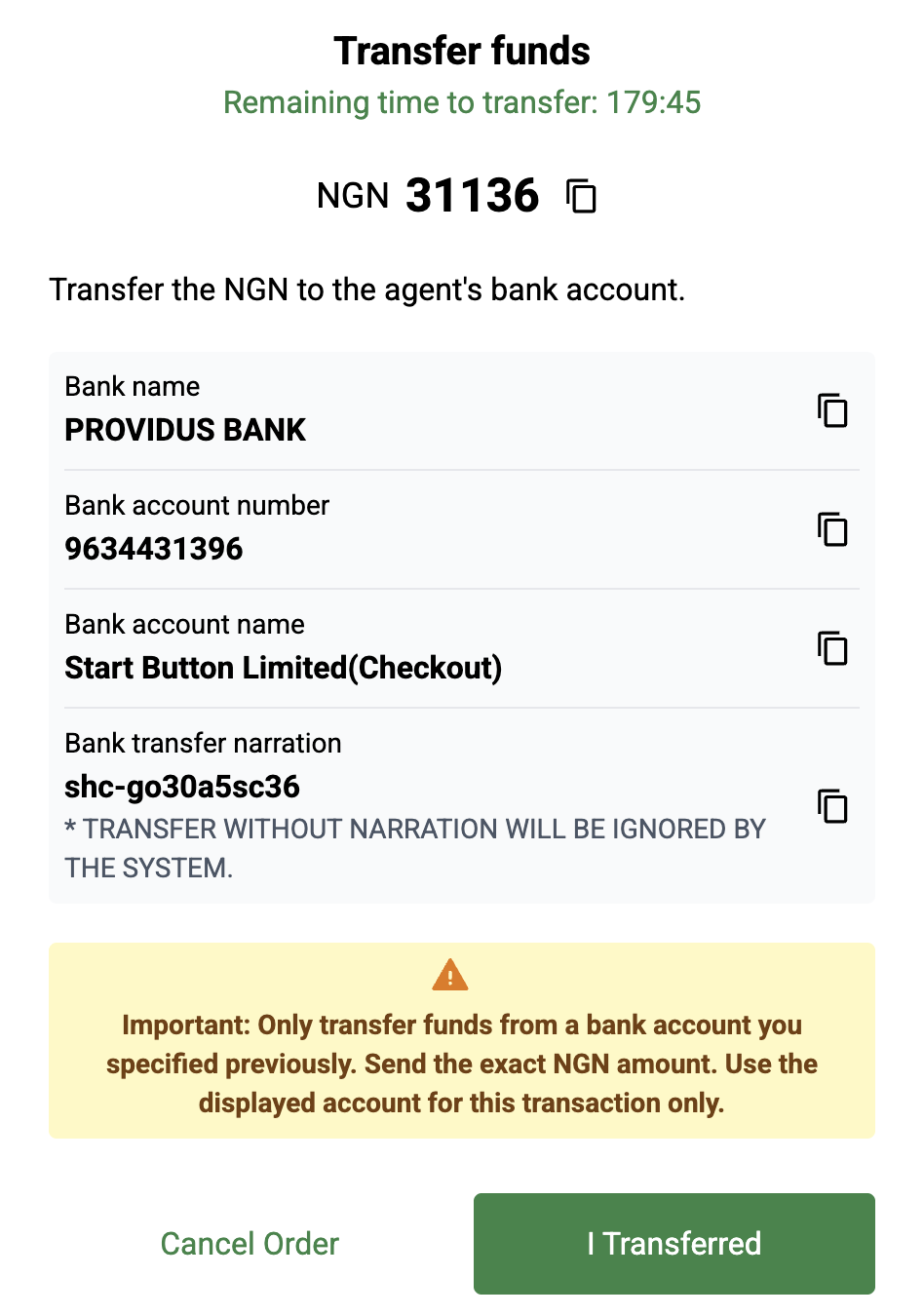
We show a list of details and the user makes the transfer themselves. For bank transfers this includes a **narration** they must copy exactly — it is how we recognise the payment.
Nigeria on-ramp, manual bank transfer:
{% embed url="" %}
## STK push
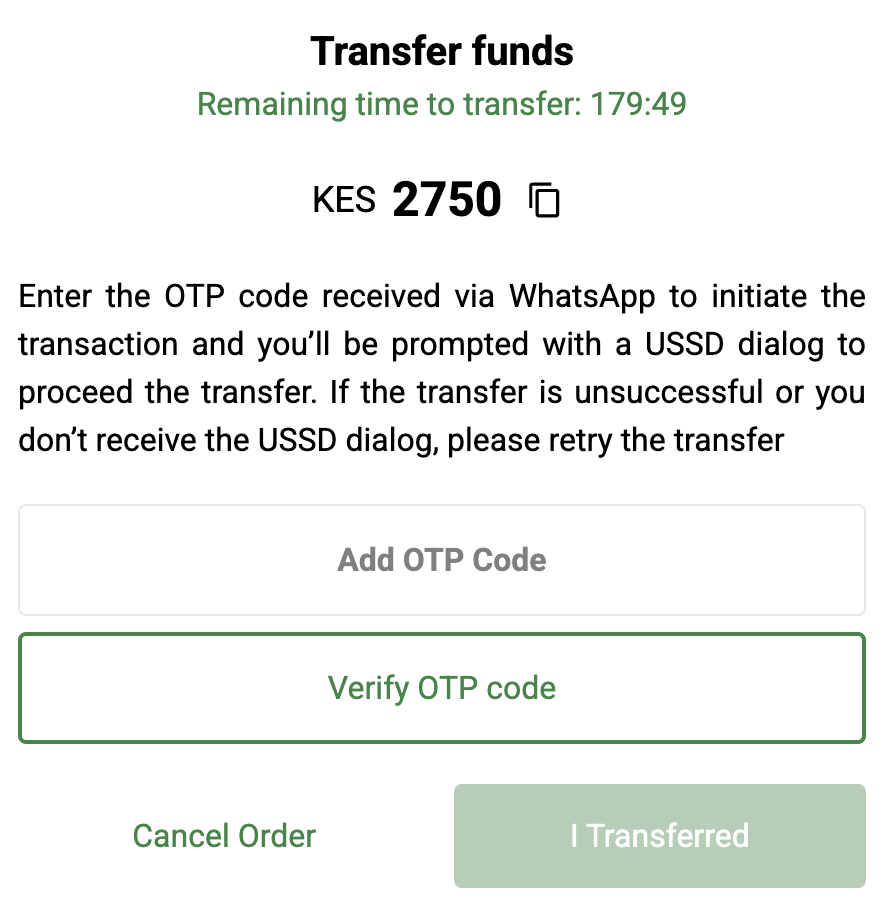
An **STK push** is a native prompt from the mobile carrier. It asks the user to confirm a mobile money transfer by entering their PIN — nothing to copy, nothing to type.
On `otp_stk_push`, the user first verifies their phone number with a code sent by SMS or WhatsApp; the prompt follows once that code is accepted.
Prompts get lost, so both types carry a retry budget: `intermediateActionMaxAttempts`, `intermediateActionAttempts` and `intermediateActionNextAttemptAvailableAt`. Show the user a retry button and drive it with [Trigger order intermediate action](/server-to-server/api-endpoints/trigger-order-intermediate-action.md).
Kenya mobile money on-ramp, STK push:
{% embed url="" %}
{% hint style="info" %}
**`otp_stk_push` is the one you meet in the sandbox.** It lives on a single offer — Kenyan mobile money — and that offer is held back from ordinary offer search, so a plain order will not land on it. To exercise the OTP path, pin it with `deposit.transferType` on [Create quote](/server-to-server/api-endpoints/create-quote.md) and create the order from that quote. Everything else about it, including the retry budget, works as described here.
{% endhint %}
## Redirect
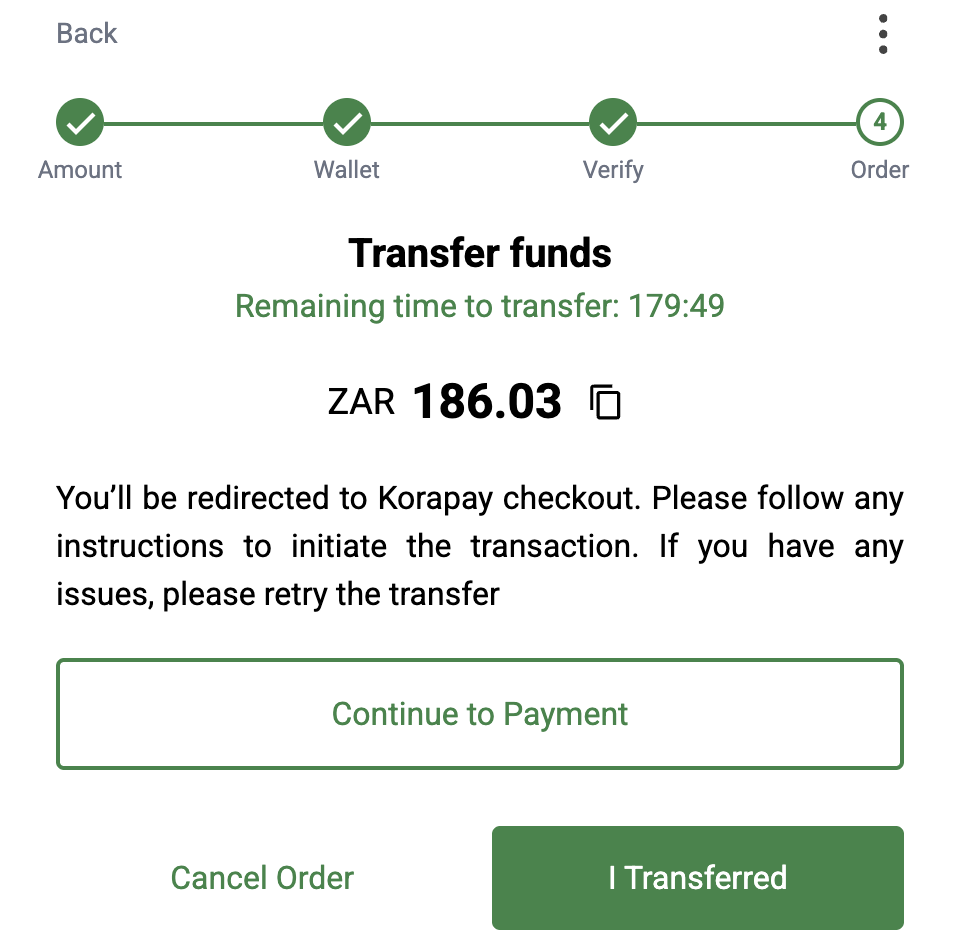
The user finishes the payment on our partner's site. Send them to `transferInstructions.paymentUrl` and they return when they are done. Some redirect offers ask you for a `redirectUrl` in `fieldsToCreateOrder` — the page to bring them back to.
Redirect is not only a bank thing: Ivorian mobile money is a redirect channel today, and so are the Senegalese, Ivorian and Gambian digital wallets. Do not tie your UI to the channel — read the `type`.
## USSD
We show a USSD code in `ussdCode` for the user to dial on their phone. No prompt arrives — they start the transfer themselves from the handset.
{% hint style="info" %}
The type is implemented, but **no live offer serves it right now**, so you will not receive `ussd` instructions today. It is documented because a provider can turn it on without a release on our side, and because a client that switches on `type` should not fall over when it does.
{% endhint %}
{% hint style="warning" %}
**One live type per channel, as things stand.** Every live production channel currently serves exactly one deposit transfer type, so you usually do not need to choose. `transferTypes` on [Get available currencies](/server-to-server/api-endpoints/get-available-currencies.md) can list more than that, because it is collected from every offer including the disabled ones — South African bank still lists `manual` even though its only live offer is a `redirect` one. Pin a type with `deposit.transferType` on [Create quote](/server-to-server/api-endpoints/create-quote.md) only when you mean to exclude the others, and be ready for no offer to match.
{% endhint %}
---
# Agent Instructions
This documentation is published with GitBook. GitBook is the documentation platform designed so that both humans and AI agents can read, navigate, and reason over technical content effectively. Learn more at gitbook.com.
## Querying This Documentation
If you need additional information that is not directly available in this page, you can query the documentation by asking a question.
Perform an HTTP GET request on the following URL with the `ask` and `goal` query parameters:
```
GET https://docs.fonbnk.com/fiat-transfer-types.md?ask=&goal=
```
`ask` is the immediate question: it should be specific, self-contained, and written in natural language.
`goal` is what the user is ultimately trying to achieve, the reason they need the answer. Sharing it helps GitBook give you a better, more relevant answer. A goal is most helpful when it describes the outcome the user wants rather than restating the question. For example, with `ask=how do I create an API token`, a goal like `automate deployments from our CI pipeline` lets GitBook tailor the answer to that use case.
The response will contain a direct answer to the question and relevant excerpts and sources from the documentation.
Use this mechanism when the answer is not explicitly present in the current page, you need clarification or additional context, or you want to retrieve related documentation sections.